
On this page
Start here
Quick answer
Treat 'loss of signal from fan' as an unverified diagnostic phrase until the exact LG LDC22720 display or service record is identified. LG's product page confirms LDC22720 as a bottom-freezer refrigerator family and the specification lists Multi-Air Flow and three digital temperature sensors, but the opened LDC22720 materials do not show that phrase as a model-specific consumer code. LG's general code guide uses distinct strings such as FF, CF, and rF for freezer, condenser, and refrigerator fan faults; do not convert a vague fan-signal note into a fan replacement. Measure refrigerator and freezer temperatures separately, clear visible food or frost from air paths, check doors and gaskets, and note whether the compressor/fan sound changes. If both compartments remain warm, the code is confirmed on the display, food is warming, or diagnosis would require panels, fans, wiring, or sealed-system work, stop and arrange LG service.
Before you begin
Safety first
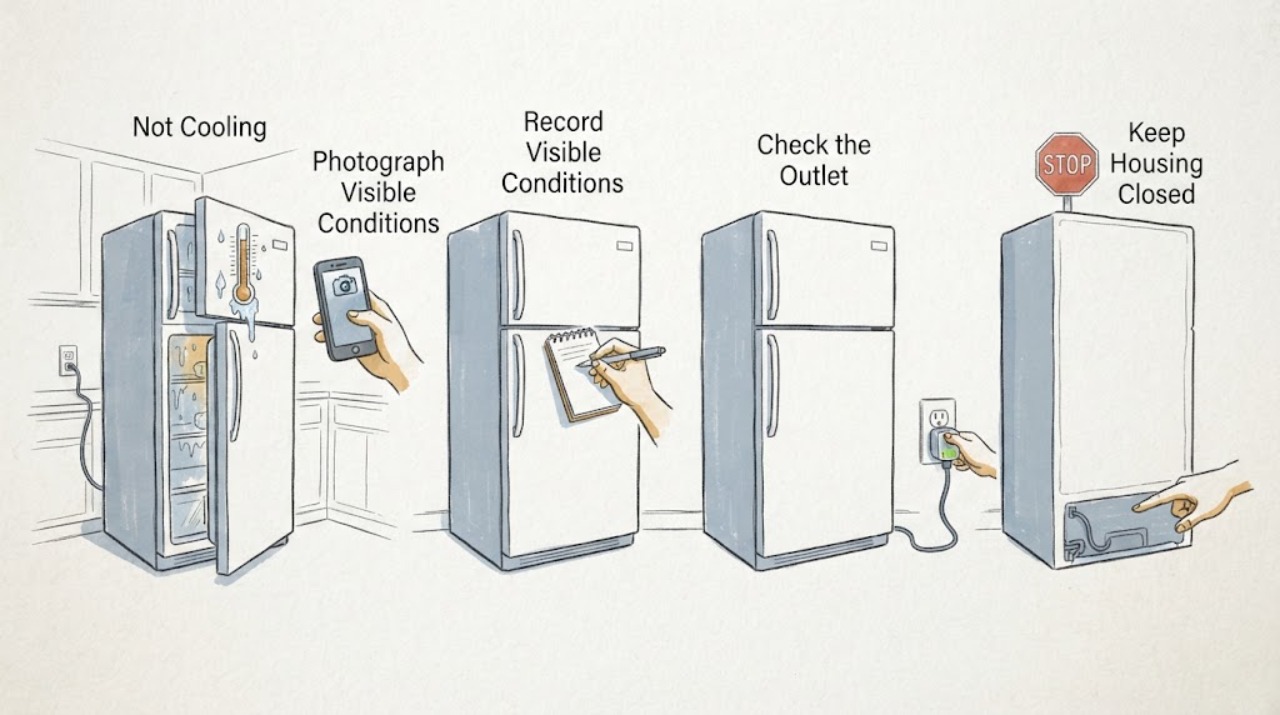
- Do not remove evaporator or rear covers, hand-spin or touch a fan, probe live wiring, pierce refrigerant tubing, open the sealed system, or bypass door switches. Keep the refrigerator intact and isolate power only from a dry, safe position if there is a visible electrical hazard.
Work through in order
Diagnostic checks
Use only checks that match the exact appliance or system and its official guide.
-
Check 1
Read the refrigerator display, if present, and photograph the exact characters, capitalization, spacing, and any blinking pattern. Then photograph the rating label inside the refrigerator compartment and record the full suffix, serial number, and market. Do not treat a note saying 'loss of signal from fan' as the display itself.
Expected result: The display shows a specific LG code such as FF, CF, or rF, the phrase appears only in a service note or app, or neither the code nor full suffix can be confirmed.
Next step: Use the matching LDC22720 suffix page/manual and give the exact display or service record to LG support. If the phrase cannot be matched, continue only with symptom-level temperature and airflow checks.
Stop if: Do not enter an undocumented diagnostic mode, copy an FF/CF/rF procedure to an unconfirmed display, or order a fan from a generic LDC22720 listing.
Why this matters
Why: LG uses separate fan-code strings for different fan locations in its general guide, while the LDC22720 support record is suffix-specific. A vague phrase or incomplete identity cannot select a refrigerator fan or control part.
-
Check 2
Measure the refrigerator and freezer compartments separately with a suitable thermometer and record the location, time, and trend without dismantling anything. Compare the readings with the settings and keep perishable food protected if the cabinet is warming.
Expected result: The freezer is cold while the refrigerator is warm, both compartments are warm, temperatures are near the selected settings, or the readings are uncertain.
Next step: Record the measurements for LG service. Continue with visible airflow, door, and frost checks only when the appliance is safe; stop if food safety is compromised or the refrigerator is leaking, sparking, or unusually hot.
Stop if: Do not remove evaporator covers, touch a fan, pierce tubing, or make live electrical measurements.
Why this matters
Why: A cold freezer with a warm fresh-food section points toward a distribution/airflow branch but does not prove a fan, damper, sensor, or control fault. Both warm compartments make a broader cooling or power issue more concerning; normal readings make the diagnostic phrase less reliable but do not dismiss a recurring code.
-
Check 3
With doors open only as needed, move food away from the visible air outlets and return paths in both compartments. Check that shelves, bins, and the freezer drawer are seated and that no package prevents either door or drawer from closing. Do not remove an air duct or rear cover.
Expected result: An outlet is blocked, the cabinet is heavily packed, the drawer/door does not seal, or the visible air paths and closures are normal.
Next step: Correct only the visible loading or closure issue and recheck the two compartment temperatures. If the refrigerator remains warm, continue to the frost and sound branch and arrange service rather than removing panels.
Stop if: Do not force a drawer, compress a gasket with tools, or continue if the door is damaged, the gasket is torn, or food is warming rapidly.
Why this matters
Why: LG says overfilling, blocked vents, incorrect shelf placement, and a door that does not close can reduce cold-air circulation. A normal visible arrangement does not establish a fan failure, especially when a fan can appear to run without adequate airflow at the refrigerator outlet.
-
Check 4
Inspect only the visible freezer compartment for frost blocking an air vent or return path, and note whether the refrigerator airflow changes when a door is opened or closed normally. Listen from outside for compressor, fan, clicking, scraping, or repeated cycling; do not push a door switch, hand-spin a fan, or remove covers.
Expected result: Frost blocks a vent, airflow is weak despite a cold freezer, the fan sound changes normally, there is scraping/clicking, or both compartments lack effective cooling.
Next step: Keep the appliance intact and document the frost pattern, temperatures, and sounds for LG service. If frost is extensive or cooling is deteriorating, stop relying on repeated resets and request service.
Stop if: Do not use sharp tools or heat to remove frost, reach behind panels, or operate with exposed wiring or a damaged fan guard.
Why this matters
Why: LG explains that frost at return vents can restrict cold air between sections and that fan-code strings refer to different fan locations. A fan sound or a single airflow observation cannot distinguish ice, duct restriction, sensor feedback, motor, control, or sealed-system causes.
-
Check 5
If the refrigerator is dry, electrically intact, and the exact model instructions allow a reset, disconnect it from the direct outlet for one documented interval and restore it once. Do not use a power strip, repeat the reset, or treat a temporary return of cooling as proof that a fan or sensor is repaired.
Expected result: Cooling improves and stays stable, the phrase or code returns, the refrigerator remains warm, or the outlet/breaker trips.
Next step: Record the reset result and arrange LG service with the full suffix, code/photo, temperatures, airflow, frost, and sound history. Use qualified electrical help for a suspect outlet or repeated breaker trip.
Stop if: Do not reset a wet or hot appliance, bypass a door switch, run repeated cooling tests, or open the sealed system.
Why this matters
Why: LG's general error guidance uses a single 60-second direct-outlet restart for some code paths, but the opened LDC22720 page does not make every fan phrase equivalent to those paths. Recurrence or a power event is a service boundary.
-
Check 6
Prepare the service handoff: exact LDC22720 suffix and serial, market, display/photo or source of the 'loss of signal from fan' wording, separate temperatures, time to warm, door/gasket results, frost location, compressor/fan sounds, and whether any recent move, repair, or power interruption occurred.
Expected result: The identity and symptom sequence are complete, or the model suffix, display origin, or temperature history remains uncertain.
Next step: Request an LG technician diagnosis that identifies the applicable code definition and the test result before any fan, sensor, board, compressor, or sealed-system part is proposed.
Stop if: Do not accept a fan replacement solely because the refrigerator is warm or because the metadata uses the words 'loss of signal'.
Why this matters
Why: This evidence separates a real model-specific code from an informal fan hypothesis and helps a technician distinguish airflow distribution from fan feedback, control, or sealed-system work.
Use your observations
Decision map
Find the observation that best matches what you see, then follow the next safe action.
-
PATH 01Next step
What you see
The full LDC22720 suffix is confirmed, but 'loss of signal from fan' appears only in metadata or a service note and not as a matching consumer display code.
Do this next
Keep the appliance on symptom-level checks, document temperatures and airflow, and ask LG service to identify the exact code or test that produced the phrase.
Why this path and its safety boundary
Why it matters: The wording is an unverified diagnostic description. LG's general FF, CF, and rF meanings cannot be selected without the exact display and model context.
-
PATH 02Next step
What you see
The freezer is cold, the refrigerator section is warm, and airflow at the refrigerator outlet is weak or absent even though a fan appears to run.
Do this next
Clear only visible food obstructions, document frost and temperatures, and arrange LG service if airflow or cooling does not recover. Do not remove covers or replace a fan by guesswork.
Why this path and its safety boundary
Why it matters: This pattern makes air distribution, frost, duct restriction, or control feedback more plausible than a proven fan-motor failure. The matching community report shows why a visible fan alone is not conclusive.
-
PATH 03Safety boundary
What you see
Both compartments are warm, temperatures continue rising, or the compressor/fan sounds are absent, repeatedly clicking, scraping, or accompanied by a hot electrical odor.
Do this next
Protect perishable food, stop operating if there is odor, heat, sparking, or repeated cycling, and request qualified LG appliance service. Use electrical service for an outlet or breaker concern.
Why this path and its safety boundary
Why it matters: This is no longer a simple loading or fresh-food airflow branch; power, cooling, control, fan, or sealed-system service may be involved, and the odor/sound may be a safety issue.
Safety stop: Do not remove rear covers, touch compressor or fan wiring, pierce refrigerant tubing, or keep restarting the refrigerator to test it.
-
PATH 04Next step
What you see
Visible vents are clear, doors and gaskets close normally, frost is not blocking the paths, and temperatures remain outside the expected range after one permitted reset.
Do this next
Leave the refrigerator intact and book LG service with the exact suffix, code origin, measurements, frost/sound observations, and reset result.
Why this path and its safety boundary
Why it matters: The ordinary user checks have not explained the cooling loss. A fan phrase still does not identify the fan, sensor, board, compressor, or sealed-system cause.
Helpful context
Understand the symptom
LDC22720 is an older LG bottom-freezer family with Multi-Air Flow cooling and three digital temperature sensors. The exact suffix matters: LG's support record for LDC22720TT shows a suffix-specific product page and owner manual, while the family specification lists several finishes. Confirm the rating-label suffix before applying any service code or parts information.
The phrase 'loss of signal from fan' is not shown in the opened LDC22720 consumer materials. LG's general refrigerator code guide does use fan-related strings, including FF, CF, and rF, but those are not interchangeable with a vague note from metadata, a third-party diagnostic screen, or another model. Start with temperatures and visible airflow, then escalate instead of guessing a fan.
When checks do not resolve it
Need a professional?
Call LG service for a recurring fan-related display, persistent warm compartments, weak airflow after visible checks, extensive frost, abnormal compressor/fan behavior, or any need to inspect a fan, sensor, harness, control, compressor, or sealed system. Use qualified electrical help for outlet or breaker symptoms.
Safety scope: Do not remove evaporator or rear covers, hand-spin or touch a fan, probe live wiring, pierce refrigerant tubing, open the sealed system, or bypass door switches. Keep the refrigerator intact and isolate power only from a dry, safe position if there is a visible electrical hazard.
Have this ready
- Provide LDC22720 plus the complete suffix, serial and market, exact display or source of the phrase, separate compartment temperatures and measurement times, settings, door/gasket and airflow observations, frost pattern, sounds, recent move/repair/power event, and reset result.
Common questions
FAQ
Does 'loss of signal from fan' prove the LDC22720 fan is bad?
No. The opened LDC22720 materials do not show that phrase as a model-specific consumer code. LG's general guide uses different fan strings, including FF, CF, and rF, and the exact display and suffix are needed before a fan diagnosis is made.
Why can the freezer be cold while the refrigerator is warm?
Cold air may not be reaching the refrigerator section effectively because of blocked vents, frost, door/closure problems, or another airflow/control condition. A fan that appears to run does not prove that the full air path or feedback system is working.
Can I remove the freezer cover to check the fan?
Do not do that as a user check here. Removing covers can expose wiring and refrigeration components, and the fan phrase has not been verified for the exact LDC22720 suffix. Document visible frost and airflow, then use LG service.
Should I replace the fan because the refrigerator is not cooling?
No. First record both compartment temperatures, clear visible food obstructions, check doors and gaskets, and identify the exact display code. If those checks do not restore cooling, request a diagnosis that distinguishes airflow, fan feedback, sensors, controls, compressor, and sealed-system causes before any part is chosen.
Read the exact guide
Official sources
- LDC22720 Spec SheetLG Electronics U.S.A. · Exact LDC22720 family specification opened for bottom-freezer configuration, Multi-Air Flow, digital temperature controls, and three digital sensors; not used to diagnose a fan.
- If Your LG Refrigerator Is Not Cold EnoughLG USA Support · General LG refrigerator guidance used only for visible settings, airflow, door, recovery, and service checks; not for assigning an LDC22720 fan part.
- [LG Refrigerator] Digital and Analog Error CodesLG USA Support · General LG code guide opened to distinguish FF, CF, and rF fan-related strings and show that code meaning is model/display-specific; it is not used to claim that the candidate phrase is an LDC22720 code.
- LG Refrigerator - Frost Buildup - FREEZER ONLYLG USA Support · General LG refrigerator frost guidance used for visible vent and door observations; not used to identify an LDC22720 component.
- LG FridgeReddit r/appliancerepair · Exact Reddit thread naming LDC22720SW and reporting cold freezer/warm refrigerator, weak refrigerator airflow, and an apparently running fan; used only as lived symptom evidence with no verified repair outcome.
- LG LDC22720TT.ATICLGG: Support, Manuals, Warranty & MoreLG Electronics USA · Exact LDC22720 family support page opened for model identity and suffix boundary; it does not define the phrase 'loss of signal from fan'.
Community feedback
Share a repair observation
Share a plain-text repair observation. Accepted observations are published automatically; this page may take a moment to update.