
On this page
Start here
Quick answer
Read and photograph the exact code before pressing buttons, because LG says code meanings and recovery steps can vary by model. First stop for smoke, a burning smell, sparking, a hot or damaged plug, water near electrical parts, or a breaker that trips again. For a safe unit, match the code to the installed model manual: dE, dE1, E01, dE2, or E30 points you toward the door and lock; OE, E03, or E21 toward draining; IE, E02, or E10 toward the water inlet; UE toward load balance; LE toward a stalled tub or motor load; and Sud toward excess detergent. Check only accessible hoses, the door seal, load, and controls. A CE electrical over-current code, a recurring heating or drying code, a leak, or any code that returns after one model-directed reset is a service boundary. Do not repeatedly reset the appliance or open panels to chase a code.
Before you begin
Safety first
- A user may inspect visible controls, door and gasket, faucet, accessible hose condition, load, and manual-approved filter or recovery steps from a safe position. Internal lock, pump, valve, motor, heater, sensor, control, and live electrical work require qualified service.
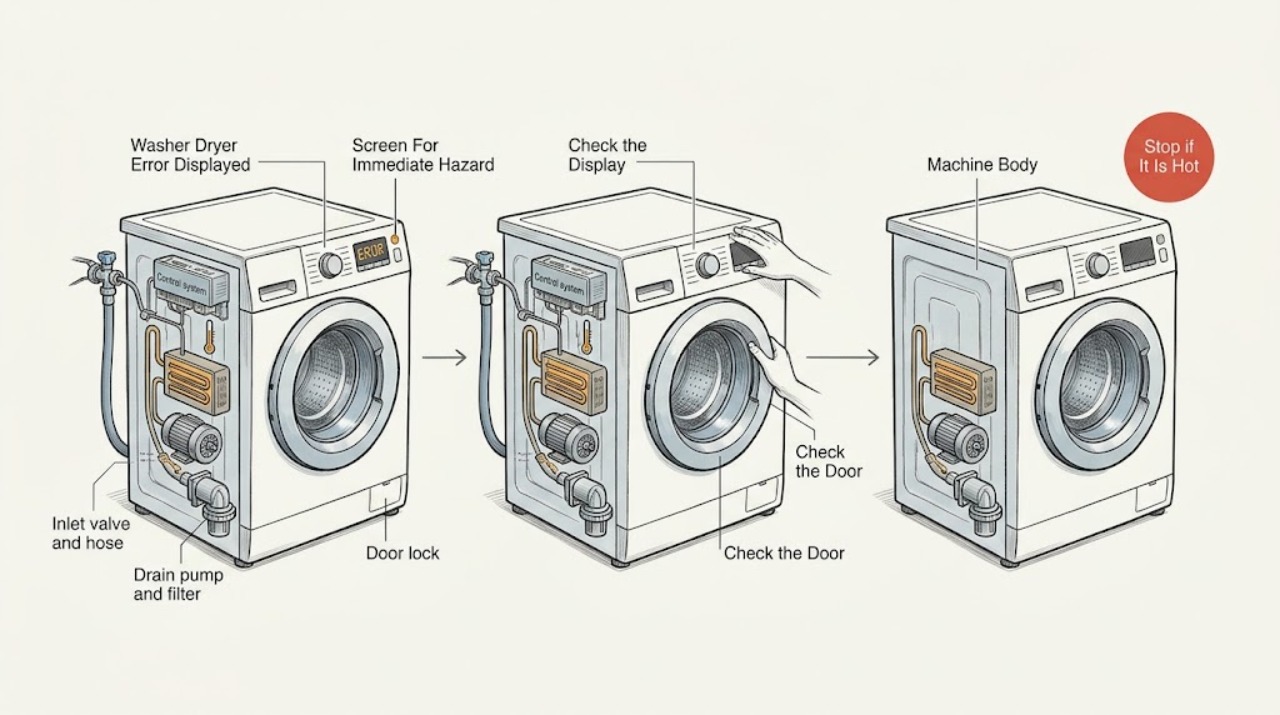
Work through in order
Diagnostic checks
Use only checks that match the exact appliance or system and its official guide.
-
Check 1
Stop the cycle and look from a dry, safe position for smoke, a burning smell, sparks, a hot or damaged plug, water near electrical parts, a damaged cord, or a breaker that trips again; isolate power only if the safe disconnect is accessible without touching the hazard.
Expected result: Record whether the display is still lit, whether the odor or heat is present, whether water is reaching the power area, and whether electrical protection trips again when the appliance is used.
Next step: Keep the appliance off, keep clear of unsafe areas, and arrange qualified appliance or electrical help. Do not continue code checks after a hazard is found.
Stop if: Stop immediately for smoke, sparking, burning odor, a hot plug, damaged wiring, water near electricity, or repeated protection trips.
Why this matters
Why: These signs can indicate an electrical, overheating, or water-related hazard rather than an ordinary display fault.
-
Check 2
Photograph the exact display and write down whether the washer dryer was filling, washing, draining, spinning, drying, or holding the door locked when the message appeared; consult the manual for that model.
Expected result: Compare the letters and numbers exactly, including a leading or trailing character, and note whether the message returns immediately or only at one cycle stage.
Next step: Use the installed model's support page or manual to select the matching branch below. If the code is absent from the manual or is unclear, stop guessing and prepare a service handoff.
Why this matters
Why: A precise code and cycle stage narrows the next check; a similar-looking code can point to a different water, door, motor, or temperature condition.
-
Check 3
For dE, dE1, E01, dE2, or E30, inspect the visible door opening, gasket, and latch area for a garment or debris; for IE, E02, or E10, confirm the supply faucet is open and the accessible inlet hose is not kinked.
Expected result: Note whether the door closes squarely and the gasket is clear, whether the latch can engage without force, whether water is available at the faucet, and whether the inlet hose is visibly restricted or frozen.
Next step: Remove only an obvious accessible obstruction or correct a clearly closed faucet. Run one model-directed retry if the appliance is dry and safe; if the code returns, arrange service.
Stop if: Do not force the door, bypass the lock, disconnect hoses with pressure present, or remove covers.
Why this matters
Why: LG describes the first group as door-closure or lock conditions and the second group as inlet conditions; a clear door and available water move the diagnosis toward a lock, valve, sensor, or other internal issue.
-
Check 4
For OE, E03, or E21, check the visible drain hose for a kink and use the installed model manual to decide whether the pump-filter access is user serviceable; prepare towels and a container if water may remain.
Expected result: Record whether water remains in the drum, whether the hose is visibly pinched, whether the filter area is blocked by accessible debris, and whether the pump makes an unusual sound without draining.
Next step: Correct only a clear hose kink or follow the manual's safe filter procedure. If water does not drain, the code returns, or the filter cannot be safely accessed, keep the unit off and arrange service.
Stop if: Do not open a filter or hose without following the manual's water-release procedure, and do not reach into a moving or powered pump.
Why this matters
Why: LG associates these codes with a drainage problem and identifies a kinked or clogged hose or pump filter as possible causes; persistent failure can indicate a pump or internal fault.
-
Check 5
For UE, pause safely and redistribute the load; for LE, remove excess laundry and look only for an accessible foreign object with the appliance safely disconnected as directed by the manual.
Expected result: Note whether the load is a single heavy item or tightly packed, whether the appliance rocks, whether the drum turns freely by the permitted user check, and whether the code clears after the load is corrected.
Next step: Redistribute or reduce the load and perform one model-directed retry. If the drum still will not spin, the code returns, or an object is not safely reachable, arrange service.
Stop if: Do not force the drum, remove panels, reach past guards, or test motor wiring.
Why this matters
Why: LG links UE with an unbalanced load and links LE with a tub that fails to spin from overload or an obstruction; a returning code after a suitable load points to a mechanical or drive fault.
-
Check 6
After one obvious correction, follow the installed model's documented reset or test procedure once; for CE, recurring codes, heating or drying messages, leaks, or any unresolved display, stop troubleshooting and prepare service details.
Expected result: Record whether the code stays cleared through the same cycle stage, whether the drum drains and spins, whether drying produces an abnormal smell or heat, and whether any leak or electrical symptom returns.
Next step: Arrange qualified appliance service and provide the exact code, model and serial information, cycle stage, remaining water, photos, and notes from the safe checks.
Stop if: Do not bypass a door lock, jumper a control, test live wiring, open sealed electrical areas, or continue operating after smoke, burning odor, sparking, a leak near electricity, or repeated protection trips.
Why this matters
Why: A code that returns after a safe documented recovery is evidence of an unresolved component or control condition, not a reason to keep resetting the appliance.
Use your observations
Decision map
Find the observation that best matches what you see, then follow the next safe action.
-
PATH 01Safety boundary
What you see
There is smoke, a burning smell, sparking, a hot or damaged plug, water near electrical parts, or repeated protection trips.
Do this next
Keep the washer dryer off and arrange qualified appliance or electrical help from a safe position.
Why this path and its safety boundary
Safety stop: Do not reset it, move it through water, touch damaged wiring, or remove a cover.
-
PATH 02Safety boundary
What you see
The display shows dE, dE1, E01, dE2, or E30 and there is no immediate hazard.
Do this next
Check for an accessible obstruction at the door and gasket, close the door without force, and follow the model manual for one retry.
Why this path and its safety boundary
Safety stop: If the lock still will not engage or the code returns, arrange service; never bypass the lock.
-
PATH 03Safety boundary
What you see
The display shows IE, E02, E10, OE, E03, or E21.
Do this next
Check the faucet and visible inlet hose for inlet codes, or the visible drain hose and manual-approved filter path for drain codes.
Why this path and its safety boundary
Safety stop: If water remains, a hose is damaged, the code returns, or access requires opening the cabinet, keep the unit off and call for service.
-
PATH 04Safety boundary
What you see
The display shows UE or LE during spin.
Do this next
Redistribute or reduce the load and perform only the manual-directed user check for an accessible obstruction.
Why this path and its safety boundary
Safety stop: A returning code, seized drum, or inaccessible obstruction needs qualified service.
-
PATH 05Safety boundary
What you see
The display shows Sud and there is no electrical or water hazard.
Do this next
Allow the model-directed recovery to complete and use only the detergent amount and type specified for the appliance.
Why this path and its safety boundary
Safety stop: If Sud returns with the correct detergent or the machine leaks, stop using it and arrange service.
-
PATH 06Safety boundary
What you see
The display shows CE or a recurring heating, drying, or unrecognized code.
Do this next
Photograph the display, keep the appliance off if the manual does not provide a safe user step, and arrange qualified diagnosis.
Why this path and its safety boundary
Safety stop: Do not test live wiring, replace a motor or heater by guesswork, or keep resetting the code.
Helpful context
Understand the symptom
Record the symptom before clearing it
An error on a washer dryer is a symptom, not a diagnosis. Photograph the display and note whether the unit was filling, washing, draining, spinning, drying, or refusing to unlock when the code appeared. LG's support material covers washer dryer combos as well as washers, but the exact code set and button sequence can differ by model, so use the manual for the installed appliance before trying a reset.
Separate water, door, load, and electrical clues
Door codes call for an unobstructed door and gasket check; drain codes call for an accessible hose or filter check only when the manual permits it; inlet codes call for the faucet and inlet hose; and UE or LE calls for a load and drum assessment. These checks should stay external and dry. Water left in the drum may spill when a filter or hose is opened, and an appliance that has smoke, a burning smell, sparking, a hot plug, or a repeated protection trip needs to stay off.
Use one documented recovery attempt
After correcting an obvious door obstruction, load imbalance, faucet position, or excess detergent issue, follow the installed model's documented recovery or test cycle once. Do not use repeated power cycling to make a code disappear. If the same code returns, if the drum will not move or drain, or if the code concerns motor over-current, heating, or drying, preserve the evidence and arrange qualified appliance service.
What to give the technician
Provide the model and serial information, the exact code including capitalization, the stage of the cycle, whether water remained in the drum, whether the door locked, and any noise, leak, odor, or power event. A clear display photograph and the result of the one safe check help distinguish a user-correctable condition from a pump, lock, inlet, motor, heater, sensor, or control fault.
Only after diagnosis
Potential parts
- door lock or latch
Consider only when a recurring door-closure or lock code remains after the gasket and accessible obstruction checks.
Confirm the exact model and door-lock revision; do not bypass the lock or choose a part from the code alone. - drain pump or pump filter
Consider only when a recurring drain code remains after the visible hose and manual-approved filter checks.
Water-release procedures and pump access vary by model; verify compatibility before any replacement decision. - inlet valve or inlet hose
Consider only when a recurring inlet code remains with an open faucet and an unobstructed, correctly connected hose.
Confirm the exact model, hose configuration, and electrical specification through qualified diagnosis. - motor or drive component
Consider only when UE or LE is not resolved by a suitable load and CE or spin failure is confirmed by a technician.
Motor and drive parts are model-specific and require internal electrical and mechanical diagnosis. - heater, thermistor, or drying temperature component
Consider only for a recurring heating or drying code after safe external checks and model-specific diagnosis.
Do not infer fit or replace a heater or sensor from a generic display message.
When checks do not resolve it
Need a professional?
Arrange qualified appliance service for smoke, burning odor, sparking, a hot or damaged plug, water near electricity, repeated protection trips, a recurring code, a door that will not lock, water that will not drain, a drum that will not spin, a leak, or any heating, drying, motor, or control diagnosis.
Safety scope: A user may inspect visible controls, door and gasket, faucet, accessible hose condition, load, and manual-approved filter or recovery steps from a safe position. Internal lock, pump, valve, motor, heater, sensor, control, and live electrical work require qualified service.
Have this ready
- Provide the exact LG model and serial information, a photograph of the code, the cycle stage, whether water remained in the drum, door-lock behavior, load details, visible hose or gasket observations, and any odor, leak, noise, or power-event notes.
Common questions
FAQ
Why is my LG washer dryer showing an error code?
The display is reporting a condition detected during filling, draining, locking, spinning, heating, drying, or control operation. Photograph the exact code, identify the cycle stage, and use the manual for the installed model before resetting it.
Can I reset an LG washer dryer error code?
Only follow the installed model's documented recovery procedure once after a safe, obvious correction. If the code returns, do not keep cycling power; arrange qualified service and provide the code photograph.
What should I check for an LG washer dryer door error?
Check that clothing or debris is not caught in the visible gasket or door opening and that the door closes squarely without force. A lock that still will not engage or a returning code needs service; never bypass the lock.
What does an LG washer dryer OE error usually point to?
LG associates OE and related codes with a drainage problem. Check the visible hose for a kink and use the model manual to determine whether the pump-filter procedure is safe for you. If water remains or the code returns, arrange service.
When should I stop using the washer dryer?
Stop for smoke, a burning smell, sparks, a hot or damaged plug, water near electrical parts, repeated protection trips, a leak, a drum that will not move, or a recurring heating, drying, motor, or unknown code. Keep it off and arrange qualified help.
Read the exact guide
Official sources
- [LG Front Load Washer] How to resolve a UE (unbalanced) errorLG Electronics USA Support · Use the load-redistribution and leveling guidance with the exact installed model's instructions.
- LG Front Load Washer - Error Code List(New)LG Electronics USA Support · The page lists model-dependent washer and combo error-code guidance; confirm the installed model manual before applying a code-specific step.
- LG Washer – Troubleshooting Washing Machine Drum Not SpinningLG Electronics USA Support · Use the drum, load, level, foreign-object, and test-cycle guidance with the installed model instructions.
- Why is an LE error code displayed on my washing machine?LG Electronics USA Support · Use the LE overload, obstruction, and reset guidance only with the installed model's safety instructions.
Community feedback
Share a repair observation
Share a plain-text repair observation. Accepted observations are published automatically; this page may take a moment to update.