
On this page
Start here
Quick answer
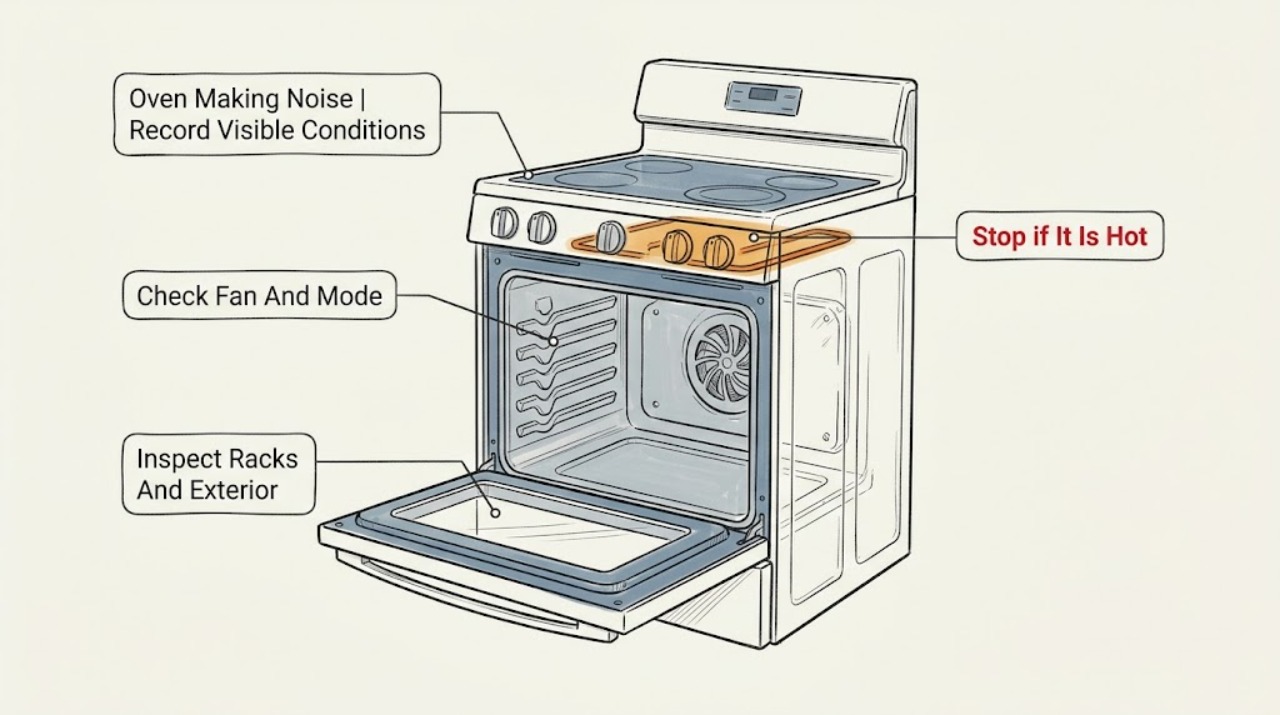
A Magic Chef oven can make a normal fan or relay sound, but the exact model and fuel type matter. Magic Chef lists electric convection wall ovens with a circulating fan and an automatic cooling fan that can continue until the oven is sufficiently cool; that smooth airflow is different from scraping, grinding, repeated harsh clicking, a bang, or a sound accompanied by smoke, gas odor, arcing, or uncontrolled heat. First record the model, fuel type, cooking mode, when the sound starts, and whether it continues after the controls are off. From ordinary safe access, check only the racks, visible obstruction, door and exterior panels. If the noise is a bang or delayed ignition on a gas model, there is a raw-gas odor, smoke, burning smell, visible arc, excessive heat, or a breaker trip, stop using the oven and leave gas or electrical diagnosis to qualified service. Do not remove panels, bypass controls, light a gas burner by hand, or perform live electrical tests.
Before you begin
Safety first
- Keep the oven out of service after a gas, smoke, arc, CO, shock, uncontrolled-heat, or repeated-trip event until the appropriate qualified professional clears it.
Work through in order
Diagnostic checks
Use only checks that match the exact appliance or system and its official guide.
-
Check 1
Before starting another heating cycle, record the complete model number, whether the appliance is gas, electric, or unknown, the selected mode, temperature, and whether the sound starts at power-on, preheat, burner or element operation, convection, door movement, self-clean, or shutdown. Keep the oven off while making notes.
Expected result: Describe the sound as a steady airflow, short click, repeated click, hum, buzz, rattle, scrape, grind, pop, bang, whoosh, or electrical crackle. Note whether it follows fan speed, appears only while heating, changes when the door is opened, continues after the controls are off, or occurs with a smell, smoke, flame change, or code.
Next step: Use the model number with Magic Chef's manual and support pages, then perform only the matching low-risk check below. If the sound is a bang, arc, crackle, or unexplained combustion event, skip further testing and arrange service.
Stop if: Stop for gas odor, smoke, burning smell, electrical crackle, visible arc, uncontrolled heat, a hot or melting control area, shock, or a repeated breaker trip.
Why this matters
Why: Timing and sound character separate a documented fan or control event from an obstruction, loose external item, mechanical failure, delayed burner lighting, or electrical fault. The same word such as clicking can describe different systems, so a cross-model conclusion is unsafe.
-
Check 2
If the sound is a smooth airflow or low hum, compare it with the selected mode and oven temperature without touching internal parts. For an electric convection model, note whether the sound begins in convection or when the oven becomes hot; after turning the controls off, observe from a safe distance whether the cooling fan winds down as the appliance cools. Do not block vents or reach toward the fan.
Expected result: Classify the sound as steady and mode-linked, a cooling fan that continues after shutdown, a fan with a cyclic scrape or vibration, or a sound that is present even when the oven is cold and off. Note any heat, odor, or vibration at the exterior.
Next step: If the sound matches the documented mode and is smooth, use the exact manual for normal operation. If it scrapes, rattles, vibrates, or starts without an expected mode, stop operating the oven and request service rather than removing the fan cover.
Stop if: Stop for a fan blade contacting the housing, exposed moving parts, smoke, burning smell, abnormal surface heat, or any need to remove a panel or reach inside the fan assembly.
Why this matters
Why: Magic Chef describes convection airflow and automatic cooling-fan operation on its electric wall-oven listing. A rough, scraping, worsening, or cold-state fan sound is not established as normal by that listing and can indicate an obstruction, damaged blade, mounting issue, or motor problem.
-
Check 3
With the oven fully off and cool, inspect only the accessible racks, trays, door edge, handle, control knobs, trim, and exterior panels. Remove a loose rack or tray and refit it as shown in the model manual; check for foil, cookware, crumbs, or a visible item touching the door or rear wall. Do not remove the oven floor, burner cover, rear panel, insulation, or control panel.
Expected result: Determine whether the noise stops with a loose rack or tray removed, comes from the door or trim during expansion, or remains with the cavity empty and all accessible parts secure. Note dents, loose glass, a door that does not close, or a panel that vibrates.
Next step: Correct only a clearly loose accessible rack or tray according to the manual and make one brief supervised check. If the sound persists, becomes louder, or comes from behind a panel, stop and arrange qualified service.
Stop if: Stop for cracked or loose door glass, a damaged hinge, exposed wiring, a panel that is hot or arcing, sharp metal, smoke, or any requirement to disassemble the oven.
Why this matters
Why: An external rack or trim vibration can be isolated without opening the appliance. A persistent scrape, knock, or rattle with no accessible source points toward a fan, motor, element, burner, support, or control problem that cannot be identified safely by repeated heating.
-
Check 4
Only if the rating label and manual confirm a gas oven, record whether the sound happens when Bake or Broil is selected, whether ignition is immediate or delayed, and whether the flame is stable, without opening the burner area or attempting a manual-light test. If the fuel type is unknown, do not infer it from the sound.
Expected result: Classify the event as a brief model-documented ignition indication, repeated clicking without stable heat, a pop or bang at ignition, a whoosh that gets louder, raw-gas odor, unstable flame, soot, smoke, or no ignition. Record the exact mode and stop the test at the first abnormal sign.
Next step: For any abnormal ignition, odor, bang, smoke, or flame behavior, turn the control off if it is safe to do so, leave the area, and contact the gas utility or emergency service from outside. For a nonhazardous recurring sound, provide the model and recording to a qualified appliance technician; do not test the igniter, valve, or wiring live.
Stop if: Stop immediately for raw-gas odor, a hissing sound, delayed ignition, a bang, unstable or yellow flame, soot, smoke, CO alarm, headache, dizziness, nausea, or any electrical arc.
Why this matters
Why: A burner-lighting noise cannot be judged from generic oven advice. Repeated or delayed lighting can allow fuel to accumulate, while raw-gas odor or an unstable flame creates an immediate fuel and combustion boundary. CPSC warns that gas leaks require evacuation and that fuel-burning appliances with a CO concern must remain out of use until serviced.
-
Check 5
After one safe observation, turn the oven controls off and monitor from a safe distance without touching hot surfaces or restarting the cycle. Confirm whether only a fan continues, whether heating or flame continues, whether the sound stops as the appliance cools, and whether the control area, door, cabinet, or surrounding material becomes unusually hot.
Expected result: Record a normal cooling-only pattern, continued heating with no selected heat, a fan that scrapes or never settles, a hot control area, smoke, burning odor, a code, or a breaker trip. Do not repeatedly switch the control or reset the breaker to compare sounds.
Next step: If only a smooth cooling fan remains and the manual supports it, allow it to cool. If heat continues, a safety symptom appears, or the sound returns abnormally, isolate the oven from a safe position and arrange qualified appliance service; do not open the cabinet.
Stop if: Stop for continued heating after shutdown, gas odor, smoke, burning smell, visible arc, melting, abnormal heat, shock, or a repeated trip.
Why this matters
Why: A cooling fan may be part of a Magic Chef electric wall oven's design, but continued heating, uncontrolled gas flame, abnormal heat, or smoke is not a sound-identification exercise. CPSC advises professional service for malfunctioning fuel-burning appliances and warns not to touch wet energized appliances.
-
Check 6
Only after the manual supports the observed sound and no stop condition occurred, perform one short supervised recheck in the same mode with the cavity clear of loose items. Keep a safe distance, do not use self-clean, and stop at the first recurrence of an abnormal sound, odor, flame change, smoke, heat, or electrical symptom.
Expected result: Record whether the same smooth mode-linked sound occurs, whether it is now louder or rougher, whether it starts in a different stage, and whether the oven heats or cools normally. Compare the result with the exact model manual rather than a different Magic Chef model.
Next step: Stop after this single recheck. If the sound is abnormal or unresolved, provide the recording, model, fuel type, mode, timing, and stop symptoms to qualified service.
Stop if: Stop immediately for any gas odor, bang, smoke, burning smell, arc, uncontrolled heat, abnormal flame, shock, or breaker trip.
Why this matters
Why: A repeatable, smooth fan sound that matches the manual is more likely an operating characteristic. A changed, rough, location-shifting, or safety-linked noise is evidence of a fault or unsafe condition, not a reason to keep testing.
Use your observations
Decision map
Find the observation that best matches what you see, then follow the next safe action.
-
PATH 01Next step
What you see
The sound is a smooth airflow that is tied to convection or a hot electric wall oven, and it fades as the appliance cools without odor, scraping, or unusual heat.
Do this next
Confirm the model manual's fan behavior and use the oven only if the sound remains smooth and all controls and surfaces behave normally.
Why this path and its safety boundary
Why it matters: This matches the fan functions described for the listed Magic Chef electric convection wall oven, subject to exact-model confirmation.
-
PATH 02Next step
What you see
The sound is a scrape, grind, hard rattle, repeated buzz, or vibration that follows a fan or motor, or remains when the oven is cold and off.
Do this next
Keep the oven off, do not remove panels, and arrange qualified appliance service with the sound recording and exact model.
Why this path and its safety boundary
Why it matters: The source is not established as a normal operating sound and may involve an obstruction, fan blade, motor, mounting, or control component.
-
PATH 03Next step
What you see
The appliance is a gas model and the noise includes delayed ignition, a bang, worsening whoosh, raw-gas odor, unstable flame, soot, or smoke.
Do this next
Stop using the oven, leave immediately if gas is smelled or heard, and contact the gas utility or emergency service from outside. Do not operate switches or attempt another ignition.
Why this path and its safety boundary
Why it matters: This is a gas and combustion safety event, not a normal-noise comparison.
-
PATH 04Next step
What you see
The sound is accompanied by smoke, a burning smell, an arc or crackle, a hot control area, continued heating after shutdown, shock, or a repeated breaker trip.
Do this next
Stop the cycle, isolate power only from a safe dry position if possible, keep away from the appliance, and arrange qualified appliance or electrical service. Do not reset and retest.
Why this path and its safety boundary
Why it matters: The appliance may have an electrical, thermal, or control fault with fire or shock risk.
-
PATH 05Next step
What you see
The fuel type, model, sound source, or manual applicability cannot be established from the available information.
Do this next
Stop operating the oven until the rating label and correct Magic Chef manual are identified; request qualified service if the sound is recurring or abnormal.
Why this path and its safety boundary
Why it matters: Cross-model advice could misclassify a burner-lighting, fan, control, or mechanical event.
Helpful context
Understand the symptom
A smooth fan sound is not the same as a mechanical or combustion noise
Start with the timing rather than the loudness. Magic Chef's current electric wall-oven information describes a convection fan that distributes heat and a cooling fan that starts automatically when the oven is hot and remains on until it cools. A steady airflow sound that follows a selected convection mode or a hot oven may fit that design. A sound that scrapes, grinds, rattles with the fan speed, knocks the housing, or continues with unusual heat needs service. A brief click can also be a control or ignition event on some designs, but do not label it normal without the exact model manual and fuel type.
Gas and electric models have different stop conditions
Magic Chef sells both gas and electric ranges, and a gas model adds combustion and fuel hazards that an electric oven does not have. On a gas model, a bang, whoosh that is getting stronger, delayed ignition, raw-gas odor, unstable flame, or a sound that begins with a gas-control event is not a safe experiment. On any model, smoke, arcing, a burning smell, a hot control area, an oven that continues heating after being switched off, or a repeated breaker trip is a reason to stop. CPSC advises leaving immediately if gas is smelled or heard leaking and not operating electronics before leaving; do not troubleshoot the oven from inside the home.
Use the model manual to resolve the remaining uncertainty
The Magic Chef manual-download page is the right place to identify the procedure for a particular range or wall oven. Record the model from the rating label before searching. Manuals can distinguish convection and cooling-fan operation, self-clean behavior, rack placement, burner lighting, door handling, and control indications. Do not borrow a burner-lighting or fan diagnosis from another Magic Chef model just because the cabinet looks similar.
Only after diagnosis
Potential parts
- convection or cooling fan assembly
Consider this only when the exact manual and a qualified diagnosis identify a fan-related scrape, vibration, or motor fault after accessible rack and exterior checks are clear.
Confirm the full Magic Chef model and the fan location before ordering; do not substitute a blade or motor by appearance. - oven igniter or ignition component
Consider this only for a confirmed gas model after a qualified technician links delayed or failed ignition to the igniter rather than the valve, supply, burner, or control.
Gas components require exact-model verification and professional installation; do not perform a manual-light or live test. - oven temperature control or relay
Consider this only after qualified diagnosis finds a control or relay fault that explains repeated clicking, uncontrolled heat, or an abnormal cycling event.
Match the exact model and electrical specification through Magic Chef support; a sound alone does not establish a control failure.
When checks do not resolve it
Need a professional?
Safety scope: Keep the oven out of service after a gas, smoke, arc, CO, shock, uncontrolled-heat, or repeated-trip event until the appropriate qualified professional clears it.
Common questions
FAQ
Is a fan sound normal on a Magic Chef oven?
It can be, but only when the exact model supports that behavior. Magic Chef describes a convection fan and an automatic cooling fan on its listed electric wall oven, with the cooling fan remaining on until the oven cools. A smooth, mode-linked airflow sound is different from scraping, grinding, worsening rattling, smoke, or unusual heat; check the exact manual before deciding it is normal.
Why does my Magic Chef oven click when I use it?
A click can come from a control, heating, or gas-ignition event, and the sound alone does not identify the cause. Record the mode, fuel type, timing and whether the oven heats normally. Repeated harsh clicks, a pop or bang, delayed ignition, raw-gas odor, smoke, or an arc require stopping the appliance rather than repeating the test.
What should I do if a Magic Chef gas oven makes a whoosh or bang?
Stop using it. If you smell or hear gas, leave immediately and do not operate switches or electronics before leaving. Contact the local gas authority or emergency service from outside. Do not relight the oven, remove the burner, or diagnose the valve or igniter yourself.
Can I remove the fan or oven panel to find the noise?
Not as an ordinary user check. Keep panels, insulation, gas components, moving fan parts and live wiring closed. Record the sound from a safe distance and give the model, mode and timing to qualified appliance service.
When should I stop using a noisy Magic Chef oven?
Stop for raw-gas odor, a hissing or delayed-ignition sound, a bang, smoke, burning smell, visible arcing, uncontrolled heating, a hot or melting control area, shock, a CO alarm, or a repeated breaker trip. Leave immediately for gas or suspected combustion danger and keep the oven out of service until the right qualified professional clears it.
Read the exact guide
Official sources
- CPSC Warns of Generator, Carbon Monoxide and Fire Hazards Ahead of Hurricane SeasonU.S. Consumer Product Safety Commission · General household safety guidance, not a Magic Chef repair procedure.
- Manual DownloadsMagic Chef · Use to locate the manual for the exact model; it is not itself a diagnosis for a particular sound.
- SupportMagic Chef · General Magic Chef support navigation; it does not establish that any particular noise is normal.
- Magic Chef Stoves & Ranges | Gas and ElectricMagic Chef · Magic Chef's current range catalog; it establishes that fuel type varies across products, not the sound behavior of a specific model.
- Carbon-Monoxide-Questions-and-AnswersU.S. Consumer Product Safety Commission · General fuel-burning appliance safety; apply the gas-specific guidance only if the Magic Chef appliance is gas-fueled.
- 2.2 cu. ft. Single Electric Wall Oven with Convection in Stainless SteelMagic Chef · The listed MCSWOE24S electric wall oven; use its fan descriptions only as an example and confirm the user's exact model.
Community feedback
Share a repair observation
Share a plain-text repair observation. Accepted observations are published automatically; this page may take a moment to update.