
On this page
Start here
Quick answer
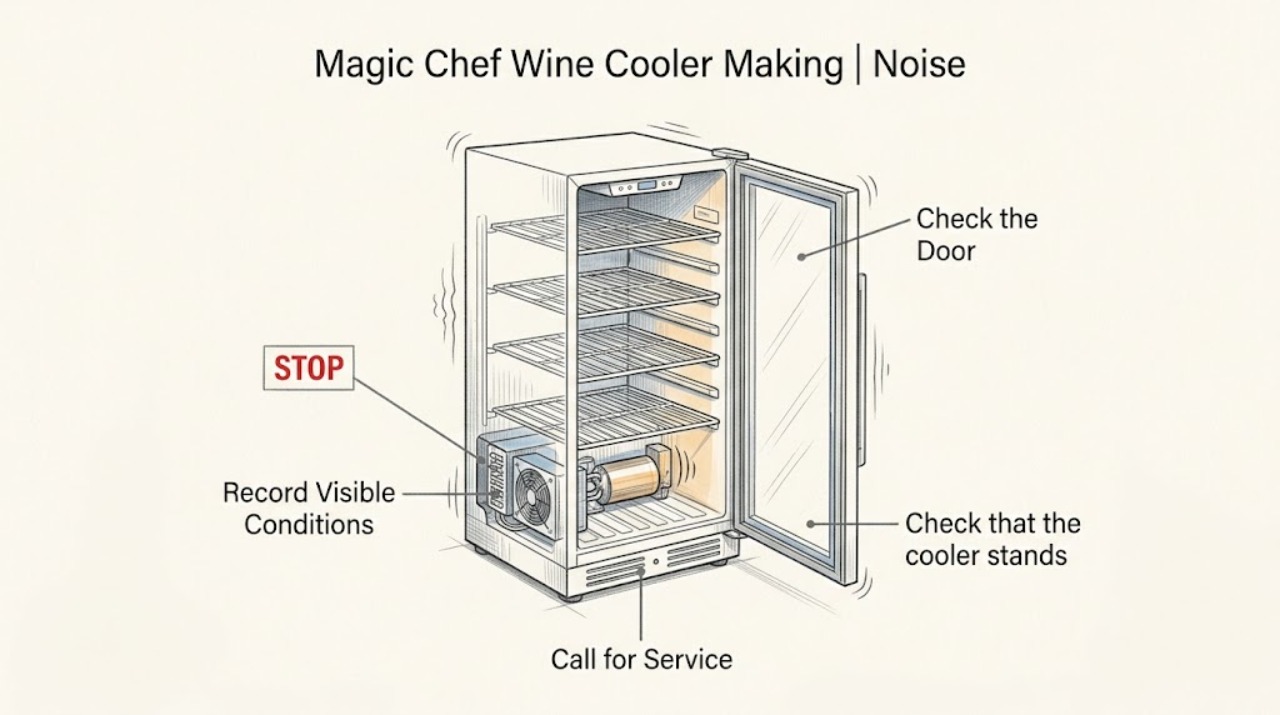
Some Magic Chef wine cooler noise is normal fan or cooling-system operation, but a new rattle, vibration, scrape, or click should be located before service. Note whether it changes with the fan or temperature cycle, then level the cooler, maintain the model's clearance, and separate bottles or racks that touch. Persistent mechanical noise, loss of cooling, water, smoke, or a burning smell warrants qualified service.
Work through in order
Diagnostic checks
Use only checks that match the exact appliance or system and its official guide.
-
Check 1
Stand beside the wine cooler and record whether the sound is a steady fan, brief click, compressor-like hum, liquid movement, rattle, or scrape, and whether it changes when cooling starts.
Expected result: The sound is a steady fan or brief operating sound and the cabinet holds its set temperature.
Next step: Continue with placement and interior-vibration checks if the noise is unusually loud.
Stop if: A scrape, hard knock, or noise paired with warming needs the stop-and-service path.
Why this matters
Why: Normal cooling operation is possible, but the pattern should still be checked for a new change.
-
Check 2
Check that the cooler stands level on a firm surface and that it has the side and rear clearance required by the exact manual; identify any wall, countertop, or cabinet contact.
Expected result: The cabinet rocks or touches an adjacent surface, and the sound changes when the contact is removed.
Next step: Correct the clearance or leveling within the installation instructions and listen again.
Stop if: Continue to inspect racks and bottles.
Why this matters
Why: Installation contact can amplify normal fan or cooling vibration.
-
Check 3
Open the door briefly and check that racks, bottles, and accessories are seated and not touching each other, the rear wall, or the fan mask; do not reach into a moving fan.
Expected result: Moving a bottle or reseating a rack changes the rattle or vibration.
Next step: Separate the items and retest during a later cycle.
Stop if: Leave the interior intact and proceed to the safety and cooling check.
Why this matters
Why: The sound is likely an interior contact rather than proof of a failed cooling component.
-
Check 4
Check the temperature display or control response and look for water, smoke, burning odor, a hot cord, or a breaker trip without removing panels.
Expected result: Noise is paired with loss of cooling, water at electricity, smoke, burning odor, heat, or repeat trips.
Next step: Stop using the cooler and isolate power only from a dry safe position; arrange qualified service.
Stop if: If the cooler remains stable and the sound is only a normal operating pattern, monitor it and record any change.
Why this matters
Why: A safety or cooling fault is more important than identifying the sound by ear.
Use your observations
Decision map
Find the observation that best matches what you see, then follow the next safe action.
-
PATH 01Next step
What you see
The fan or cooling sound is steady and temperature remains within the selected range
Do this next
Monitor for a change and keep the installation ventilated as specified.
-
PATH 02Next step
What you see
The noise changes after leveling or separating a bottle, rack, or wall contact
Do this next
Correct the contact and reassess during a later cycle.
-
PATH 03Next step
What you see
A scrape or hard knock persists, or noise is accompanied by warming, water, odor, smoke, or electrical symptoms
Do this next
Keep the cooler off when safe and arrange qualified appliance service.
Helpful context
Understand the symptom
Listen for change, not just volume
A fan may run frequently as part of cooling, while a bottle, rack, wall contact, or uneven floor can turn normal vibration into a rattle. The product configuration matters: freestanding and built-in-capable coolers have different clearance rules.
When checks do not resolve it
Need a professional?
Use qualified service when safe leveling and vibration checks do not resolve the noise or any safety symptom appears.
Common questions
FAQ
Is a fan that runs often automatically a failure?
Not necessarily. Fan operation can be part of the cooling system. Check for abnormal noise, blocked clearance, and loss of temperature before requesting service.
Why does a wine cooler rattle after it is installed?
An uneven surface, wall contact, or bottles and racks touching can amplify vibration. Level the unit and separate interior contacts within the exact manual's limits.
Read the exact guide
Official sources
- 24 in. 44 Bottle or 140 Can Dual Zone Wine Beverage in Stainless SteelMagic Chef · Magic Chef wine and beverage cooler cooling configuration and installation context
- Freestanding Wine Cooler User’s ManualMC Appliance / Magic Chef · Magic Chef freestanding wine cooler operation, fan, installation, leveling, and vibration troubleshooting
Community feedback
Share a repair observation
Share a plain-text repair observation. Accepted observations are published automatically; this page may take a moment to update.