
On this page
Start here
Quick answer
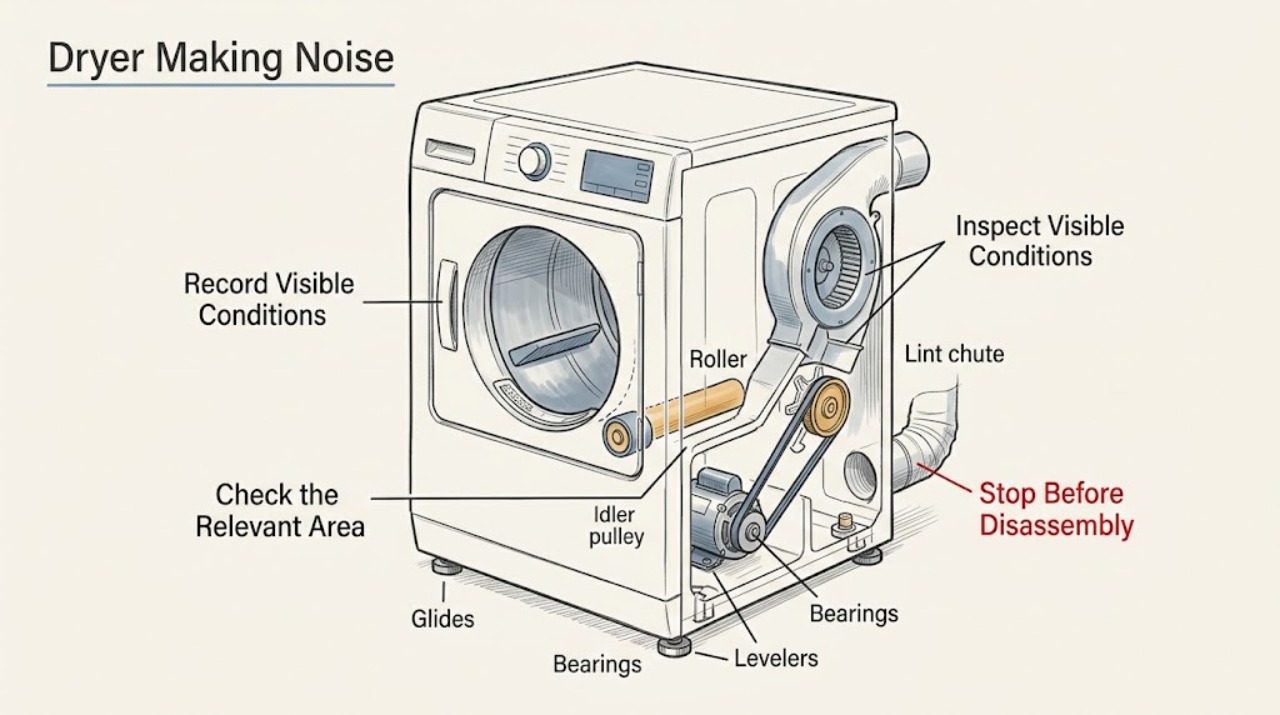
First stop the Maytag dryer if the sound comes with smoke, a burning smell, sparks, excessive heat, a repeated breaker trip, or violent movement. With the dryer off and cool, note whether the noise starts at startup, follows the drum, comes from the blower or exhaust area, or continues after the cycle ends. Maytag says a brief thump after the dryer has been idle can come from roller flat spots, while clothing hardware and loose objects can rattle or tap. Check the load and pockets, remove only an object that is plainly accessible at the drum edge, confirm that the dryer is level and not touching another appliance, and inspect the lint screen and external exhaust opening. Grinding, scraping that persists, a repeated rumble, or a noise that remains with a light empty-drum test points to a drum support, belt, blower, motor, or other internal issue that needs qualified appliance service; do not reach into a moving drum or open the cabinet.
Work through in order
Diagnostic checks
Use only checks that match the exact appliance or system and its official guide.
-
Check 1
Press Stop, wait for the drum to stop, and let the dryer cool before touching the load or lint screen. From outside the appliance, record whether there is smoke, a burning smell, sparks, scorching, unusual heat, violent movement, water near electrical parts, or a breaker that opened.
Expected result: The dryer is cool and intact with no warning sign, or a fire, electrical, water, or mechanical warning is present.
Next step: If no warning sign is present, continue with the sound-timing check. If one is present, leave the dryer off, isolate power only when safe and permitted, and arrange qualified appliance or electrical help.
Stop if: Stop immediately for smoke, burning odor, sparks, scorching, excessive heat, violent movement, water near electrical parts, or a breaker that opens again.
Why this matters
Why: A quiet, cool appliance permits low-risk external checks. A warning sign can indicate fire, shock, thermal, or mechanical danger and should not be reproduced by another cycle.
-
Check 2
With the dryer off, write down whether the noise occurs only at startup, during tumbling, during a higher-speed portion of the cycle, near the blower or exhaust area, or after the drum stops. If a safe recording is useful, make it from outside the closed appliance and never reach into a moving drum.
Expected result: The sound is a brief startup thump, follows drum rotation, changes with load or speed, comes from the air path, or continues after the cycle ends.
Next step: Use the phase as the branch for the next check: inspect level and load for a thump, pockets and the drum seam for a scrape, accessible lint and exhaust for an air-path sound, and stop testing for a sound that persists after shutdown.
Stop if: Stop if the sound is accompanied by smoke, burning odor, sparks, severe impact, or loss of electrical protection.
Why this matters
Why: A brief thump after non-use can be a temporary roller flat spot; a rotation-linked scrape or rumble points toward the drum path; an air-path sound points toward lint or the blower area; a continuing sound after stop needs prompt service assessment.
-
Check 3
With the dryer empty and off, look for a missing or uneven leg, rocking cabinet, contact with a wall or washer, or an item sitting on top or beside the dryer. Correct only an obvious external obstruction and confirm the appliance sits firmly; do not remove panels or reach below a supported appliance.
Expected result: The cabinet rocks, a leg is uneven or missing, the dryer touches another object, or the cabinet is stable with clearance.
Next step: If the problem is external, restore stable clearance according to the installation guidance and make one brief supervised check. If the cabinet is stable or the noise remains, continue to the load and seam check.
Stop if: Stop if the cabinet is tipping, the floor is wet or damaged, the dryer cannot be stabilized, or the correction would require moving an unsafe appliance.
Why this matters
Why: An unstable base or external contact can turn normal vibration into thumping or rattling. A stable, clear cabinet makes an internal drum or blower cause more likely if the sound continues.
-
Check 4
With the dryer stopped and cool, remove the load and inspect pockets, zippers, buckles, buttons, and other hard items. Separate a balled or very small load, remove loose objects, and check whether the noise was tied to one garment or a large solid item. Do not reach into the drum while it is moving.
Expected result: A coin, fastener, hard item, balled garment, or unbalanced load is found, or the drum is empty and the sound remains unexplained.
Next step: Remove the identified object and make one short supervised check with a balanced, soft load. If the sound remains with no load-related cause, stop and continue with the accessible seam and air-path checks.
Stop if: Stop for metal-on-metal grinding, a hard object wedged where it cannot be reached safely, a seized drum, or any sharp edge or broken glass in the load.
Why this matters
Why: Hard objects and uneven or balled clothing can make knocking, rattling, tapping, or thumping without a failed internal part. A persistent noise with no load-related cause shifts concern toward the drum support or drive path.
-
Check 5
With the appliance disconnected only as permitted by its instructions and the drum fully stopped, inspect the visible front and rear drum edges for a small object lodged at a seam. Remove it only if it is plainly accessible without tools, panel removal, or contact with moving or sharp parts; otherwise leave it in place for service.
Expected result: An accessible object is present at the seam, the seam is clear, or the sound is a persistent scrape or grind with no accessible object.
Next step: If the object is safely removed, make one brief supervised check. If the seam is clear or the scrape returns, keep the dryer off and arrange qualified diagnosis; do not open the cabinet.
Stop if: Stop for a trapped object, sharp edge, a drum that does not turn freely when it is safe to check, persistent grinding, or any need to remove a panel.
Why this matters
Why: Maytag's scraping guidance identifies small objects at the front or rear drum seam as a possible source. A clear seam with persistent scraping is more consistent with an internal drum support, glide, roller, bearing, belt, or blower issue.
-
Check 6
Clean the lint screen as directed by the Maytag use and care guide. From outside the dryer, look for an obvious blockage at the exhaust termination and listen for a rattling or rubbing sound that is strongest near the lint chute or blower area. Do not insert tools, remove the blower guard, or open the cabinet.
Expected result: The lint screen or accessible exhaust is blocked, the noise is strongest near the air path, airflow is weak, or the accessible path is clear and the noise is unchanged.
Next step: Clear only the accessible lint screen or obvious outside blockage and make one brief supervised check. If airflow remains weak or the sound persists, stop and arrange service for the vent and blower path.
Stop if: Stop for smoke, burning odor, scorching, excessive heat, a damaged vent, or any need to enter the blower housing or cabinet.
Why this matters
Why: Lint or an air-path restriction can change airflow and can make a blower-area sound more noticeable. A clear external path with persistent noise does not prove a blower failure and requires internal diagnosis.
-
Check 7
Arrange qualified Maytag or appliance service when the noise is persistent, returns with a light load or empty drum, is a grinding or rumbling sound, continues after shutdown, or remains after the accessible checks. Give the technician the model number, cycle and phase, sound location, load details, external checks, and any heat, odor, spark, or breaker observations.
Expected result: The sound is repeatable, intermittent but worsening, limited to one phase, or accompanied by a safety warning.
Next step: Keep the dryer off when the sound is unsafe or persistent and let a qualified technician perform model-specific inspection. Do not remove the cabinet, bypass a safety device, or run an unattended cycle to reproduce the symptom.
Stop if: Stop all operation for smoke, burning smell, sparks, excessive heat, violent movement, a seized drum, water near electrical parts, or a repeated breaker trip.
Why this matters
Why: The remaining cause may involve rollers, an idler pulley, belt, glides, bearings, motor, blower wheel, lint chute, or another internal component. The noise alone cannot identify a safe replacement part.
Use your observations
Decision map
Find the observation that best matches what you see, then follow the next safe action.
-
PATH 01Next step
What you see
A light thump occurs during the first few minutes after the dryer has been idle and then fades.
Do this next
Arrange qualified service and follow the exact model guidance.
Why this path and its safety boundary
Why it matters: Check that the dryer is level and clear of nearby contact, then monitor one supervised cycle. A thump that persists, grows louder, or occurs with an empty drum needs service.
-
PATH 02Next step
What you see
The sound changes with a particular garment, hard fastener, pocket item, or balled or uneven load.
Do this next
Arrange qualified service and follow the exact model guidance.
Why this path and its safety boundary
Why it matters: Remove loose objects, correct the load, and make one short supervised check. If the noise returns without that load cause, stop and arrange diagnosis.
-
PATH 03Next step
What you see
The cabinet rocks, a leg is uneven, or the dryer touches a wall, washer, or nearby object.
Do this next
Arrange qualified service and follow the exact model guidance.
Why this path and its safety boundary
Why it matters: Restore safe external clearance and stability according to the installation guidance. Do not force or dismantle the appliance; service is needed if noise remains.
-
PATH 04Next step
What you see
A scrape is strongest at the front or rear drum seam, or an object is visible there.
Do this next
Arrange qualified service and follow the exact model guidance.
Why this path and its safety boundary
Why it matters: Turn the dryer off and remove only a plainly accessible object. A trapped object or continuing scrape is a service condition; do not open the cabinet.
-
PATH 05Next step
What you see
The sound is strongest near the lint chute or blower area, or airflow is weak.
Do this next
Arrange qualified service and follow the exact model guidance.
Why this path and its safety boundary
Why it matters: Clean the lint screen and inspect only the accessible outside exhaust opening. Persistent noise or weak airflow requires qualified vent or appliance service.
-
PATH 06Next step
What you see
Grinding, rumbling, repeated scraping, or a rotation-linked noise remains after the load, level, seam, and accessible air-path checks.
Do this next
Arrange qualified service and follow the exact model guidance.
Why this path and its safety boundary
Why it matters: Keep the dryer off and arrange qualified diagnosis of the drum support, drive, motor, or blower path. Do not infer a replacement part from sound alone.
-
PATH 07Next step
What you see
Smoke, burning odor, sparks, scorching, excessive heat, violent movement, water near electrical parts, a seized drum, or a repeated breaker trip occurs.
Do this next
Arrange qualified service and follow the exact model guidance.
Why this path and its safety boundary
Why it matters: Stop using the dryer, isolate power only when safe, and obtain qualified appliance or electrical help. Do not restart it to reproduce the warning.
Helpful context
Understand the symptom
Identify the phase before tracking a part
A noise heard only at startup has a different path from one that follows drum rotation or one that continues after the cycle. Record the cycle, approximate load, exact phase, location, and whether the sound changes with drum speed. A short sound recording made from a safe distance can help service, but do not stand near a moving drum with loose clothing or reach inside. Maytag's product guidance notes that the first minutes after a period of non-use can include a light roller thump that fades.
Start with objects, level, and contact
Coins, zippers, buckles, buttons, and other hard items can knock or rattle. A dryer that is not level, has an uneven or missing leg, or touches another appliance can vibrate. These are accessible checks; they do not prove that an internal support part is worn.
Treat scraping and grinding as different signals
A small object can lodge at the front or rear drum seam and produce a scrape. Maytag permits turning the dryer off, checking the accessible edge, and removing an object only if it can be reached without opening the cabinet or putting a hand near moving parts. Persistent grinding, rumbling, or scraping after that check can involve rollers, glides, bearings, a belt, motor, or blower wheel and should be assessed by a qualified technician.
Keep the air path clear without cabinet work
A lint screen, lint chute, blower area, or exhaust restriction can change the sound and can also affect drying and heat. Clean the lint screen as the use and care guide directs and inspect only the accessible outside vent termination for obvious blockage. Do not insert tools into the blower housing, remove a guard, or open the cabinet to chase a noise.
When a noise is a stop condition
Stop the dryer and isolate it only when safe for smoke, sparks, a burning smell, scorching, excessive heat, violent drum movement, a seized drum, water near electrical parts, or a breaker that opens again. Do not keep running a machine to see whether a metallic scrape or impact becomes worse. Arrange qualified appliance service and preserve the sound timing and observations.
Only after diagnosis
Potential parts
Only after a qualified technician confirms a startup or rotation-linked thump, squeak, or rumble for the exact Maytag model; the sound alone does not identify the part.
Only after model-specific inspection confirms persistent scraping, grinding, rumbling, or drive noise; do not open the cabinet as an ordinary-user test.
Only after qualified diagnosis confirms an air-path noise or restriction that remains after accessible lint and exhaust checks.
When checks do not resolve it
Need a professional?
A grinding, rumbling, or repeated scraping sound remains after safe load, level, seam, and external air-path checks., The sound returns with a light load or empty drum, follows drum rotation, or continues after the cycle ends., The dryer is unstable, cannot be safely leveled, or touches another appliance after external clearance checks., The blower or cabinet would need a guard, panel, or internal component removed to continue diagnosis., Smoke, burning odor, sparks, scorching, excessive heat, violent movement, water near electrical parts, a seized drum, or a repeated breaker trip occurs.
Common questions
FAQ
Why does a Maytag dryer thump when it starts?
A light thump during the first few minutes after the dryer has been idle can come from temporary flat spots on the drum rollers. Check level and nearby contact, and stop if the sound persists, grows louder, or is present with an empty drum.
What can make a Maytag dryer rattle or knock?
Inspect pockets and garment hardware such as zippers, buckles, and buttons, then check for loose objects at the drum edge and for contact with a nearby appliance. If the rattle remains without a load or contact cause, arrange service.
Can I remove something scraping inside my Maytag dryer?
Turn the dryer off and inspect the visible front and rear drum seam. Remove an object only when it is plainly accessible without tools, panel removal, or contact with moving or sharp parts. Leave a trapped object for qualified service.
When should I stop using a noisy Maytag dryer?
Stop for smoke, a burning smell, sparks, scorching, excessive heat, violent movement, a seized drum, water near electrical parts, or a breaker that opens again. Also stop for persistent grinding, rumbling, or scraping that remains after safe external checks.
Read the exact guide
Official sources
- Maytag Manuals & LiteratureMaytag · Supports using the exact Maytag model number to retrieve the applicable use and care or installation document before any model-specific procedure.
- Owner's Manual W11555403 Rev BMaytag · Supports not reaching into a moving drum, stopping for unusual sound or unsafe conditions, lint-screen care, and model-documentation limits; exact model instructions control.
- Sounds or Noises in a DryerMaytag Product Help · Supports checks for large or uneven loads, missing or uneven legs, nearby contact, drum-seam scraping, and zippers, buckles, buttons, and loose coins.
- Dryer Making Loud Noises? | MaytagMaytag · Supports the Maytag-specific distinctions among squeaking, rattling, grinding, rumbling, and thumping and the need for professional help for internal component causes.
- Dryer Sounds and NoisesMaytag Product Help · Supports a light initial roller sound after non-use and the distinction between temporary roller noise and persistent noise that needs further diagnosis.
- Scraping Sound - DryerMaytag Product Help · Supports the specific possibility of a small object at the front or rear drum seam and the boundary for removing only an accessible object before seeking service.
Community feedback
Share a repair observation
Share a plain-text repair observation. Accepted observations are published automatically; this page may take a moment to update.