
On this page
Start here
Quick answer
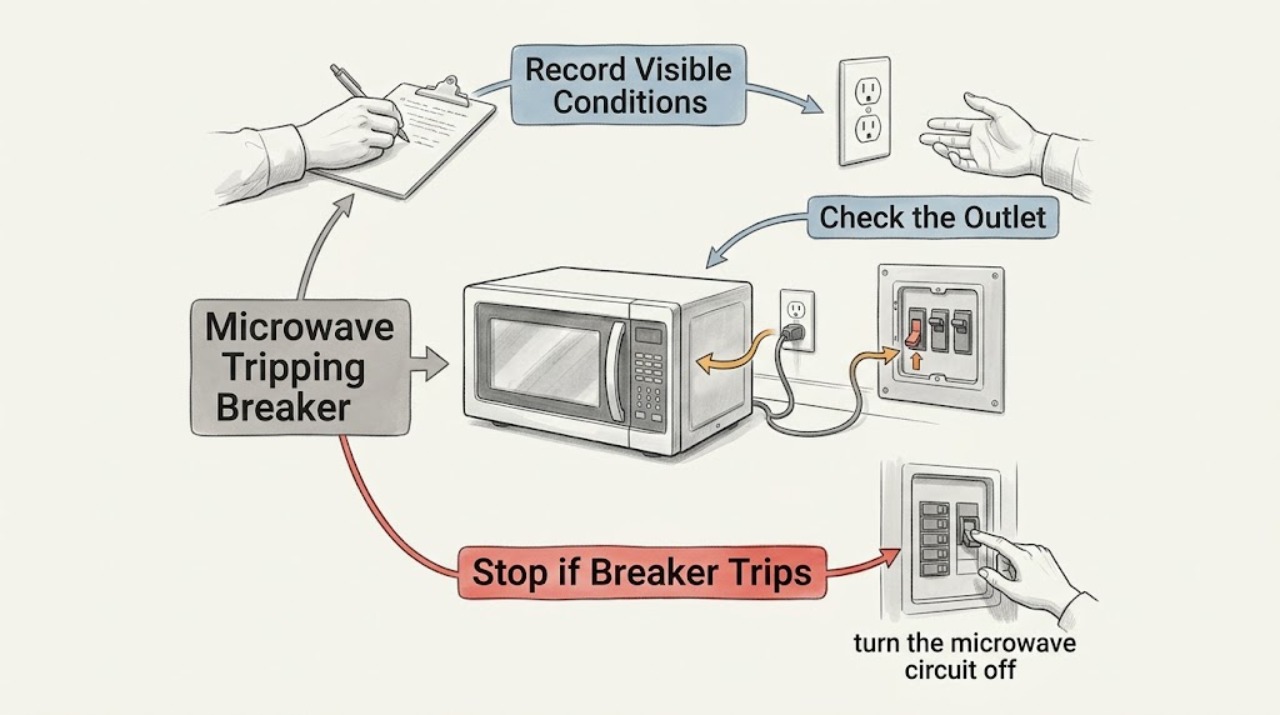
If a Maytag microwave trips the breaker, stop using it and note whether the trip occurs immediately, when cooking starts, or only while the cooktop is heavily used. Check the outlet and cord only from a safe position, reset the circuit once if the installation permits, and monitor briefly. If the breaker or fuse opens again, disconnect power or switch off the circuit when safe and arrange licensed electrical or qualified appliance service instead of repeatedly resetting it.
Before you begin
Safety first
- Do not repeatedly reset protection, use an extension cord, open the microwave cabinet, or probe live electrical parts.
Work through in order
Diagnostic checks
Use only checks that match the exact appliance or system and its official guide.
-
Check 1
Stop the microwave and record exactly when the breaker opens: while the display is idle, when Start is pressed, during heating, or when the cooktop below an over-the-range model is running.
Expected result: The trip is immediate, load-related, or occurs only with other appliances/cooktop use.
Next step: Do not repeat the event deliberately. Continue only with a single safe power-path inspection.
Why this matters
Why: Timing helps separate a household circuit capacity/installation issue from a microwave load or appliance fault, but it does not justify opening the unit.
-
Check 2
From a dry safe position, inspect the accessible plug, cord, and outlet for looseness, discoloration, heat, or damage; do not use an extension cord or touch exposed wiring.
Expected result: The cord/outlet shows damage or heat, or the visible power path looks intact.
Next step: Isolate the circuit only if safe and call an electrician for damage or a suspected household wiring problem.
Why this matters
Why: Visible electrical damage is a stop condition. An intact exterior does not rule out an internal appliance or circuit fault.
-
Check 3
If no damage is visible and the installation allows it, turn the microwave circuit off for one minute, restore it once, and monitor the appliance for one minute without starting repeated cooking cycles.
Expected result: Power returns and remains stable, or the breaker/fuse opens again.
Next step: For a repeat trip, disconnect the cord or turn off the controlling breaker/fuse and arrange qualified service.
Why this matters
Why: A single interruption may clear after a reset; Maytag specifically says not to continue operating when the breaker or fuse opens again.
-
Check 4
After a stable reset only, note whether the microwave's display, light, fan, and controls operate normally without unusual noise, smell, heat, or another trip.
Expected result: Operation is normal, or a symptom returns when a cycle begins.
Next step: Stop using the unit for any returning electrical symptom and provide the timing and circuit details to the technician.
Why this matters
Why: Normal idle behavior does not prove the appliance is safe under load; a repeat trip, burning odor, or abnormal heat needs service.
Use your observations
Decision map
Find the observation that best matches what you see, then follow the next safe action.
-
PATH 01Next step
What you see
The circuit remains stable after one safe reset and no symptom returns
Do this next
Monitor normally and stop if the breaker opens again.
Why this path and its safety boundary
Why it matters: A transient interruption is possible, but the cause is not proven.
-
PATH 02Next step
What you see
The breaker opens again when the microwave starts or during operation
Do this next
Do not reset it again; isolate power if safe and arrange licensed electrical or qualified appliance service.
Why this path and its safety boundary
Why it matters: A recurring circuit or appliance load fault remains possible.
-
PATH 03Next step
What you see
The cord/outlet is hot, damaged, discolored, wet, or accompanied by smoke or burning odor
Do this next
Keep away from the damaged area, isolate power only if safe, and request urgent qualified inspection.
Why this path and its safety boundary
Why it matters: This is an electrical safety stop, not a normal microwave troubleshooting branch.
Helpful context
Understand the symptom
A repeated trip is a protection response
The useful distinction is a one-time interruption versus a repeat opening under load. Maytag's guidance makes the repeat-trip boundary explicit: stop attempting to operate the microwave and arrange service.
When checks do not resolve it
Need a professional?
Use a licensed electrician for household circuit or outlet concerns and qualified microwave service for a repeat appliance load fault.
Safety scope: Do not repeatedly reset protection, use an extension cord, open the microwave cabinet, or probe live electrical parts.
Have this ready
- Provide the model, circuit type if known, exact trip timing, other loads on the circuit, reset result, and any heat, odor, smoke, or damage.
Common questions
FAQ
Can I keep resetting the breaker when my Maytag microwave trips it?
No. Maytag says not to continue attempting operation if the breaker or fuse opens again. Stop and arrange qualified electrical or appliance service.
What details should I record when a microwave trips a breaker?
Record whether the trip occurs at idle, Start, heating, or cooktop use; whether the display returns; and any odor, heat, noise, cord, or outlet damage. Do not reproduce the trip just to gather more data.
Read the exact guide
Official sources
- Vent Not Turning On - Over-the-Range MicrowaveMaytag · Maytag over-the-range microwaves
Community feedback
Share a repair observation
Share a plain-text repair observation. Accepted observations are published automatically; this page may take a moment to update.