
On this page
Start here
Quick answer
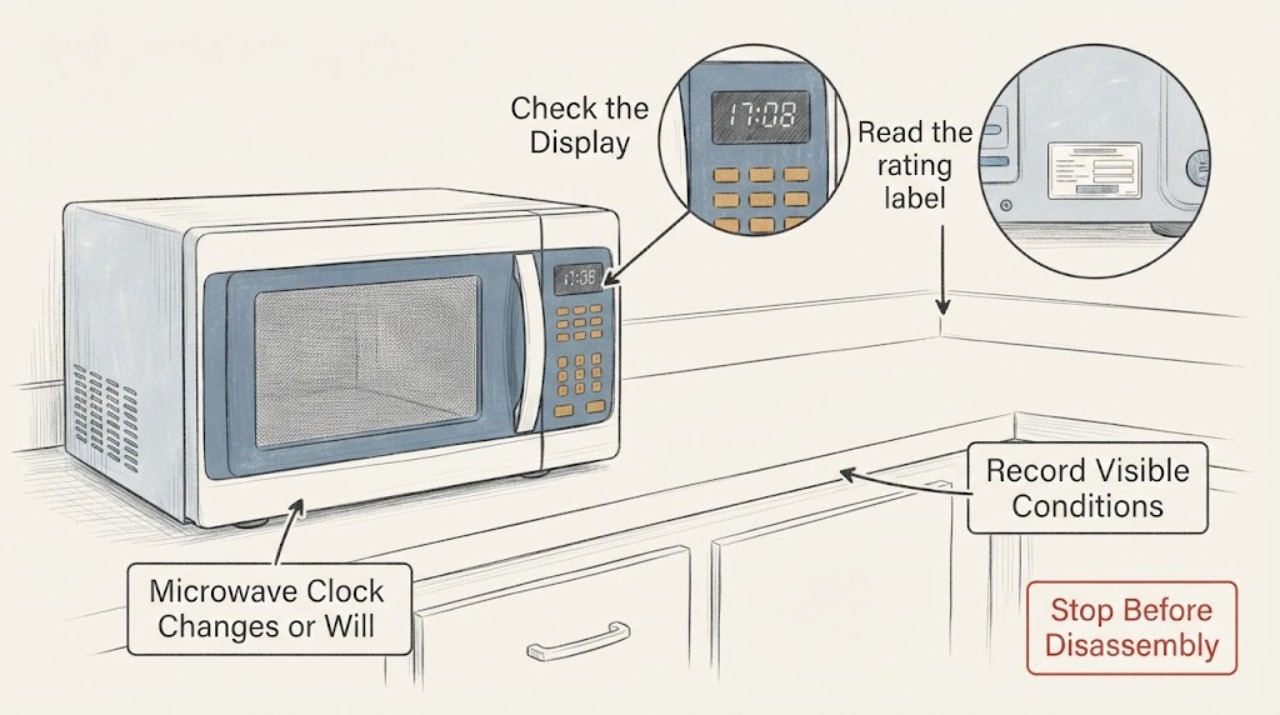
If a microwave clock returns to 12:00, flashes a colon, or changes after you set it, first determine whether the oven lost power, a model-specific clock or smart-sync setting changed it, or the control is actually losing time while power remains steady. Reset the clock only with the exact model manual; manufacturers publish different button sequences. Check for the display pattern that indicates a power interruption, and on a connected model check whether an approved network or voice-assistant time setting is overriding manual entry. Do not copy a demo-mode sequence from another brand or open the cabinet. If the clock keeps changing with uninterrupted power, or the display, cord, outlet, door, or controls show damage, stop using the microwave and arrange qualified service.
Work through in order
Diagnostic checks
Use only checks that match the exact appliance or system and its official guide.
-
Check 1
Write down exactly what the display does after the clock is set: does it return to 12:00 or another default, flash a colon, go blank, or show a normal-looking time that gains or loses minutes? Also note whether the microwave, kitchen lights, or another clock lost power at the same time.
Expected result: The display shows a default time or flashing colon after a known outage or power interruption, the display went blank, or the time changes while the display stays powered and other appliances do not reset.
Next step: If an interruption occurred, continue with the exact model's clock-setting instructions. If the clock drifts without an interruption, record the elapsed time and proceed to the model, connected-setting, and service checks without opening the microwave.
Why this matters
Why: A default time or flashing colon is consistent with a power-restoration prompt in the manufacturer guidance. A steadily powered clock that drifts is not explained by that normal reset behavior and should not be treated as proof of a specific component failure.
-
Check 2
Read the rating label for the full brand and model, then open that manufacturer's owner manual or support page. Follow only the listed clock procedure for that panel; do not assume that a Clock button, Settings menu, dial, or AM/PM step works on another model.
Expected result: The exact manual provides a clock procedure that matches the panel, or the model cannot be identified or the published controls do not match.
Next step: Use the matching manual and confirm that the clock-setting prompt is exited or saved. If the model cannot be identified, limit the check to recording the display and contact the manufacturer rather than trying sequences from another brand.
Why this matters
Why: GE, Samsung, and Panasonic all document model or panel differences, so a mismatched sequence can leave the clock in a setting prompt or change a different function. An unidentified model prevents a reliable button-level conclusion, but it does not prove a control failure.
-
Check 3
If the microwave has Wi-Fi, an app, or a voice-assistant setup, inspect the exact model's documented time or automatic-sync setting. Check whether the displayed time changes back immediately after a manual correction, and compare it with the configured network or assistant time. Do not enable or disable a connected feature using an unverified button sequence.
Expected result: The exact model documents automatic time synchronization and the microwave repeatedly returns to the configured network or assistant time, or no connected setting exists and the time still changes.
Next step: Correct the documented account or network time and use the model's supported setting if synchronization is wanted. If the microwave has no such feature, or the clock changes despite the documented setting being correct, preserve the model and timing details for manufacturer or qualified service.
Why this matters
Why: Panasonic states that compatible microwaves configured with Alexa can automatically use the Alexa network time, so manual entry can revert to that value. If no documented synchronization exists, the same symptom remains unresolved and cannot be assigned to a board, memory device, or other part from outside.
-
Check 4
Look at the display for a model-specific demo indication such as D or DEMO MODE PRESS ANY KEY, and inspect only the accessible cord, plug, outlet, door, latch, and seal for visible damage or heat marks. Do not remove the cabinet, ceiling service cover, control panel housing, or door-interlock parts.
Expected result: A documented demo indication is present and the exact manual explains it, the clock is changing without a demo indication, or the cord, outlet, door, latch, or seal is damaged or overheated.
Next step: Use the exact manual only for a documented demo-mode setting. For damage, smoke, a burning smell, a hot cord or outlet, a door that will not close firmly, or continued unexplained clock changes, disconnect power if safe and arrange qualified service. Do not bypass an interlock or repeatedly re-energize a damaged oven.
Why this matters
Why: Panasonic identifies D or DEMO MODE PRESS ANY KEY as a demonstration state on some models, while FDA treats a damaged door, latch, or seal as a reason not to use the oven. A demo indication does not explain every clock symptom, and visible electrical or door damage is a safety stop rather than a clock-setting problem.
Use your observations
Decision map
Find the observation that best matches what you see, then follow the next safe action.
-
PATH 01Next step
What you see
The display returned to a default time or flashing colon immediately after a known outage, tripped breaker, or unplugging.
Do this next
Restore stable power if safe, then set the clock using the exact model manual. If it resets again without another interruption, record that repeat and use the service branch.
Why this path and its safety boundary
Why it matters: The evidence matches a power-restoration clock prompt described by multiple manufacturers; it does not show that a particular internal part failed.
-
PATH 02Next step
What you see
A compatible smart microwave documents automatic time synchronization and the time changes back to the configured assistant or network time after manual entry.
Do this next
Correct the documented network or assistant time, or follow the exact model's supported manual-clock setting. Do not transplant a connected-device sequence from another model.
Why this path and its safety boundary
Why it matters: The observed change is consistent with the documented synchronization behavior, not proof of a failing clock circuit.
-
PATH 03Next step
What you see
The clock drifts or resets while the microwave remains powered, no documented synchronization or demo indication applies, and the exact manual does not resolve it.
Do this next
Stop repeated resets, keep the cabinet closed, and contact the manufacturer or a qualified appliance technician with the full model, display pattern, timing, and power history.
Why this path and its safety boundary
Why it matters: The symptom is outside the verified user-level setting and power-restoration checks; it does not identify a battery, board, relay, or other component.
-
PATH 04Next step
What you see
The microwave has smoke, a burning smell, a hot or damaged cord or outlet, a damaged door or latch, or it operates with the door open.
Do this next
Stop using it and disconnect power only if that can be done safely; arrange qualified service. Do not open the cabinet, bypass the interlock, or test high-voltage parts.
Why this path and its safety boundary
Why it matters: This is an electrical or microwave-safety stop condition, not a clock-setting issue.
Helpful context
Understand the symptom
What a changing clock can tell you
A clock that returns to a default time or a flashing colon after the oven has been unplugged, the breaker has opened, or power has otherwise interrupted is a power-restoration event in the manufacturer guidance. Whirlpool and Maytag describe the clock prompt or flashing display after power is restored, while GE directs owners to reset the clock after an outage. A clock that gradually changes while the microwave stays powered is a different observation: it is not explained by the normal post-outage reset instructions, so record the exact behavior and move to the model-specific service boundary rather than naming a failed board or battery.
Why the model number matters
Clock controls are not standardized. GE describes separate push-button and electronic-dial procedures, Samsung lists several panel-specific methods, and Panasonic lists different clock and demo-mode controls across its model families. Use the rating label and the manufacturer manual for the exact microwave. A display reading such as D or DEMO MODE PRESS ANY KEY can identify a demonstration setting on some Panasonic models, but that does not authorize carrying the same key sequence to an unidentified microwave.
When checks do not resolve it
Need a professional?
Stop using the microwave for smoke, burning odor, a hot or damaged cord or outlet, a door or latch that is bent or will not close firmly, operation with the door open, or a clock that continues to reset or drift after the exact manual and documented connected-setting checks. Do not open the cabinet, perform high-voltage measurements, bypass an interlock, or repeat tests on damaged equipment.
Common questions
FAQ
Why does my microwave clock keep going back to 12:00?
A default time or flashing colon after an outage, breaker trip, or unplugging is consistent with a power-restoration prompt. Reset the clock using the exact model manual. If it returns to 12:00 while power remains steady, that is a different symptom and needs manufacturer or qualified service rather than a guessed part.
Can a smart microwave change its own time after I set it?
On compatible Panasonic models configured with Alexa, Panasonic says the clock can automatically use the Alexa network time, so manual entry can revert to that setting. Check the exact model's documented connected features and account time before treating the behavior as a hardware fault.
Can I use a demo-mode reset sequence from another microwave?
No. Demo-mode controls vary by model and brand. If the display shows D or DEMO MODE PRESS ANY KEY, use only the exact model manual. Do not try an unverified sequence on an unidentified microwave.
Can I open the microwave to replace a clock battery or control part?
No. The verified Panasonic service guidance says not to disassemble or repair a microwave yourself. Keep the cabinet closed and use qualified service for persistent clock loss or any electrical, door, smoke, or heat symptom.
Read the exact guide
Official sources
- Microwave OvensU.S. Food and Drug Administration · Opened FDA consumer guidance for microwave safety. It supports stopping use for damaged doors, hinges, latches, or seals and following the model manual; it does not diagnose the clock fault.
- Flashing ':' or PF in display - Over-the-Range MicrowaveMaytag · Opened the official Maytag product-help page. It identifies a flashing colon as a power failure or clock-off condition and instructs the owner to reset the clock; no cross-brand display meaning is inferred.
- Panasonic - Service - Where can I find instructions to repair my microwave myself?Panasonic · Opened the official Panasonic service page. Its safety instruction is used as a general microwave service boundary: no user disassembly, repair, or remodeling, and service through an authorized center.
- Microwave - How to Set the Clock After a Power OutageGE Appliances · Opened the official GE support page. It states that the procedure is applicable to most models but directs owners to the exact owner manual, and it distinguishes push-button and electronic-dial controls.
- Set the clock time on your Samsung microwaveSamsung · Opened the official Samsung support page. It explicitly says clock steps vary by model and shows several panel-specific methods; it is used to require exact model matching, not to prescribe Samsung controls for an unknown microwave.
- Panasonic - How to select the functions and settings for the initial set up of the microwave oven.Panasonic · Opened the official Panasonic setup page. It documents model-family-specific setup and identifies D or DEMO MODE PRESS ANY KEY as a demo-mode indication on applicable models; it does not support transferring one sequence to an unknown microwave.
- Panasonic - How to set the clock on a Microwave Oven.Panasonic · Opened the official Panasonic support page. It states that the clock retains time while plugged in and electricity is supplied, and that compatible microwaves configured with Alexa can use Alexa network time; the latter is limited to compatible configured models.
- Non-Cooking Functions - MicrowaveWhirlpool · Opened the official Whirlpool product-help page. The clock steps are used as Whirlpool-specific evidence for a model-dependent clock setting and for the documented power-failure prompt, not as universal button instructions.
Community feedback
Share a repair observation
Share a plain-text repair observation. Accepted observations are published automatically; this page may take a moment to update.