
On this page
Start here
Quick answer
If water has entered or reached a built-in microwave, stop using it and disconnect power only if you can do so without touching wet electrical parts; otherwise switch off the circuit from a dry, safe location. Do not run a test cycle, open the cabinet, remove the trim or outer cover, use a hair dryer, or inspect high-voltage parts. CPSC says not to use electrical appliances that have been wet or turn on damaged appliances, and Samsung's appliance safety guidance says to unplug an appliance if liquid enters it and contact service. Blot only accessible exterior water after power is isolated, document where the water appeared, and arrange qualified appliance service; an electrician may also be needed if the plug, outlet, circuit or cabinet wiring is wet or damaged.
Before you begin
Safety first
- User work stops at safe power isolation, external observation, dry blotting of accessible surfaces and recording the model/leak facts. Do not restore power to test, run a cycle, move the built-in unit, remove trim or the outer cover, probe wiring, discharge or access high-voltage parts, bypass door interlocks, or use a hair dryer/cleaner to dry the appliance.
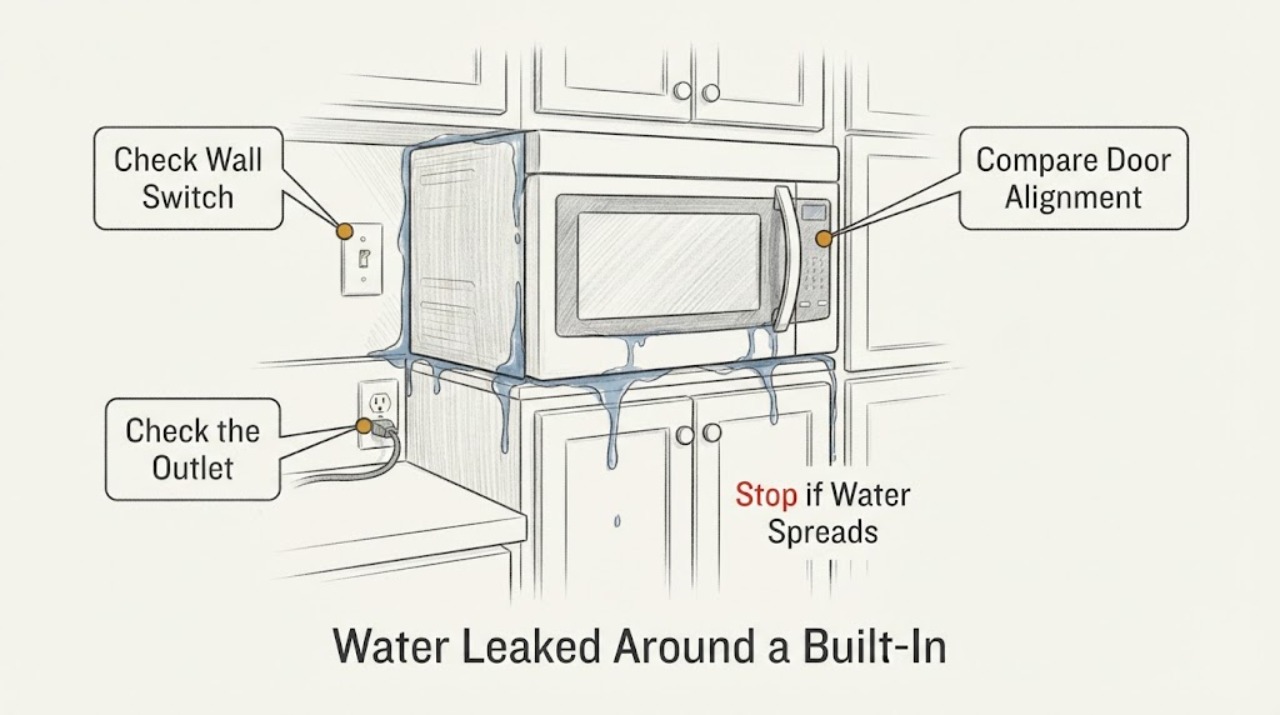
Work through in order
Diagnostic checks
Use only checks that match the exact appliance or system and its official guide.
-
Check 1
Stop the microwave immediately. If the plug, outlet, cord or surrounding floor is dry and reachable without touching water, disconnect the plug by its body; otherwise switch off the microwave circuit from a dry, safe location. Do not touch a wet plug or outlet.
Expected result: Power is isolated safely, or water blocks safe access to the plug/outlet/circuit.
Next step: If safe isolation cannot be completed without contact with water or damaged wiring, leave the area and have a qualified electrician or emergency service isolate it. Do not re-energize it.
Why this matters
Why: A water-affected appliance may have energized internal or connection points. The safe objective is isolation, not a reset or test cycle.
-
Check 2
From outside the built-in installation, note where water first appeared: above or beside the unit, at the door/cavity, beneath the unit, around the controls, or at the cord/outlet. Look only for visible pooling, wet trim, discoloration, smoke, sparking, burning smell or a tripped breaker; do not remove trim or pull the unit out.
Expected result: Water is confined to an external surface, or it reached the cavity, controls, wiring, cord, outlet or cabinet void; damage or electrical symptoms may also be present.
Next step: Keep power off and photograph the accessible condition. Do not run the fan, light, heat or microwave to locate the leak.
Why this matters
Why: The observation helps service plan the inspection but does not identify the failed seal or internal component. Water inside the appliance or at the electrical connection keeps the unit in the do-not-use state.
-
Check 3
With power isolated, blot only water that is safely accessible on the exterior using a dry cloth. Do not spray cleaner, pour more water, use a hair dryer or insert a cloth/tool through vents, the door gap, control openings or cabinet seams.
Expected result: Only an accessible exterior surface is damp, or moisture is visible through openings/inside the unit or around the power connection.
Next step: For any moisture inside, at controls, in vents, at the cord/outlet or in the cabinet void, stop handling the unit and arrange qualified service/electrical evaluation.
Why this matters
Why: Surface blotting does not dry or certify the internal chassis. GE says to unplug before maintenance/cleaning and not to spray solution directly on controls; internal moisture remains a service issue.
-
Check 4
Record the full brand/model and serial label if it can be read without moving the unit, along with the leak timing, recent cleaning or cooking, installation type, breaker behavior and any odor, smoke, spark or unusual sound. Do not remove the outer cabinet or mounting hardware to find the label or leak.
Expected result: The model and installation details are available, or the label is inaccessible; any electrical symptom or water path remains unresolved.
Next step: Provide the record and photographs to the microwave manufacturer/authorized service provider; include an electrician when the outlet, circuit or cabinet wiring was wet or damaged.
Why this matters
Why: Exact manuals and service parts depend on the model, but no model-specific procedure can be safely selected from this task. Unresolved internal water or electrical symptoms require professional evaluation.
-
Check 5
Before anyone considers restoring power, have qualified service inspect the water path, cavity/door area, controls, wiring, grounding and high-voltage enclosure according to the exact model documentation. Do not treat a dry exterior or a successful breaker reset as a safety test.
Expected result: Qualified service clears the appliance for operation, or finds moisture, damage, unsafe wiring, or a condition that needs repair/replacement.
Next step: Follow the service provider's repair or replacement decision. Keep the microwave disconnected if any safety concern remains.
Why this matters
Why: Drying the visible surface cannot establish that internal insulation, interlocks, high-voltage parts or connections are safe. A breaker reset only changes power state and does not diagnose water damage.
Use your observations
Decision map
Find the observation that best matches what you see, then follow the next safe action.
-
PATH 01Next step
What you see
Water reached the microwave cavity, controls, vents, internal cabinet, cord, plug, outlet or wiring, or the unit shows smoke, sparks, burning smell, abnormal noise or breaker trips.
Do this next
Keep power off, do not test or open the microwave, and arrange qualified appliance service plus electrical evaluation when the supply connection was affected.
Why this path and its safety boundary
Why it matters: This is a water-affected or damaged electrical appliance condition; the symptom does not safely identify a replaceable seal or board.
-
PATH 02Next step
What you see
Water is visible only on a dry, accessible exterior surface, with no sign that it entered openings or the electrical connection.
Do this next
Leave the microwave disconnected until the leak source is corrected and the exact manual or qualified service provider confirms the unit is safe; do not use a heat or microwave test to check it.
Why this path and its safety boundary
Why it matters: The source may be external, but the built-in installation and missing model details prevent a safe conclusion about the appliance interior.
-
PATH 03Next step
What you see
The plug, outlet, circuit or cabinet wiring is wet, damaged, hot, discolored or repeatedly trips power.
Do this next
Do not touch the connection or reset the breaker repeatedly. Keep people away and call a qualified electrician; appliance service should inspect the microwave before re-energization.
Why this path and its safety boundary
Why it matters: The electrical supply itself may be unsafe, separate from the microwave's internal fault.
-
PATH 04Next step
What you see
The leak source and internal condition cannot be established without pulling the built-in unit, removing the cover or accessing high-voltage parts.
Do this next
Stop at the external record and arrange authorized service with the complete model/serial and photographs; do not attempt disassembly or a powered test.
Why this path and its safety boundary
Why it matters: The remaining diagnosis is outside safe user-level checks and cannot be narrowed from a generic built-in microwave symptom.
Helpful context
Understand the symptom
Treat internal water as an electrical safety event
The title describes water around the built-in microwave and then water internally, but it does not identify the brand, model, leak path or how much of the appliance became wet. That is enough to set a safe boundary, not enough to name a failed seal, control board, transformer or other part. CPSC warns against using wet or damaged electrical appliances, and Samsung's appliance safety guidance says to unplug when liquid enters an appliance and contact service.
Keep the inspection external and dry
After power is isolated, limit owner observations to accessible surfaces: where water first appeared, whether the cabinet, door, control area, plug or outlet is wet, and whether there was a breaker trip, burning smell, smoke, sparking or abnormal noise. Do not pull a built-in unit out, remove its trim or cover, spray cleaner, apply heat, or probe the cavity or wiring. GE's microwave guidance requires unplugging before maintenance or cleaning and says not to spray liquid directly on controls.
The model and installation determine what service must inspect
Without a brand, model and installation manual, the leak could be from an external cabinet or plumbing source, a door/cavity spill, condensation, or an internal appliance path. These possibilities cannot be separated safely by powering the oven again. Give service the full model label, installation type, where the first water appeared, whether water reached the cavity or controls, and the power/breaker condition.
When checks do not resolve it
Need a professional?
Arrange qualified microwave service after any internal water entry, water at the controls or electrical connection, visible damage, breaker trip, smoke/sparking/burning smell, or any unresolved leak. Use a qualified electrician as well when the plug, outlet, circuit or cabinet wiring was wet or damaged.
Safety scope: User work stops at safe power isolation, external observation, dry blotting of accessible surfaces and recording the model/leak facts. Do not restore power to test, run a cycle, move the built-in unit, remove trim or the outer cover, probe wiring, discharge or access high-voltage parts, bypass door interlocks, or use a hair dryer/cleaner to dry the appliance.
Have this ready
- Provide the full brand/model/serial if accessible without moving the unit, installation type, exact first water location, whether water reached the cavity/controls/cord/outlet, timing, breaker behavior, photographs and any smell, smoke, spark or unusual-noise observations.
Common questions
FAQ
Can I plug the built-in microwave back in after it dries?
Not as a test. CPSC says not to use electrical appliances that have been wet or turn on damaged appliances, and Samsung says to unplug an appliance when liquid enters it and contact service. Keep it disconnected until qualified service evaluates the exact model and the affected electrical areas.
Can I remove the trim or open the microwave to find the leak?
No. The task has no model-specific manual, and microwave chassis contain high-voltage hazards. Limit yourself to safe external observations and arrange qualified appliance service; involve an electrician if the outlet, cord, circuit or cabinet wiring was wet.
Read the exact guide
Official sources
- Home Appliance Terms and ConditionsSamsung Electronics America · Opened Samsung's official home-appliance safety guidance. It says to unplug if liquid enters an appliance and contact service, notes high-voltage current in the chassis, and prohibits unqualified repairs. It is a safety source only; no Samsung model or part is assigned here.
- Microwave - Cleaning RecommendationsGE Appliances · Opened official GE microwave guidance. It says to unplug before maintenance or cleaning and not to spray liquid directly on controls. It is used only for external cleaning/power-isolation boundaries, not to infer this unbranded built-in unit's leak cause or repair.
- Surviving the Aftermath of a Hurricane, Tornado, or Flood: CPSC Warns of Post-Storm Hazards from Generators, Candles, and Wet AppliancesU.S. Consumer Product Safety Commission · Opened CPSC safety guidance. It directly says not to use electrical or gas appliances that have been wet and not to turn on damaged appliances because of shock or fire hazards. It is used for the water-affected appliance safety boundary, not for a microwave component diagnosis.
Community feedback
Share a repair observation
Share a plain-text repair observation. Accepted observations are published automatically; this page may take a moment to update.