
On this page
Start here
Quick answer
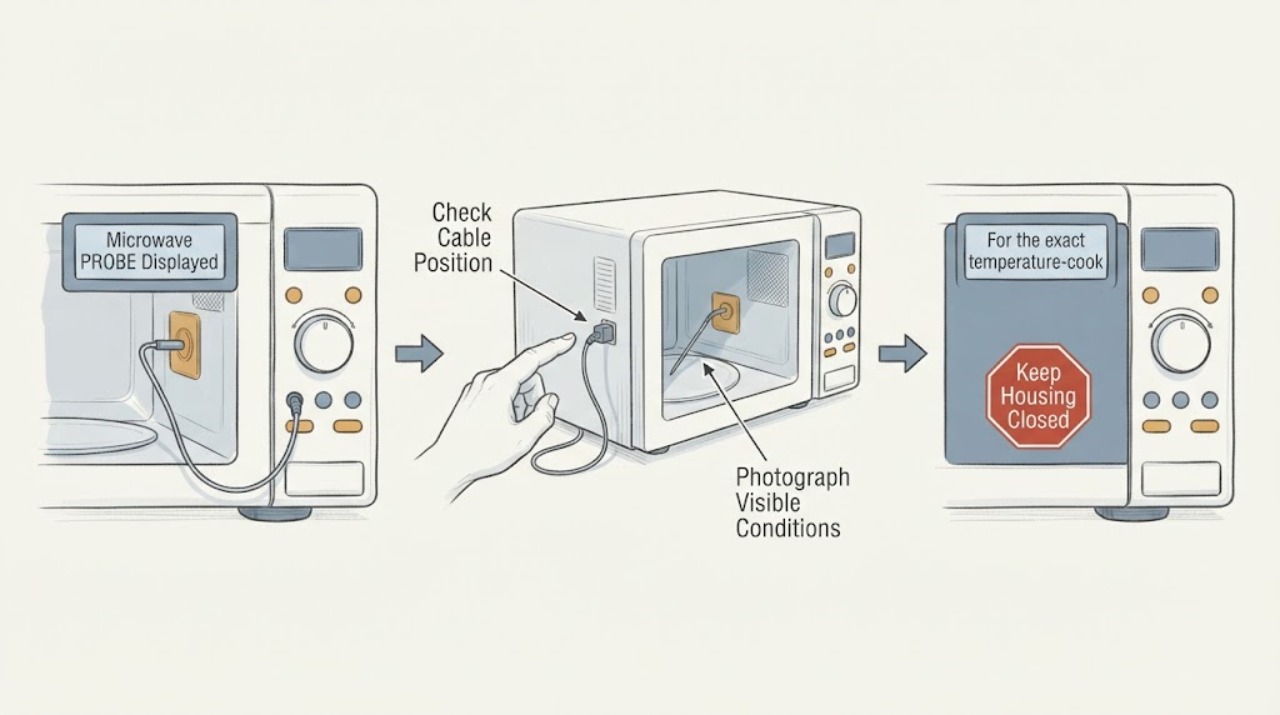
On Monogram microwave models that use a temperature probe, a PROBE prompt generally means the control does not detect the probe correctly during a temperature-based cooking function. Stop the program, let the food and probe cool enough to handle, and check that the probe plug is fully seated in the microwave wall receptacle and that the probe tip is placed in the food as the cooking guide specifies. Do not force the plug, use a damaged probe, or insert the probe into a program that does not call for it. If the display remains after a correct connection and one model-approved retry, or the probe, receptacle, cord, or food is damaged, stop using the probe function and arrange service with the exact model information.
Work through in order
Diagnostic checks
Use only checks that match the exact appliance or system and its official guide.
-
Check 1
Stop or cancel the current program without opening the microwave cabinet, photograph or write down the exact PROBE wording, and record whether a temperature-cook, Auto Roast, or another function was selected.
Expected result: The display says PROBE or Use Probe during a temperature-based function; the prompt appears during a function that does not call for a probe; or the wording and function are unclear.
Next step: Continue only with the exact Monogram manual and a cool, accessible probe check when the selected function requires the probe. If the display is unclear, preserve the photo and arrange model-specific support.
Stop if: Do not keep starting programs to clear the prompt or remove any microwave cover.
Why this matters
Why: A probe prompt during temperature cooking is consistent with the control not detecting the expected temperature probe. A prompt during another function may be a program-selection or model-specific issue and should not be diagnosed from the word alone.
-
Check 2
With the cooking program stopped and the probe safe to handle, inspect the probe cable, plug, and accessible tip for bending, cuts, scorching, contamination, or a loose connection. Reseat the plug fully in the microwave wall receptacle without forcing it.
Expected result: The plug was partly inserted and seats firmly now; the probe or cable is visibly damaged; the receptacle is loose or damaged; or the connection was already firm and undamaged.
Next step: Use only an intact probe with a firm model-correct connection. If damage is present or the receptacle does not hold the plug, stop using the probe function and arrange service.
Stop if: Do not bend pins, scrape the receptacle, splice the cable, use tape as a repair, or probe the receptacle with a tool.
Why this matters
Why: An incomplete connection can explain an open-probe prompt. Visible probe, cable, or receptacle damage prevents a reliable user repair and can create an electrical or food-safety problem.
-
Check 3
For the exact temperature-cook or Auto Roast program, place the probe tip in the food and the plug in the wall receptacle exactly as the Monogram cooking guide specifies; use the supported food and target-temperature limits rather than a generic placement rule.
Expected result: The probe is fully seated in the wall and food, the food and program match the manual, or the probe tip is shallow, touching a bone or fat, outside the food, or used with an unsupported food or function.
Next step: Correct only the placement allowed by the exact manual and make one attended retry. If the prompt remains with correct placement, stop the probe function and contact service.
Stop if: Do not force the probe into hard or frozen food, let the cable contact a heating surface, or use it for a function that does not call for it.
Why this matters
Why: Correct placement lets the control receive a food-temperature signal. Incorrect placement or an unsupported program can produce early or late shutoff or a continuing probe prompt without proving the probe itself has failed.
-
Check 4
After the connection and placement are corrected, run one model-approved temperature test while monitoring the display and food safely. Record whether PROBE clears, returns immediately, or appears only after the food warms.
Expected result: The prompt clears and the program reads temperature; it returns despite a firm connection and correct placement; or the oven stops too soon or too late while using the probe.
Next step: Stop the probe function and arrange qualified Monogram or GE Appliances service for recurrence or abnormal timing. Do not substitute a part based on the prompt alone.
Stop if: Stop immediately for smoke, burning odor, arcing, a hot or damaged cord, liquid near electrical parts, or a probe that overheats or appears damaged.
Why this matters
Why: Clearing after a connection or placement correction supports an input or setup issue. Recurrence or abnormal shutoff with a properly set probe is consistent with a probe, receptacle, wiring, setting, or control problem that cannot be separated safely at the user level.
Use your observations
Decision map
Find the observation that best matches what you see, then follow the next safe action.
-
PATH 01Next step
What you see
PROBE appears during a temperature-based function and the probe plug was not fully seated or the probe was not placed in the food.
Do this next
Stop the program, correct the wall-receptacle and food placement using the exact manual, and make one attended retry.
Why this path and its safety boundary
Why it matters: The control may be waiting for the temperature probe input described by the function, so connection or placement is the first supported distinction.
-
PATH 02Next step
What you see
The probe is fully seated, correctly placed for the exact food and function, and PROBE still appears or returns on the single retry.
Do this next
Stop using the temperature-probe function and arrange qualified service. Provide the exact model, display photo, function, food, placement, and retry result.
Why this path and its safety boundary
Why it matters: A setup error is less likely; the probe, receptacle, wiring, or sensing control may need model-specific diagnosis.
-
PATH 03Next step
What you see
The probe or receptacle has a cut, scorch mark, bent connector, loose socket, liquid contamination, or other visible damage.
Do this next
Keep the microwave and probe function unused and arrange qualified service. Do not repair the cable, clean inside the receptacle, or order a replacement without model confirmation.
Why this path and its safety boundary
Why it matters: The probe input cannot be considered reliable, and handling or testing it further may create an electrical or food-safety risk.
-
PATH 04Next step
What you see
The prompt appears during a non-probe function, the display wording is different, or the correct program and model manual cannot be identified.
Do this next
Cancel the program, record the exact display and model information, and use the model-specific Monogram manual or qualified service rather than copying a reset or probe procedure from another microwave.
Why this path and its safety boundary
Why it matters: The generic Probe guidance does not establish the meaning of the observed prompt for that control state or model.
Helpful context
Understand the symptom
Confirm that PROBE is a temperature-cooking prompt
Read the full display and note which function was selected. On the GE Appliances support page used for Monogram-family microwave guidance, Probe is associated with an open temperature probe or a probe that is not plugged in during a temperature-cook function. Do not assume that every text prompt is a failed sensor: first identify whether the selected program is intended to measure food temperature and record the exact model for the matching manual.
Check the wall receptacle and food placement
Cancel the active selection and handle the probe only when it is safe to do so. Check that the plug is fully inserted into the microwave wall receptacle and that the probe tip is in the food, using the exact cooking guide for placement. GE Appliances' probe guidance describes the probe as seated in the wall and inserted into the food; its Auto Roast guidance gives a three-quarter insertion example for supported meat programs. Do not bend the probe, push it against the oven wall, or force a loose connection.
Retry only the model-supported probe function
After correcting a visibly incomplete connection or placement, start one temperature-based test using the exact Monogram manual's permitted food, program, and target temperature. A cleared prompt supports a connection, placement, or program-selection cause; it does not prove the probe will remain reliable. If PROBE returns with a firm connection and correct placement, stop retrying and preserve the display and model details for service.
Keep the high-voltage repair boundary clear
A persistent PROBE prompt can involve the probe, receptacle, wiring, or sensing control. Microwave cabinets contain hazardous high-voltage components, and the public support guidance routes a properly set probe that still produces the prompt to service. Do not open the cabinet, measure the receptacle while energized, splice the probe cable, or substitute an unverified probe. Give service the model, serial number, display wording, selected function, probe placement, and whether the prompt cleared after the single safe retry.
When checks do not resolve it
Need a professional?
Arrange qualified Monogram or GE Appliances service when PROBE remains after the probe is fully seated and correctly placed for the exact function, returns after one model-approved retry, appears with a damaged probe or receptacle, or is accompanied by abnormal shutoff, smoke, odor, arcing, liquid near electrical parts, or a hot or damaged cord. Provide the exact model and serial number, display wording or photo, selected function, food, probe placement, and retry result. Do not open the microwave cabinet or select a probe, receptacle, control, or wiring part from the display prompt alone.
Common questions
FAQ
What does PROBE mean on a Monogram microwave?
On models that use a temperature probe, the official GE Appliances support table defines Probe as an open temperature probe or a probe that is not plugged in during a temperature-cook function. Check the selected function and the exact Monogram manual before treating it as a failed part.
How do I clear a PROBE prompt?
Stop the program, make sure the probe plug is fully seated in the microwave wall receptacle, and place the probe in the food as the exact cooking guide specifies. Retry the model-supported temperature function once. If PROBE returns with a correct connection and placement, use service.
Can I keep using the microwave without the probe?
Do not bypass a probe prompt or use a different cooking function until the exact manual confirms that the function does not require the probe and the microwave operates normally. If the prompt appears in a non-probe function or the control behaves abnormally, cancel the program and arrange model-specific support.
Read the exact guide
Official sources
- Microwave Problem With Temperature ProbeGE Appliances · Opened official support page describing probe-related early or late shutoff causes; exact Monogram model cooking rules remain authoritative.
- Microwave - Error, Fault or Function CodesGE Appliances · Opened official GE Appliances support guidance. It identifies Probe as an open temperature probe or a probe not plugged in during a temperature-cook function; the exact Monogram model manual remains controlling.
- Microwave Use Probe Showing on DisplayGE Appliances · Opened official manufacturer support page for microwaves that display Use Probe or Probe; exact probe layout and food limits remain model-specific.
- Microwave Auto Roast ProblemsGE Appliances · Opened official support guidance for Auto Roast models; its three-quarter insertion example is limited to supported programs and must not replace the exact Monogram manual.
- Monogram Microwave Owner CenterGE Appliances · Opened official GE Appliances owner-center page for a Monogram microwave; it demonstrates the Monogram model manual and service path, while the reader's exact model must be used for final instructions.
Community feedback
Share a repair observation
Share a plain-text repair observation. Accepted observations are published automatically; this page may take a moment to update.