
On this page
Start here
Quick answer
Confirm the complete Samsung microwave model, market, and every character of the display before treating C-20 as a diagnosis. Samsung's US, Canada, and Philippines support pages group C-20 with a temperature-sensor error; the Philippines page further describes the sensor as open or short. If the appliance is dry and there is no smoke, burning smell, damaged door, or other hazard, one 60-second power isolation may be attempted as the applicable Samsung guidance allows. If C-20 returns, or if moisture entered the appliance, stop using it and arrange Samsung or qualified microwave service. Do not open the cabinet, probe high-voltage circuitry, replace an internal sensor from the code alone, or bypass the door interlock.
Before you begin
Safety first
- Do not remove the microwave cabinet, probe live or high-voltage circuits, access the magnetron or capacitor, alter shielding, bypass the door interlock, or continue operating a microwave with recurring C-20 or any smoke, arc, burning odor, damaged door, or electrical hazard.
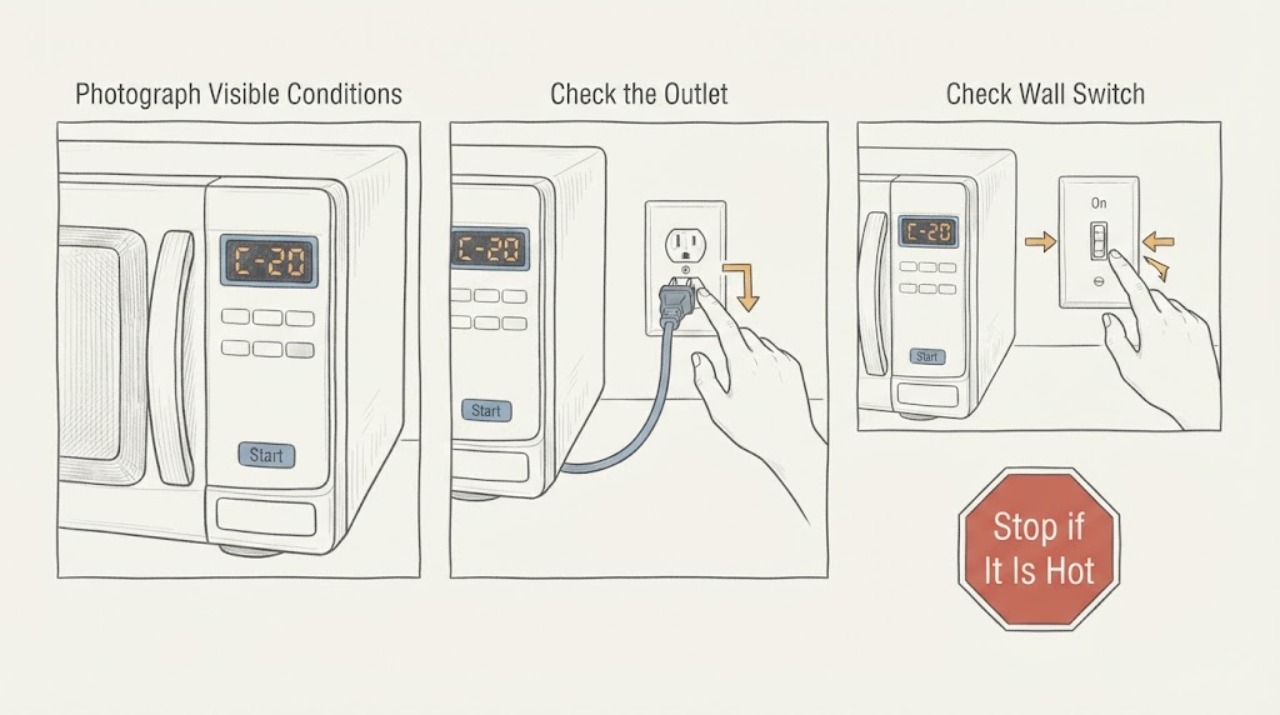
Work through in order
Diagnostic checks
Use only checks that match the exact appliance or system and its official guide.
-
Check 1
Photograph the complete display and rating label before trying to clear anything. Record the full model, market or country, whether the display is exactly C-20 or instead C-21/C-22, E-21/E-22, C-d0/C-d1/C-d2, or another code, and whether Stop/Clear responds normally.
Expected result: The label and code are complete and match C-20, or the model, market, punctuation, leading letter, or code family is different or unreadable.
Next step: Use the exact model manual or regional Samsung support page. If the identity remains uncertain, do not select a sensor, board, or other part from C-20 alone; keep the appliance off if any warning or unsafe behavior is present.
Stop if: Do not remove the cabinet, probe the display wiring, or test the microwave's high-voltage system to identify the code.
Why this matters
Why: Samsung's opened US, Canada, and Philippines pages support a temperature-sensor meaning for C-20, but the Canadian page limits its guide to Canadian products and warns that codes and solutions may vary by location. A different display may be a different sensor, temperature, door/key, or communication condition.
-
Check 2
With no cooking cycle running, inspect only the outside of the control area, door, nearby underside, plug, and outlet for recent steam, condensation, a spill, wetness, scorch, damaged plastic, or other visible damage. Do not spray cleaner into vents or controls.
Expected result: The controls are dry and undamaged, or C-20 appeared after steam/spill exposure or there is moisture, scorching, damaged trim, a damaged door/seal, or a wet electrical area.
Next step: If the exterior is merely damp and no hazard is present, leave the appliance unused until accessible surfaces are dry. If moisture entered the appliance, there is damage, or the plug/outlet is wet or scorched, keep it disconnected from a safe dry position and arrange qualified service.
Stop if: Do not open the case, direct heat into vents, reach behind the unit, or restore power while an electrical area is wet or damaged.
Why this matters
Why: Samsung says moisture around microwave electronics can cause errors and advises allowing moisture to dry. Moisture or visible damage changes this from a simple code check to an appliance-safety boundary; drying an exterior surface does not certify an appliance after liquid entered it.
-
Check 3
Only when the model-specific guidance permits it and the microwave is dry, the door and plug are intact, and there is no smoke, burning odor, arcing, abnormal heat, or breaker problem, switch power off at the normal plug or circuit breaker for 60 seconds and restore it once.
Expected result: C-20 clears and does not return, C-20 returns immediately or on the next operation, or the appliance trips protection or behaves erratically when power is restored.
Next step: If C-20 returns, stop using the microwave and give service the model, market, display photo, and reset timing. If the breaker trips or behavior is erratic, leave power isolated when safe and arrange qualified electrical or microwave service. Do not repeat the reset.
Stop if: Do not use repeated power cycling to bypass C-20 or continue cooking while the warning returns.
Why this matters
Why: Samsung US and Canada describe a 60-second power interruption as a reset step and direct the owner to seek service if the code returns. A single reset can clear a transient control state; it cannot prove that the temperature-sensor circuit is healthy.
-
Check 4
Treat a confirmed C-20 as a temperature-sensor circuit service issue rather than a parts-order instruction. From outside the appliance, record whether the code is present at startup, after heating, or after steam exposure, and whether the microwave otherwise accepts commands; do not perform a sensor, wiring, control-board, magnetron, or capacitor test.
Expected result: C-20 recurs while the exterior is dry, recurs after a particular heating or steam event, or is accompanied by a different code, failure to stop, sparks, smoke, or a damaged door/seal.
Next step: Keep the microwave out of service and arrange Samsung or qualified microwave service. Provide the exact model/market, code sequence, operating stage, moisture history, and visible safety observations; let the technician identify the failed circuit and compatible part.
Stop if: Do not open the cabinet, access high-voltage parts, bypass the door interlock, or use the microwave as a test load after a recurring C-20.
Why this matters
Why: The official pages support a sensor-related error scope, and the Philippines page specifies open/short, but none of these public owner pages proves which internal component or connection must be replaced. Additional symptoms can raise a high-voltage, door, fire, or control-safety concern without identifying a safe DIY repair.
-
Check 5
If the display is not exactly C-20, stop comparing it by appearance and use the exact model's code guide. Record whether the panel shows a door/key code, a temperature code with a different suffix, a communication code, or an unknown sequence.
Expected result: The code is C-21/C-22/E-21/E-22 or another temperature-related code, a C-d door/key code, C-F communication code, or an unknown/partial display.
Next step: Follow the exact regional manual and arrange service for a persistent or unsafe code. Do not substitute C-20 instructions for a different code or attempt hidden service-mode key sequences.
Stop if: If the microwave starts without a command, a key activates itself, the door or seal is damaged, there is arcing/smoke/burning odor, or protection trips, stop use immediately and isolate power only from a safe position.
Why this matters
Why: Samsung's lists place related-looking displays in different code families and markets; C-20 is not a universal label for every temperature, door, or control fault. A code that cannot be read completely cannot safely select a repair path.
Use your observations
Decision map
Find the observation that best matches what you see, then follow the next safe action.
-
PATH 01Next step
What you see
The complete display is C-20, the Samsung model and market are confirmed, the exterior is dry, and there is no door, smoke, arcing, burning, or electrical hazard.
Do this next
If the exact regional guidance allows it, make at most one 60-second power isolation. If C-20 returns, leave the microwave unused and arrange Samsung or qualified microwave service with the code and model record.
Why this path and its safety boundary
Why it matters: Samsung's US, Canada, and Philippines sources support treating C-20 as a temperature-sensor error in those scoped markets; the Philippines wording further describes an open or short sensor condition. The code still does not identify a replaceable part by itself.
-
PATH 02Next step
What you see
C-20 appeared after steam or a spill, or moisture is visible near the controls, vents, plug, or outlet.
Do this next
Keep the microwave off and let only safe, accessible exterior surfaces dry. If liquid entered the appliance or the power connection is wet/damaged, do not restore power; arrange qualified service.
Why this path and its safety boundary
Why it matters: Samsung identifies moisture as a possible trigger for microwave errors, but liquid entering the cabinet or an electrical area creates a safety concern that an exterior wipe cannot clear.
-
PATH 03Next step
What you see
The display is C-21, C-22, E-21, E-22, a door/key or communication code, or the model/market cannot be confirmed.
Do this next
Retrieve the complete model and exact regional manual, retain a display photo, and use Samsung service for a persistent code. Do not infer a sensor, board, or interlock repair from a partial display.
Why this path and its safety boundary
Why it matters: The visual similarity is not enough to reuse C-20 guidance. Samsung's official lists separate related sensor, temperature, door/key, and communication families, and the Canadian page warns that regional solutions can vary.
-
PATH 04Next step
What you see
C-20 returns after the one safe reset, or the microwave starts by itself, has a damaged door/seal, sparks, smokes, smells burnt, overheats, or trips electrical protection.
Do this next
Stop using the microwave, isolate power only from a safe dry position, keep clear of damaged electrical areas, and arrange Samsung or qualified microwave service. Use emergency response for an active fire or immediate electrical danger.
Why this path and its safety boundary
Why it matters: This is a persistent sensor-related or broader microwave safety condition. The official code meaning does not make cabinet, high-voltage, shielding, or interlock work safe for an owner.
Helpful context
Understand the symptom
What C-20 establishes—and what it does not
On the opened Samsung US, Canada, and Philippines support pages, C-20 is grouped with a temperature-sensor error. The Philippines page gives the narrower wording that the temperature sensor may be open or short. That identifies a sensor-related error scope, not a confirmed failed sensor, control board, wiring point, or replacement part. Samsung Canada also says its guide is for microwaves sold in Canada and that codes and solutions may differ elsewhere, so do not carry this meaning to an unidentified model or market without checking its exact manual.
Why the microwave safety boundary is stricter
A microwave can still show a display or appear to heat while an internal fault remains. The safe user-level work here is identification, an external moisture and damage check, and at most one safe power isolation when the appliance is dry and otherwise normal. Do not remove the outer cabinet, measure a sensor or live circuit, work around the magnetron or capacitor, alter the door interlock, or keep resetting C-20 to continue cooking.
When checks do not resolve it
Need a professional?
Arrange Samsung or qualified microwave service if C-20 returns after one permitted 60-second reset, if the model or market cannot confirm the code, if moisture entered the appliance, or if the display is accompanied by a damaged door or seal, self-starting controls, sparks, smoke, burning odor, abnormal heat, or a tripped breaker. Do not remove the cabinet, test high-voltage circuitry, replace an internal sensor from the code alone, or bypass the door interlock.
Safety scope: Do not remove the microwave cabinet, probe live or high-voltage circuits, access the magnetron or capacitor, alter shielding, bypass the door interlock, or continue operating a microwave with recurring C-20 or any smoke, arc, burning odor, damaged door, or electrical hazard.
Common questions
FAQ
Does Samsung microwave C-20 prove that the temperature sensor must be replaced?
No. Samsung's cited US and Canada pages group C-20 with a temperature-sensor error, and the Philippines page describes an open or short sensor condition. That narrows the diagnostic scope but does not identify the failed internal component or authorize a DIY replacement. A recurring C-20 needs qualified service.
Can I keep using a Samsung microwave after C-20 clears once?
Do not treat a single reset as a repair. Samsung describes a 60-second power interruption and directs owners to service if the code returns. If C-20 reappears, or there is moisture, smoke, arcing, burning odor, door damage, abnormal heat, or a breaker problem, stop using the microwave and keep it isolated when safe.
Is C-20 interchangeable with C-21, C-22, or E-21/E-22?
No. Samsung groups some of these displays in related sensor or temperature families, but the exact code format, model, and market still matter. Record every character and use the matching regional manual rather than treating a partial or similar-looking display as C-20.
Read the exact guide
Official sources
- Meaning of Error Codes on Your Samsung MicrowaveSamsung Canada · Official Canada Samsung guide for microwaves sold in Canada; the page warns that codes and solutions may vary in other locations.
- What does the error code on your Samsung microwave mean?Samsung Electronics America · Official US Samsung support page; use the exact model manual for model-specific differences.
- Samsung Microwave Error CodesSamsung Electronics Philippines · Official Philippines Samsung support page; use only as regional evidence and confirm the user's model and market before applying the code meaning.
Community feedback
Share a repair observation
Share a plain-text repair observation. Accepted observations are published automatically; this page may take a moment to update.