
On this page
Start here
Quick answer
First make sure the Monogram microwave is running a Cook cycle rather than Timer or another non-heating mode, and confirm the door closes fully. Check only the visible cavity and control state. If it runs but does not heat after those checks, or if there is arcing, smoke, a burning odor, or door damage, stop using it and arrange authorized service; do not open the cabinet.
Before you begin
Safety first
- Do not open the cabinet, discharge or touch a capacitor, defeat door interlocks, or attempt high-voltage component repair. GE notes that a capacitor can remain charged after unplugging.
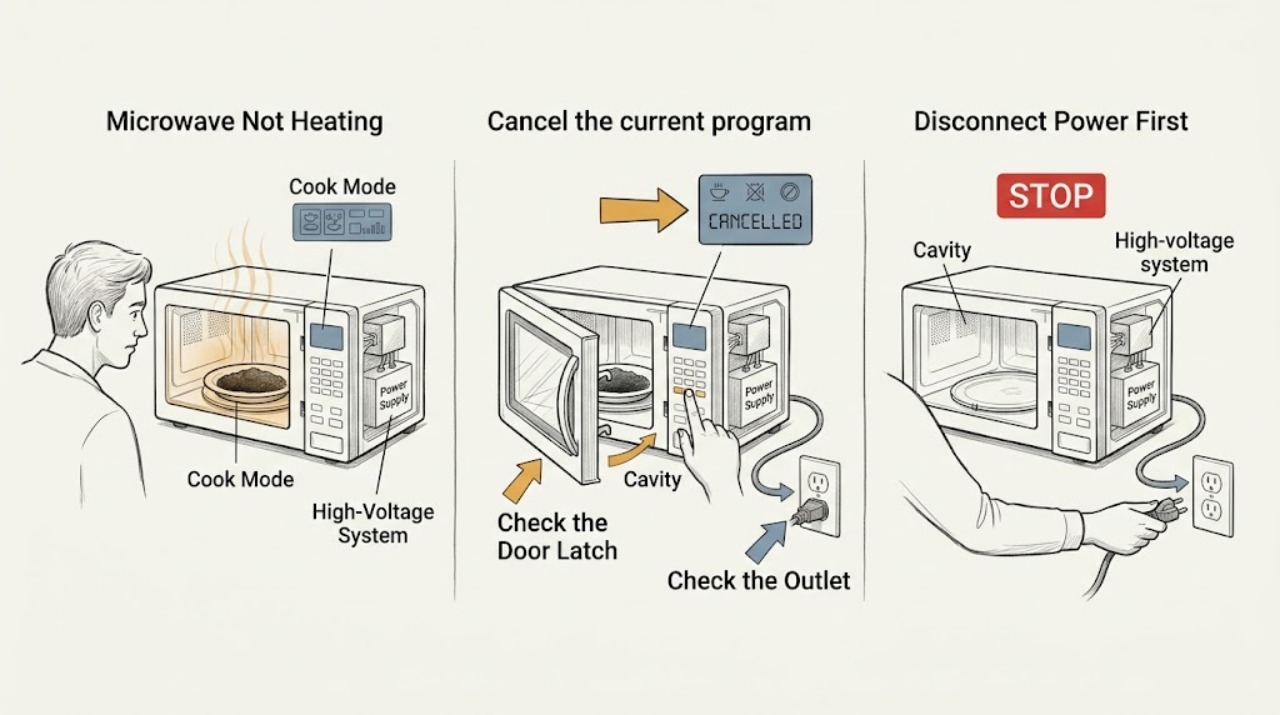
Work through in order
Diagnostic checks
Use only checks that match the exact appliance or system and its official guide.
-
Check 1
Cancel the current program and start a normal Cook cycle with a suitable water-containing load, following the model instructions; never run the cavity empty.
Expected result: The display indicates Timer or another non-cooking mode, or the Cook cycle runs without heating.
Next step: Select the correct Cook mode once; if it still runs without heat, stop repeated testing and arrange service.
Why this matters
Why: A non-heating mode explains no heat; continued no heat in Cook mode needs the door and service checks below.
-
Check 2
Close the door firmly and inspect the visible latch area, door edge, and seal for food debris, misalignment, or damage without removing the door or cabinet.
Expected result: The door does not close squarely, the latch area is damaged/blocked, or the door appears normal.
Next step: Remove only loose visible debris after stopping the oven; service any damage, misalignment, or repeat no-heat condition.
Why this matters
Why: The safety interlock depends on correct door closure; visible damage can prevent heating or requires service even if the oven sometimes runs.
-
Check 3
Check the dedicated outlet and breaker/fuse externally if the display or fan also loses power; do not use an extension cord or repeatedly reset a tripping breaker.
Expected result: The display is dark or power is intermittent, or the oven runs normally but still does not heat.
Next step: Restore only an obvious tripped breaker once; if it trips again or Cook mode still produces no heat, call service.
Why this matters
Why: A power problem can stop all functions; power that is present with no heat shifts attention to the microwave's internal heating system.
-
Check 4
After stopping the oven, inspect the visible cavity, turntable, and cookware for metal, scorch marks, sparks, smoke, or a burning odor.
Expected result: Arcing, smoke, odor, or visible cavity damage occurred, or no visible damage is present.
Next step: Leave the unit out of service for any spark, smoke, odor, or damage; otherwise arrange diagnosis if Cook mode still does not heat.
Why this matters
Why: Arcing or cavity damage can make continued operation unsafe; a clean visible cavity does not rule out an internal no-heat fault.
Use your observations
Decision map
Find the observation that best matches what you see, then follow the next safe action.
-
PATH 01Next step
What you see
The oven was in Timer mode and heats normally in a proper Cook cycle
Do this next
Use the model's Cook mode instructions and monitor normal operation.
Why this path and its safety boundary
Why it matters: The apparent failure was a mode-selection issue rather than proof of a failed component.
-
PATH 02Next step
What you see
Cook mode, power, and visible door condition are normal but the load remains cold
Do this next
Stop using the microwave and arrange authorized service; do not buy a magnetron or other part based on the symptom alone.
Why this path and its safety boundary
Why it matters: An internal heating or control fault is more likely and cannot be identified safely from outside.
-
PATH 03Next step
What you see
No heat is accompanied by sparks, smoke, burning odor, or visible cavity damage
Do this next
Disconnect power only when safe, keep the cabinet closed, and request prompt authorized service.
Why this path and its safety boundary
Why it matters: The safety risk takes priority over further diagnosis.
Helpful context
Understand the symptom
Confirm that the oven was asked to heat
A timer countdown can look like a cooking cycle while producing no heat. Read the active mode and use a normal Cook program; do not infer a failed heating component until the mode and door are correct.
No-heat is an internal-service symptom after external checks
A microwave can run its light, fan, or turntable without producing heat. That does not make opening the cabinet safe; keep the diagnosis to controls, door, power, and visible damage.
When checks do not resolve it
Need a professional?
Call authorized Monogram service when the microwave runs in Cook mode but does not heat, the door is damaged or misaligned, a breaker trips again, or any spark, smoke, burning odor, or cavity damage occurs.
Safety scope: Do not open the cabinet, discharge or touch a capacitor, defeat door interlocks, or attempt high-voltage component repair. GE notes that a capacitor can remain charged after unplugging.
Have this ready
- Provide the model number, active mode, whether the display/fan/turntable run, door condition, power behavior, and any spark or odor history.
Common questions
FAQ
Can a microwave run normally and still have no heat?
Yes. The display, light, fan, and turntable can operate while the heating system does not. After confirming Cook mode and door closure, use authorized service.
Is unplugging the microwave enough to make internal repair safe?
No. The high-voltage capacitor can remain charged after unplugging. Keep the cabinet closed and have a qualified technician diagnose it.
Read the exact guide
Official sources
- Microwave - Arcing or Making SoundsGE Appliances · GE microwave ovens
- Microwave - Power is OffGE Appliances · GE microwave ovens
- Microwave - Runs But Does Not HeatGE Appliances · GE microwave ovens; exact Monogram controls vary
Community feedback
Share a repair observation
Share a plain-text repair observation. Accepted observations are published automatically; this page may take a moment to update.