
On this page
Start here
Quick answer
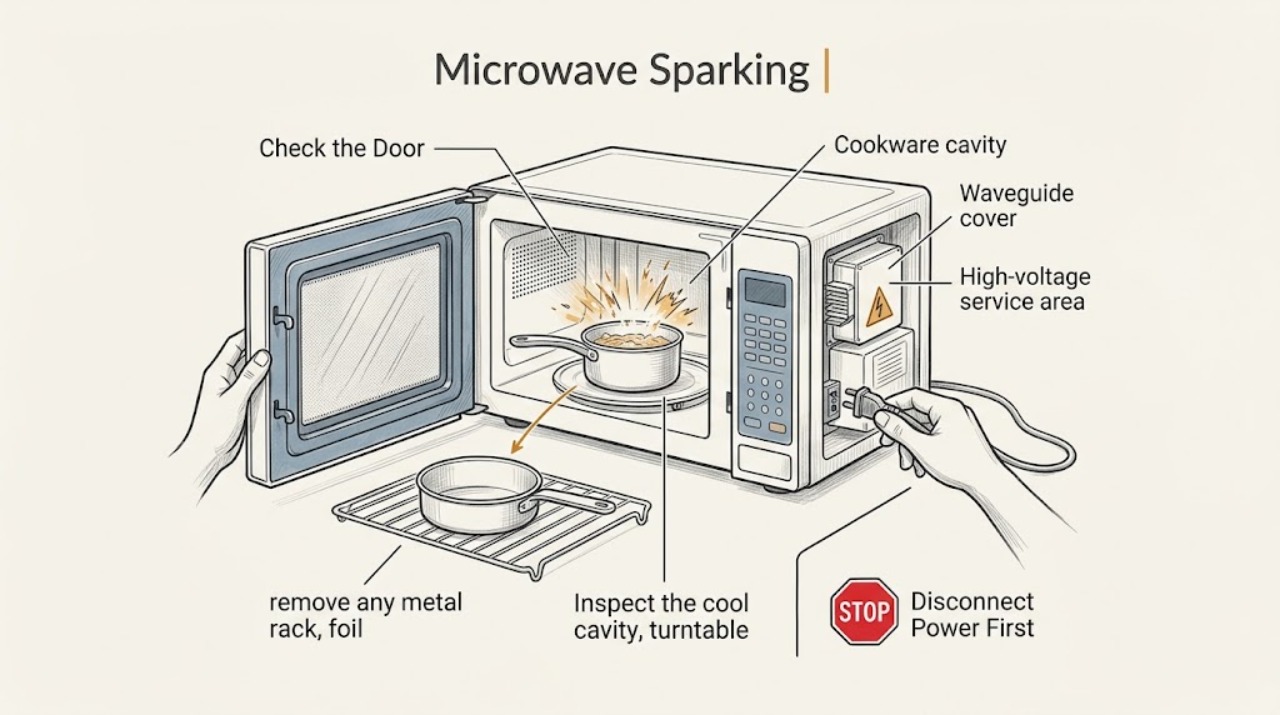
Stop the microwave as soon as you see sparks. If there is flame or smoke, keep the door closed and disconnect power only if it is safe. Once cool, remove metal or foil cookware and inspect the cavity for burnt food or visible damage; do not run it empty, bypass the door, or remove internal panels. Persistent arcing or a damaged cavity needs Monogram service.
Work through in order
Diagnostic checks
Use only checks that match the exact appliance or system and its official guide.
-
Check 1
Stop the cook cycle immediately; if there is flame or smoke, keep the door closed and disconnect power from the plug or breaker only when safe.
Expected result: Sparking stops with the cycle, or flame/smoke continues.
Next step: Leave the microwave off. Use emergency help for a fire that does not stop; do not restart to test it.
Why this matters
Why: Power interruption limits continued arcing; an active fire must not be fed oxygen by opening the door.
-
Check 2
After the cavity is cool, remove any metal rack, foil, twist tie, or cookware with metallic trim and check the food/container externally.
Expected result: Metal/foil or damaged cookware is present, or the cookware is microwave-safe and intact.
Next step: Do not reuse the suspect item. Continue with a cavity inspection rather than another cooking test.
Why this matters
Why: Metallic items can produce visible arcs; a safe container with continued arcing makes residue or internal damage more concerning.
-
Check 3
Inspect the cool cavity, turntable area, and visible waveguide-cover area for burnt food, carbon marks, chipped coating, or a damaged cover; do not remove the cover.
Expected result: Residue is removable from an intact surface, or there is pitting, a burn mark, chipped cavity, or damaged cover.
Next step: Clean only according to the manual and leave the unit off when damage is visible.
Why this matters
Why: Surface residue can be a user-cleanable contributor; structural or waveguide-cover damage can expose an internal service issue.
-
Check 4
Confirm the microwave was not run empty and note whether the arc happened at one location or across repeated uses.
Expected result: The event was one-time with a removed external cause, or it recurs with safe cookware and a clean, undamaged cavity.
Next step: Do not perform repeated tests. Recurrence requires Monogram service.
Why this matters
Why: A removed cookware/residue cause is different from repeat arcing that points toward an internal component or damaged cavity.
Use your observations
Decision map
Find the observation that best matches what you see, then follow the next safe action.
-
PATH 01Next step
What you see
Sparking stops after removing metal/foil and the cavity is clean and undamaged
Do this next
Use only appropriate cookware and monitor; stop immediately if arcing returns.
-
PATH 02Next step
What you see
Burnt residue or a damaged waveguide cover/cavity is visible
Do this next
Keep the microwave off and arrange qualified Monogram service.
-
PATH 03Next step
What you see
Sparking recurs with safe cookware in a clean, intact cavity
Do this next
Stop use and request service; do not open the cabinet.
Helpful context
Understand the symptom
Sparking is a stop condition
The visible arc does not tell you whether the cause is cookware, residue, or internal damage. The safe sequence is stop, contain any fire, then inspect only the cool cavity and cookware.
When checks do not resolve it
Need a professional?
Arrange Monogram service for recurring sparks, a burn mark/pitting/chipped cavity, damaged waveguide cover, smoke, fire, door damage, or any internal inspection.
Common questions
FAQ
Should I open the microwave door when there is a flame?
Keep the door closed and stop power if safe. Opening it can feed the fire oxygen; do not restart the oven afterward until it has been assessed.
Can I keep using a Monogram microwave after one spark?
Only after the cavity is cool and an external metal/foil or residue cause has been removed, and only if there is no visible damage. Recurring sparks or any cavity/cover damage require service.
Read the exact guide
Official sources
- Monogram Use and Care Guide for ZW2000 Series Built-In MicrowaveGE Appliances / Monogram · ZW2000 guide; exact Monogram model may differ
Community feedback
Share a repair observation
Share a plain-text repair observation. Accepted observations are published automatically; this page may take a moment to update.