
On this page
Start here
Quick answer
First determine whether the oven is completely without power or has a working display that will not start a cycle. Record the exact model, fuel type, display and clock state, lock or delay message, selected mode, door behavior, and whether the cooktop or another appliance still works. With the oven cool and the area dry, check only the normal user-visible power, control-lock, clock, delayed-start, demo, and door conditions described by the model guide. A gas oven also needs its gas path and igniter, while an electric oven needs its electrical supply and heating controls; do not assume one from the other. If gas odor, delayed ignition, abnormal flame, smoke, uncontrolled heat, sparking, a hot panel, shock, or a breaker that trips occurs, stop and use the appropriate emergency or professional service. A blank display, persistent lock, recurring error, or working display that still will not start requires qualified appliance service.
Before you begin
Safety first
- This article supports ordinary external observation, exact model and message recording, visible user-state checks, and one model-authorized reset when no hazard exists. It does not authorize moving the appliance, gas-leak searching, ignition repetition, panel or burner access, live electrical work, heating-element contact, or safety-device bypass.
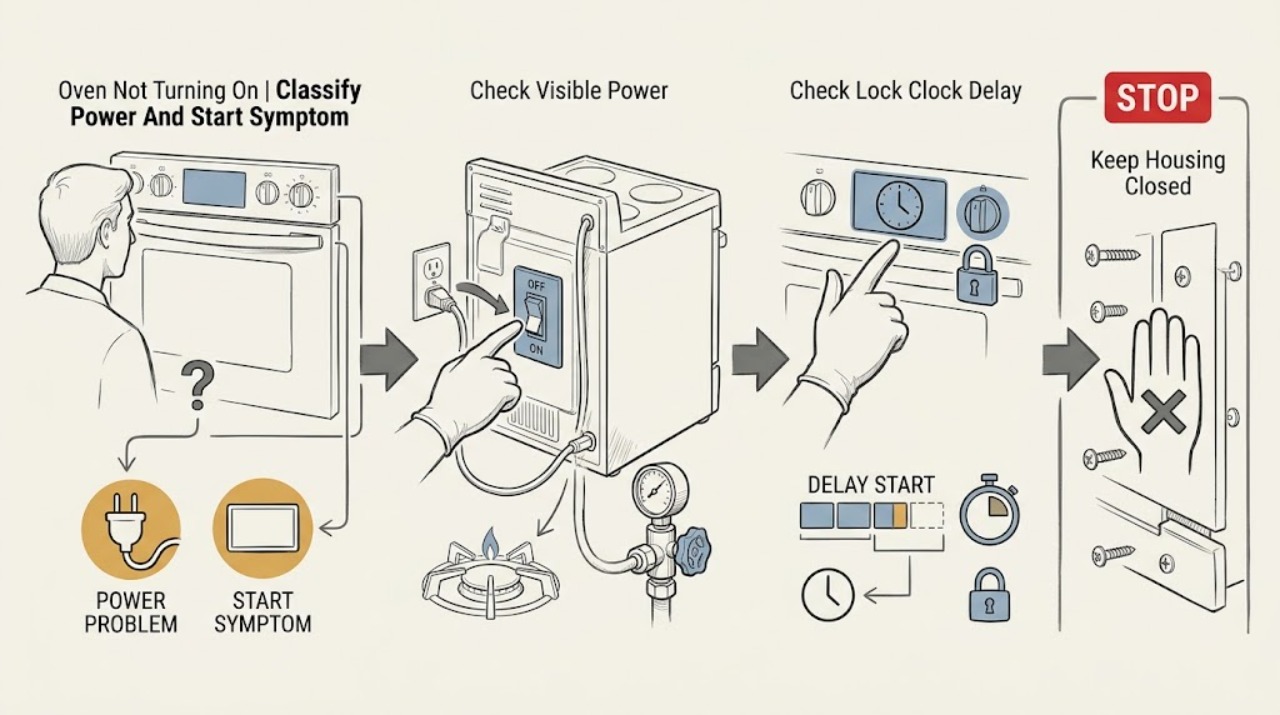
Work through in order
Diagnostic checks
Use only checks that match the exact appliance or system and its official guide.
-
Check 1
From a safe position, record the model, fuel type, whether the display is blank or responsive, the clock and selected mode, any exact message or lock symbol, whether the door closes, and whether the cooktop or another appliance still works.
Expected result: The oven has no display, a responsive display that rejects commands, a cycle that begins but has no heat, a lock or delay state, or an exact error.
Next step: Keep the record and follow only the matching branch; do not guess an error meaning or internal part from the broad symptom.
Stop if: Stop for gas odor, smoke, abnormal flame, uncontrolled heat, sparking, burning odor, a hot panel, shock, water near the appliance, or a breaker that trips.
Why this matters
Why: A blank display points toward supply or control; a working display points toward a user state, door, gas, ignition, or heating branch. The model and fuel type determine which controls and components exist.
-
Check 2
With the appliance cool and the area dry, check the ordinary user-visible power status, whether a household breaker or fuse is affected, and whether the expected outlet or other range functions have power. Do not open an electrical panel, access wiring, or repeatedly reset a trip.
Expected result: The display and other functions are dead, the supply is affected, a breaker has tripped, or power appears normal while the display remains blank or the oven will not start.
Next step: If there is no hazard, follow the exact model guide for one ordinary reset if it authorizes one. Leave the oven off and arrange qualified electrical or appliance service if the display stays blank or the breaker trips again.
Stop if: Do not bypass protection, use an adapter, probe wiring, touch wet equipment, or restore a breaker that trips with the oven.
Why this matters
Why: A supply issue can prevent all functions, while normal visible supply with a blank display moves toward appliance control or installation service. A gas oven still needs power for controls and ignition.
-
Check 3
Use the exact owner's guide to inspect the visible control lock, clock or power-loss message, delayed-start, demo or showroom state, and selected bake, broil, or other mode. With the oven and timer off, clear only a documented user state; do not force buttons or start a hot cycle to test it.
Expected result: A lock, delay, demo state, flashing clock, missing time, wrong mode, or no visible user state is present.
Next step: Follow only the model-specific clearing steps. If the state returns, the controls remain unresponsive, or the oven still will not start, leave it off and arrange appliance service.
Stop if: Do not bypass the lock, run self-clean to clear a fault, repeatedly cycle power, or continue if heat, smoke, gas odor, sparking, or a breaker event occurs.
Why this matters
Why: A control state can make the oven appear dead or ignore Start without proving a failed element, igniter, or board. A normal control state with persistent no-start needs the next branch or service.
-
Check 4
When the oven is cool, confirm the door closes fully and the visible seal, latch area, and control surface are not blocked by an object, spill, or loose debris. Do not remove the door, pry the latch, cover the oven bottom, or access the burner area.
Expected result: The door closes and the cycle begins, a visible obstruction prevents closure, the latch or glass is damaged, or the no-start symptom is unchanged.
Next step: Remove only a loose external obstruction while cool and use the exact manual for door behavior. Leave the oven off for a damaged door, persistent lock, or unchanged no-start.
Stop if: Stop for cracked glass, a loose latch, a hot or warped door, smoke, gas odor, abnormal flame, sparking, or any need to disassemble the door.
Why this matters
Why: A door interlock or visible obstruction can prevent a start, but a damaged latch or unchanged symptom needs service rather than a forced closure.
-
Check 5
For a gas or dual-fuel model only, and only when there is no gas odor or other warning, record whether the model's normal start sequence calls for a flame, whether the cooktop works, and whether the oven produces ignition. Do not repeat ignition, light a match, move the range, or remove burner parts.
Expected result: The cooktop works but the oven has no ignition, the main or appliance gas state is uncertain, ignition is delayed, clicking occurs without flame, or the oven starts normally.
Next step: Keep the oven out of service and arrange qualified gas-appliance service for persistent no ignition or an uncertain supply. If odor appears, leave immediately and contact gas authorities from outside.
Stop if: Stop for gas odor, delayed ignition or a boom, abnormal flame, smoke, carbon-monoxide alarm or symptoms, or electrical sparking.
Why this matters
Why: The oven gas path, regulator, igniter, valve, control, and supply can differ from the surface-burner path. No ignition or delayed ignition is not a safe user diagnosis of one component.
-
Check 6
For an electric model only, record whether the display and controls work, whether one mode or every mode fails, whether a recent outage or installation preceded the symptom, and whether heat is requested without a normal response. Do not touch heating elements or remove panels.
Expected result: The display is blank, the controls work but no mode starts, only one mode fails, a recent power event occurred, or a breaker trips when the oven is used.
Next step: Follow the exact model guide for one authorized reset when safe, then leave the oven off and request qualified appliance or electrical service for persistent no-start or no-heat.
Stop if: Do not touch an element, open panels, bypass protection, run self-clean to test it, or continue after smoke, burning odor, sparking, hot controls, shock, or a breaker trip.
Why this matters
Why: Supply, control, mode, door, thermal, relay, or heating-system faults remain possible; external observations cannot select the internal part.
-
Check 7
Photograph or transcribe the exact message, model, fuel type, selected mode, door and lock state, visible power result, gas or electric branch, and timing. Do not perform another start attempt once a service or safety trigger is present.
Expected result: The message clears, returns, changes, or remains with no-start, no-heat, gas, smoke, electrical, or door symptoms.
Next step: Leave the oven unused and provide the complete record to qualified appliance service; use emergency or gas response from a safe location for immediate danger.
Stop if: Do not repeatedly reset, open panels, move the range, bypass a lock, repeat ignition, or continue with gas odor, smoke, abnormal flame, uncontrolled heat, or sparking.
Why this matters
Why: A returning or model-specific message is evidence for service, while a safety symptom overrides any reset or normal-start instruction.
Use your observations
Decision map
Find the observation that best matches what you see, then follow the next safe action.
-
PATH 01Safety boundary
What you see
The display is blank, no controls respond, other expected functions are dead, or a breaker or fuse is affected.
Do this next
Use ordinary visible checks and one model-authorized reset only when safe; leave the oven off and arrange qualified electrical or appliance service if the display stays blank or the breaker trips again.
Why this path and its safety boundary
Why it matters: The immediate branch is household supply, installation, or appliance control rather than gas ignition alone.
Safety stop: Do not probe wiring, bypass protection, use an adapter, open panels, or repeatedly reset a breaker.
-
PATH 02Safety boundary
What you see
The display works but a lock, delayed start, clock/power-loss state, demo state, wrong mode, or door condition prevents the cycle from beginning.
Do this next
Follow only the exact model guide and clear a loose visible obstruction while cool. Request service for a persistent lock, damaged door, or controls that remain unresponsive.
Why this path and its safety boundary
Why it matters: A user state or door interlock can block a start without proving an internal heating, gas, or control component failed.
Safety stop: Do not pry the door, defeat an interlock, run self-clean to test it, or continue with smoke, gas odor, sparking, or uncontrolled heat.
-
PATH 03Safety boundary
What you see
A gas or dual-fuel oven has power and a responsive control but no ignition, while surface burners may or may not work.
Do this next
Keep the oven off and arrange qualified gas-appliance service without moving the range or accessing gas parts. If odor appears, use the gas-emergency branch.
Why this path and its safety boundary
Why it matters: The oven's gas supply, regulator, igniter, valve, grounding, or control path may differ from the surface-burner path.
Safety stop: Do not repeat ignition, use a match, search for a leak, remove burner parts, or continue with delayed ignition, abnormal flame, smoke, or gas odor.
-
PATH 04Safety boundary
What you see
An electric oven has a responsive display and door but no mode starts, or one or all modes fail after a power or installation event.
Do this next
Use one authorized model reset only when safe, then leave the oven off and arrange qualified appliance or electrical service for persistent no-start or no-heat.
Why this path and its safety boundary
Why it matters: Supply, controls, mode, door, thermal, relay, or heating-system faults remain possible and require model-specific service diagnosis.
Safety stop: Do not touch elements, open panels, bypass protection, run self-clean to test it, or continue after smoke, burning odor, sparking, hot controls, shock, or a breaker trip.
-
PATH 05Safety boundary
What you see
Gas odor or escaping gas, delayed ignition or abnormal flame, smoke, fire, uncontrolled heat, electrical arc, burning odor, hot controls, shock, carbon-monoxide alarm or symptoms, or repeated breaker trips occur.
Do this next
Leave the area when appropriate, avoid flames and electrical controls near gas odor, and contact emergency, gas, electrical, or appliance service from a safe location.
Why this path and its safety boundary
Why it matters: This is an immediate safety boundary rather than a restart or settings branch.
Safety stop: Do not operate lights or electronics near gas odor, open panels, touch hot equipment, reset a tripped breaker, repeat ignition, or re-enter while danger persists.
Helpful context
Understand the symptom
Define “not turning on” before choosing a fix
A blank display, a display that responds but will not begin, an oven that starts but does not heat, and a locked or delayed control are different symptoms. Write down the model and whether the oven is electric, gas, or dual fuel. Note whether surface burners, a second oven, or nearby outlets work. This prevents a gas-supply diagnosis from being applied to an electric model or an internal control diagnosis from being assumed when the home supply is actually affected.
Check user states and the door before internal parts
Whirlpool's official support lists control lock, delayed start, demo mode, clock state, and door conditions as possible reasons an oven appears not to start. A lock can intentionally disable command pads, and some models will not begin a cycle if the door is not closed. Use only the exact owner's guide for the model and clear visible, loose obstructions while the oven is cool. Do not pry a door, remove a panel, or run self-clean to clear a control problem.
Gas and electric models have different stop boundaries
A gas oven needs an appropriate gas path and ignition system as well as electrical power for controls and many igniters. An electric oven does not have a gas path, so an odor on an electric model should be handled as a possible food, cleaner, overheating, or electrical issue. For either type, smoke, sparking, burning odor, uncontrolled heat, a hot panel, a repeated breaker trip, or a damaged door is a reason to stop using the appliance and call a professional.
Safety boundary
Stop conditions
- If gas odor remains or gas is heard escaping, leave immediately and contact local gas authorities or emergency services from outside; do not operate lights, electronics, phones, or ignition sources before leaving.
- Stop for delayed ignition, a boom, abnormal flame, smoke, fire, uncontrolled heat, carbon-monoxide alarm or symptoms, or any suspected combustion fault; do not attempt another start.
- Stop for electrical crackling or sparking, burning odor, hot controls, shock, water near electrical equipment, damaged door or cord, or a breaker that trips again; keep the oven off and use qualified service.
- Do not move the range, inspect or replace a gas connector, open gas or electrical panels, bypass locks or safety devices, touch heating elements, or run self-clean to clear a fault.
- Keep the oven out of service and arrange qualified appliance, gas, or electrical service for persistent no-power, no-start, no-heat, returning error, damaged door, or uncertain fuel or supply conditions.
When checks do not resolve it
Need a professional?
Arrange qualified appliance service for a blank display that remains after safe external checks, a persistent lock or door fault, a responsive oven that will not start, a returning error, or no ignition/no heat. Gas or dual-fuel models require qualified gas-appliance service for uncertain supply, absent or delayed ignition, or abnormal flame. For gas odor or escaping gas, smoke, fire, carbon-monoxide alarm or symptoms, uncontrolled heat, sparking, burning odor, shock, or repeated breaker trips, stop immediately and use the appropriate emergency, gas, or electrical response from a safe location.
Safety scope: This article supports ordinary external observation, exact model and message recording, visible user-state checks, and one model-authorized reset when no hazard exists. It does not authorize moving the appliance, gas-leak searching, ignition repetition, panel or burner access, live electrical work, heating-element contact, or safety-device bypass.
Common questions
FAQ
What is the first check when an oven will not turn on?
Determine whether the display is completely blank or responsive but unable to start. Record the model, fuel type, exact message, lock or delay state, mode, door behavior, and whether other range functions work. Use only ordinary visible checks before arranging service.
Can a locked oven look like it has no power?
Yes. On applicable models, a control lock can disable command pads and lock the oven door. Look for lock text or a symbol and follow the exact model guide with the oven and timer off. Do not pry the door or bypass the lock.
Why can the cooktop work while the gas oven will not start?
The oven and surface burners can have different gas, regulator, ignition, control, or grounding paths. A gas range can therefore have working surface burners while the oven has no ignition. Do not move the range or access gas parts; arrange qualified gas-appliance service for persistent no-start.
When should I stop trying to start the oven?
Stop for gas odor, delayed ignition, abnormal flame, smoke, uncontrolled heat, sparking, burning odor, a hot panel, shock, a carbon-monoxide alarm or symptoms, water near electrical equipment, or a breaker that trips again. Leave when appropriate and use emergency, gas, electrical, or appliance service from a safe location.
Read the exact guide
Official sources
- Oven Not Working - ElectricWhirlpool Product Help · Whirlpool official support for applicable electric ranges and ovens; exact model guide controls settings and installation details.
- Nothing is Working - GasWhirlpool Product Help · Whirlpool official support for applicable gas ranges; exact model owner manual controls settings and fuel components.
- Certain Older Gas Connectors May Be DangerousU.S. Consumer Product Safety Commission · U.S. CPSC general safety guidance; local emergency and gas-utility procedures may differ.
- Locked, Lock or Loc - RangeWhirlpool Product Help · Whirlpool official support for applicable ranges; exact model guide controls lock behavior.
Community feedback
Share a repair observation
Share a plain-text repair observation. Accepted observations are published automatically; this page may take a moment to update.