
On this page
Start here
Quick answer
First determine whether the display is blank, the controls respond but cooking will not start, or the oven runs with an unsafe symptom. Panasonic recommends a direct suitable outlet, a fully closed door, cancelling an old program, and checking for Demo mode where applicable. Stop using the oven for arcing, a fan or turntable that runs with the door open, repeated breaker trips, or an error code; do not open the cabinet.
Before you begin
Safety first
- Do not disassemble, probe, remodel, bypass the door interlock, or replace internal microwave components yourself.
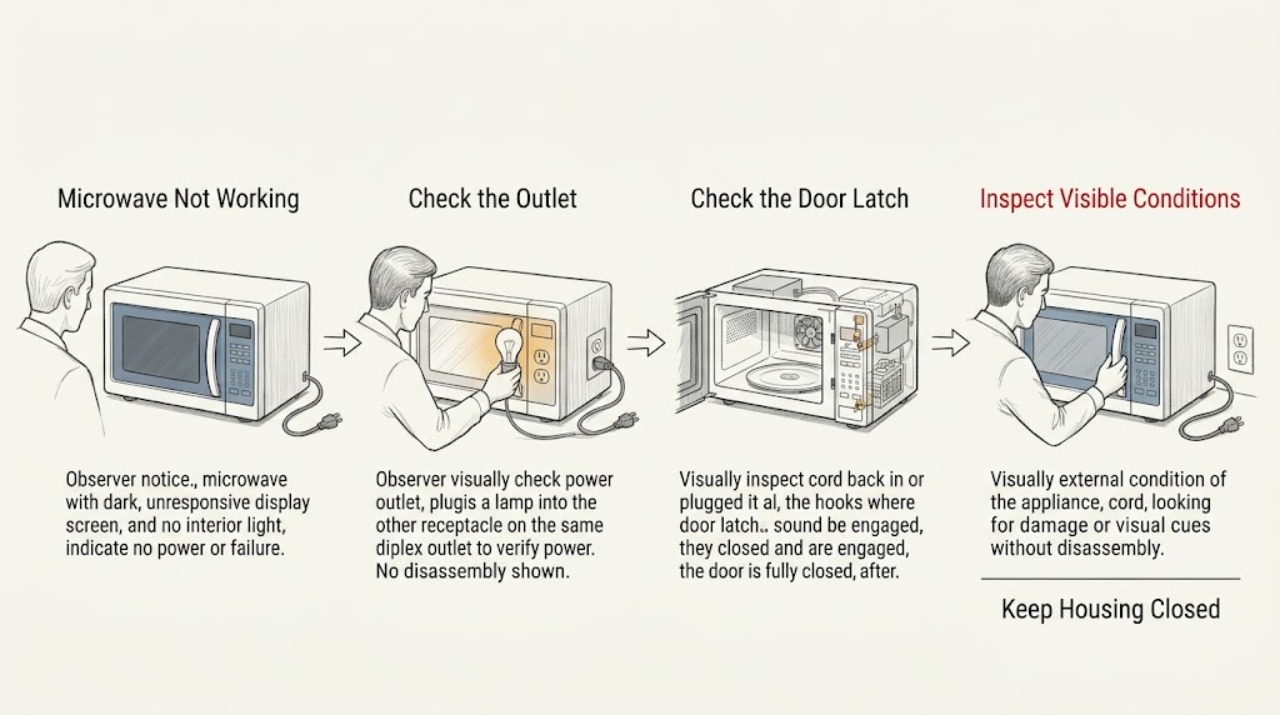
Work through in order
Diagnostic checks
Use only checks that match the exact appliance or system and its official guide.
-
Check 1
Check the cord at the wall and the household breaker from a dry position; plug the oven directly into a suitable grounded outlet rather than an extension cord.
Expected result: The outlet is dead, the breaker is tripped, the cord was loose, or the display remains blank on a known-good outlet.
Next step: Do not change breaker size or defeat grounding; stop and arrange Panasonic service/electrical help if the supply remains abnormal.
Why this matters
Why: A supply issue can make the entire oven appear dead; persistent no power after a safe outlet check requires service rather than repeated resets.
-
Check 2
Close the door firmly, remove any obstruction at the latch area, press Stop/Reset once, and enter a simple program using the model's operating instructions.
Expected result: The oven starts, the Start control is ignored, or the door will not close/latch.
Next step: Use the exact manual for the control sequence and arrange service for a damaged door, latch, or continued no-start.
Why this matters
Why: A door closure or stale program can prevent a start; a damaged or misaligned latch is not a user adjustment.
-
Check 3
Look at the display for Demo, Lock, or an error message and follow only the model-specific instructions for leaving Demo/Lock mode.
Expected result: Demo/Lock is shown, an error code appears, or the display is normal but operation still fails.
Next step: Record the exact message and contact an authorized Panasonic service center if it remains.
Why this matters
Why: Demo or a lock can block cooking without a hardware failure; Panasonic treats listed error codes and persistent failures as service conditions.
-
Check 4
With the oven unplugged and cool, verify the glass tray and roller ring are correctly seated and inspect the cavity for food debris or visible damage; do not test with metal.
Expected result: The tray was displaced, debris is present, the cavity is damaged, or the oven still will not cook.
Next step: Clean only accessible residue with the manual's method; stop use for damage/arcing and arrange service.
Why this matters
Why: A displaced tray or debris can affect operation, but cavity damage, arcing, or an internal cooking fault is not a DIY repair.
Use your observations
Decision map
Find the observation that best matches what you see, then follow the next safe action.
-
PATH 01Next step
What you see
The display is blank and the outlet/breaker is abnormal
Do this next
Use a qualified electrician or Panasonic service; do not share the circuit or alter protection.
-
PATH 02Next step
What you see
The display works but Start is ignored and the door/program state was wrong
Do this next
Correct the documented setting once and stop if the latch or keypad still fails.
-
PATH 03Next step
What you see
The oven sparks, runs with the door open, repeatedly trips, or shows a persistent error
Do this next
Unplug/stop use where Panasonic directs and arrange authorized service; never remove the cabinet.
Helpful context
Understand the symptom
Classify the symptom before resetting
A blank display points toward the outlet, cord, breaker, or standby behavior. A lit display with no cooking response points toward door closure, program state, control mode, or a fault. A microwave that operates with the door open is an immediate stop condition.
When checks do not resolve it
Need a professional?
Call Panasonic service for persistent no power after a safe outlet check, a damaged door/latch, repeated trips, arcing, operation with the door open, a fan that does not operate as expected, or an error code.
Safety scope: Do not disassemble, probe, remodel, bypass the door interlock, or replace internal microwave components yourself.
Have this ready
- Provide the model number, display state/message, outlet/breaker result, door behavior, and the exact symptom when Start is pressed.
Common questions
FAQ
Why is my Panasonic microwave completely blank?
Check the cord, outlet, and breaker safely and use a direct suitable grounded outlet. If the display remains blank on a known-good supply, stop troubleshooting and arrange Panasonic service.
Can I remove the microwave cover to check a fuse?
No. Panasonic warns not to disassemble or repair the microwave yourself because of shock, ignition, and abnormal-operation risks. Use authorized service.
Read the exact guide
Official sources
- Service - Where can I find instructions to repair my microwave myself?Panasonic · Panasonic microwave ovens
- Troubleshooting - Microwave power, fan or motor problemsPanasonic · Panasonic microwave ovens; power requirements and controls vary by model
- No Heat, Low HeatPanasonic · Panasonic microwave ovens; follow the exact model operating manual
Community feedback
Share a repair observation
Share a plain-text repair observation. Accepted observations are published automatically; this page may take a moment to update.