
On this page
Start here
Quick answer
Confirm the refrigerator has power, the control is set as the manual requires, the doors close firmly, and food is not blocking cold-air circulation. Move it away from direct heat only within the installation guidance and allow the cabinet to recover after warm loading or frequent door opening. If it remains warm, shows an error, or has a damaged cord/seal, arrange Panasonic service rather than opening the cooling system.
Before you begin
Safety first
- Do not scrape evaporator ice, access refrigerant, remove sealed covers, probe live wiring, or change protection devices.
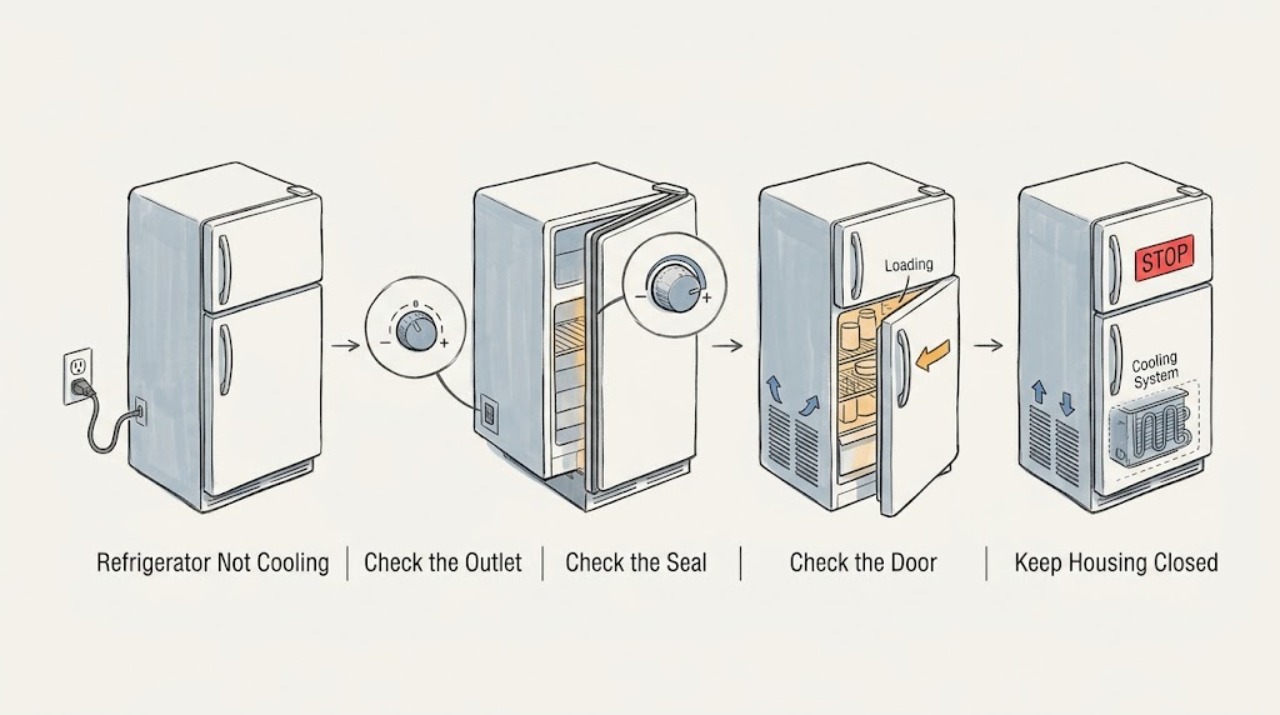
Work through in order
Diagnostic checks
Use only checks that match the exact appliance or system and its official guide.
-
Check 1
Check the power plug, outlet, household fuse/breaker, and interior light without moving a wet appliance; use the manual's safe reset procedure if supplied.
Expected result: The light/display is off, the outlet is abnormal, or power is present.
Next step: Restore only a normal outlet connection and arrange service for recurring electrical issues or a dead unit.
Why this matters
Why: No power prevents cooling; power with a warm cabinet shifts attention to controls, loading, airflow, or a cooling fault.
-
Check 2
Read the temperature/control display and verify the selected setting matches the exact Panasonic manual; close both doors fully and inspect the gasket for folds or damage.
Expected result: The setting is changed, a door is not sealing, or controls and seals appear normal.
Next step: Correct only the documented setting and remove an obvious obstruction; do not replace a seal without model identification.
Why this matters
Why: A changed control or leaking door seal can raise cabinet temperature; normal settings/seals make airflow or refrigeration faults more likely.
-
Check 3
Check whether hot food, excessive loading, frequent door opening, direct sunlight, or a nearby heat source is affecting the cabinet; leave space for air circulation.
Expected result: The cabinet is overloaded, warm food was recently added, doors are opened often, or installation exposes it to heat.
Next step: Rearrange loose items and reduce the heat/door-load cause within the manual's installation limits, then observe recovery.
Why this matters
Why: These conditions can temporarily reduce cooling or block circulation without proving a compressor fault.
-
Check 4
Look for heavy frost, an error display, damaged cord, burning smell, or unusual persistent operation; do not scrape ice or remove rear covers.
Expected result: Frost blocks an air path, an error appears, the cord is damaged, or no accessible cause explains the warmth.
Next step: Keep doors closed, protect food, unplug for electrical damage, and arrange Panasonic service.
Why this matters
Why: An inaccessible airflow, control, or sealed-system issue needs model-specific diagnosis; damaged electrical parts are an immediate stop condition.
Use your observations
Decision map
Find the observation that best matches what you see, then follow the next safe action.
-
PATH 01Next step
What you see
Power is absent or the display/light remains off
Do this next
Use a qualified electrician or Panasonic service; do not alter fuses or wiring.
-
PATH 02Next step
What you see
Power is normal but a door is obstructed, the seal is folded, or loading blocks circulation
Do this next
Correct the accessible condition according to the manual and monitor temperature recovery.
-
PATH 03Next step
What you see
Power, settings, doors, and loading are normal but cooling remains poor or an error/frost persists
Do this next
Stop opening panels and arrange Panasonic service with the model number and observations.
Helpful context
Understand the symptom
Decide whether the whole cabinet or one zone is warm
Check the display, interior light, freezer, and refrigerator compartments separately. A whole-cabinet problem starts with power and control checks; one warm zone can reflect airflow, loading, or a door-seal condition.
When checks do not resolve it
Need a professional?
Arrange Panasonic service when cooling does not recover after the documented external checks, an error appears, heavy frost persists, the cord is damaged, or an internal component is suspected.
Safety scope: Do not scrape evaporator ice, access refrigerant, remove sealed covers, probe live wiring, or change protection devices.
Have this ready
- Provide the model number, display/light state, compartment temperatures by observation, door/seal condition, loading/heat history, and any error or frost.
Common questions
FAQ
How long should I wait after adding hot food before judging cooling?
Allow recovery time while keeping the doors closed and follow the exact model instructions. Warm loading and frequent opening can temporarily reduce cooling, but persistent warmth needs service.
Should I remove the back panel to check the fan?
No. The manual's user checks do not authorize opening sealed or electrical panels. Arrange Panasonic service for persistent frost, fan, or cooling-system symptoms.
Read the exact guide
Official sources
- Panasonic Refrigerator Operating InstructionsPanasonic · Models NR-BX471G, NR-BX421B, NR-BX421G, NR-BX421H, and NR-BX421W listed in the manual; use the exact manual for other models
Community feedback
Share a repair observation
Share a plain-text repair observation. Accepted observations are published automatically; this page may take a moment to update.