
On this page
Start here
Quick answer
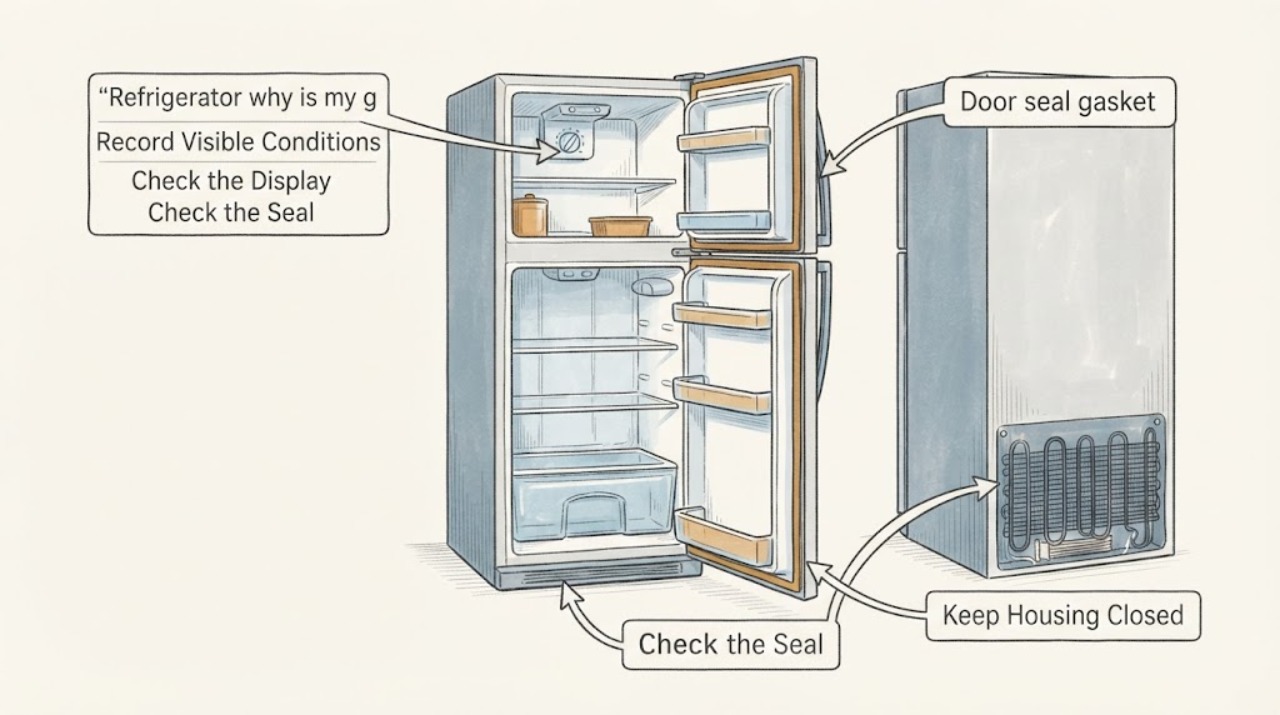
Start with GE's external checks: identify the exact model, verify the temperature control, give a newly installed refrigerator about 24 hours to stabilize, make sure doors and gaskets close, move containers away from air outlets, and confirm the room and appliance clearances match the model manual. Clean condenser coils only when your manual says they are user-accessible, and unplug before cleaning. If the refrigerator remains warm after these checks, or the freezer has heavy frost, the light stays on, or the unit needs a colder setting but still cannot hold temperature, arrange GE service. Do not open the sealed system or guess at a compressor, refrigerant or control-board fault.
Work through in order
Diagnostic checks
Use only checks that match the exact appliance or system and its official guide.
-
Check 1
Record the complete GE model and serial number, refrigerator style, whether it was recently installed or loaded with a large amount of food, and whether it is in a garage or other unusually hot or cold location.
Expected result: The model/serial tag and owner support page are available, or the identity and installation conditions are unknown.
Next step: Use the exact GE owner manual/support page for the identified model. If the tag or installation type is unresolved, do not apply another GE model's temperature, coil or clearance instructions.
Why this matters
Why: GE troubleshooting and clearance requirements vary by model, and garage-ready guidance is not universal. Without the identity, you can still perform only the general external checks and cannot choose a model-specific part or setting.
-
Check 2
Check the refrigerator and freezer temperature controls against the exact manual. If the unit is newly installed, allow the manufacturer-recommended stabilization period before judging the result; GE's general guidance says about 24 hours for a new installation.
Expected result: The control is warmer than the manual's recommended setting, the unit has not completed its initial stabilization, or the control is already set colder and the food temperature remains elevated.
Next step: Adjust only as the manual describes and allow the documented stabilization time. If the setting is already cold and the symptom persists, continue with door, airflow and frost checks rather than repeatedly changing the control.
Why this matters
Why: A warm setting or incomplete startup can explain a temporarily warm cabinet. If the control is already colder and the refrigerator remains warm after stabilization, the problem needs more than a setting change.
-
Check 3
Inspect both doors for a tray, package, ice buildup or other obstruction; close each door slowly and check the gasket all around for gaps, looseness or damage.
Expected result: A package prevents closure, the gasket does not seal, or both doors close fully with an intact visible gasket.
Next step: Remove only the accessible obstruction and follow the exact manual for any gasket or leveling adjustment. If the door remains misaligned or the gasket is damaged, arrange service; do not force the door or replace a gasket without model confirmation.
Why this matters
Why: GE identifies blocked closure and leaking door gaskets as causes of warm temperatures. A sealed door does not prove the cooling system is healthy, but it removes a common external cause.
-
Check 4
Look inside the freezer and refrigerator for packages blocking cold-air openings, and check for an unusual sheet or buildup of frost on the freezer wall or around the air path.
Expected result: A large container blocks an outlet, the air path is clear, or heavy frost is present and the door seal is not closing correctly.
Next step: Rearrange only the accessible items without covering vents. For frost, follow the exact GE manual; do not chip ice with a sharp tool, apply heat, or remove internal covers. If frost returns or does not clear as documented, schedule service.
Why this matters
Why: GE says containers can block airflow, while frost can result when warm outside air enters through a door or gasket problem. Heavy frost can also require service if it does not clear under the model's approved defrost instructions.
-
Check 5
Check the surrounding temperature and visible clearance around the refrigerator. If the manual says the model has user-cleanable condenser coils, unplug the refrigerator before cleaning only those accessible coils as directed.
Expected result: The location is outside the model's permitted range, the appliance is crowded against a wall or cabinet, the manual permits coil cleaning and the coils are visibly dirty, or none of these conditions is present.
Next step: Correct only the documented external clearance or coil-maintenance issue. Do not remove panels or use a vacuum on inaccessible components unless the manual specifically permits it; schedule service if cooling remains poor.
Why this matters
Why: GE says extreme installation temperatures and inadequate air clearance can reduce cooling, and it warns that coil-cleaning directions depend on the model. A clean accessible area does not prove a sealed-system or compressor diagnosis.
-
Check 6
Close the refrigerator door slowly and observe whether the interior light goes out as the door nears closed. If the refrigerator was recently serviced, check whether the exact support instructions identify diagnostic mode and permit a power reset.
Expected result: The light remains on with the door nearly closed, or the refrigerator is not in a documented diagnostic-mode condition.
Next step: Correct the visible door alignment or switch issue through the model manual or service. Use a reset only when the exact GE instructions support it; do not repeatedly power-cycle a warm refrigerator as a substitute for service.
Why this matters
Why: GE says a light that stays on can add heat and affect refrigerator temperature. A power reset is relevant only to the documented diagnostic-mode scenario; it does not diagnose a failed control or compressor.
Use your observations
Decision map
Find the observation that best matches what you see, then follow the next safe action.
-
PATH 01Next step
What you see
The refrigerator was newly installed or recently heavily loaded, the controls are set as the manual describes, and the doors seal normally.
Do this next
Allow the model-appropriate stabilization period with the doors closed as much as practical. If food remains warm after that period, continue to service rather than repeatedly changing settings.
Why this path and its safety boundary
Why it matters: GE identifies startup stabilization and food load as conditions that can temporarily slow the return to a stable temperature.
-
PATH 02Next step
What you see
A package blocks an air outlet, a door does not close, a gasket leaks, or the interior light stays on near closed.
Do this next
Correct only the visible issue using the exact GE manual, then allow the refrigerator to stabilize. If the issue cannot be corrected or the temperature remains elevated, arrange service.
Why this path and its safety boundary
Why it matters: A documented external airflow, closure or heat source can account for the warm cabinet without proving a sealed-system fault.
-
PATH 03Next step
What you see
Heavy frost blocks the freezer air path, the garage environment is outside the model's approved range, or the appliance lacks the manual's required clearance.
Do this next
Use the exact owner manual for safe defrost, clearance and ambient limits. Do not chip ice, add heat, or apply the garage-ready range to an unverified model; schedule service if the documented correction does not restore cooling.
Why this path and its safety boundary
Why it matters: Installation conditions or frost can reduce cooling, but the garage temperature range and defrost procedure depend on model and product type.
-
PATH 04Next step
What you see
The controls, doors, airflow, frost, installation conditions and permitted maintenance checks are satisfactory, but the refrigerator remains cool rather than cold.
Do this next
Arrange GE or qualified appliance service and provide the model/serial number, temperature observations, frost pattern, settings, recent installation or service history and any unusual sounds or odors. Leave the unit configured as the technician requests rather than opening the sealed system.
Why this path and its safety boundary
Why it matters: The external GE checks have not identified the cause. The symptom does not safely identify a compressor, refrigerant, fan or control-board failure.
Helpful context
Understand the symptom
Separate a warm setting from a cooling failure
A refrigerator that feels cool but does not keep food cold can have a control setting, door-seal, airflow, installation or frost problem before it has a confirmed sealed-system fault. GE's support article lists those external checks and says model-specific owner instructions control coil access and clearance. The symptom alone does not identify a compressor, refrigerant leak, fan or control-board failure.
Use the exact GE model path
GE directs owners to model-specific support from the model/serial tag or QR code. GE's garage-ready guidance is a separate conditional path with a defined ambient-temperature range and frost checks; do not apply that range to a refrigerator unless the data plate and manual identify the unit as a garage-ready model.
When checks do not resolve it
Need a professional?
Arrange service if the refrigerator remains warm after the model-specific external checks, if heavy frost returns or does not clear as documented, if a door or light issue persists, or if diagnosis would require panels, refrigerant or internal electrical work. Stop using the appliance and seek urgent help for smoke, burning odor, damaged wiring, refrigerant concerns or a tripped breaker that recurs.
Common questions
FAQ
How long should a newly installed GE refrigerator take to get cold?
GE's general support guidance says to allow about 24 hours for a new refrigerator to cool down and stabilize. Use the exact model manual and avoid judging the unit during that initial period unless there is a safety symptom or obvious damage.
Can a dirty coil make a GE refrigerator cool but not cold?
It can reduce efficiency on models whose owner manual says the coils are user-cleanable. GE notes that many newer models have coils in locations that do not require owner cleaning, so unplug the appliance and follow the exact manual rather than removing panels or assuming the coils are accessible.
Should I use GE's garage-ready temperature range for any refrigerator in a garage?
No. GE publishes a separate garage-ready troubleshooting path, while its general guidance says installation temperatures and clearances vary by model. Confirm the data plate and owner manual before applying a garage range or defrost instruction.
Read the exact guide
Official sources
- Refrigerator - Not Cooling EnoughGE Appliances · Opened GE's official support article for general refrigerator checks across GE styles, including controls, startup stabilization, door closure/gaskets, airflow, model-permitted coil cleaning, installation temperature, clearance, interior lights, diagnostic mode and service escalation. Exact limits and procedures remain model-specific.
- Troubleshooting for GSS25IMNESGE Appliances · Opened as a concrete GE model-support example to verify that model pages expose an owner manual and the not-cooling article. The task has no GSS25IMNES model, so no model-specific behavior or part fit is transferred.
- Refrigerators, Freezers and Icemakers Troubleshooting and SupportGE Appliances · Opened GE's official refrigerator support hub for model/serial or QR-code identification, the not-cool-enough troubleshooting path and qualified service routing. It does not establish a particular refrigerator model or internal component failure.
- Top-Freezer Refrigerator - Garage-Ready Models Not CoolingGE Appliances · Opened GE's conditional garage-ready article for its stated model class only. It supports checking ambient conditions, food temperature, controls and frost, but its ranges and defrost guidance must not be transferred to an unverified refrigerator.
Community feedback
Share a repair observation
Share a plain-text repair observation. Accepted observations are published automatically; this page may take a moment to update.