
On this page
Start here
Quick answer
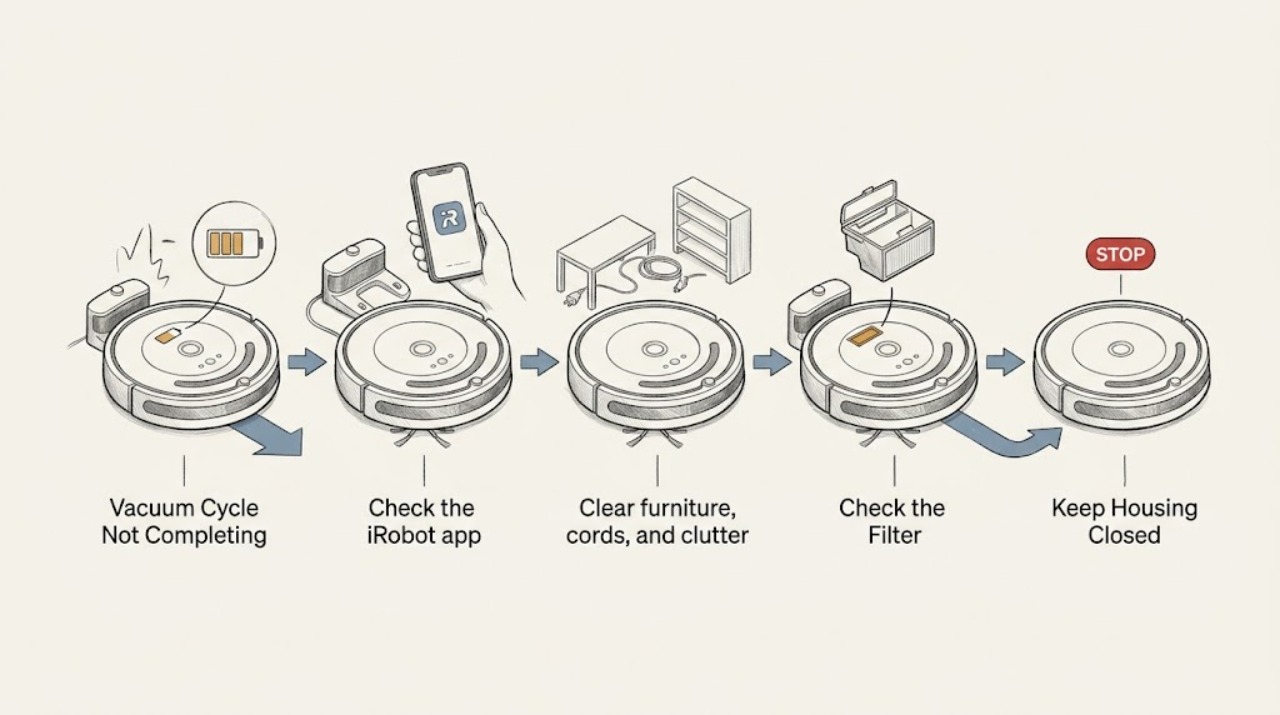
If a Roomba cleaning cycle does not complete, first check whether it is returning to charge, stopping with an app/error message, or ending in place. iRobot says supported models can recharge and resume when they start from the Home Base, while a blocked dock or a robot not started from the dock can end the job. Check dock access, battery charge, bin, brushes, and wheels before a reboot; use the exact model guidance.
Before you begin
Safety first
- Use only model-documented maintenance; do not open the battery or dock electronics.
Work through in order
Diagnostic checks
Use only checks that match the exact appliance or system and its official guide.
-
Check 1
Check the iRobot app and the robot's light/error state, then note whether it returned to the Home Base or stopped elsewhere.
Expected result: An error is shown, the robot is at the dock, or it stopped away from the dock without an obvious message.
Next step: Save the exact message and do not factory-reset the robot as a first step.
Why this matters
Why: iRobot directs no-light/no-error stops to an app check, button/reboot path, and battery/dock check; location distinguishes recharge behavior from a failure to return.
-
Check 2
Clear furniture, cords, and clutter around the Home Base and confirm the robot started the job from the dock with the dock powered.
Expected result: The dock is blocked/unpowered or the robot did not start there, or access is clear.
Next step: Restore dock access/power and start one controlled mission from the base.
Why this matters
Why: iRobot says supported recharge-and-resume needs a reachable Home Base and a start from that base; otherwise the cycle can end near its starting location.
-
Check 3
Empty the bin, inspect the filter and main brushes for hair/debris, and clear the front caster and side wheels using the exact model care instructions.
Expected result: The bin is full or a brush/wheel is obstructed, or all accessible parts are clear.
Next step: Clean and reinstall the parts, then run one supervised test; do not run with a missing brush bearing or cover.
Why this matters
Why: iRobot notes that full-bin behavior can pause cleaning and that regular brush, bin, and wheel care supports operation.
-
Check 4
If the battery is low, leave the robot on the Home Base for the model-recommended charge and observe whether it resumes or reports a charging error.
Expected result: It charges and resumes, or charging fails/it stops again before completing.
Next step: Clean accessible charging contacts per the manual and arrange iRobot support if the error returns.
Why this matters
Why: A low battery can legitimately interrupt a mission; failure to charge or repeated early stops keeps battery, dock contacts, and service in scope.
Use your observations
Decision map
Find the observation that best matches what you see, then follow the next safe action.
-
PATH 01Next step
What you see
Roomba returns to a clear powered dock and later resumes
Do this next
Keep the dock accessible and monitor the next mission.
Why this path and its safety boundary
Why it matters: The cycle was using supported recharge-and-resume behavior rather than failing to complete.
-
PATH 02Next step
What you see
It stops with a full bin, brush, wheel, or path obstruction
Do this next
Clear the indicated item and retest once; service a repeated stop.
Why this path and its safety boundary
Why it matters: A maintenance or navigation interruption is supported.
-
PATH 03Next step
What you see
It stops with no error after battery/dock/maintenance checks
Do this next
Attempt the documented reboot once and contact iRobot Customer Care if the cycle still ends early.
Why this path and its safety boundary
Why it matters: A battery, dock, software, or model-specific fault remains.
Helpful context
Understand the symptom
A cycle can end for a reason other than a fault
A low battery, a full bin, a blocked dock, or a brush obstruction can make ‘not complete’ look similar. Record the app message and where the Roomba stopped before resetting it.
When checks do not resolve it
Need a professional?
Keep the robot stopped if it overheats, has liquid damage, or repeatedly fails to charge.
Safety scope: Use only model-documented maintenance; do not open the battery or dock electronics.
Have this ready
- Provide the model, app/error message, stop location, dock state, charge behavior, bin/brush checks, and serial number.
Common questions
FAQ
Why does Roomba stop before finishing and return to the dock?
Supported models may return to recharge and then resume. A blocked dock, starting away from the dock, low battery, or an error can instead end the job; check the app and dock access.
Should I factory-reset Roomba when a cycle does not complete?
No. iRobot recommends a reboot before a factory reset, and a reset erases settings and maps. Check battery, dock, bin, brushes, and the app first.
Read the exact guide
Official sources
- The Setup Guide for a Roomba i Series and j Series Robot VacuumiRobot Home Support · Roomba recharge-and-resume, Home Base access, starting location, and cycle-completion behavior
- j Series Roomba Stops Running with No Error IndicatoriRobot Home Support · Roomba no-error stop, app/error, button, reboot, battery, and Customer Care guidance
- The Roomba 600 series essential care and maintenance procedures.iRobot Home Support · Roomba bin/filter, brush, wheel, caster, and charging-contact maintenance
Community feedback
Share a repair observation
Share a plain-text repair observation. Accepted observations are published automatically; this page may take a moment to update.