
On this page
Start here
Quick answer
Turn off power before removing standing water, then clean the accessible filter and sump, inspect the drain hose, air gap or disposal connection, and run a short rinse. Water left above the filter suggests a restriction; a hum without flow can point to an obstructed pump. Do not use drain chemicals. Arrange service for electrical faults, leaks, an error code, or a pump that still will not drain.
Before you begin
Safety first
- Keep power off if water reaches wiring or the pump only hums; do not open the sealed electrical or pump housing.
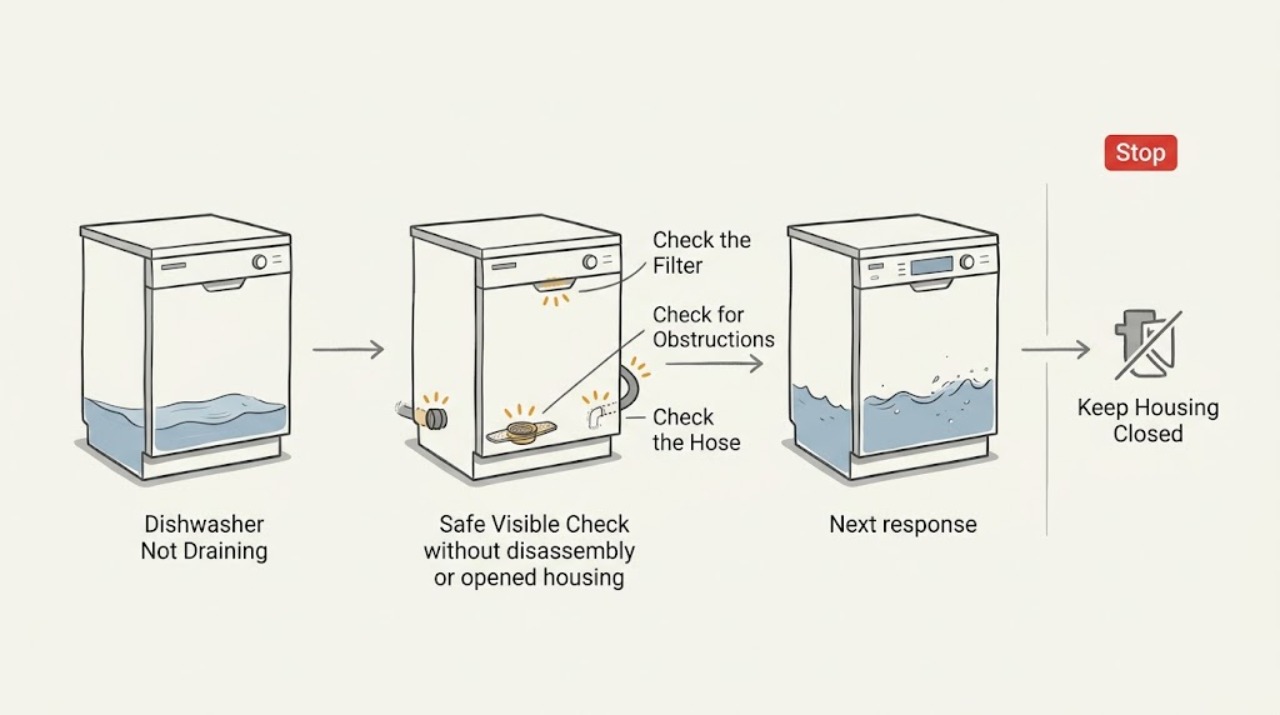
Work through in order
Diagnostic checks
Use only checks that match the exact appliance or system and its official guide.
-
Check 1
Switch off the dishwasher at its control and breaker, protect the floor with towels, and remove only accessible standing water. Note whether it is above the filter or pooled near the door.
Expected result: Water is only above the filter, or a large amount remains near the door.
Next step: Continue with the filter and sump check; keep power off if water reaches wiring or a leak is present.
Why this matters
Why: A shallow level is consistent with a partial restriction; a large pool can indicate a severe blockage or a pump that is not operating.
-
Check 2
Remove and rinse the accessible filter as directed by the model manual, then inspect the sump opening for food, glass, or other debris without reaching into a powered pump.
Expected result: Debris is present, or the filter and sump are clear.
Next step: Reinstall the filter and run a short rinse; stop if the pump only hums or the water does not move.
Why this matters
Why: Debris can restrict intake and damage or jam the impeller; a clear intake makes the hose, pump, or control more likely.
-
Check 3
Inspect the accessible drain hose for a kink and trace its connection to the sink air gap or disposal. Check that a recently installed disposal has its dishwasher knockout removed, if applicable.
Expected result: The hose is kinked, the air gap is blocked, or water backs up at the sink/disposal connection.
Next step: Correct only an obvious hose position or accessible connection issue; use the installation instructions for the exact routing.
Why this matters
Why: A restricted or incorrectly connected drain path can prevent the dishwasher from emptying and can allow backflow.
-
Check 4
Run one brief test after accessible cleaning and observe the drain phase from outside the tub.
Expected result: Water exits and the dishwasher finishes, or it remains full, makes an abnormal hum, or shows an error.
Next step: Stop testing and request qualified service for persistent no-flow, an error, a leak, or any electrical concern; never add drain-opening chemicals.
Why this matters
Why: Successful flow supports a cleared restriction; persistent no-flow points to a pump, electrical, control, or remaining blockage diagnosis.
Use your observations
Decision map
Find the observation that best matches what you see, then follow the next safe action.
-
PATH 01Next step
What you see
The filter or sump contains food or glass and the hose path is clear
Do this next
Clean only the accessible area, reinstall the filter, and retest once.
Why this path and its safety boundary
Why it matters: The blockage is at the dishwasher intake, so the drain hose is less likely to be the immediate cause.
-
PATH 02Next step
What you see
The hose, air gap, or disposal connection restricts flow or causes backflow
Do this next
Correct the accessible connection using the model installation guidance; call service if the restriction returns.
Why this path and its safety boundary
Why it matters: The external drain path is restricting discharge or allowing water to return, rather than proving a failed pump.
-
PATH 03Next step
What you see
The unit is still full, the pump only hums, an error appears, or water reaches electrical areas
Do this next
Keep power off and arrange qualified dishwasher service; report the water level, sound, and error.
Why this path and its safety boundary
Why it matters: A remaining blockage, pump, control, or safety fault cannot be distinguished safely from outside the appliance.
Helpful context
Understand the symptom
Where the water stops matters
Water above the filter, water near the door, and a quiet or humming pump point to different next checks. Record the level and what the dishwasher sounds like before taking anything apart.
Only after diagnosis
Potential parts
- drain pump
Consider only after the hose, filter, sump, and connections are confirmed clear and service diagnosis identifies a pump fault.
When checks do not resolve it
Need a professional?
Persistent no-flow after accessible checks, electrical symptoms, leaks, or an error code.
Safety scope: Keep power off if water reaches wiring or the pump only hums; do not open the sealed electrical or pump housing.
Common questions
FAQ
Should I pour drain cleaner into a Roper dishwasher?
No. Do not use drain-opening chemicals; use the accessible filter, sump, and drain-path checks or call service.
What does a humming sound with no draining suggest?
It can indicate a jammed impeller or another pump or control fault. Keep power off and have the pump diagnosed if cleaning the accessible intake does not restore flow.
Read the exact guide
Official sources
- Dishwasher Not DrainingWhirlpool Product Help (Whirlpool Corporation) · Legacy Roper dishwashers using the documented Whirlpool-family drainage layout; verify the exact Roper model manual before applying.
- Home | Roper AppliancesRoper Appliances · Roper appliances; exact product documentation is model-specific
Community feedback
Share a repair observation
Share a plain-text repair observation. Accepted observations are published automatically; this page may take a moment to update.