
On this page
Start here
Quick answer
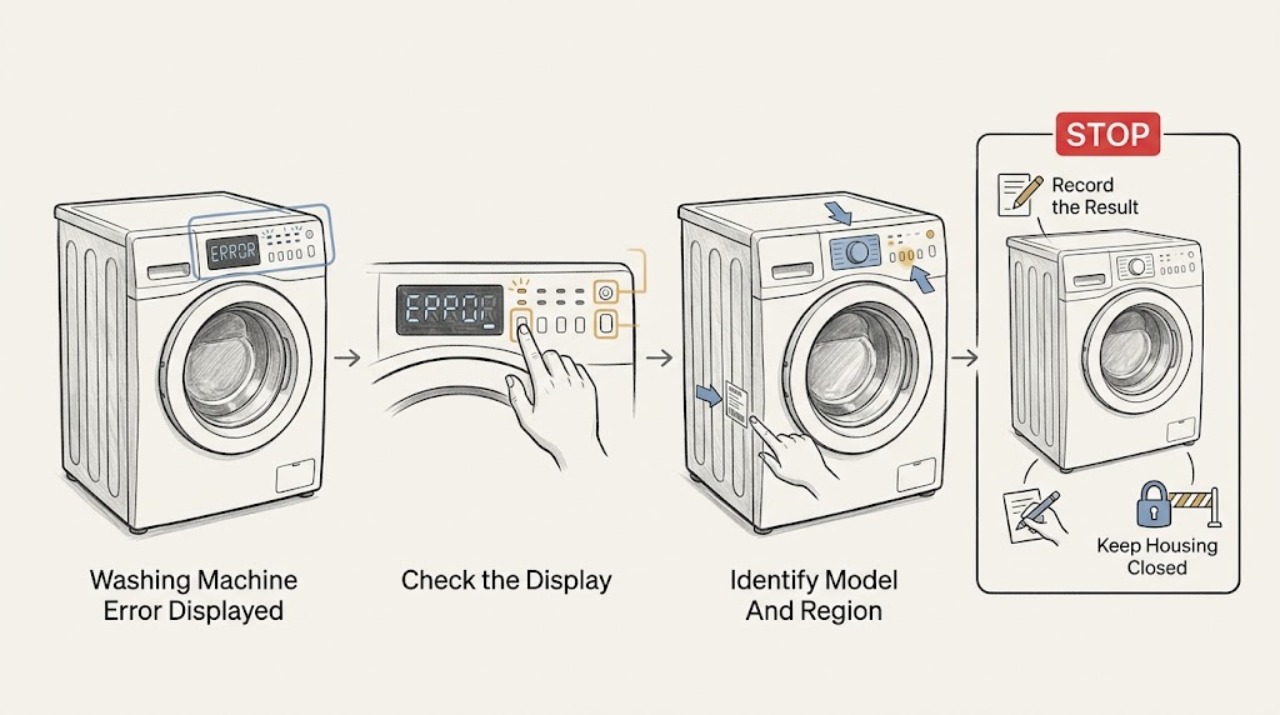
Do not diagnose a Roper washer error from the code alone. Photograph the complete code or flashing-light pattern, record the model and serial label, identify whether the washer is a top-load or front-load machine, and note when the code appeared: at power-up, after Start, during fill, drain, spin or after a stop. Use the Roper manual for that exact model because code meanings, light patterns and reset steps vary. Safe checks usually include a fully closed lid or door, Control Lock or Delay state, selected cycle and Start command, visible hose or drain conditions, and the household breaker or fuse. A single manual-authorized power cycle may clear a temporary control state, but a returning code points to service. Close the water taps and stop for water near electricity, hot or damaged outlets, smoke, burning smell, sparks, arcing, violent walking or repeated breaker trips. Never bypass a lid or door lock, reach into a moving tub, tilt the washer, or open the cabinet to test a code.
Before you begin
Safety first
- Owner checks are limited to dry visual observations, exact manual control instructions, safe visible hose checks and one model-authorized reset. Do not stand in water, handle a wet plug, force or bypass a lock, reach into a moving tub, tilt the machine, open panels or test energized wiring.
Work through in order
Diagnostic checks
Use only checks that match the exact appliance or system and its official guide.
-
Check 1
Before resetting the Roper washer, photograph the entire display and all flashing lights, write the exact code including letters, spaces and punctuation, and record the model, serial label, top-load or front-load style, cycle and elapsed stage.
Expected result: The display shows a stable code, a repeating light pattern, a temporary message, or no readable code after the event.
Next step: Find the exact Roper manual through the official Owner Support or Manuals & Guides page and compare the complete code only there. Preserve the photo for service.
Stop if: Do not clear the display before recording it, guess a code meaning from another model, or continue if smoke, burning smell, water near electricity, sparks or violent movement is present.
Why this matters
Why: The full pattern and timing distinguish a model-specific fault from a normal sensing, lock, pause or end state. A partial code or a code copied from memory is not enough for a safe interpretation.
-
Check 2
Use the model and serial label to identify the Roper washer family and region, then retrieve the matching owner's manual; on a top-loader, the label is commonly visible around the rear of the wash basket when the lid is open, but do not open a lid that is locked or unsafe.
Expected result: The model is readable and a matching manual is found, the model is incomplete or unreadable, or the machine cannot be safely accessed to read the label.
Next step: Use the official Roper support route to locate documentation or request service with the information available. Do not substitute a visually similar model's manual.
Stop if: Do not move the washer, force a lid or door, reach through an opening, or remove panels to find the label.
Why this matters
Why: Roper's official manuals page uses the model number to locate the correct literature. Without the model, a code or light pattern cannot be safely mapped to a part or condition.
-
Check 3
From a dry, safe position, note whether the display and controls respond, whether the selector is on a valid cycle, whether Control Lock is illuminated, and whether Start must be pressed or held according to the exact Roper manual.
Expected result: The panel is dead, the controls are locked, the selector is not on a cycle, Start is accepted, or the code returns immediately.
Next step: Check the household breaker or fuse without touching wiring, then follow only the manual's control instructions. Record whether the code changed after the documented action.
Stop if: Do not repeatedly reset a breaker, use an extension cord, bypass Control Lock, or continue with a hot outlet, damaged cord, smoke, odor or arcing.
Why this matters
Why: A dead panel points to supply or control power; Control Lock can make touch controls appear dead; an invalid cycle or required Start action can prevent operation. A returning code needs model-specific service.
-
Check 4
For a top-load Roper, close the lid and inspect only the visible lid striker and lock area for clothing, lint, detergent buildup or packaging; for a front-load Roper, check that no clothing protrudes from the door seal and that the door closes normally.
Expected result: The lid or door closes and locks, a visible obstruction prevents latching, the lock light flashes, or the lock remains engaged with water or a moving tub.
Next step: Remove only cool, loose visible debris with the machine stopped and follow the exact manual. If the lock or latch still fails, arrange service.
Stop if: Do not pry the door or lid, bypass the lock, reach into a moving tub, or attempt to release a lock while water or heat remains.
Why this matters
Why: Whirlpool platform guidance says lid or door closure is a model-dependent start condition and that visible debris can prevent a top-load lock from engaging. A lock that remains engaged may be protecting against movement, water or heat.
-
Check 5
If the exact manual links the code or lights to fill, drain or overflow, inspect only the accessible water taps, inlet hoses and drain-hose routing; do not tilt the washer or open a wet pump area.
Expected result: A tap is closed, an inlet hose is kinked, the drain hose is kinked or inserted incorrectly, water is filling and draining at once, or the visible plumbing looks normal.
Next step: Correct only a clearly visible, manual-approved hose or tap condition, then record whether the same code returns. Use service for valve, pressure sensing, pump or internal plumbing diagnosis.
Stop if: Close the taps and stop for overflow, an active leak, water near electricity, hot water, a wet plug, or a drain component that requires opening the cabinet or pump area.
Why this matters
Why: Whirlpool's official help gives model-specific examples in which fill alerts can be caused by water supply or drain-hose siphoning. The same-looking light on another Roper model may mean something else, so the exact manual controls.
-
Check 6
If the code appears during sensing, wash or spin, note whether the basket is overloaded, severely unbalanced, walking, grinding or repeatedly stopping; do not place hands in the tub while it moves.
Expected result: The load is visibly bunched, the washer walks or bangs, the basket does not move, or a motor or electrical symptom appears.
Next step: Pause only by the manual's normal control, wait until all movement stops, and redistribute a safe load if the manual permits. Request service if the code or movement fault returns.
Stop if: Stop for violent walking, metal-on-metal noise, smoke, burning smell, overheating, sparks, arcing or a breaker trip; do not hold a lid switch or reach into the basket.
Why this matters
Why: A load or leveling condition can trigger a protective stop, while failure to move, severe impact or an unusual motor symptom may require drive, suspension, lid or control diagnosis. A code must still be interpreted against the exact Roper model.
-
Check 7
Only when the washer is dry, stopped and intact, follow the exact Roper manual's reset instruction once; if the manual has no reset, do not invent a button combination or timed unplug procedure.
Expected result: The code clears and the washer completes a normal start check, the code returns, the panel stays dead, or the breaker trips during reconnection.
Next step: Record the result, close the water taps if leaving the washer unattended, and use Roper-authorized service for a returning code or failed reset.
Stop if: Do not reset a wet washer, reconnect a damaged cord, repeat the cycle, or operate after smoke, odor, sparks, arcing or a breaker trip.
Why this matters
Why: A one-time documented power cycle can clear a temporary control state, but recurrence indicates a continuing fault. A trip or dead panel is an electrical or control boundary, not a reset challenge.
-
Check 8
If the code returns or the washer will not operate, keep it out of use and give authorized Roper service the complete code or light pattern, model, region, top-load or front-load style, cycle stage, power behavior, door or lid behavior, water state and recent work history.
Expected result: The issue is resolved by a documented low-risk check, or the same code or symptom returns under the same or a different cycle.
Next step: Use Roper Owner Support and its factory-authorized service route, or a qualified technician, and provide the saved photos. Do not order a part from the code without model-specific confirmation.
Stop if: Do not open the cabinet, test energized wiring, bypass a safety device, tilt the washer, or leave a leaking or electrically unsafe washer connected.
Why this matters
Why: A recurring error can involve an interlock, inlet or drain system, motor or load protection, control board, harness or household power. The code alone does not establish which part failed.
Use your observations
Decision map
Find the observation that best matches what you see, then follow the next safe action.
-
PATH 01Safety boundary
What you see
The code or flashing pattern is incomplete, the model is unknown, or the display has already been cleared.
Do this next
Locate the model through Roper Owner Support, consult the matching manual, and request service if the code returns.
Why this path and its safety boundary
Why it matters: A safe, code-specific diagnosis cannot be made without the exact identity and full pattern.
Safety stop: Do not borrow a code meaning or reset sequence from another Roper, Whirlpool or visually similar washer.
-
PATH 02Safety boundary
What you see
The display is blank, the outlet is dead, the breaker or fuse is off, or the breaker trips again.
Do this next
Leave the washer disconnected and arrange qualified electrical or Roper service help; close the water taps if it will remain unattended.
Why this path and its safety boundary
Why it matters: The issue is household supply, cord, internal power or control related rather than a code that should be repeatedly cleared.
Safety stop: Do not keep resetting, handle a hot or wet outlet, open electrical covers or reconnect a damaged cord.
-
PATH 03Safety boundary
What you see
The panel responds but Control Lock, a lid or door indicator, or an incomplete-latch condition blocks the cycle.
Do this next
Follow the exact model manual for lock cancellation and closure, removing only cool visible debris; use service if the lock will not operate.
Why this path and its safety boundary
Why it matters: A control or safety interlock is preventing operation and may be working as designed.
Safety stop: Do not force, bypass, hold down or defeat the lid or door switch.
-
PATH 04Safety boundary
What you see
The code appears during fill or drain, water enters and leaves at once, water remains, or the washer overflows or leaks.
Do this next
Close the taps from a dry safe position, inspect only visible hose routing as the manual allows, and arrange authorized service for a returning alert.
Why this path and its safety boundary
Why it matters: Water supply, drain routing, siphoning, valve, pressure sensing or pump protection may be involved; the visible code is not a universal part diagnosis.
Safety stop: Do not stand in water, touch a wet plug, tilt the washer, open a pump area with water inside or restart an overflow.
-
PATH 05Safety boundary
What you see
The code appears during sensing, wash or spin with severe imbalance, walking, impact, failure to move or unusual motor noise.
Do this next
Wait for movement to stop and follow the manual's safe load or leveling check once; request service if the condition repeats.
Why this path and its safety boundary
Why it matters: A load or leveling issue may be triggering protection, or a drive, suspension, motor, lock or control fault may require service.
Safety stop: Stop for violent walking, metal impact, smoke, burning smell, overheating, sparks, arcing or a trip, and never reach into a moving basket.
-
PATH 06Safety boundary
What you see
The exact code returns after the manual-approved check or reset, or the manual does not explain the pattern.
Do this next
Keep the washer out of use and provide the complete record and photos to Roper-authorized service.
Why this path and its safety boundary
Why it matters: A continuing internal, installation or model-specific fault remains possible.
Safety stop: Do not clear the error repeatedly, replace a part from the code alone or open the cabinet.
Helpful context
Understand the symptom
An error code is a lead, not a universal diagnosis
Roper washers have different control layouts and generations. A number, letter, or flashing-light pattern can refer to different conditions on different models, and an indicator may describe a protected state rather than a failed part. Capture the display before turning the machine off, then use the exact Roper manual found through Owner Support. Do not borrow a code meaning or reset sequence from a similar-looking washer.
Top-load and front-load checks diverge
On a top-load Roper, the lid lock, striker and sensing sequence can block fill, wash, drain or spin. On a front-load model, the door lock, retained water and temperature can keep the door closed. Water-supply or drain alerts may appear while the controls are otherwise working. Identify the machine style before following a check, and never force an interlock.
Safety signs override troubleshooting
A leak, overflow, hot outlet, damaged cord, smoke, burning smell, sparks, arcing, repeated breaker trip, violent movement or a hot water condition is a stopping point. Close the water taps only from a dry, safe position and isolate power without standing in water or touching a wet appliance. Keep the code and observations for authorized service instead of trying to reproduce the fault.
Safety boundary
Stop conditions
- Stop for water near the outlet, plug or controls; do not stand in water, handle a wet appliance or touch electrical parts.
- Stop for a hot or damaged outlet, damaged cord, smoke, burning smell, sparks, arcing, violent walking or a breaker that trips again.
- Do not force or bypass a lid or door lock, hold a safety switch, reach into a moving or hot tub, tilt the washer or remove a wet pump component.
- Do not repeatedly reset, use an extension cord, open the cabinet, test energized wiring or order a part from a code without model-specific confirmation.
- Close the water taps and keep the washer out of use when it leaks, overflows, fills while off or returns an unexplained error after the exact manual's safe checks.
Only after diagnosis
Potential parts
- lid or door lock assembly
Consider this category only when the exact model and a qualified diagnosis confirm that the lid or door closes correctly but the interlock prevents operation.
Match the exact Roper model and regional configuration; never bypass the lock or order from a flashing light alone. - water inlet valve or pressure-sensing component
Consider this category only after the exact manual and a qualified technician link a returning fill or water-level code to the appliance rather than the household supply or hose routing.
Confirm model fitment and water configuration; do not open the washer or replace a valve as a code-clearing experiment. - drain pump or drain component
Consider this category only when a qualified diagnosis confirms a drain fault after safe visible hose and plumbing checks.
Confirm the exact model and water-removal procedure; do not tilt or open a wet pump area yourself. - control board or harness
Consider this category only after stable household power and model-specific checks leave a recurring control or wiring fault confirmed by an authorized technician.
Confirm exact model fitment and service diagnosis; do not handle internal wiring or energized controls.
When checks do not resolve it
Need a professional?
Use Roper Owner Support and its factory-authorized service route when the complete error or flashing-light pattern returns, the exact manual does not resolve it, the washer has no power with a known-good outlet, the lid or door lock fails, water or drain alerts persist, or a motor, load-protection or control fault is suspected. Contact a qualified electrician for an absent, hot or damaged outlet, damaged cord or repeated breaker trips. Treat water contacting electrical parts, smoke, burning smell, sparks, arcing or violent movement as an immediate safety stop.
Safety scope: Owner checks are limited to dry visual observations, exact manual control instructions, safe visible hose checks and one model-authorized reset. Do not stand in water, handle a wet plug, force or bypass a lock, reach into a moving tub, tilt the machine, open panels or test energized wiring.
Common questions
FAQ
What should I do first when my Roper washer shows an error?
Photograph the complete code or flashing-light pattern before resetting, and record the Roper model, region, top-load or front-load style and cycle stage. Use the exact Roper manual; do not apply a code meaning from another model.
Can I reset a Roper washing machine error?
Only use a reset documented for the exact Roper model, only when the washer is dry and safe, and only once. If the code returns, the panel stays dead or the breaker trips, close the water taps and arrange authorized service.
Why does a Roper washer error involve the lid or door?
The lid or door interlock can prevent filling, washing, draining or spinning on some models. Check only for a cool, visible obstruction and closure condition. Never force, bypass or hold the safety switch.
Can I use a Whirlpool code chart for my Roper washer?
Use related Whirlpool guidance only to understand broad diagnostic categories such as lid, fill, drain and no-start behavior. Roper codes and flashing patterns are model-specific, so the Roper manual for the exact model controls the meaning and procedure.
What if the Roper washer error appears with water or an overflow?
Close the water taps from a dry, safe position, do not stand in water or touch a wet plug, and do not restart the washer. Keep it out of use and arrange authorized service or qualified electrical or plumbing help as appropriate.
When is a Roper washer error an emergency?
Stop for a hot or damaged outlet, damaged cord, smoke, burning smell, sparks, arcing, water near electricity, violent walking or a repeated breaker trip. Move away from the hazard and obtain qualified help rather than clearing the code again.
Read the exact guide
Official sources
- Owner SupportRoper Appliances · Official Roper owner-support portal for Roper appliances; use the correct region and model resources.
- Operation - Product HelpWhirlpool Product Help · Official Whirlpool operation index for a related laundry platform; use it to distinguish topic families, not as a Roper code map.
- Not Starting - WasherWhirlpool Product Help · Official Whirlpool Product Help for a related laundry platform; use only for diagnostic categories and not as a universal Roper code chart.
- LF - Error CodeWhirlpool Product Help · Official Whirlpool guidance for specific top-load families; its LF or F8 E1 meanings must not be transferred to an unidentified Roper model.
- MANUALS & GUIDESRoper Appliances · Official Roper Manuals & Guides page; the exact model manual controls code meanings and procedures.
- Lid Locking on a Top Load High Efficiency Washer - Product HelpWhirlpool Product Help · Official Whirlpool Product Help for a related top-load platform; Roper model instructions control the applicable lock and reset procedure.
- Lid Light FlashingWhirlpool Product Help · Official Whirlpool Product Help for a related top-load platform; do not map the light pattern to a Roper model without its manual.
Community feedback
Share a repair observation
Share a plain-text repair observation. Accepted observations are published automatically; this page may take a moment to update.