
On this page
Start here
Quick answer
If a Roper washing machine is not draining, first note whether water remains in the basket, where the cycle stopped, and whether the machine hums, clicks, or is silent. Identify the exact model and whether it is a top-load or front-load design before opening any filter or drain access. With the washer off, check the visible drain hose for a kink, clog, incorrect height, or an overly deep insertion into the standpipe, and check whether the household drain backs up. A drain-pump filter is accessible only on some models and must be handled exactly as the manual allows with a shallow container ready for residual water. Do not tilt the washer or work near water and electricity; stop for hot water, a leak near the outlet, smoke, burning odor, sparks, a hot cord, or a repeated electrical trip and arrange qualified service.
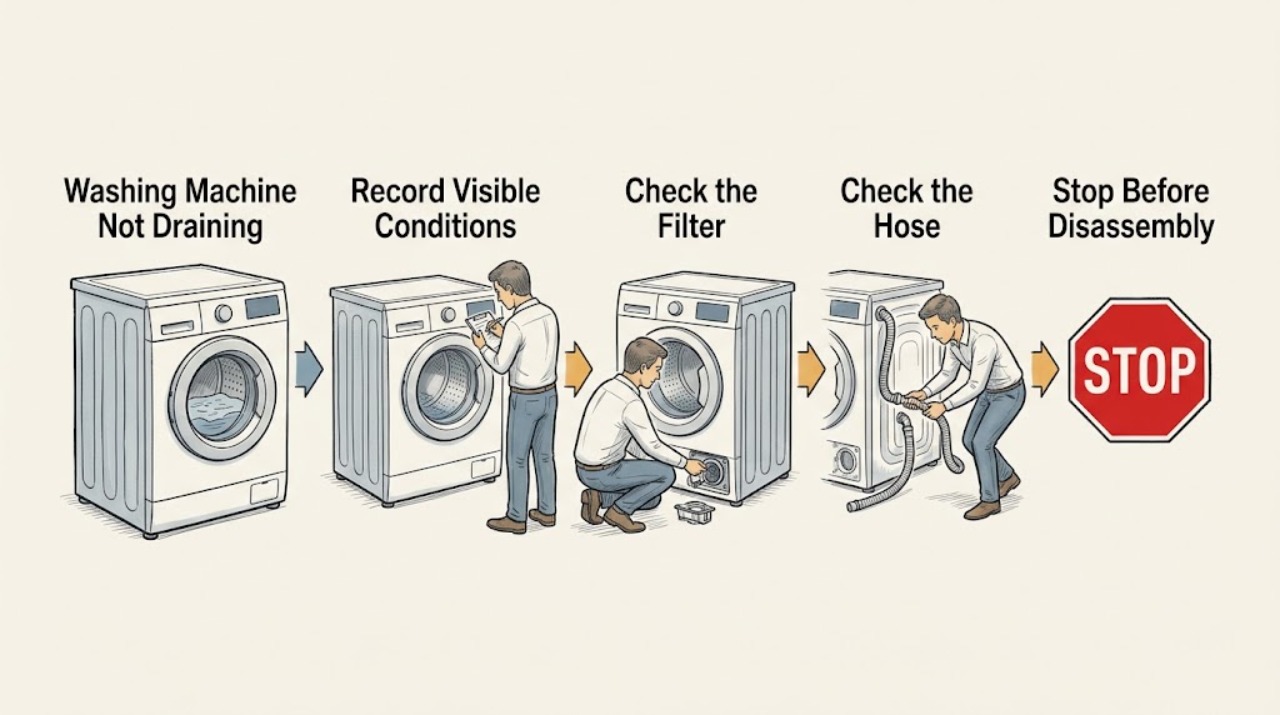
Work through in order
Diagnostic checks
Use only checks that match the exact appliance or system and its official guide.
-
Check 1
Record the exact Roper model, top-load or front-load design, selected cycle, spin setting, displayed lights or code, and where the cycle stopped. Note whether water is visible in the basket and whether the lid or door is locked; do not force a lock or open a full front-load door.
Expected result: The tub is full, partly full, or empty; the load is only wet; a drain or service light is present; or the machine stopped before the drain phase.
Next step: Keep the model and sequence for the manual and service record, then continue only with checks that apply to that design. If water is hot, leaking toward electricity, or the door cannot be safely managed, stop and arrange service.
Why this matters
Why: Visible water points toward a drain path or pump issue, while wet clothes with an empty tub can reflect spin selection, imbalance, or excess suds. A code or light must be interpreted for the exact Roper model rather than borrowed from another washer.
-
Check 2
Switch the washer off using its normal control and, when safe, disconnect power before touching a hose or model-approved filter access. Close the water supply if a hose or valve is leaking; do not tilt the washer or pull it out through a wet area just to reach the rear.
Expected result: The plug, receptacle, cord, floor, or lower cabinet is wet, hot, discolored, damaged, or unaffected by any water problem.
Next step: For moisture near electrical parts, a hot or damaged connection, smoke, odor, sparks, or a breaker trip, leave the washer off and call qualified electrical or appliance service. Otherwise continue with visible plumbing checks from a dry position.
Why this matters
Why: Water near electrical equipment or heat and damage at a connection can turn a drain problem into a shock or fire risk. A dry exterior does not prove that an internal pump or wiring area is safe to access.
-
Check 3
Inspect the visible drain hose and its connection without removing a built-in panel. Look for a kink, crushing, clog, loose connection, tape sealing the standpipe, an end inserted too far, or a hose routed too high; compare the routing with the exact installation guide.
Expected result: The hose is kinked or blocked, the hose form is missing, the hose is taped into the standpipe, its end is more than 4.5 inches into the standpipe on the Roper installation example, or the end is above 96 inches from the floor.
Next step: If the manual confirms the same arrangement, restore the hose to its documented form and remove only an accessible external obstruction with power off. If the routing cannot be confirmed, the hose is damaged, or water backs up, stop and have the installation or plumbing assessed.
Why this matters
Why: Roper's RTW4516FW installation guide requires about 4.5 inches of hose inside the standpipe and says not to force excess hose into it. Roper's use guide also warns that a hose routed too high or a clog can prevent pumping; these dimensions are model and installation dependent.
-
Check 4
Check the receiving standpipe, laundry tub, or utility sink from above for a visible blockage or backup, without putting hands into dirty water or dismantling household plumbing. Run another fixture only when the area is dry and safe, and stop if the drain backs up.
Expected result: The household drain accepts water normally, backs up, drains slowly, or the washer hose is the only path that appears restricted.
Next step: Have a plumber address a household backup. If the household drain is clear, continue only with the manual-approved washer checks; do not push tools into the washer hose or tilt the cabinet.
Why this matters
Why: A blocked standpipe or sink can make a healthy washer appear unable to drain. If the household drain is clear but the washer retains water, suspicion shifts toward the washer hose, model-specific filter, pump, control, or an obstruction between basket and pump.
-
Check 5
For a front-load Roper or related model only when the owner's manual explicitly provides a filter or residual-water procedure, place a broad shallow container and cloth below the access point, drain gradually, and inspect only the removable filter described by that manual. Do not open an access point on a top-load model unless its manual specifically allows it.
Expected result: The manual shows an accessible filter, the container fills with lint or water, the filter is clear, or no filter or drain tube is identified for the model.
Next step: Reinstall a model-approved filter and plug exactly as the manual directs, without forcing it. If there is no approved user access, water will not drain, the filter is damaged, or an obstruction lies beyond the access point, leave the washer off and arrange service.
Why this matters
Why: Whirlpool's official guidance says pump filters are accessible on some front-load models but not all washers have one. Lint or a small object can restrict flow, while a clear filter does not rule out a pump, hose, control, or internal obstruction.
-
Check 6
Review the selected cycle, spin speed, load size, and detergent amount against the Roper manual. With the tub safe and the lid or door properly closed, redistribute a tightly packed or unbalanced load and use the documented Drain and Spin or equivalent cycle once; do not add more detergent or water.
Expected result: The load is a single bulky item, tightly packed, badly unbalanced, set to low or no spin, or surrounded by excessive suds; the drain-and-spin cycle removes water or leaves it in place.
Next step: If the cycle completes after the load or detergent correction, monitor the next normal load with the manual's settings. If water remains, the pump is silent or harsh, or the washer stops again, keep it off and arrange diagnosis.
Why this matters
Why: Roper says small items can reach the pump, unbalanced loads can leave clothes wetter, low spin removes less water, and excess detergent suds can slow or stop draining and spinning. A cycle that still leaves water after the load is corrected suggests a plumbing or washer fault.
-
Check 7
During one manual-approved drain attempt from a safe, dry position, note whether the washer pumps steadily, hums without moving water, clicks, makes grinding or scraping sounds, or remains silent. Do not repeat the cycle to force a pump, and do not remove the cabinet or test live wiring.
Expected result: Water flows strongly, flow is weak, the pump hums with no flow, the sound is harsh or intermittent, or no pump sound occurs.
Next step: Stop for grinding, metal contact, smoke, burning odor, leakage, or a hot connection. Otherwise record the sound and water behavior and arrange qualified Roper or appliance service if draining remains incomplete.
Why this matters
Why: Strong flow after a hose or load correction supports a prior installation or cycle issue. Weak flow, a blocked-looking path, abnormal noise, or silence can involve a pump, filter, hose, control, lid or door interlock, or an internal obstruction; the sound alone cannot identify the part.
-
Check 8
Copy any complete error code or flashing pattern, note the cycle phase and water level, and locate the exact Roper manual through Owner Support. A single reset is acceptable only when the manual permits it and there is no leak, odor, heat, or electrical warning; do not keep resetting a persistent drain fault.
Expected result: The code clears but water remains, returns during drain, changes after a hose correction, or the washer has no code but still will not empty.
Next step: Leave the washer off and give the technician the model, code, stage, water level, hose routing, filter status, and pump sound. Do not open the control area or use a generic code table.
Why this matters
Why: Roper documentation is model-specific, and a cleared control message does not prove that the drain path or pump is working. A persistent code or repeated no-drain event needs a service diagnosis rather than a guessed code meaning.
Use your observations
Decision map
Find the observation that best matches what you see, then follow the next safe action.
-
PATH 01Next step
What you see
The washer stopped with visible water after wash, rinse, or spin.
Do this next
Keep power off, identify the model and load stage, then check the visible hose and household drain. Use a filter or residual-water procedure only when the manual explicitly supports it; do not tilt the washer.
-
PATH 02Next step
What you see
The washer pumped out water but the load remains wetter than expected.
Do this next
Check spin selection, load balance, bulky items, and detergent amount, then use the documented Drain and Spin or equivalent cycle once. Arrange service if the issue repeats with a balanced load.
-
PATH 03Next step
What you see
A kink, clog, taped connection, incorrect hose depth, excessive height, or household backup is visible.
Do this next
Correct only the externally visible routing that the exact manual supports. Have a plumber address a household backup, and do not push tools into the washer or dismantle the cabinet.
-
PATH 04Next step
What you see
The exact manual identifies an accessible pump filter and it contains lint or a small object.
Do this next
With power off and a container ready, follow the manual's drain and filter procedure once, reseat the filter correctly, and stop if water cannot be controlled or the blockage is beyond the user access point.
-
PATH 05Next step
What you see
A safe drain attempt produces no pump sound, a hum without water movement, or grinding, scraping, or repeated clicking.
Do this next
Do not repeat the cycle or access live wiring. Keep the washer off and arrange qualified service for the pump, control, interlock, hose, or internal obstruction diagnosis.
-
PATH 06Next step
What you see
Hot water, a leak toward the outlet, smoke, burning odor, sparks, a hot or damaged cord or receptacle, shock, or a repeated electrical trip is present.
Do this next
Stop using the washer. Do not touch wet electrical equipment or restore power to retest; keep people away from the hazard and contact qualified electrical, plumbing, appliance, or emergency help as appropriate.
Helpful context
Understand the symptom
Begin with the stage and the water level
A Roper washer can leave clothes wet because it could not pump out water, because a load or cycle limited the final spin, or because a plumbing path is restricted. Record whether the tub is visibly full, partly full, or empty; whether the lid or door is locked; which cycle and spin setting were selected; and whether the washer stopped before rinse, during drain, or after a slow spin. Do not assume that every Roper model has the same filter or access panel.
Separate a top-load check from a front-load check
Roper has top-load models, while washer families sharing Whirlpool support material can also use front-load designs with an accessible pump filter. A top-load washer may have no user-accessible filter, and a front-load filter can release a large amount of water. Find the model manual through Roper Owner Support before opening an access door, draining residual water, or looking for a filter.
Water and electricity change the safe boundary
Turn the washer off and keep water away from the plug, receptacle, controls, and extension equipment. Have towels and a shallow container ready only for a manual-approved front-load drain procedure. Do not tilt a full washer, pull on a built-in hose connection, reach behind live equipment, or keep restarting a pump that makes a harsh sound.
Use the manual before naming a failed part
A drain pump, hose, filter, lid or door interlock, control, and household drain can produce similar symptoms. A pump hum is not proof that the pump has failed, and silence is not proof that it is blocked. Record observations for a qualified technician instead of ordering a part from a generic symptom.
Safety boundary
Stop conditions
- Stop immediately for hot water, a leak toward a plug or receptacle, water inside electrical areas, smoke, burning or electrical odor, sparks, a hot or discolored cord or connection, electric shock, severe cabinet movement, or a repeated electrical trip.
- Do not tilt a washer full of water, reach into live equipment, remove cabinet or control covers, force a locked lid or door, push tools into the drain path, or order and install an internal part as a diagnostic test.
- Do not keep restarting a blocked or noisy pump, repeatedly reset a code or breaker, or run another load to see whether a hazardous symptom goes away. Leave the washer off until a qualified professional identifies the cause.
Only after diagnosis
Potential parts
- drain pump
Consider this category only after the exact manual and a qualified diagnosis connect the no-drain symptom to the pump rather than the hose, filter, household drain, or control.
Pump design and fit vary by Roper model and washer configuration. Confirm the complete model and manufacturer fit information; do not access or change a pump in an energized or water-filled cabinet. - drain hose or model-specific pump filter
Consider this category only when the exact Roper documentation identifies the item and inspection confirms a damaged hose or unusable filter.
Not every Roper washer has an accessible pump filter, and hose routing requirements vary. Confirm the exact model and installation instructions before selecting a part.
When checks do not resolve it
Need a professional?
Arrange qualified Roper or appliance service when the washer still retains water after the model-appropriate hose, plumbing, load, detergent, and filter checks; when a pump is silent or makes harsh noise; when a code persists; or when the lid, door, control, or internal hose needs diagnosis. Use a plumber for a household standpipe or sink backup, and an electrician for a hot or damaged connection, shock, repeated electrical trip, or wiring concern. Provide the exact model, load stage, water level, hose routing, filter status, code, and pump sound.
Common questions
FAQ
Why is my Roper washer full of water after a cycle?
Start by recording the cycle stage and model, then check the visible drain hose and household drain from a dry position. A model-approved filter may be present on some designs, but do not open an access point or tilt the washer unless the exact manual permits it.
Can I clean the drain pump filter on a Roper washer?
Only if the exact Roper manual identifies an accessible filter and gives a residual-water procedure. Some top-load washers have no user-accessible filter, while front-load procedures can release a large amount of water.
How far should the Roper drain hose go into the standpipe?
Use the exact installation guide. The Roper RTW4516FW example specifies about 4.5 inches inside the standpipe and says not to force excess hose into it; another Roper model may differ.
Could too much detergent make a Roper washer stop draining?
Yes. Roper says excessive suds can slow or stop draining and spinning. Measure detergent for the model and load, and do not add more detergent when trying to clear a suds-related symptom.
What does a humming drain pump mean?
A hum without water movement can indicate a restricted path or a pump or control issue, but sound alone cannot identify the failed part. Stop for grinding, scraping, odor, smoke, leakage, or heat and arrange qualified diagnosis.
Should I run another load to see if the washer drains?
No when water remains, a code returns, the pump sounds abnormal, or there is any leak or electrical warning. Record the symptom, leave the washer off, and arrange service after the safe model-specific checks.
Read the exact guide
Official sources
- Why is My Washing Machine Not Draining?Whirlpool · General washer drain mechanics, model variation, top-load versus front-load checks, and professional escalation
- Washer Not Draining or Spinning? Troubleshooting GuideWhirlpool Product Help · Whirlpool-family washer drain-hose, standpipe, pump-filter, suds, and manual-specific troubleshooting context
- Installation Instructions – RTW4516FWRoper Appliances · Roper top-load washer drain-hose installation for the named model example
- Use and Care Guide – RTW4516FWRoper Appliances · Roper top-load washer cycle, load, suds, drain-hose, and no-drain troubleshooting for the named model example
- Not Draining - WasherWhirlpool Product Help · Top-load washer drain-hose routing, load balance, spin, detergent, and plumbing checks
- Cleaning the Drain Pump FilterWhirlpool Product Help · Front-load washer model-dependent residual-water and pump-filter procedure
- Owner SupportRoper Appliances · Roper model manual lookup and factory-authorized service routing
Community feedback
Share a repair observation
Share a plain-text repair observation. Accepted observations are published automatically; this page may take a moment to update.