
On this page
Start here
Quick answer
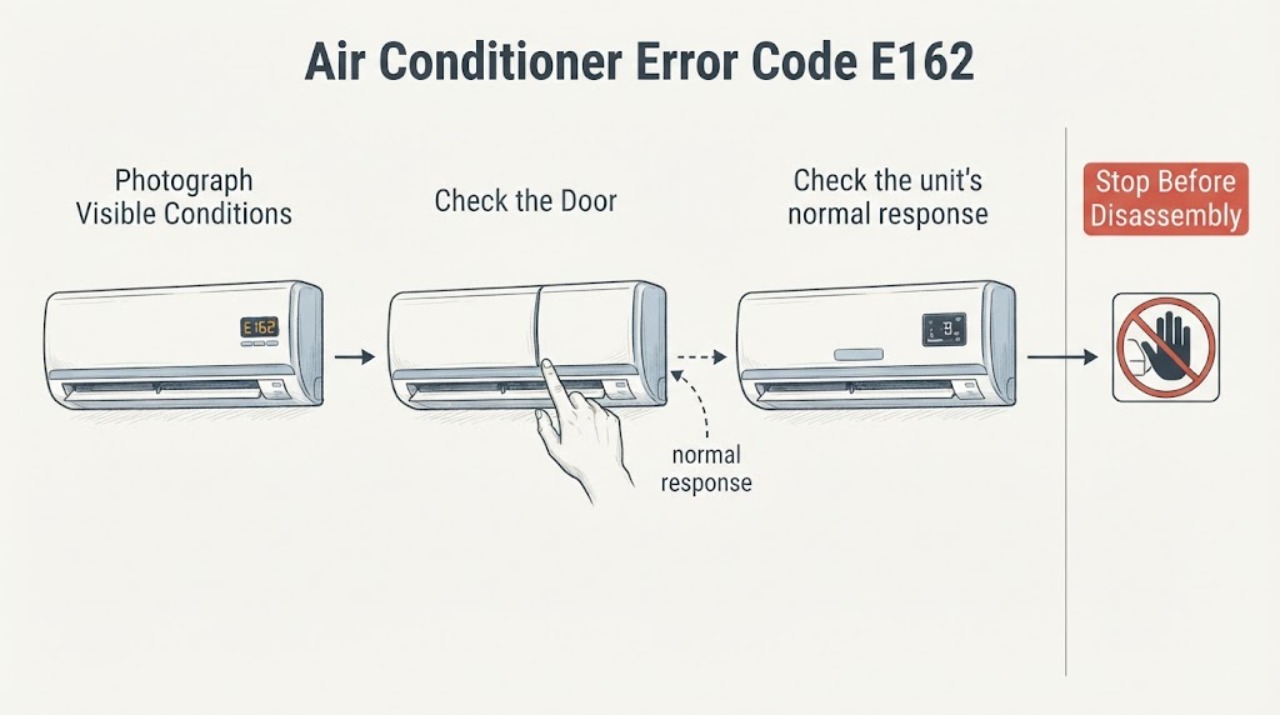
Samsung's official air-conditioner error-code guide identifies E162 as an indoor EEPROM error. The code is a control-electronics or stored-data fault category, not a diagnosis of a user-replaceable part. First record the exact display, whether the indoor indicator is blinking, and the air conditioner's full model number. Samsung says code formats and meanings can vary by model, so use that model's manual. If E162 remains, returns after the model-authorized user procedure, or leaves the unit unresponsive, stop using the unit and contact Samsung service rather than opening the indoor unit or ordering a control board from the code alone.
Work through in order
Diagnostic checks
Use only checks that match the exact appliance or system and its official guide.
-
Check 1
With the air conditioner stopped through its normal controls, photograph the display and write down whether it reads E162 continuously, alternates a letter with 162, or shows a different code; also record whether the indoor indicator is blinking.
Expected result: The display is exactly E162, uses a different letter or sequence, shows another code, or is too unclear to identify.
Next step: Keep the photograph and use the exact model manual. Do not translate an unclear display into E162 by assumption.
Why this matters
Why: Samsung lists E162 as an indoor EEPROM error, but its support guidance says the displayed code format depends on the model. A different sequence may require different guidance.
-
Check 2
Locate the complete Samsung model number on the indoor unit or rating label and match it to Samsung's manual and support page before attempting any reset or option change.
Expected result: The model is identified and its manual contains E162 guidance, or the model is missing, different, or its manual does not list E162.
Next step: Follow only the matching manual. If the model cannot be identified or the code is not covered, provide the model and display photograph to Samsung service instead of borrowing instructions from another model.
Why this matters
Why: Samsung states that alarm codes and their display conventions vary by air-conditioner model; the model-specific manual controls the safe user procedure.
-
Check 3
Check the unit's normal response without opening it: note whether it starts, stops, cools or heats, becomes unresponsive, or immediately returns to E162; if the matching manual documents a user-level restart, perform only that documented procedure once.
Expected result: E162 clears and does not return during a brief normal check, returns immediately, or the unit will not respond.
Next step: For a returning code or an unresponsive unit, stop use and contact Samsung service. If it clears, record the event and continue to follow the exact model manual rather than repeatedly cycling power.
Why this matters
Why: A code that returns or prevents normal operation remains an active electronic fault indication. Clearing once does not identify or prove repair of the underlying EEPROM condition.
-
Check 4
Prepare a service report containing the model and serial information, exact code and display format, whether the indoor indicator blinked, when the code first appeared, and what happened after the model-authorized procedure; do not remove covers or test live wiring.
Expected result: The same E162 record is available for service, or a new code, burning odor, smoke, water intrusion, sparking, or damaged power connection is present.
Next step: Keep the air conditioner off and request qualified Samsung service. Isolate power only from a safe position if there is an electrical hazard; do not open the indoor unit or attempt an EEPROM or board repair.
Why this matters
Why: Samsung's support guidance asks owners to record the displayed code and routes persistent alarm codes to authorized support. Safety symptoms require immediate stop-use handling.
Use your observations
Decision map
Find the observation that best matches what you see, then follow the next safe action.
-
PATH 01Next step
What you see
The display clearly shows E162 on a Samsung air conditioner and the exact model is known.
Do this next
Open the matching Samsung manual, follow only its documented user step, and record the result without opening the unit.
Why this path and its safety boundary
Why it matters: This matches Samsung's published indoor EEPROM error category, while the exact model still controls the display interpretation and user procedure.
-
PATH 02Next step
What you see
The code is shown in a different format, the model is unknown, or the manual does not list E162.
Do this next
Photograph the display, identify the model from its rating label, and ask Samsung support for the model-specific interpretation.
Why this path and its safety boundary
Why it matters: Samsung documents model-dependent code formats, so the display cannot safely be mapped to another model's E162 procedure.
-
PATH 03Next step
What you see
E162 returns after the matching manual's permitted user procedure, or the indoor unit remains unresponsive.
Do this next
Keep the air conditioner off and arrange authorized Samsung service with the model, serial information, display photo, and procedure result.
Why this path and its safety boundary
Why it matters: The electronic fault indication is persistent; the code alone still does not select a compatible board or memory component.
-
PATH 04Next step
What you see
E162 appears with smoke, burning or chemical odor, sparking, water near electrical parts, a hot or damaged cord, or repeated protective trips.
Do this next
Stop using the air conditioner and isolate power only from a safe dry location; obtain qualified electrical or Samsung service before restarting it.
Why this path and its safety boundary
Why it matters: The safety symptom takes priority over code interpretation and cannot be resolved by a display reset.
Helpful context
Understand the symptom
E162 identifies an indoor EEPROM error
Samsung's official air-conditioner code table lists E 162 as an indoor EEPROM error. That identifies an electronic stored-data or control fault category; it does not identify a particular board, memory device, wiring fault, or other replaceable part. The code should therefore be treated as a model-specific service clue rather than a parts diagnosis.
Confirm the display format before applying instructions
Samsung notes that alarm codes correspond to the air-conditioner model and that the first letter or display format can differ. Some Samsung units show a letter-and-number sequence or blink a two-digit number, so photograph the panel and record the model before using a procedure found for another unit.
When checks do not resolve it
Need a professional?
Contact Samsung authorized service when E162 returns after the exact model's documented user procedure, when the unit is unresponsive, or when the model manual does not explain the displayed sequence. Provide the model and serial information, display photograph, blink pattern, operating response, and restart result. Do not order an EEPROM, control board, or other part from E162 alone; compatibility and the failed component require model-specific diagnosis.
Common questions
FAQ
What does E162 mean on a Samsung air conditioner?
Samsung's official air-conditioner error table identifies E162 as an indoor EEPROM error. It is an electronic fault category and does not identify a user-replaceable part by itself.
Can I reset Samsung E162 myself?
Use a reset only if the exact Samsung model manual documents one for this code, and follow that procedure once. Samsung says code formats and meanings vary by model; a returning E162 needs authorized service rather than repeated power cycling.
Should I replace the Samsung air-conditioner control board for E162?
No. Samsung's public code tables identify the EEPROM error category but do not select a compatible board or memory component. Give the model and code record to Samsung service for diagnosis before choosing a part.
What if my Samsung display shows a letter followed by 162 instead of E162?
Record the complete display and model. Samsung notes that the first letter and code format can differ by model, so confirm the matching manual before treating the message as E162.
Read the exact guide
Official sources
- How to solve error codes on your Samsung indoor air conditionerSamsung India · Samsung indoor air-conditioner model-dependent code display, blinking-code recording, and authorized-service guidance
- Samsung Klima hata kodları ve çözümleri nelerdir?Samsung Türkiye · Samsung air-conditioner model-specific error-code interpretation and E162 EEPROM error escalation
- Códigos de errores que pueden aparecer en la pantalla (display) del aire acondicionadoSamsung México · Samsung air-conditioner displayed error-code table, including E162 indoor EEPROM error, manual lookup, and support escalation
Community feedback
Share a repair observation
Share a plain-text repair observation. Accepted observations are published automatically; this page may take a moment to update.