
On this page
Start here
Quick answer
First identify whether your Samsung cooktop is gas, radiant electric, or induction; the word igniting applies directly to a gas burner, while electric and induction elements use power and cookware detection instead. For a gas burner, turn every knob off, let the surface cool, then confirm the burner head and cap are clean, correctly seated, and dry. Push the knob in and turn it to Lite as the Samsung instructions describe. If there is no clicking on any burner, check power and the breaker. If the igniters click but no burner lights, turn the knob off and have the gas supply checked by the gas provider or a qualified professional. For induction, use centered magnetic cookware with water in it; for a radiant element, use the Samsung quick test and stop if one element stays cool. Never keep releasing gas while a burner is unlit, work on the gas line, or continue after a gas smell, abnormal flame, smoke, or sparking.
Work through in order
Diagnostic checks
Use only checks that match the exact appliance or system and its official guide.
-
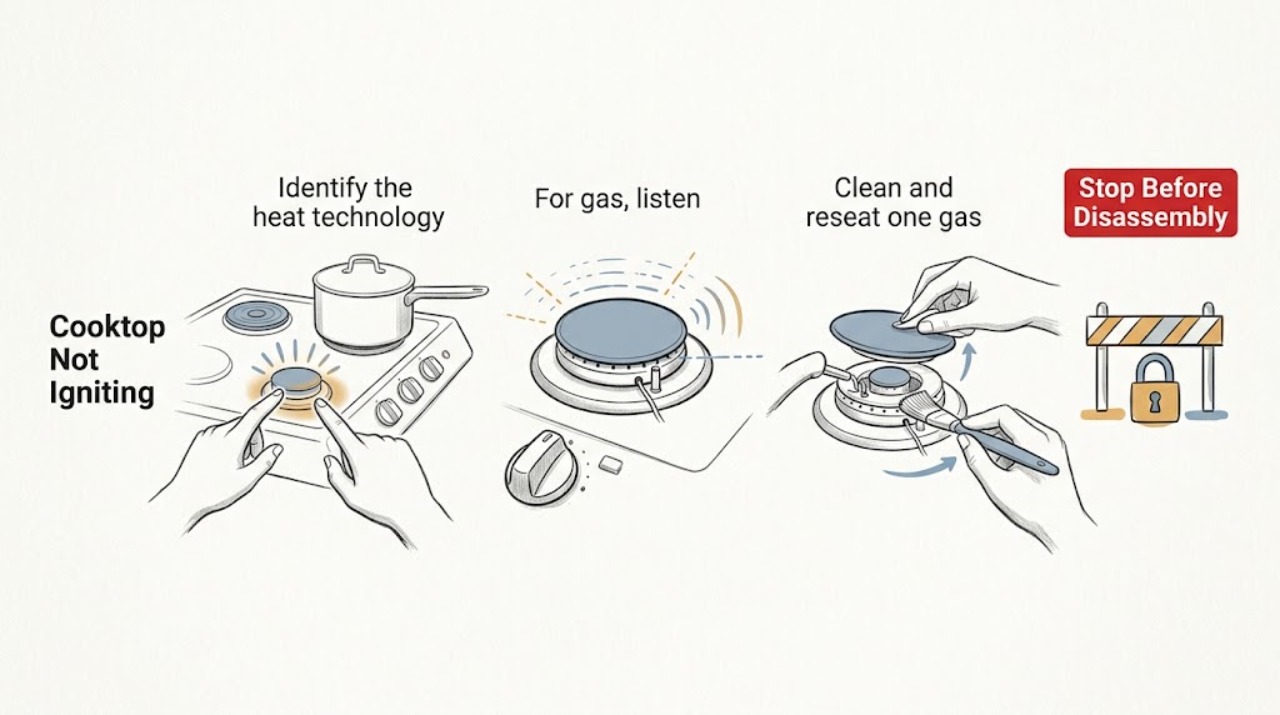
Identify the heat technology and scope of the failure
Look at the controls and burner surface without turning anything on. Identify a gas cooktop with knobs and burner caps, a radiant electric surface, or an induction surface. Note whether one cooking zone or every zone fails, whether the display responds, and whether the complaint is no spark, no flame, no heat, or cookware not detected.
Expected result: The cooktop is gas, radiant electric, or induction; one zone is affected or all zones are affected; and the controls either respond or stay blank.
Next step: Use the gas branch for a gas surface, the radiant branch for an electric element, and the cookware branch for induction. Do not use a gas-lighting test on an electric or induction zone.
Stop if: Do not turn on a gas knob while trying to identify the type, and do not continue if you smell gas, see smoke, or see damaged controls or glass.
Why this matters
Why: Only a gas model has a burner ignition sequence. An all-zone failure points toward shared power, controls, or gas supply, while a one-zone failure points toward that burner, cookware path, or local control.
-
For gas, listen for the ignition response
Make sure the gas knob is OFF, the surface is cool, and the area is ventilated. For the affected gas burner only, push the control knob in and turn it to Lite as Samsung describes, then listen briefly for clicking while watching from a safe position. Turn the knob back to OFF if the burner does not light promptly.
Expected result: No burner clicks, the igniter clicks but there is no flame, the burner lights with an even flame, or there is a gas odor or an unusual burst or flame pattern.
Next step: For no clicking on any burner, check the outlet and breaker without opening the cooktop. For clicking without flame, turn the knob OFF and have the gas supply checked by the gas provider or a qualified professional. If the flame is abnormal or gas is smelled, leave the area and follow the emergency gas-safety procedure.
Stop if: Never leave a gas knob on Lite while the burner is unlit, repeatedly release gas to try again, use a short match near an unlit burner, or test a suspected gas leak with a flame.
Why this matters
Why: No clicking on any burner is consistent with a power or ignition-system branch. Clicking without flame shifts attention to the gas supply or burner path. An abnormal flame or gas odor is a safety stop, not a reason to keep testing.
-
Clean and reseat one gas burner only when safe
If the surface is cool and the gas is OFF, remove only the affected burner's cap and head as the Samsung cleaning guide permits. Keep the parts in their original positions, clear visible food from the burner ports, keep water out of the burner base and gas orifice, and dry every piece fully. Reassemble the head so the electrode opening lines up with the electrode and the cap sits flat.
Expected result: The port openings were blocked, the cap or head was wet or mis-seated, the parts are clean and dry after reassembly, or a component is cracked, missing, warped, or cannot sit flat.
Next step: If the parts are clean, dry, and correctly seated, perform one normal ignition attempt. If the burner still does not ignite, or any part is damaged or missing, turn it OFF and request Samsung service.
Stop if: Do not uninstall the cooktop, spray cleaner into manifold holes, poke into the gas line or orifice beyond the user-manual cleaning instruction, or operate with a damaged burner head or cap.
Why this matters
Why: Debris, moisture, or incorrect placement can prevent a spark from reaching the gas mixture. A damaged or incorrectly fitting part is not a cleaning problem and can make ignition or flame behavior unsafe.
-
For induction, verify cookware before calling the zone faulty
On an induction Samsung cooktop, place a compatible magnetic pan in the center of the affected zone and add water for the test. Use the size guidance in the exact model manual. Do not test with an empty pan, and do not treat a gas-style spark or flame as an induction symptom.
Expected result: The zone recognizes the pan and heats the water, the zone stays off with incompatible or empty cookware, or compatible cookware is centered but the water does not heat.
Next step: Use compatible cookware and the exact manual if the test succeeds. If compatible cookware with water still does not heat, stop the test and request Samsung service for the affected zone.
Stop if: Do not put hands on a hot surface to check whether it is heating, use damaged cookware, or open the cooktop to test induction wiring.
Why this matters
Why: Samsung says induction zones can turn off when cookware is not magnetic or is empty. A compatible, centered pan with water that does not heat is evidence for a cooktop or control fault rather than a missing flame.
-
For radiant electric, separate normal cycling from a dead zone
On a radiant electric Samsung cooktop, set the affected element and the other elements to HI only as the official quick test describes, wait 30 seconds, and observe from a safe distance. Look for the element cycling on and off rather than assuming every visible pause is a fault.
Expected result: The element cycles on and off like the others, becomes hot, or remains cool while the other elements operate.
Next step: Turn the controls OFF after the test. If the element remains cool, request service rather than removing the glass or making live measurements.
Stop if: Do not touch the element or glass to test heat, place objects on a powered zone, or continue if the surface, control, or wiring shows damage or abnormal arcing.
Why this matters
Why: Samsung identifies cycling on and off as normal temperature control. If one element or part of a multi-zone element remains cool while the others work, Samsung directs the owner to request service.
-
Check shared power and control conditions
If every electric or induction zone is unresponsive, or no gas burner clicks, confirm from a dry position that the cooktop's power connection is intact and the dedicated breaker has not tripped. For a touch-control model, make sure the panel is clean and dry and that Control Lock is not active. Use only the model manual for any reset.
Expected result: The breaker is tripped, the panel is wet or unresponsive, Control Lock is shown, power and controls appear normal, or the condition returns after the documented reset.
Next step: Restore a tripped breaker only once if there is no odor, smoke, spark, or visible damage. Dry the surface without spraying into controls, follow the exact manual for Control Lock or reset, and request service if the fault returns.
Stop if: Do not repeatedly reset a tripping breaker, remove the cooktop, access live wiring, or continue after smoke, burning odor, sparking, or damaged insulation.
Why this matters
Why: Samsung identifies power, control settings, moisture, and Control Lock as possible shared reasons a cooktop does not turn on. A normal supply with a recurring no-heat or no-spark condition requires service diagnosis.
Use your observations
Decision map
Find the observation that best matches what you see, then follow the next safe action.
-
PATH 01Next step
What you see
A gas burner clicks and lights normally after its clean, dry head and cap are correctly seated.
Do this next
Turn the knob OFF, let the surface cool, and keep the burner parts dry and correctly matched for future use.
Why this path and its safety boundary
Why it matters: The issue was likely a visible burner obstruction, moisture, or assembly position.
-
PATH 02Next step
What you see
No gas burner clicks when its knob is turned to Lite, while the area is dry and there is no gas odor.
Do this next
Check the working outlet and breaker once without opening the cooktop. If power is normal or the condition returns, request Samsung service.
Why this path and its safety boundary
Why it matters: A shared power or ignition-system issue is possible.
-
PATH 03Next step
What you see
Gas burners click but no burner lights, or the burners light and will not stay lit.
Do this next
Turn every knob OFF and have the gas provider or a qualified professional verify the gas supply. Request Samsung service if supply is confirmed and the condition remains.
Why this path and its safety boundary
Why it matters: The gas supply, pressure, burner path, or ignition condition needs professional assessment.
-
PATH 04Next step
What you see
An induction zone works with compatible magnetic cookware and water but not with an empty or incompatible pan.
Do this next
Use the compatible pan size and centered position specified by the exact model manual.
Why this path and its safety boundary
Why it matters: Cookware recognition and the normal empty-pan protection explain the apparent no-ignition condition.
-
PATH 05Next step
What you see
A compatible, centered induction pan with water does not heat, or one radiant element stays cool while the others work.
Do this next
Turn the control OFF and request Samsung service; do not open the glass surface or make live measurements.
Why this path and its safety boundary
Why it matters: The affected cooking zone needs service diagnosis.
-
PATH 06Next step
What you see
There is a gas smell, uncontrolled flame, smoke, sparking, abnormal heat, damaged glass, or a breaker trips again.
Do this next
Turn controls OFF if this can be done without approaching danger, leave the area, avoid switches and flames, and contact the appropriate emergency or gas service. Arrange appliance service only after the area is safe.
Why this path and its safety boundary
Why it matters: This is an immediate gas, fire, burn, or electrical safety stop.
Helpful context
Understand the symptom
Ignition depends on the cooktop type
A Samsung gas cooktop creates a spark and flame; a radiant electric cooktop heats an element; an induction cooktop activates only when it recognizes suitable cookware. Confirm the surface type and whether one burner or every burner is affected before replacing anything. A gas knob that clicks without flame is a gas-supply or burner-path branch, while an induction zone that does not heat may simply be missing compatible cookware.
Keep gas and electrical checks separate
For gas models, cleaning and correct placement of the burner head and cap can resolve a single-burner ignition problem, but moisture must stay out of the burner base and gas orifice. For all burners with no spark, Samsung directs owners to check the outlet and breaker. If all burners spark but no flame appears, stop trying to light them and have the gas connection and supply checked professionally.
Safety boundary
Stop conditions
- Never keep releasing gas when a burner is unlit, repeatedly turn a knob to Lite, or use a flame to test for a gas leak.
- Stop for a gas odor, uncontrolled or abnormal flame, smoke, sparking, burning odor, damaged glass or wiring, or a breaker that trips again.
- Do not uninstall the cooktop, open the gas manifold, access live wiring, make gas-pressure adjustments, or perform live electrical measurements.
- Do not operate with a cracked, warped, missing, wet, or incorrectly seated burner head or cap, and do not continue an induction or radiant test on a damaged surface.
Only after diagnosis
Potential parts
- gas burner head or cap
Consider this category only when a qualified diagnosis confirms a damaged, missing, or incorrectly fitting burner head or cap after the safe cleaning and placement checks.
Confirm the complete Samsung cooktop model and manufacturer's fit information; burner heads and caps are position- and model-specific. - gas ignition electrode or igniter component
Consider this category only when a burner has no spark or the ignition system fails after power and burner assembly checks and a qualified technician identifies the component.
Verify the complete model and service diagnosis before ordering; clicking, no flame, and no clicking indicate different branches. - radiant element or induction zone component
Consider this category only when the official radiant or induction test fails and service confirms that the affected cooking zone, element, or related control is faulty.
Confirm the cooktop type, complete model, zone position, and manufacturer's fit information; a cookware-detection issue does not prove a failed zone.
When checks do not resolve it
Need a professional?
Request Samsung appliance service when a clean, dry, correctly assembled gas burner still does not ignite, when no gas burner sparks after a safe power check, when a compatible induction pan with water does not heat, when one radiant element remains cool, or when the fault returns after the exact model's documented control step. Contact the gas provider or a qualified gas professional for clicking without flame, burners that will not stay lit, suspected pressure or connection issues, or any gas odor; leave the area for an emergency gas or fire hazard.
Common questions
FAQ
Why does my Samsung gas cooktop click but not ignite?
Turn the knob OFF. A clean, dry, correctly seated burner head and cap can resolve a single-burner issue, but if burners click without flame, Samsung directs you to have the gas supply checked by the gas provider or a qualified professional.
Why is there no clicking on any Samsung gas cooktop burner?
With all knobs OFF and no gas odor, check the cooktop's working outlet and breaker once. If power is normal or the no-spark condition returns, request Samsung service rather than opening the cooktop.
Is a Samsung induction cooktop not igniting when it does not detect my pan?
Induction zones do not create a gas flame. Use centered cookware with a magnetic base and water for the test; an empty pan or incompatible cookware can make the zone turn off. If compatible cookware with water does not heat, request service.
Can I manually light a Samsung gas cooktop?
Samsung publishes a manual-lighting method for a power outage on some gas models, but the exact model manual and local safety rules control. Never attempt it when gas is suspected, the burner is damaged, or you are not certain the model permits it; leave the area and get gas assistance for an odor.
When should I stop troubleshooting a Samsung cooktop that will not ignite?
Stop for a gas odor, abnormal or uncontrolled flame, smoke, sparking, damaged glass or wiring, or a breaker that trips again. Turn controls OFF if safe, leave the area for a gas or fire hazard, and arrange qualified service after the hazard is controlled.
Read the exact guide
Official sources
- What can you do when the burner of your Samsung gas cooktop does not ignite or has other ignition issuesSamsung Canada · Samsung gas cooktops sold in Canada; use the exact model manual for controls and treat gas-safety and supply checks as professional boundaries
- How to clean your Samsung gas cooktopSamsung · Samsung gas cooktops; cleaning must be done with power off, surfaces cool, and burner parts returned to their original positions
- One burner on the Samsung cooktop does not workSamsung · Samsung electric radiant and induction cooktops; includes the 30-second radiant cycling check and compatible cookware and water test for induction
- How to use your Samsung gas range or cooktopSamsung · Samsung gas ranges and cooktops; exact control behavior remains model-specific
- Samsung Cooktop FAQsSamsung · Samsung gas, electric, and induction cooktops; use model-specific instructions where controls differ
Community feedback
Share a repair observation
Share a plain-text repair observation. Accepted observations are published automatically; this page may take a moment to update.