
On this page
Start here
Quick answer
On a Samsung DW80J7550UG WaterWall dishwasher, 7C is not a generic poor-cleaning code: Samsung describes 7C or 7E as a WaterWall reflector error when the moving reflector cannot move, is blocked, or was reattached incorrectly. That can stop the intended spray action and leave dishes poorly cleaned. Confirm the full model suffix first, then switch the dishwasher off and inspect only from above for a pot handle, knife, ladle, packing tape, a visibly displaced reflector, or a loading obstruction along the guide rail. Also separate a WaterWall movement problem from dirty filters, blocked spray openings, poor loading, or a water-supply or drain problem. If the visible path is clear, do not force the bar, detach the mechanism, enter service mode, or guess a motor. A single model-guided power cycle may clear a transient display; if 7C returns or cleaning remains poor, request Samsung service.
Before you begin
Safety first
- User checks are limited to the full model and code record, powered-off visual inspection of the guide rail and loading, accessible filter and spray observations, visible supply or drain observations, and one exact-guide power cycle. Do not force or detach the reflector, reach into moving parts, remove the base, open electrical covers, enter service mode, disconnect hoses, run repeated cycles, or guess a motor or control part.
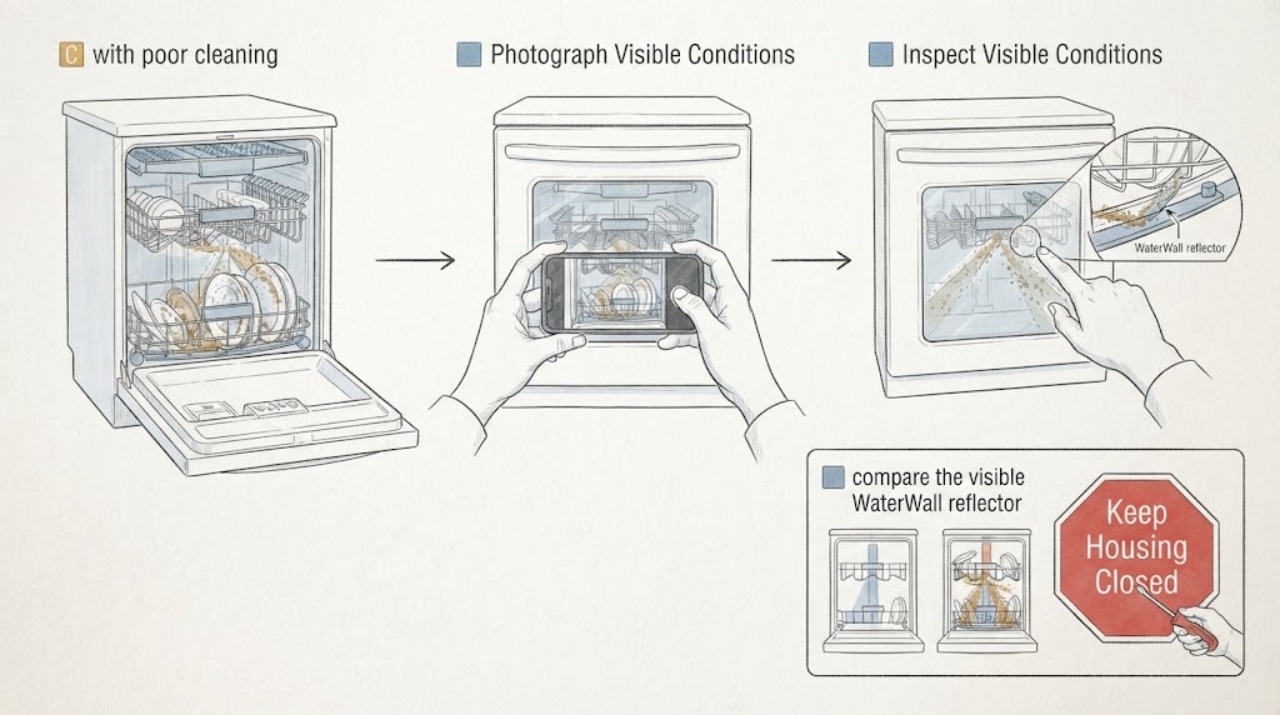
Work through in order
Diagnostic checks
Use only checks that match the exact appliance or system and its official guide.
-
Check 1
Record the display exactly as 7C, 7E, or another pattern and photograph it before clearing anything. Read the complete rating plate, including the final regional suffix, and note whether the cycle stopped, the WaterWall bar attempted to move, and whether dishes were merely dirty or there was also standing water or a leak.
Expected result: The code is 7C or 7E; only a blinking-light pattern is visible; the model is a different suffix; the cycle stops; or the cycle finishes with poor cleaning and no water issue.
Next step: Keep the photo, full E-Nr and cleaning result for the matching manual or service request. If the code is not clearly identified, do not enter a generic reset or service mode.
Stop if: Do not clear the code before documenting it, substitute another model's code table, or continue a cycle with a leak or water near electrical parts.
Why this matters
Why: Samsung's WaterWall guide groups 7C and 7E with a reflector that cannot move, while the general code list uses 7E for that WaterWall error. The exact display and model prevent applying a drain or pump code to a movement problem; poor cleaning without a code leaves loading, filter, spray and supply checks open.
-
Check 2
Switch the dishwasher off and, only when the floor and controls are dry, remove the lower rack for a visual check of the WaterWall guide rail. Look for a pot handle, large knife, ladle, utensil, or other item obstructing the reflector, and check for any remaining packing tape along the rail if the dishwasher was newly installed. Do not move the bar by force.
Expected result: A dish or utensil blocks the rail; packing tape remains; the rail is visibly clear; or the assembly is damaged or displaced.
Next step: Remove only a loose obstruction or tape that is clearly reachable without tools, then close the dishwasher and continue to the position check. If the rail or reflector is damaged or not safely accessible, stop and arrange service.
Stop if: Do not reach into a moving mechanism, use a knife or tool to free an item, pull the dishwasher out, or detach the WaterWall assembly.
Why this matters
Why: Samsung identifies an obstruction and unremoved installation tape as direct reasons the reflector cannot move. A clear rail makes a visible blockage less likely, but it does not prove the drive or control hardware is good or bad.
-
Check 3
From above, compare the visible WaterWall reflector orientation with the exact Samsung guide: the WaterWall logo should face forward and upward. Inspect for an obviously displaced vane or an assembly that was recently disturbed during cleaning or installation; do not lift, rotate, or reseat it unless the matching manual explicitly makes that a user step.
Expected result: The logo orientation appears correct; the reflector is visibly reversed or displaced; the assembly was recently removed; or the position cannot be judged without touching the mechanism.
Next step: If the exact manual authorizes a gentle reseat, follow only that procedure with power off and no obstruction. Otherwise leave the mechanism untouched and use the service branch if 7C remains.
Stop if: Do not force the vane, rotate a jammed bar, enter service mode, or test the mechanism with hands inside the tub.
Why this matters
Why: Samsung says incorrect reattachment can produce the reflector error. A correct visible orientation lowers the likelihood of a simple assembly-position issue but does not identify a motor, rail, sensor, or control failure.
-
Check 4
Separate the reflector symptom from ordinary cleaning causes without dismantling the dishwasher. Check rack loading so dishes do not block the spray path, inspect the accessible filter area for visible soil, and look at the spray openings for obvious food debris. Do not remove a hidden pump, spray arm drive, or internal cover.
Expected result: Only the reflector code is present; the filter or spray openings are visibly dirty; dishes are packed against the spray path; or the rail is clear but dishes remain dirty without 7C.
Next step: Correct only visible loading or accessible filter conditions described by the exact manual. If the WaterWall code remains or cleaning stays poor after those conditions are normal, stop user troubleshooting and request service.
Stop if: Do not reach into the pump, remove the base or hidden covers, force spray components, or run repeated cycles to compare results.
Why this matters
Why: DW80J7550UG has a WaterWall system, three spray arms and triple filtration. A cleaning-performance complaint without a movement code can be caused by loading or wash-path maintenance, while 7C with no spray action points back to the reflector branch. Neither branch identifies a pump or motor part from appearance.
-
Check 5
Check only the surrounding installation and visible supply conditions: confirm the dishwasher has water available, the visible drain route is not obviously kinked, and the unit has no active leak or water near electrical equipment. Do not disconnect hoses or move the built-in dishwasher to inspect behind it.
Expected result: The unit has a supply or drain symptom; water or a leak is visible; the external route is normal; or the only abnormality is 7C with poor cleaning.
Next step: For a visible supply, drain, or leak concern, keep water or power isolated as safely possible and arrange the appropriate appliance or plumbing service. If external conditions are normal, continue only to the single power-cycle boundary.
Stop if: Do not pull the dishwasher forward, disconnect a water or drain fitting, pressure-test the plumbing, or run another cycle with a leak.
Why this matters
Why: A fill or drain issue can reduce wash performance or stop a cycle, but Samsung distinguishes those codes from the WaterWall reflector error. Water near electrical parts is a stop condition regardless of what the display shows.
-
Check 6
After the code is documented and visible obstructions or position problems are corrected, perform at most one power cycle using the exact Samsung guide, with the dishwasher empty and safe to isolate. Observe whether 7C clears, whether the WaterWall bar attempts normal movement, and whether a later cycle restores spray and cleaning. Do not repeat the power cycle or enter a diagnostic test.
Expected result: The code clears and the cycle washes normally; the code returns immediately; the bar still cannot move; or the cycle runs but cleaning remains poor.
Next step: If the code or poor cleaning returns, request Samsung service with the full model, code photograph, obstruction and position findings, and cleaning result. Do not order a WaterWall motor or control board from 7C alone.
Stop if: Do not press or move the bar during operation, run repeated cycles, open electrical covers, or continue after abnormal noise, a leak, smoke, or a protection trip.
Why this matters
Why: Samsung says a two-minute power cycle may clear the error after the reflector is correctly assembled, but persistence after that boundary requires support. A cleared display with poor cleaning still needs a wash-path or service decision; it does not prove a motor is sound.
Use your observations
Decision map
Find the observation that best matches what you see, then follow the next safe action.
-
PATH 01Next step
What you see
The full label confirms DW80J7550UG, 7C or 7E is displayed, and a utensil or packing tape visibly obstructs the WaterWall guide rail.
Do this next
Remove only the loose obstruction or tape from a safe, powered-off position, then follow the exact guide's single clearing boundary. Request service if the code remains.
Why this path and its safety boundary
Why it matters: A direct movement obstruction is more likely than a proven WaterWall motor or control failure.
-
PATH 02Next step
What you see
The rail is clear, the reflector orientation is correct or cannot be safely touched, and 7C returns after one model-guided power cycle with poor spray or cleaning.
Do this next
Stop user troubleshooting and arrange Samsung service with the exact E-Nr, code, cycle behavior and cleaning result. Do not force the mechanism or order a motor or board.
Why this path and its safety boundary
Why it matters: The accessible obstruction and position explanations are not sufficient; a hidden WaterWall drive, rail, sensing, or control issue remains possible but is not distinguishable from the code.
-
PATH 03Next step
What you see
No 7C or 7E is present, the WaterWall moves normally, but dishes remain dirty and the filter, spray openings, loading, water supply, or drainage show an abnormality.
Do this next
Correct only the accessible condition allowed by the exact manual and request service if cleaning remains poor. Do not use 7C to justify a reflector part.
Why this path and its safety boundary
Why it matters: The cleaning complaint is better routed through the ordinary wash-path or supply branch than through a reflector fault.
-
PATH 04Next step
What you see
There is standing water, a visible leak, water near electrical parts, a damaged reflector or rail, abnormal noise, or any need to remove a cover or enter the mechanism.
Do this next
Keep clear, isolate water or power only from a dry safe location when possible, and arrange qualified Samsung appliance or plumbing service. Preserve the code and photographs.
Why this path and its safety boundary
Why it matters: The condition has crossed the safe user-check boundary and may involve water, electrical, sharp, or moving-part risk.
Helpful context
Understand the symptom
The important distinction is between the display and the cleaning result. On this WaterWall platform, 7C or 7E can mean that the moving reflector stopped, which can remove the intended spray action. A dirty filter, blocked spray opening, poor rack loading, low fill, or a drain issue can also leave dishes dirty, but those observations do not prove a WaterWall motor fault.
Samsung's support entry is for DW80J7550UG/AC, while the US product sheet lists DW80J7550UG as the black-stainless model. Read the complete rating plate and use the regional manual matching the suffix before applying any control sequence.
When checks do not resolve it
Need a professional?
Arrange Samsung dishwasher service when 7C or 7E returns after the visible WaterWall obstruction and position checks and one model-guided power cycle, when the reflector or rail is damaged, or when the dishwasher has poor cleaning with no safe external explanation. Use the full DW80J7550UG suffix and code photograph; do not order a WaterWall motor, sensor or control board from the display alone. Treat leaks, standing water near electrical parts, abnormal noise or any need to open a cover as urgent service boundaries.
Common questions
FAQ
Is Samsung 7C the same as the WaterWall 7E error?
Samsung's WaterWall guide describes the reflector error as 7E or 7C, while its general US code list labels the WaterWall reflector entry 7E. Record the exact display and use the complete DW80J7550UG suffix before applying a procedure.
Can poor cleaning alone prove the WaterWall motor failed?
No. This model also has three spray arms and triple filtration, so loading, visible filter or spray blockage, water supply and drainage remain separate branches. A 7C or 7E that returns after the visible guide-rail checks needs service, not a guessed motor.
How many times should I power-cycle after 7C?
Samsung describes a two-minute power cycle after the reflector is correctly positioned. Treat that as a single clearing boundary; if the code or poor cleaning returns, stop resetting and request service.
Read the exact guide
Official sources
- Samsung dishwasher is displaying an error codeSamsung Electronics America, Inc. · Samsung dishwasher error-code framework distinguishing WaterWall 7E from drain, fill and leakage codes
- DW80J7550UG Samsung DishwasherSamsung Electronics America, Inc. · Exact assigned DW80J7550UG model; product sheet identifies WaterWall, spray arms, filters and cleaning features
- DW80J7550UG Dishwasher with WaterWallSamsung Electronics Canada · Exact assigned DW80J7550UG model family; regional /AC support page links the model manuals and WaterWall help
- Waterwall reflector error code 7E on Samsung dishwasherSamsung Electronics America, Inc. · Samsung WaterWall dishwasher guidance; exact DW80J7550UG/AC manual controls the user-accessible procedure
Community feedback
Share a repair observation
Share a plain-text repair observation. Accepted observations are published automatically; this page may take a moment to update.