
On this page
Start here
Quick answer
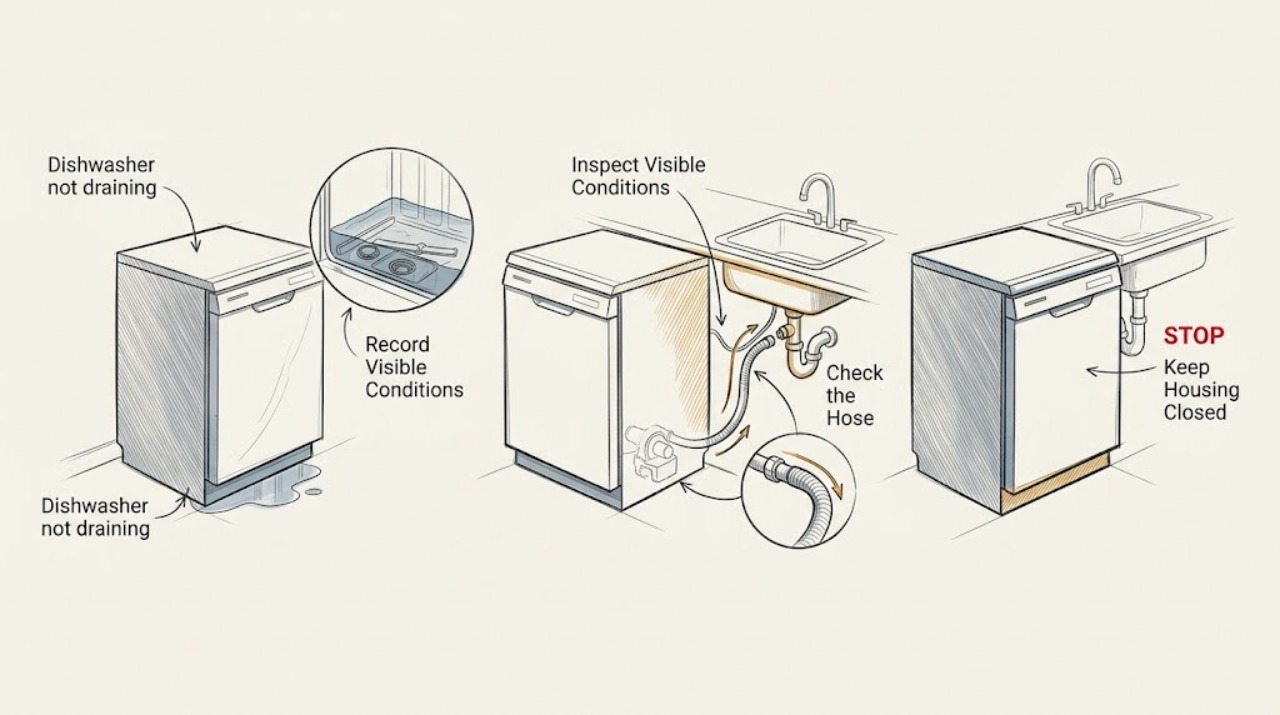
A Samsung dishwasher that will not drain most often has a blocked sink or garbage-disposal connection, a kinked or poorly routed drain hose, food debris in the filter or drain area, or a pump problem. First note how much water remains, whether the sink drains, whether the hose was recently moved or installed, and whether 5C, 5E, OC, OE, or another code appears. With the appliance stopped and power isolated from a safe dry location, check the sink connection and visible hose routing, then clean the model-specific filter and drain area and reassemble every piece correctly. Only remove a drain pump when the Samsung manual for that model says it is removable. A reset cannot correct an unaddressed hose or blockage. Stop for a leak, water near electrical parts, a damaged hose, sharp debris you cannot safely remove, or a recurring error, and arrange appliance or plumbing service.
Before you begin
Safety first
- Keep the dishwasher off for a leak, water near electrical parts, smoke, burning or electrical odor, unusual heat, arcing, a hot plug, or a returning leakage code. Do not open the cabinet, bypass a sensor, or repeat drain tests in a hazardous condition.
Work through in order
Diagnostic checks
Use only checks that match the exact appliance or system and its official guide.
-
Check 1
Stop the cycle and record how much water remains, whether the water is dirty, whether the sink or disposer also drains slowly, and every displayed code or flashing-light pattern. Look from a dry, safe position for a leak, water near electrical parts, smoke, a burning odor, or a damaged power lead before continuing.
Expected result: A small residual amount is present, a large pool remains, the sink also backs up, 5C/5E/SC/SE or OC/OE appears, LC/LE appears, or a leak or electrical hazard is visible.
Next step: For smoke, burning odor, a leak, water near electrics, or a damaged lead, keep the dishwasher off and arrange qualified help. Otherwise continue with the sink, hose, filter, and model-specific pump checks that match the observation.
Stop if: Do not restart a dishwasher that is leaking, smoking, electrically hot, or has water reaching electrical parts.
Why this matters
Why: A small residual amount may be normal on some models; a large pool, drain code, or sink backup indicates a drain or plumbing branch. A leak or leakage code is a safety branch.
-
Check 2
Run water at the sink connected to the dishwasher and observe whether the sink drains freely. If a garbage disposal is used, check only its visible drain opening for food waste and confirm, after a recent installation, that the dishwasher connection's knockout cap was removed as the installation instructions require.
Expected result: The sink backs up or drains slowly, the disposer is clogged, the disposer connection still has its cap, or the sink and disposer drain normally.
Next step: Use plumbing service for a blocked sink or disposer. If the connection cap is an obvious recent-installation issue, have the installer correct it; otherwise continue with the dishwasher drain-hose check.
Stop if: Do not put a hand into a disposer, run it while inspecting, or disconnect an under-sink drain connection with water spilling toward electrical equipment.
Why this matters
Why: A household drain or disposer blockage can prevent the dishwasher from emptying even when the dishwasher itself is operating. A normal sink makes the appliance-side hose, filter, or pump more likely.
-
Check 3
Inspect the accessible drain hose under the sink and along the cabinet for a pinch, sharp bend, crushing, damage, or a recent routing change. Confirm that the installation has the required air gap or high loop for the local installation; do not pull the dishwasher out just to reach the hose.
Expected result: The hose is pinched under the unit, kinked or bent, damaged, lacks the required backflow routing, or is straight and intact.
Next step: Correct only a visible, safe-to-reach bend or routing issue according to the installation manual and local requirements. Request installation or appliance service for a damaged hose, inaccessible hose, or a recurring drain problem.
Stop if: Do not loosen hose clamps, pull out a built-in dishwasher, or reroute a drain line across a sharp edge without proper installation guidance.
Why this matters
Why: Samsung identifies a pinched or kinked hose and missing air-gap or high-loop routing as common drain causes, especially after installation or a cabinet change. A damaged hose cannot be made safe by straightening it.
-
Check 4
Turn the dishwasher off and isolate power from a safe dry location before accessing the filter or drain area. Following the exact Samsung manual, remove the applicable filter pieces, clear food and foreign material, rinse or wipe the parts as directed, and reinstall them in the correct order until locked.
Expected result: Food, grease, or a fragment blocks the filter or drain area, the filter was installed backward or incompletely, the filter is clear and correctly seated, or the model's access does not match the online steps.
Next step: Remove only visible debris and correct only the model-documented assembly. If glass is broken, the filter will not lock, or the access differs from the manual, stop and arrange service rather than forcing parts.
Stop if: Do not reach into standing water or handle sharp debris bare-handed; do not operate the dishwasher with a missing, loose, or incorrectly fitted filter.
Why this matters
Why: Debris and incorrect reassembly can block drainage or create errors. A clean, correctly assembled filter shifts suspicion toward the drain hose, pump, sensor, or plumbing.
-
Check 5
If the matching Samsung manual documents a removable drain pump, inspect and clean it only after the filter is removed and power is isolated. If the manual does not list pump removal, leave that assembly closed; do not pry open the pump or reach past a guard.
Expected result: The pump contains visible debris, the pump is not removable on this model, the pump cover will not reseat, or the drain area is clear but water still remains.
Next step: Clean and reassemble only a model-documented removable pump, then continue to a single supervised drain attempt. Arrange appliance service for a non-removable pump, a cover that will not lock, or recurring water.
Stop if: Do not dismantle a non-removable pump, force an impeller, work with power connected, or touch sharp debris in a confined compartment.
Why this matters
Why: Samsung states that debris in a removable pump can cause a drain failure and that some models do not have a removable pump. A clear or inaccessible pump requires diagnosis beyond a homeowner cleaning step.
-
Check 6
Check whether the drain or water line could be frozen because the appliance is in an unheated area or the symptom began during freezing weather. Warm the area safely and gradually only if appropriate; do not use an open flame, heat gun, or energized appliance to thaw a line.
Expected result: The line or under-sink area is visibly frozen, the area warms but the dishwasher still will not drain, or freezing is not plausible.
Next step: Use plumbing service for a line that remains frozen or is damaged after thawing. If freezing is not involved, proceed to the reset and service decision rather than applying heat to the appliance.
Stop if: Do not apply flame, boiling water, a heat gun, or direct electrical heat to hoses, the dishwasher, or cabinet wiring.
Why this matters
Why: Samsung treats frozen water or drain lines as a plumbing condition and advises a plumber if the lines remain frozen. A normal-temperature installation points back to blockage, routing, pump, sensor, or control diagnosis.
-
Check 7
After the sink, hose, filter, and any model-documented pump correction are complete, perform at most one Samsung reset from a safe dry location: unplug the unit or switch off the breaker, wait for the model-appropriate interval, and restore power. Run one supervised drain attempt only if there is no leak or hazardous symptom.
Expected result: The dishwasher drains normally, the same drain code returns, it continues trying to drain, or water remains after the supervised attempt.
Next step: Leave the dishwasher off and arrange appliance service for recurring water, a pump or sensor symptom, an error that returns, or a unit that continually drains. Use plumbing service when the household drain remains the source.
Stop if: Do not repeat resets, bypass a leak sensor, or keep running cycles to force drainage after a failed check.
Why this matters
Why: A reset can clear an electronic state but cannot repair a kinked hose, blocked plumbing, failed pump, leakage sensor, or incorrect reassembly. A returning code or continuous drain attempt needs diagnosis.
Use your observations
Decision map
Find the observation that best matches what you see, then follow the next safe action.
-
PATH 01Next step
What you see
The sink or garbage disposal also backs up or drains slowly.
Do this next
Stop troubleshooting the appliance and arrange plumbing help. Do not disconnect a full drain connection or reach into a disposer as a DIY drain test.
Why this path and its safety boundary
Why it matters: The household drain is more likely than the dishwasher pump to be blocking discharge.
-
PATH 02Next step
What you see
The dishwasher was recently installed or the cabinet work changed, and the hose is pinched, kinked, damaged, or lacks the required air gap or high loop.
Do this next
Have the hose routed according to the installation manual and local requirements. Request installer or appliance service when the hose is damaged or inaccessible.
Why this path and its safety boundary
Why it matters: Installation routing is the strongest explanation and can permit backflow or stop the pump from moving water.
-
PATH 03Next step
What you see
The sink drains normally, the hose is straight, and food or foreign material is present in the filter or drain area.
Do this next
Power off safely, clean the model-specific filter and drain area, reassemble every piece correctly, and make one supervised drain attempt. Service a returning fault.
Why this path and its safety boundary
Why it matters: A filter or drain-area blockage is more likely than a failed control, but incorrect reassembly can cause the same symptom.
-
PATH 04Next step
What you see
The filter is clean and correctly fitted, but a removable pump contains debris or its cover will not latch.
Do this next
Clean and reseat only as the model manual directs. Arrange appliance service for a non-removable pump, a failed cover, or water that remains after one supervised attempt.
Why this path and its safety boundary
Why it matters: The pump path or reassembly is now the leading branch; a pump cover that cannot lock can itself prevent proper draining.
-
PATH 05Next step
What you see
5C, 5E, SC, or SE is displayed, or the dishwasher has the corresponding drain-error lights.
Do this next
Use the drain guide to check sink, hose, filter, and model-documented pump access. Reset only after those checks, and arrange service if the code returns.
Why this path and its safety boundary
Why it matters: Samsung classifies these displays as drain errors; the code does not by itself identify whether the cause is hose, filter, plumbing, or pump.
-
PATH 06Next step
What you see
LC or LE appears, the dishwasher will not turn off, or moisture is detected at the base or around the unit.
Do this next
Stop using the dishwasher, keep clear, turn off water if safe, and arrange qualified service. Do not repeatedly reset or run cycles to silence the drain action.
Why this path and its safety boundary
Why it matters: Samsung associates this pattern with the leak sensor detecting moisture, not merely a blocked drain.
-
PATH 07Next step
What you see
The line may be frozen, or the dishwasher still will not drain after the sink, hose, filter, pump access, and one reset check are normal.
Do this next
Use a plumber for a persistent frozen or household drain line; otherwise leave the dishwasher off and arrange Samsung or qualified appliance service with the code and checks performed.
Why this path and its safety boundary
Why it matters: A plumbing freeze or an internal pump, sensor, control, or wiring fault remains possible and cannot be confirmed safely from the outside.
-
PATH 08Next step
What you see
Smoke, burning or electrical odor, unusual heat, a hot plug, arcing, a leaking hose, or water near electrical parts occurs.
Do this next
Stop immediately, keep clear, isolate power only from a safe dry location, close the water supply if safe, and obtain qualified or emergency help. Do not restart to test.
Why this path and its safety boundary
Why it matters: This is a potential fire, shock, or water-damage event, not a drain adjustment.
Helpful context
Understand the symptom
Separate a small residual amount from a true drain failure
Samsung notes that a small amount of water can be normal on some models, while a large amount left after a cycle indicates a drainage problem. Record the amount, whether it is clean or dirty, the selected cycle, and any error or flashing lights. A sink that also backs up points toward household plumbing; a sink that drains normally leaves the dishwasher connection, hose, filter, pump, and installation as the next checks.
Installation routing can create backflow or a pinch
A Samsung drain hose should be straight and undamaged, with an air gap or high loop where required by the installation and local rules. A hose trapped under the dishwasher, kinked after a cabinet change, or connected without the required backflow protection can leave water in the tub. Correct only an obvious, accessible routing issue; do not pull out a built-in appliance or disconnect plumbing as a first step.
Use the exact Samsung manual for filter and pump access
Samsung has multiple filter designs, and not every dishwasher has a removable drain pump. The official cleaning guide says to use the matching manual, clean and reassemble the filter correctly, and remove a pump only when that model documents it. Food fragments and broken glass can be sharp, so a difficult or uncertain access step is a service boundary rather than an invitation to force parts.
Safety boundary
Stop conditions
- Stop for smoke, burning or electrical odor, unusual heat, arcing, a hot plug, a leak, or water near electrical parts. Keep clear, isolate power only from a safe dry location, and arrange qualified help.
- Disconnect power before accessing a filter, drain area, or model-documented removable pump. Do not reach into standing water or handle broken glass and sharp debris bare-handed.
- Do not dismantle a non-removable pump, force a filter or cover, bypass a leak sensor, pull out a built-in unit, or perform energized electrical tests.
- Do not use flame, boiling water, a heat gun, drain chemicals, or repeated reset cycles to force drainage. Follow the exact Samsung manual and local installation requirements.
Only after diagnosis
Potential parts
- dishwasher drain pump
Consider this only when the sink, hose, filter, and model-documented pump path are clear and qualified diagnosis confirms that the drain pump is not moving water or is electrically failed.
Samsung drain pumps vary by dishwasher model and design. Confirm the exact model and service diagnosis before selecting a replacement or attempting installation. - dishwasher filter
Consider this only if the model-specific filter is cracked, missing, or cannot be cleaned and locked correctly after inspection; standing water alone does not prove replacement is needed.
Filter variants and assembly methods differ across Samsung dishwasher models. Confirm exact fit and installation from the model manual. - dishwasher drain hose
Consider this only when the visible hose is damaged or a technician confirms the hose or connection remains restricted after safe routing and household plumbing checks.
Hose length, fittings, routing, and backflow requirements vary by Samsung model and installation. Confirm the exact model and local installation requirements.
When checks do not resolve it
Need a professional?
Request service for recurring standing water, a returning drain or leakage code, a failed or non-removable drain pump, incorrect filter or pump-cover fit, damaged drain hose, continuous drain behavior, or any electrical, heat, or leak symptom.
Safety scope: Keep the dishwasher off for a leak, water near electrical parts, smoke, burning or electrical odor, unusual heat, arcing, a hot plug, or a returning leakage code. Do not open the cabinet, bypass a sensor, or repeat drain tests in a hazardous condition.
Common questions
FAQ
Why is my Samsung dishwasher not draining?
Check the sink or disposer, visible drain-hose routing, filter and drain area, and any model-documented removable pump. A kinked hose, missing high loop or air gap, food debris, incorrect reassembly, or household drain blockage can all prevent draining.
Is a little water left in a Samsung dishwasher normal?
Samsung notes that a small amount of leftover water can be normal on some models, while a large amount after a cycle indicates a drain problem. Compare the amount with the exact manual and look for codes, dirty water, or a returning pool.
What do 5C, 5E, SC, or SE mean on a Samsung dishwasher?
Samsung classifies these as drain errors. Check the sink, hose, filter, and model-specific drain area, then reset only after troubleshooting. A returning code needs service rather than repeated resets.
Can I remove the drain pump from a Samsung dishwasher?
Only if the exact Samsung manual says the pump is removable. Samsung states that some models allow this access and others do not. Disconnect power first, avoid sharp debris, and arrange service when the access or reassembly is uncertain.
Will resetting a Samsung dishwasher fix a drain problem?
Not if a hose is kinked, a connection is blocked, a filter is dirty, or the pump or leak sensor has failed. Samsung recommends troubleshooting first and using one reset only afterward; request service if the issue returns.
Why does my Samsung dishwasher keep trying to drain?
A leakage code such as LC or LE can mean the leak sensor detects moisture, while a drain code points to a drain restriction. Stop for a leak or water near electrical parts, turn off water if safe, and arrange qualified service instead of bypassing the sensor.
When should I call a plumber instead of an appliance technician?
Use a plumber when the connected sink, garbage disposal, air gap, or household drain backs up or a drain line remains frozen. Use appliance service when those paths are clear but the Samsung dishwasher still will not drain, a code returns, or the pump, sensor, filter, or hose is damaged.
Read the exact guide
Official sources
- Samsung Dishwasher FAQ | Product, Shipping & SupportSamsung · Samsung US FAQ; general guidance should be reconciled with the exact model manual.
- Samsung Dishwasher stinks or has a musty smellSamsung · Samsung US odor troubleshooting page; residual-water behavior varies by model.
- Samsung dishwasher is displaying an error codeSamsung · Samsung US dishwasher error-code guide; code meanings and actions can vary by model.
- Samsung dishwasher is not drainingSamsung · Samsung US dishwasher troubleshooting page; model access and installation requirements vary.
- How to reset your Samsung dishwasherSamsung · Samsung US reset guidance; reset control and interval vary by model.
- Routine and deep clean your Samsung dishwasherSamsung · Samsung US cleaning guide; filter variants and pump removability must be confirmed in the exact manual.
Community feedback
Share a repair observation
Share a plain-text repair observation. Accepted observations are published automatically; this page may take a moment to update.