
On this page
Start here
Quick answer
When a Samsung dishwasher finishes with food or film still on the dishes, first separate a cleaning problem from a stopped cycle or an error. Check the exact model's cycle selection, rack loading, spray-arm/nozzle movement, filter, detergent dispenser, rinse aid, and incoming water temperature. Food particles usually point toward blocked spray coverage, a dirty filter, poor loading, too little detergent, or a wash cycle that is too light; white film that wipes away is more consistent with mineral residue, while film that does not wipe away can be etching rather than removable soil. Do not pre-rinse every dish, use hand-dish soap, overfill the dispenser, or run a cleaning cycle with dishes inside. If an empty, correctly loaded test still leaves food, the dispenser does not open, the spray system does not move water, or an error or incomplete cycle recurs, stop guessing at parts and arrange Samsung appliance service.
Before you begin
Safety first
- This article covers normal controls, loading, detergent and rinse-aid checks, accessible filter/nozzle care, and model-documented comparison cycles only. Circulation pumps, heaters, inlet valves, sensors, wiring, control boards, concealed plumbing, and internal panels belong to qualified professionals.
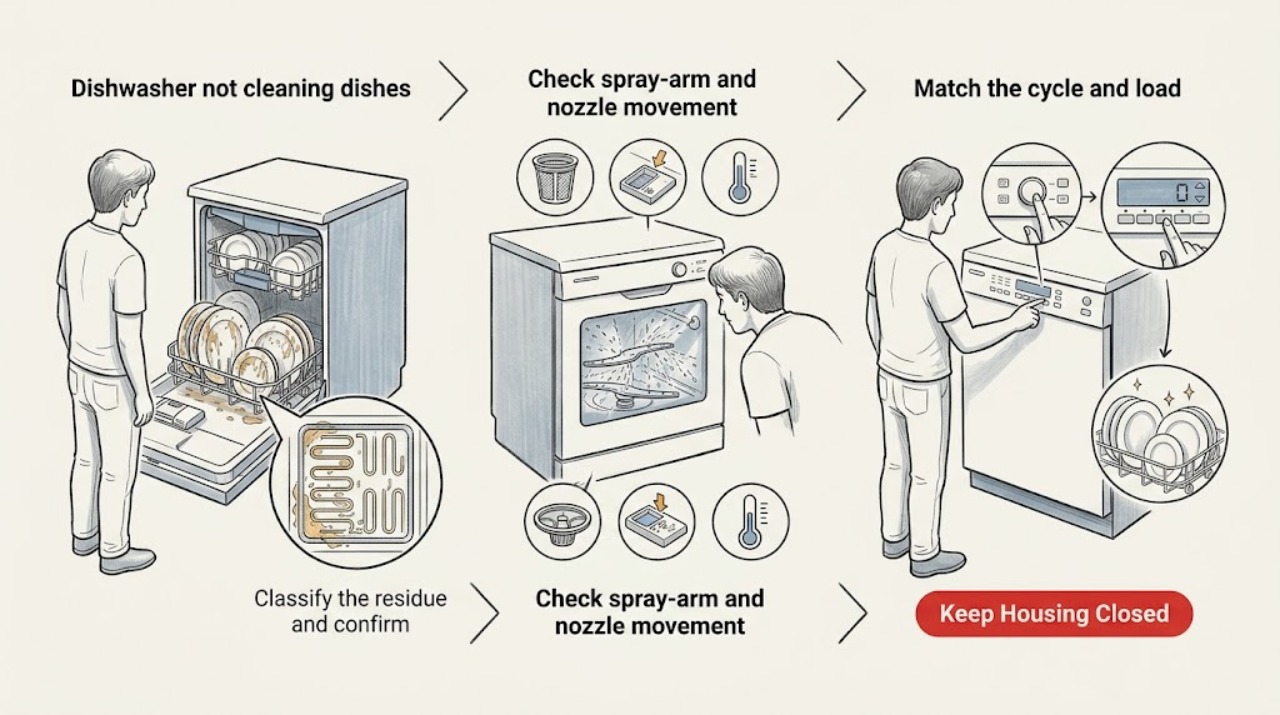
Work through in order
Diagnostic checks
Use only checks that match the exact appliance or system and its official guide.
-
Classify the residue and confirm the cycle completed
Inspect several affected dishes and the dispenser after the cycle. Identify food particles, grease, removable white film, film that does not wipe away, detergent left in the dispenser, or a cycle that stopped early or showed an error or blinking lights.
Expected result: Food remains on the dishes, white film wipes away, white film does not wipe away, detergent is still present, or the cycle did not complete normally.
Next step: Follow the residue branch and exact model guide. Do not add more detergent or change multiple settings at once; record the cycle and result so the next check has a clear comparison.
Stop if: Stop and arrange service for smoke, burning odor, exposed wiring, a leak, repeated breaker trips, an active error that prevents safe operation, or water near electrical parts.
Why this matters
Why: Food remains make spray coverage, loading, filter, detergent, water temperature, and cycle choice more likely. Wipeable film points toward mineral residue; non-wipeable film can be etching. Leftover detergent or an incomplete/error cycle means dispensing or operation must be addressed before judging wash power.
-
Match the cycle and load to the soil
Compare the selected cycle with the soil and cookware, then inspect whether racks are overloaded, dishes face the spray paths, or tall items block a nozzle, reflector, detergent door, or adjacent rack. Scrape large food pieces without fully pre-rinsing the dishes.
Expected result: A light or quick cycle was used for heavy soil, dishes are nested or overloaded, a tall item blocks a spray path or dispenser, or the load and cycle match the manual.
Next step: For one comparison load, use the model's normal or heavy-soil cycle as appropriate, leave nozzle paths open, and follow the manual's loading diagram. Do not assume another model's rack layout or specialty option applies.
Stop if: Do not force racks, remove a spray assembly that the manual does not identify as user-accessible, or run a load with an item preventing the door from latching.
Why this matters
Why: A cycle that is too light or a blocked spray path can leave food in specific areas without a pump or control failure. If loading and cycle are correct but all areas remain dirty, inspect spray movement, detergent, filter, and water conditions next.
-
Check spray-arm and nozzle movement and openings
With the dishwasher off, rotate accessible spray arms by hand only as the manual permits and inspect nozzle openings for food or mineral debris. Check that no dish or utensil is stopping an arm and that a user-removable nozzle is reattached and rotates freely after cleaning.
Expected result: An arm is blocked, a nozzle hole is clogged, an arm does not rotate freely, or all accessible nozzles are clear and move normally.
Next step: Clean and reseat only the model-accessible nozzle or spray arm, then compare one correctly loaded cycle. Arrange service if an arm is damaged, will not move after safe cleaning, or the issue persists with clear spray paths.
Stop if: Do not use knives, wires, compressed air into an unknown passage, chemicals, or force to clear a nozzle; do not open the pump or internal water path.
Why this matters
Why: Blocked openings or an arm that cannot move reduce water coverage and can leave food on dishes. Clear accessible debris with a soft brush following the Samsung model guide. If nozzles are clear but wash coverage remains poor, water delivery, filter, detergent, or an internal pump issue becomes more likely.
-
Clean the model-accessible filter and interior
Turn the dishwasher off and follow the exact Samsung manual for the removable filter variant. Inspect the filter, drain area, and accessible interior for food, grease, mineral buildup, or a filter that is not seated; clean with water and a soft brush as the manual allows.
Expected result: The filter or drain area is dirty, the filter is assembled incorrectly, the interior has buildup, or the filter and accessible interior are clean.
Next step: Reassemble the filter exactly as shown and run the model's empty cleaning cycle only when the manual calls for it. Do not use a cleaning cycle as a dish cycle, and do not remove a non-removable filter or pump cover.
Stop if: Do not reach into a wet pump, chip glass or mineral deposits with a sharp object, use bleach against the manual's material guidance, or continue if the filter housing or sump is damaged.
Why this matters
Why: Food and mineral buildup can restrict the filter or spray system and lower cleaning performance. An incorrectly assembled filter can create additional errors or drainage problems. A clean, correctly seated filter shifts the next check toward detergent dispensing, water temperature, cycle, or service-level water delivery.
-
Verify detergent dispensing, rinse aid, and water condition
Check that the dispenser is not overfilled or blocked, the detergent door can open, the selected amount follows the detergent and model instructions, and rinse aid is used as specified. Compare the incoming water condition with the Samsung guidance and look for signs the water is too cool for detergent to dissolve; do not make plumbing or heater changes beyond the manual.
Expected result: Detergent remains, residue blocks the dispenser, too much or too little detergent was used, rinse aid is absent, water is cooler than the model guidance, or dispensing and water conditions appear normal.
Next step: Clean only accessible dispenser residue, use the detergent and rinse-aid procedure for the exact model, and run one correctly loaded comparison cycle. If the dispenser still fails or dishes remain dirty, request service rather than changing several variables or opening the door assembly.
Stop if: Do not use hand-dish soap, overfill the dispenser, pour chemicals into spray paths, alter internal wiring or heating parts, or adjust a water heater beyond manufacturer and local safety guidance.
Why this matters
Why: A dispenser that cannot open or dissolve detergent leaves the wash chemistry unavailable. Incorrect detergent quantity can worsen film, while rinse aid and water temperature affect residue and cleaning results. Normal dispensing and water conditions make a spray, filter, cycle, inlet, or circulation fault more likely.
-
Document a repeatable failure before service
Record the exact model, cycle and options, load pattern, residue type, detergent and rinse-aid state, filter and nozzle condition, dispenser result, water-temperature observation, whether the cycle completed, and any error or unusual sound. Use an empty or small comparison load only as the manual permits.
Expected result: Cleaning improves after a safe loading or maintenance correction, or the same failure remains with correct loading, clear nozzles and filter, correct detergent, and a completed cycle.
Next step: Keep the record and arrange Samsung appliance service when the controlled comparison fails, detergent does not dispense, an error repeats, or diagnosis would require panels, live testing, pump access, or sealed-component work.
Stop if: Stop testing for water leaks, smoke, burning odor, shock, exposed wiring, repeated breaker trips, uncontrolled heating, or a cycle that cannot be stopped normally.
Why this matters
Why: Improvement after one identified correction supports a use or maintenance cause. Persistent failure under controlled conditions points toward circulation, fill, heating, dispenser, sensor, control, or another model-specific fault that cannot be identified safely from dirty dishes alone.
Use your observations
Decision map
Find the observation that best matches what you see, then follow the next safe action.
-
PATH 01Next step
What you see
Food remains mostly on dishes in one rack area or behind tall items, while the cycle completes and detergent dispenses.
Do this next
Rearrange one comparison load using the exact Samsung loading guidance, clear accessible nozzle openings, and select a cycle appropriate for the soil. Arrange service if the same area remains dirty with clear spray paths.
-
PATH 02Next step
What you see
Food particles remain across the load despite a suitable cycle, open spray paths, a clean filter, and a dispenser that opens.
Do this next
Confirm the manual-specific water and detergent conditions once, then arrange service rather than removing the circulation pump or testing internal heating.
-
PATH 03Next step
What you see
A white film wipes away from affected dishes or interior surfaces, and food cleaning is otherwise acceptable.
Do this next
Follow the Samsung cleaning and rinse-aid guidance, use the model's permitted cleaning cycle, and avoid overloading detergent. If the film does not wipe away, treat it as possible etching rather than adding more heat or detergent.
-
PATH 04Next step
What you see
Detergent remains in the dispenser, the door is blocked, the cycle stops early, or an error code or blinking lights appears.
Do this next
Follow the exact Samsung guide for the error or dispenser condition and correct only accessible loading or residue. Request service if the dispenser still fails or the cycle does not complete.
-
PATH 05Next step
What you see
The filter, drain area, or nozzle openings contain food or mineral buildup, or the filter was not assembled correctly.
Do this next
Clean and reseat only user-accessible parts according to the model manual, then run one comparison cycle. Stop and arrange service for damaged housings, inaccessible parts, or persistent poor cleaning.
-
PATH 06Next step
What you see
Cleaning remains poor under controlled conditions, or the dishwasher leaks, smells burned, shocks, smokes, trips the breaker, overheats, or cannot stop normally.
Do this next
Stop the dishwasher; isolate power and water when safe for a continuing leak or electrical hazard, and arrange qualified appliance or electrical service. Use appropriate emergency help for fire, shock, smoke, or uncontrolled flooding.
Helpful context
Understand the symptom
Start with the kind of residue, not a guessed replacement part
Food particles, a removable white film, and permanent glass etching lead to different checks. Samsung's cleaning guide directs food-particle complaints toward cycle choice, loading, rinse aid, detergent amount, water temperature, and dishwasher cleaning. If a white film wipes away, minerals are a stronger clue; if it does not, the glass may be etched and more detergent or heat can make the result worse. Record which dishes are affected and whether the cycle completed normally.
Water must reach the soil and detergent must be available
A crowded rack, a tall item blocking a nozzle, or a clogged spray opening can leave one area dirty while another looks clean. Samsung also notes that a dirty filter or interior can reduce performance and that detergent residue can keep the dispenser from opening or dissolving properly. Load so spray paths remain open, clean only model-accessible filters and nozzles, and compare detergent and rinse-aid use with the exact manual.
A completed cycle does not prove normal washing
The display can show a completed cycle even when a nozzle is blocked, detergent was not dispensed, the selected cycle was too light for the soil, or the unit did not reach the expected water condition. An empty or lightly loaded test is useful only after the safe external checks and the model's normal controls are correct. If the cycle stops early, shows an error, or leaves the dispenser closed, resolve that condition before judging cleaning performance.
Use the manual when the cleaning parts differ by model
Samsung dishwasher filters, nozzles, cycles, and dispenser layouts vary. The manufacturer's cleaning guide shows common removable-filter and nozzle procedures but sends users to the exact owner's manual when a variant does not match. Do not force a cap, remove an unlisted pump cover, or assume that a feature such as StormWash or a specialized zone exists on every model.
Safety boundary
Stop conditions
- Stop using the dishwasher for smoke, burning odor, shock, exposed wiring, water near electrical parts, a significant leak, uncontrolled heating, repeated breaker trips, or a cycle that cannot be stopped normally.
- Do not open internal panels, test live wiring, remove or energize a pump or heater, bypass a door or control safety, force a spray arm or filter, or tip or move the dishwasher as a routine cleaning check.
- Do not use hand-dish soap, chemical drain opener, sharp tools in spray or pump openings, excessive detergent, or an empty cleaning cycle as a substitute for the exact model instructions.
Only after diagnosis
Potential parts
- Samsung dishwasher spray arm or nozzle assembly
Consider this category only when inspection or qualified diagnosis confirms a cracked, obstructed, missing, or non-rotating spray assembly after loading and safe cleaning checks.
Confirm the exact Samsung model, rack position, attachment design, and manufacturer fit information before ordering. - Samsung dishwasher filter assembly
Consider this category only when the exact model has a replaceable filter and service confirms damage or a sealing/assembly problem that cleaning and correct reseating cannot resolve.
Filter variants and access differ by model; verify the owner's manual and approved component before replacement. - Samsung dishwasher detergent dispenser
Consider this category only when the dispenser remains closed or fails to release detergent after obstructions, loading, residue, and correct detergent use are excluded by a technician.
Confirm the exact model, dispenser door and latch design, wiring, and manufacturer-approved fit before selecting a part. - Samsung dishwasher circulation pump or heater
Consider this category only when qualified testing confirms inadequate water circulation or heating after loading, filter, nozzle, detergent, fill, and control causes are excluded.
Do not infer pump or heater failure from dirty dishes alone; confirm exact model, assembly, electrical connections, and approved compatibility.
When checks do not resolve it
Need a professional?
Arrange qualified Samsung appliance service when an empty or correctly loaded comparison cycle still leaves food, the dispenser does not open or dissolve detergent, spray arms do not move normally after safe accessible cleaning, a filter or nozzle assembly is damaged or inaccessible, the cycle stops with a recurring error, or diagnosis requires panels, pump/heater access, live electrical testing, or internal water work. Arrange plumbing or electrical help for an independent drain or power problem. Stop immediately for smoke, burning odor, shock, exposed wiring, water near electricity, flooding, uncontrolled heating, or repeated breaker trips.
Safety scope: This article covers normal controls, loading, detergent and rinse-aid checks, accessible filter/nozzle care, and model-documented comparison cycles only. Circulation pumps, heaters, inlet valves, sensors, wiring, control boards, concealed plumbing, and internal panels belong to qualified professionals.
Have this ready
- Provide the exact model, cycle and options, residue type and location, load pattern, whether detergent dispensed, filter and nozzle observations, rinse-aid and water-temperature context, cycle completion or error behavior, unusual sound or leak, and which single safe correction was tested.
Common questions
FAQ
Why is my Samsung dishwasher leaving food on the dishes?
Check whether the load or a tall item blocks a spray path, whether the selected cycle matches the soil, whether nozzle openings and the filter are clean, and whether detergent dispenses. If those checks are normal but food remains throughout a controlled load, water circulation, heating, filling, or control faults need qualified diagnosis.
Should I pre-rinse dishes before loading a Samsung dishwasher?
Scrape off large food pieces, but Samsung advises against fully pre-rinsing every dish in its cleaning guidance. Excessive pre-rinsing can contribute to white film or etching in some conditions; follow the exact cycle and loading instructions instead.
What does white film on dishes mean?
If the film wipes away, Samsung identifies hard-water mineral residue as a likely explanation. If it does not wipe away, the glass may be etched, which is not corrected by adding more detergent. Check detergent amount, water condition, rinse aid, and the model's cleaning guidance.
Why is detergent still in my Samsung dishwasher dispenser?
The dispenser may be overfilled, blocked by a dish or utensil, coated with residue, or affected by water that is too cool for the detergent to dissolve. Clean only accessible residue and check spray paths using the exact model guidance. If an empty comparison cycle still leaves detergent, request service.
How often should I clean the Samsung dishwasher filter and nozzles?
Samsung recommends keeping the filter, drain area, and nozzle openings clean whenever debris accumulates and describes periodic interior cleaning. The exact removal and interval vary by model, so use the owner's manual and reassemble the filter correctly.
Can a quick cycle cause dirty dishes?
Yes. Samsung describes cycle choices for different soil levels, with heavier cycles intended for tougher loads and shorter cycles intended for lighter work. Use the exact model's cycle guidance and keep spray paths open before treating a dirty load as a component failure.
When should I call for Samsung dishwasher service?
Arrange service when dishes remain dirty after a correctly loaded, suitable cycle with clear nozzles and filter, correct detergent dispensing, and model-appropriate water conditions; when the dispenser fails, the cycle stops with a recurring error, or diagnosis requires internal pump, heater, wiring, or control access.
Read the exact guide
Official sources
- Detergent does not dispense in Samsung dishwasherSamsung Support · Samsung dishwasher detergent and spray-path guidance; model manual controls dispenser design and access.
- Routine and deep clean your Samsung dishwasherSamsung Support · Samsung dishwasher cleaning maintenance; exact model manual controls variant-specific filter and nozzle removal.
- Samsung dishwasher cycles, options, and settingsSamsung Support · Samsung dishwasher cycle guidance; cycle names and options vary by exact model.
- Dishwasher cycle ends before dishes are cleanSamsung Support · Samsung dishwasher cleaning-performance troubleshooting; exact model instructions control model-specific cycles and procedures.
- Samsung Dishwasher FAQ | Product, Shipping & SupportSamsung US · Samsung dishwasher general product support; exact model manual controls model-specific features.
Community feedback
Share a repair observation
Share a plain-text repair observation. Accepted observations are published automatically; this page may take a moment to update.