
On this page
Start here
Quick answer
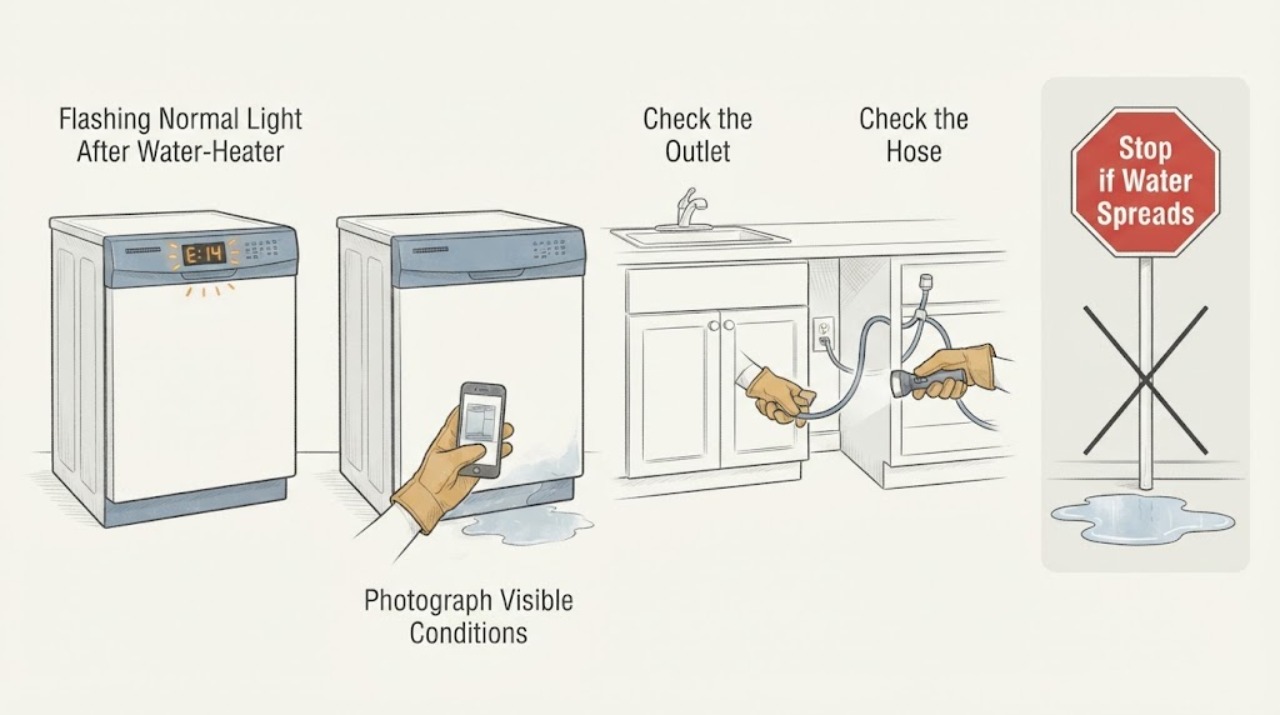
On the Samsung DW80M2020US platform, a flashing Normal light is a moisture-sensor warning rather than proof that flushing a household water heater caused a dishwasher leak. Samsung says the Normal indication can mean the leak sensor detected moisture and that the dishwasher may turn itself on and try to drain. First record whether Normal is the only light, whether the pump continues, and whether water is visibly returning. If there is standing water, an active leak, a wet cord or outlet area, or an electrical smell, stop the dishwasher, close its water shutoff if it is safely accessible, and turn off power from a dry position; do not keep resetting it. Do not tilt the machine, remove the base, bypass the sensor, disconnect a hose under pressure, or run cycles to reproduce the problem. A dry external check does not prove the sensor is faulty, so a persistent indication needs model-matched service.
Work through in order
Diagnostic checks
Use only checks that match the exact appliance or system and its official guide.
-
Check 1
Before pressing Reset or starting another cycle, photograph or write down the exact panel behavior: whether Normal alone flashes, which other lights or beeps appear, whether the dishwasher starts a drain pump by itself, and whether the door controls respond. Confirm the rating-label identity as DW80M2020US/AA-00 rather than relying on a shorthand model entry.
Expected result: Normal alone flashes with an attempted drain, several lights flash together, the pattern is ordinary cycle-status blinking, or the pattern cannot be captured reliably.
Next step: Keep the photo, complete model, market, and timing after the heater work for the service request. If Normal is accompanied by self-draining or a stopped cycle, treat it as a moisture warning and continue with the isolation check.
Stop if: Do not enter a service mode, erase the pattern, or repeatedly power-cycle merely to obtain a different display.
Why this matters
Why: Samsung distinguishes the Normal moisture indication from other blinking patterns and says blinking is not automatically an error when the dishwasher otherwise works normally. A different or unclear pattern cannot safely be assigned the leak meaning from this article.
-
Check 2
If any water is standing on the floor, returning from under the dishwasher, near the cord or outlet, or accompanied by an electrical smell, stop the cycle. From a dry, safe position, close the dishwasher's local water shutoff if it is accessible without moving the machine, and turn off the dishwasher breaker; do not reach into wet areas.
Expected result: Water is actively returning or standing, the electrical area is wet or smells burnt, or the floor and connection area remain dry.
Next step: For active water or electrical warning signs, leave the dishwasher isolated and arrange qualified appliance service (and electrical help when the supply area is affected). If dry, make only the external observations in the next check.
Stop if: Do not tilt or pull out the dishwasher, remove a toe-kick or base panel, bypass a leak sensor, or restore power while water or electrical damage is present.
Why this matters
Why: Active water or electrical exposure takes priority over identifying the exact leaking component. A dry area lowers the immediate hazard but does not disprove moisture trapped in the base or a sensor state.
-
Check 3
With the dishwasher still off, wipe only accessible dry surfaces and inspect from outside the cabinet for fresh moisture at the door edge and visible supply or drain connections. Do not disconnect a hose, loosen a fitting, touch the pump, or run a cycle to force the warning to return.
Expected result: The same area becomes wet again while the dishwasher is isolated, a visible connection is damp, or the accessible area stays dry after cleanup.
Next step: Photograph the first wet location and provide it with the light pattern to a qualified technician. If no moisture is visible but Normal persists, request service rather than repeatedly resetting or running the dishwasher.
Stop if: Do not use a controlled wash cycle as a home leak test when the leak warning is active, and do not remove the base to look for water.
Why this matters
Why: Returning moisture or a damp connection makes a real leak more likely; a dry outside surface can be consistent with residual moisture or a hidden base leak, but cannot prove a failed sensor or identify a part.
-
Check 4
Write a short timeline for the hot-water-heater work: when the household water was shut off and restored, whether the dishwasher was operating, whether a faucet initially sputtered or carried sediment, and when Normal began flashing. Note any visible moisture at the dishwasher's accessible supply or drain path without opening the plumbing.
Expected result: The warning began immediately after water service was disturbed, began later during a dishwasher cycle, or has no reliable relationship to the heater work.
Next step: Give the timeline, light photo, complete model suffix, and wet/dry observations to Samsung or a qualified installer/service provider. Do not flush sediment through the dishwasher or alter its inlet setting based only on this history.
Why this matters
Why: A water-service change may explain why the timing is notable, but timing alone cannot distinguish supply pressure or sediment from dishwasher leakage or residual moisture. A later cycle-linked return is more useful service evidence than the heater event by itself.
-
Check 5
Prepare the service handoff with the complete rating-label model, market, flashing-light pattern, whether the pump continues, the first wet location if any, and whether the water-heater work included a shutoff or plumbing change. Keep the dishwasher unused until the warning is resolved by model-matched guidance or service.
Expected result: The warning clears after a documented professional check and does not return, or it returns / the dishwasher remains stopped or drains continuously.
Next step: Ask Samsung service or the installer to inspect the leak-protection system, accessible supply/drain installation, and hidden moisture using the exact model documentation. Do not order a sensor, valve, pump, or control board from the light pattern alone.
Stop if: Stop immediately for smoke, burning odor, a wet electrical connection, overflow, or repeated breaker operation.
Why this matters
Why: A non-repeating event may have been transient, but clearing alone does not identify the cause. A returning indication or continuous draining means the moisture or leak condition remains unresolved and should not be managed with repeated resets.
Use your observations
Decision map
Find the observation that best matches what you see, then follow the next safe action.
-
PATH 01Next step
What you see
Normal flashes by itself, the dishwasher tries to drain or will not operate normally, and moisture is visible or returns at an accessible location.
Do this next
Keep water and power isolated as safely possible, document the first wet location, and arrange qualified Samsung or appliance service without opening the base.
Why this path and its safety boundary
Why it matters: This pattern fits Samsung's moisture-sensor warning plus a real or unresolved moisture condition; it does not identify whether the source is supply, drain, installation, or an internal leak.
-
PATH 02Next step
What you see
Normal flashes after the heater work, but the outside remains dry, there is no electrical warning, and the pump is not continuously running.
Do this next
Do not repeatedly reset or deliberately run the dishwasher to reproduce the warning; retain the timeline and request model-matched service if the light persists.
Why this path and its safety boundary
Why it matters: Residual moisture or a sensor state remains possible, but a dry external inspection cannot rule out hidden base moisture or prove that the sensor itself failed.
-
PATH 03Next step
What you see
Several lights flash, the pattern differs from Normal alone, or the display cannot be read reliably.
Do this next
Capture the pattern and complete model suffix, then use the exact manual or Samsung service. Do not borrow a code meaning from another Samsung appliance or platform.
Why this path and its safety boundary
Why it matters: Samsung uses multiple light patterns and ordinary status blinking on some models; the supplied word “leak” is not enough to map an unconfirmed pattern to LC/LE or another code.
-
PATH 04Next step
What you see
There is standing water near the cord or outlet, an electrical smell, smoke, or a breaker trips again when the dishwasher is powered.
Do this next
Stay clear, leave power off from a dry safe position, and contact qualified appliance/electrical help; do not re-energize to test the light.
Why this path and its safety boundary
Why it matters: This is an immediate electrical and water-safety boundary, not a normal code-reset situation.
Helpful context
Understand the symptom
What the flashing Normal light tells you
The DW80M2020US specification lists a digital water-leakage sensor designed to shut the dishwasher off when it detects a small leak. Samsung's blinking-light guidance gives the Normal indication a more specific meaning: moisture has been detected, and the dishwasher may start itself and try to drain. That is different from treating the word “leak” in the report as a confirmed hose, pump, valve, or control failure. The -00 suffix and the country-market rating label still matter for the matching manual and service record.
Why the water-heater work changes the first question
A dishwasher warning that appears after a household hot-water-heater flush deserves a timeline, not a causal assumption. Record whether the home's water was shut off, whether the supply was cloudy or disturbed, and whether anyone saw moisture at the dishwasher or its accessible connections. Samsung's leak guidance supports checking whether water returns and looking at visible supply and drain connections, but it does not make a heater-flush event evidence of a failed dishwasher part. Keep the machine isolated if water is active or the warning returns.
When checks do not resolve it
Need a professional?
Call for qualified service when Normal returns, the dishwasher continuously drains or will not operate normally, any moisture returns, the source is hidden, or the light pattern is not documented by the exact model guidance. Stop immediately and keep power off for smoke, burning odor, wet electrical connections, overflow, or repeated breaker operation. Do not tilt, pull out, open the base, bypass the leak sensor, disconnect pressurized plumbing, or perform live tests.
Common questions
FAQ
Does a flashing Normal light prove that my Samsung dishwasher is leaking?
Samsung's blinking-light guide ties Normal to moisture detected by the leak sensor, but the light alone does not identify where the moisture came from or which part is involved. Check only for visible external moisture from a safe, dry position and arrange service if the indication persists.
Could flushing the home's hot-water heater have caused this warning?
The timing is worth recording, especially if household water was shut off or disturbed, but it is not proof of causation. Do not flush sediment through the dishwasher or change a component based on timing; document the water-service event and have the dishwasher's accessible supply, drain, and moisture condition evaluated.
Should I reset the dishwasher until the Normal light stops flashing?
No. Record the exact light pattern first. Repeated resets can hide a returning moisture condition; Samsung advises troubleshooting the blinking pattern before resetting, and a persistent warning should go to model-matched service.
Can I remove the bottom panel to check for water?
Not for this warning. Keep the dishwasher isolated and do not tilt it, remove its base, bypass the sensor, or make an internal electrical check. A technician should inspect hidden moisture and the leak-protection system with the exact model documentation.
Read the exact guide
Official sources
- Steps to stop your Samsung dishwasher from leakingSamsung Canada · Opened Samsung Canada dishwasher leak guidance for general leak-safety decisions; the regional page does not define the assigned US light pattern or authorize invasive checks.
- DW80M2020US.inddSamsung · Opened Samsung US specification PDF for the exact base model; it confirms the dishwasher platform and its digital water-leakage sensor but does not replace the regional user manual.
- warranty | Official Samsung Support USSamsung · Opened Samsung US support page for the assigned DW80M2020US/AA platform; the rating label should confirm the supplied -00 suffix and market before service.
- DW80M2020US Dish Washer with Hybrid TubSamsung Canada · Opened Samsung Canada exact-base-model support page only to confirm the DW80M2020US family and route model manuals; /AC is not silently treated as the assigned US /AA-00 suffix.
- Lights are blinking on the Samsung dishwasherSamsung · Opened Samsung US dishwasher support guide; it covers model-dependent light patterns and directly defines the Normal moisture indication, while advising against assuming every blink is an error.
Community feedback
Share a repair observation
Share a plain-text repair observation. Accepted observations are published automatically; this page may take a moment to update.