
On this page
Start here
Quick answer
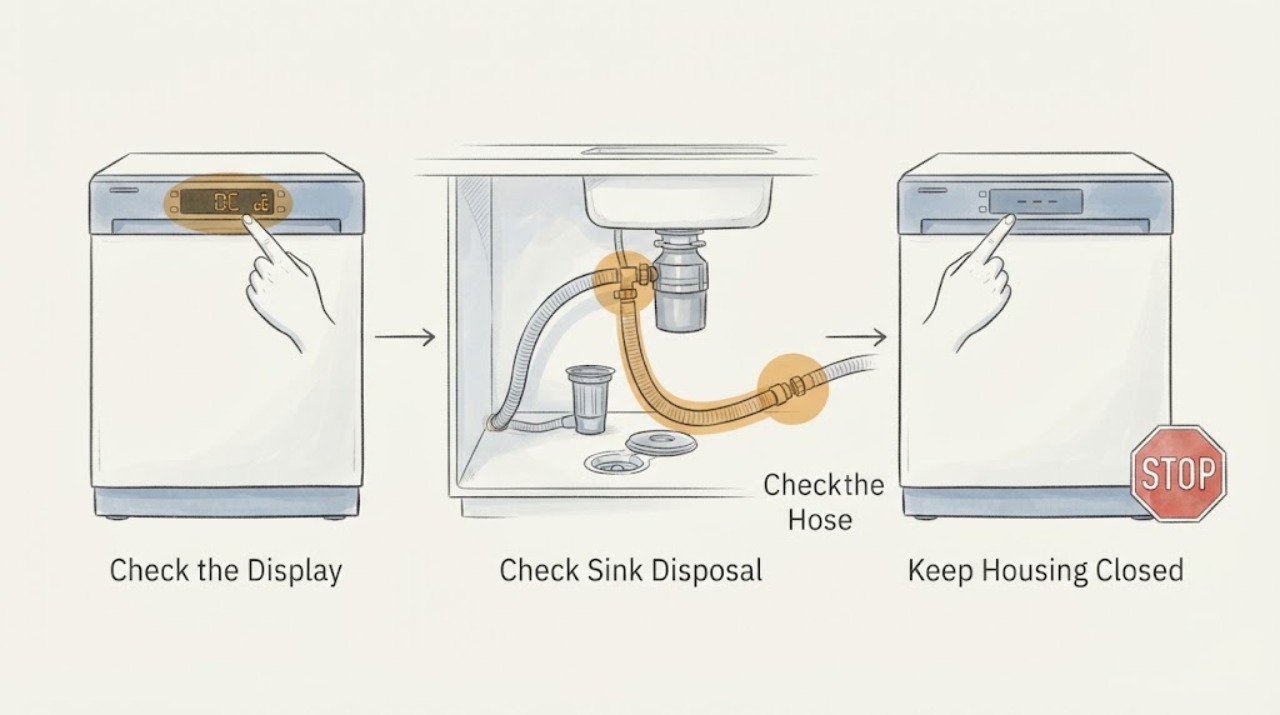
Samsung defines OC, 0C and oE as an over-level water error, while its drain guide includes those codes in the drain and overflow path. Start with the sink drain and garbage disposal, then inspect the visible drain hose for a pinch, kink, bend, damage, missing air gap or missing high loop as required by local rules. A recently installed disposal may still have its knockout cap. Run the connected sink briefly to distinguish a household plumbing blockage from a dishwasher drain problem. With power off and the dishwasher safe to access, clean only the filter or drain area that the exact manual identifies; sharp debris may be present and removable parts must be reassembled correctly. Do not keep resetting OC, reach into a powered or wet appliance, open the pump, or assume the drain pump has failed. If water remains, the hose is damaged, a leak is present or the code returns after the documented external checks, keep the dishwasher off and request model-matched Samsung service.
Before you begin
Safety first
- Limit owner checks to reading the code, inspecting the sink-side drain hose, checking the household sink and cleaning only model-documented accessible filter/drain parts with power isolated. Do not reach into a disposal, work on a wet or energized appliance, disconnect unknown plumbing, open the pump, bypass a leak sensor or perform live electrical tests.
Work through in order
Diagnostic checks
Use only checks that match the exact appliance or system and its official guide.
-
Check 1
Read the panel carefully and record whether it shows OC, 0C or oE, whether water remains in the tub, and when the code appears; use the complete model number for manual lookup.
Expected result: The display matches the OC family, another code is shown, or there is no code and only standing water is present.
Next step: Use the OC drain branches only for the matching display. If the code is different, stop applying this guide and use the exact model's support page.
Why this matters
Why: Samsung groups OC/0C/oE as over-level water and directs those cases to drain/overflow troubleshooting; another display may require a different path.
-
Check 2
Inspect the connected sink drain and garbage disposal for visible blockage; if the disposal was recently installed, confirm its dishwasher knockout cap was removed without reaching into the disposal.
Expected result: The sink or disposal is blocked, the disposal cap remains, or the sink connection is visibly clear.
Next step: Clear only a safe visible sink-side obstruction or have household plumbing serviced. If clear, continue to the drain-hose check.
Why this matters
Why: Samsung says a sink blockage or an unremoved disposal cap can prevent dishwasher drainage and mimic an appliance fault.
-
Check 3
From the dry, accessible sink cabinet, inspect the visible drain hose for being pinched under the dishwasher, kinked, bent or damaged, and verify the air-gap or high-loop arrangement required by local rules.
Expected result: The hose is pinched, kinked, damaged, lacks the required routing, or appears correctly routed.
Next step: Do not disconnect a damaged or pressurized connection. Correct only a safely accessible external position when the model installation instructions support it; otherwise arrange professional installation or service.
Why this matters
Why: Samsung says hose restriction and incorrect air-gap/high-loop installation can stop drainage or allow backflow; a sound visible hose does not prove the internal drain path is clear.
-
Check 4
Run water in the sink connected to the dishwasher for about 30 seconds and observe whether the sink itself drains normally.
Expected result: The sink backs up or drains slowly, or it drains normally.
Next step: Use a plumber for sink drainage trouble. If the sink drains normally, continue with the exact-manual filter and drain-area check.
Why this matters
Why: Samsung says failure of the sink to drain indicates a household plumbing issue rather than a dishwasher drain fault.
-
Check 5
With power isolated and only according to the exact model manual, inspect and clean the accessible filter or drain area, then reinstall every removable part in its documented position.
Expected result: Food or debris is found, a removable part is missing or mis-seated, or the area is clear and correctly assembled.
Next step: Remove only safe, accessible debris and reassemble exactly as documented. If water remains or OC returns, keep the dishwasher off and request service.
Why this matters
Why: Samsung says debris can prevent draining and that missing or incorrectly reassembled parts can cause drain errors; sharp debris may be present.
-
Check 6
Only after the drain path checks are complete, use the exact model's Samsung reset instructions if the manual or support page calls for a reset; record whether OC returns.
Expected result: The code clears and drainage remains normal, or OC returns/standing water remains.
Next step: For a returning code, damaged hose, leak, standing water or any internal access requirement, stop use and request model-matched service; do not keep resetting.
Why this matters
Why: Samsung says a reset can clear a stored code but will not fix an unresolved drain-hose or plumbing condition.
Use your observations
Decision map
Find the observation that best matches what you see, then follow the next safe action.
-
PATH 01Next step
What you see
The display reads OC, 0C or oE and water is above the normal level or remains in the tub.
Do this next
Check the sink/disposal, drain-hose routing and exact-manual filter area. Do not assign a pump failure or rely on reset alone.
Why this path and its safety boundary
Why it matters: Samsung identifies that code family as over-level water and routes it to drain and overflow troubleshooting.
-
PATH 02Next step
What you see
The connected sink backs up or does not drain during the 30-second sink check.
Do this next
Stop appliance troubleshooting and arrange plumbing service; do not use repeated dishwasher resets to clear a blocked sink drain.
Why this path and its safety boundary
Why it matters: Samsung says the issue is with household plumbing rather than the dishwasher itself.
-
PATH 03Next step
What you see
The drain hose is pinched, kinked, bent, damaged, or lacks the air-gap/high-loop arrangement required by local rules.
Do this next
Have the external installation corrected according to the model manual and local rules; request service if the hose is damaged or the code remains.
Why this path and its safety boundary
Why it matters: Samsung identifies hose restriction or incorrect routing as a common drain cause and warns that missing routing can allow backflow.
-
PATH 04Next step
What you see
The sink and visible hose are normal, but the filter/drain area contains debris or a removable part is misassembled.
Do this next
Clean and refit only the model-documented accessible parts with power isolated, then reassess; arrange service if OC or standing water returns.
Why this path and its safety boundary
Why it matters: Samsung says debris and incorrect reassembly can cause drain issues and errors.
-
PATH 05Next step
What you see
Water is leaking, pooled near electrical parts, the hose is damaged, or OC returns after the documented checks.
Do this next
Turn off power safely, close the water supply when appropriate, keep the dishwasher off and request qualified Samsung service; do not open the pump or run another cycle.
Why this path and its safety boundary
Why it matters: The condition is outside safe owner-level drainage maintenance and may involve an installation or internal fault.
Helpful context
Understand the symptom
Read OC correctly before resetting
Samsung's US error-code guide groups OC, 0C and oE under over-level water and sends them to the drain and overflow guide. A display that looks like 0C can therefore be the same code family, but the exact model manual remains the authority for a model-specific display. The code does not by itself identify a failed pump or a blocked filter.
Check the sink and disposal first
Look at the sink drain connected to the dishwasher. Samsung says a sink blockage can make the dishwasher appear unable to drain. If a garbage disposal is present, check for food waste or blockage; after a recent installation, confirm that the disposal knockout cap was removed. Do not put hands into a disposal or reach into a wet appliance.
Inspect the visible drain hose arrangement
From under the sink, look for a hose pinched by the dishwasher, sharply kinked, bent or damaged. Samsung says the drain connection needs an air gap or a high loop where required by local regulation; without the correct arrangement, water can backflow into the dishwasher. Do not disconnect a hose or alter the installation unless the water and power are safely isolated and the exact installation instructions support the work.
Separate household plumbing from the appliance
Run water in the connected sink for about 30 seconds and watch whether the sink drains. Samsung says a sink that does not drain points to household plumbing rather than the dishwasher. Stop there and use a plumber for that blockage; an appliance reset cannot clear a house drain.
Clean only the model-documented drain area
With the appliance powered off and the door open only as needed, follow the exact manual for any removable filter or drain-area parts. Samsung says food and debris can obstruct drainage, sharp debris may be present, and incorrect reassembly can create drain errors. Do not force a cover, reach into an energized or wet appliance, or infer a pump failure from standing water.
Reset only after the cause is addressed
Samsung says resetting clears error codes from memory but should follow the drain troubleshooting. If OC returns after the sink, hose, installation and model-documented filter checks, a reset has not solved the underlying condition. Keep the dishwasher off and request service rather than repeating resets or opening the pump area.
Stop for water or electrical risk
If water is leaking, pooling near electrical parts, the dishwasher will not stop draining, or the drain hose is damaged, turn off power safely and close the water supply when appropriate. Samsung's leak guidance calls for power isolation and moisture inspection; it does not support continued operation of a wet appliance. Arrange qualified service for a persistent code or any internal access.
When checks do not resolve it
Need a professional?
Use Samsung support or a qualified servicer for a returning OC code, persistent standing water, a damaged or incorrectly installed hose, a leak, suspected internal blockage or pump problem, or any condition needing cabinet access.
Safety scope: Limit owner checks to reading the code, inspecting the sink-side drain hose, checking the household sink and cleaning only model-documented accessible filter/drain parts with power isolated. Do not reach into a disposal, work on a wet or energized appliance, disconnect unknown plumbing, open the pump, bypass a leak sensor or perform live electrical tests.
Common questions
FAQ
Does Samsung OC mean the drain pump is broken?
No. Samsung defines OC, 0C and oE as over-level water and sends them to drain and overflow troubleshooting. Check the sink, disposal, drain-hose routing and model-documented filter area before service; the code alone does not prove a pump failure.
Can I reset a Samsung dishwasher showing OC?
Samsung says to troubleshoot the drain first. A reset can clear the code from memory, but it will not correct a blocked sink, a pinched hose or incorrect drain-hose installation. If OC returns, request service rather than repeating resets.
What should I check if the dishwasher still has water?
Check the connected sink and disposal, visible drain-hose routing, and the exact manual's filter/drain area instructions with power isolated. Samsung warns that sharp debris may be present and that removable parts must be reassembled correctly.
Read the exact guide
Official sources
- How to reset your Samsung dishwasherSamsung · Official Samsung reset guidance; used to state that reset follows troubleshooting and cannot correct unresolved hose or plumbing conditions.
- Samsung dishwasher is displaying an error codeSamsung · Official Samsung US error-code reference; used for OC/0C/oE over-level meaning and the distinction from 5C/5E drain codes.
- Samsung dishwasher is not drainingSamsung · Official Samsung US drain troubleshooting for units with or without a code, explicitly including OC/OE; used for sink, disposal, hose, air-gap/high-loop, plumbing, filter and service checks.
- Samsung dishwasher is leaking or has a leakage error codeSamsung · Official Samsung leak and moisture safety guidance; used only for power isolation, visible moisture and water-shutoff boundaries when a drain/overflow symptom is accompanied by a leak.
Community feedback
Share a repair observation
Share a plain-text repair observation. Accepted observations are published automatically; this page may take a moment to update.