
On this page
Start here
Quick answer
Treat a Samsung dishwasher that repeatedly triggers its moisture or leak sensor as a possible water or installation problem, not as a harmless reset condition. If there is visible water, stop the dishwasher, disconnect power from a safe dry location, and close the water supply. If there is no visible leak, keep power off while checking the supply and drain connections, a recently installed garbage-disposal connection, excess detergent or suds, and moisture left after moving the dishwasher. Let a suspected sensor area dry before one controlled power check; if the warning or self-draining returns, leave the dishwasher off and arrange Samsung or qualified appliance service. The exact display code or blinking-light pattern varies by model, so do not assign a code meaning without the model manual.
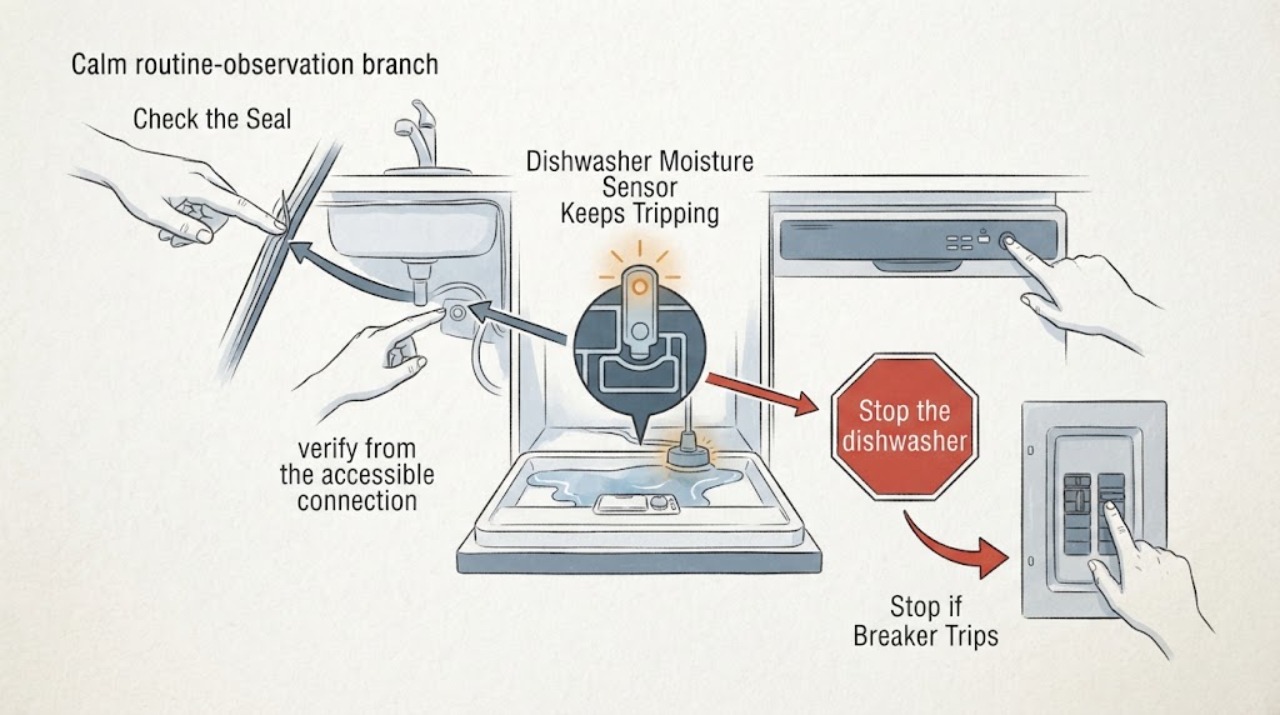
Work through in order
Diagnostic checks
Use only checks that match the exact appliance or system and its official guide.
-
Check 1
Stop the dishwasher. If there is visible water, turn off the dishwasher's circuit breaker or unplug it only from a dry, safe location, and close the dishwasher water-supply valve. Do not keep it powered while it repeatedly tries to drain.
Expected result: Water is actively collecting or reappearing, or the appliance is dry but continues to run its drain behavior after the moisture warning.
Next step: Leave the unit without power, keep the water supply closed when a leak is present, and arrange qualified appliance service. Do not remove panels or bypass the sensor.
Stop if: Stop immediately for water near electrical connections, a damaged cord or outlet, sparking, smoke, or a breaker that will not remain off.
Why this matters
Why: Active water makes a leak or overflow the priority; repeated draining means the protection response has not cleared and does not prove that the sensor itself is defective.
-
Check 2
With power isolated, inspect the accessible water-supply hose and its connections, the accessible drain-hose connection, the door seal, and the floor or cabinet area for moisture, loose fittings, gaps, or a hose that was disturbed during installation. Wipe up water only from safe, accessible surfaces.
Expected result: Moisture is concentrated at a hose connection, the door edge, the drain connection, or nowhere visible.
Next step: Close the water supply and request service for a leak inside the appliance or along the hose. A clearly loose household-side connection may need correction by an installer or plumber, but do not pull out a built-in unit or open panels.
Why this matters
Why: A connection or seal location gives service a useful leak path to inspect; no visible moisture does not rule out water in the base or an intermittent leak.
-
Check 3
If the warning began after the dishwasher was connected to a garbage disposal, verify from the accessible connection information or installer documentation that the disposal inlet cap was removed. Do not dismantle the disposal or dishwasher to reach it.
Expected result: The dishwasher was recently connected to a disposal and the cap status is unknown, or the cap is confirmed removed.
Next step: Have the installation corrected by a qualified installer if the cap is still present. Keep the dishwasher off until the connection is corrected and the moisture warning is cleared under the exact installation instructions.
Why this matters
Why: Samsung identifies a retained disposal cap as a condition that can send water where it should not go and activate the leakage sensor; a confirmed removed cap shifts attention back to leaks, drying, or service.
-
Check 4
Check whether detergent was overfilled or placed outside the dispenser, and whether there were unusually heavy suds. Do this only with the appliance unpowered; do not add more detergent or run a cycle to test the theory.
Expected result: Excess detergent or suds are present, or the dispenser was filled normally and the tub is not unusually sudsy.
Next step: Clean only what is safely accessible according to the exact model instructions, leave the unit off while it dries, and request service if the warning returns or any water remains.
Why this matters
Why: Samsung says lingering detergent can be moist enough to activate the moisture sensor and can remain longer than water; normal detergent use makes that explanation less supported but does not clear a leak.
-
Check 5
If the dishwasher was recently moved, installed, or leveled, leave it without power long enough for incidental moisture near the sensor to dry. Record the exact model label and the display code or blinking-light combination instead of guessing its meaning.
Expected result: The warning clears after drying, or it returns as soon as power is restored; the model and display pattern are known or still unknown.
Next step: If the area is dry and there is no visible leak, make one controlled power check. If the warning or self-draining returns, turn power back off and arrange service with the model and pattern recorded; do not repeatedly reset it.
Why this matters
Why: Samsung recognizes splashed moisture after moving as a possible temporary trigger, but a returning warning means the underlying moisture or installation issue remains unresolved. Blinking-light meanings are model-dependent.
-
Check 6
Use the exact model manual or Samsung support lookup to identify the displayed code or light pattern, then compare it with the observed water condition. Do not treat LE, LC, or a light combination as universal across every Samsung dishwasher.
Expected result: The model-specific guide confirms a leakage indication, identifies an alternate condition such as over-level water, or does not match the observed pattern.
Next step: Follow only the matching model guidance for external checks. If the pattern returns, does not match, or the dishwasher cannot be safely isolated, leave it off and request Samsung or qualified appliance service.
Why this matters
Why: Samsung's general code page groups leakage indications separately from over-level, drain, water-supply, and other errors; a mismatched pattern needs model-specific interpretation rather than a generic moisture-sensor diagnosis.
Use your observations
Decision map
Find the observation that best matches what you see, then follow the next safe action.
-
PATH 01Next step
What you see
Water is actively leaking, pooling near electrical parts, or the water supply cannot be stopped safely.
Do this next
Keep power isolated, close the water supply if safely accessible, protect the surrounding area from further water, and arrange qualified appliance or installation service. Do not open the base or touch wet electrical parts.
Why this path and its safety boundary
Why it matters: This is an active leak or overflow risk; the moisture warning is not safe to clear by repeated resets.
-
PATH 02Next step
What you see
No leak is visible, but the dishwasher was recently moved or installed, or water was recently introduced near the base.
Do this next
Leave power off and allow the area to dry. After confirming the water connections are secure and the area is dry, make one controlled power check; service is needed if the warning returns.
Why this path and its safety boundary
Why it matters: Samsung identifies residual or splashed moisture near the sensor as a possible trigger even when no active leak is obvious.
-
PATH 03Next step
What you see
The warning began after a garbage-disposal connection or after excess detergent/suds were used, and the corresponding installation or detergent condition is confirmed.
Do this next
Have the installation corrected or stop the detergent overfill, then keep the appliance off while accessible moisture dries. Request service if the warning persists.
Why this path and its safety boundary
Why it matters: These are documented ways for water or persistent moisture to reach where the leakage sensor reacts; they do not prove a failed sensor.
-
PATH 04Next step
What you see
The dishwasher is dry and the warning returns after one controlled power check, or the exact model pattern does not match the general Samsung guidance.
Do this next
Turn power off again, do not bypass the sensor or open panels, and provide service with the model label, code/light pattern, leak observations, installation history, and detergent history.
Why this path and its safety boundary
Why it matters: A recurring protection response needs model-specific diagnosis; it could reflect hidden moisture, an installation problem, or a sensor/control issue that cannot be identified safely from the symptom alone.
Helpful context
Understand the symptom
A moisture warning is a protection response, not a diagnosis
Samsung's dishwasher guidance describes LE/LC leakage indications as moisture detected where it does not belong and says the dishwasher may keep draining. Moisture can come from a real leak, installation or connection trouble, detergent residue, or water splashed near the sensor; the warning alone does not identify a failed sensor or another internal part. Because this task has no model, use the exact model manual only to interpret an unlisted display or blinking-light pattern.
Keep the user checks external
The safe scope is to isolate power, stop the water if a leak is visible, inspect accessible hose and connection areas, correct an installation condition that is directly visible, and allow incidental moisture to dry. Do not remove the base, probe the sensor, bypass the protection, open electrical compartments, or keep restarting the dishwasher to see whether the warning clears.
When checks do not resolve it
Need a professional?
Give the technician the exact model/serial label, code or blinking-light pattern, whether the dishwasher was recently moved or installed, the location and timing of any water, disposal-connection history, detergent/suds history, and photos taken only from a safe dry position.
Common questions
FAQ
Is a moisture-sensor warning proof that the Samsung sensor has failed?
No. Samsung describes moisture where it does not belong as the trigger and lists leaks, installation conditions, detergent residue, and moisture after moving as possible causes. A returning warning needs model-specific service rather than a guessed sensor replacement.
Can I keep letting the dishwasher drain until the warning disappears?
No. Samsung says the dishwasher may keep draining while moisture is detected, but the safe troubleshooting path is to isolate power, inspect for a leak or installation condition, allow suspected incidental moisture to dry, and request service if the warning returns.
Does every Samsung dishwasher use LE or LC for this problem?
Do not assume that. Samsung says some models show blinking lights instead of a digital code, and different light combinations can indicate different conditions. Use the exact model guide and observed pattern before interpreting the warning.
Read the exact guide
Official sources
- Samsung dishwasher is displaying an error codeSamsung · General Samsung dishwasher code reference; LE/LC is cited only as an example of leakage detection and not assigned universally to the no-model task.
- Samsung dishwasher will not turn offSamsung · Family-level Samsung dishwasher guidance for a unit that keeps running or draining; not used to infer a particular model's code or component failure.
- Lights are blinking on the Samsung dishwasherSamsung · Used to establish that models without a digital display use combinations of lights and that the meaning varies by pattern; no pattern is assumed for the assigned topic.
- Samsung dishwasher is leaking or has a leakage error codeSamsung · Samsung's US support guidance for dishwasher models with a leakage indication; used for family-level external checks only because the assigned task supplies no exact model.
Community feedback
Share a repair observation
Share a plain-text repair observation. Accepted observations are published automatically; this page may take a moment to update.