
On this page
Start here
Quick answer
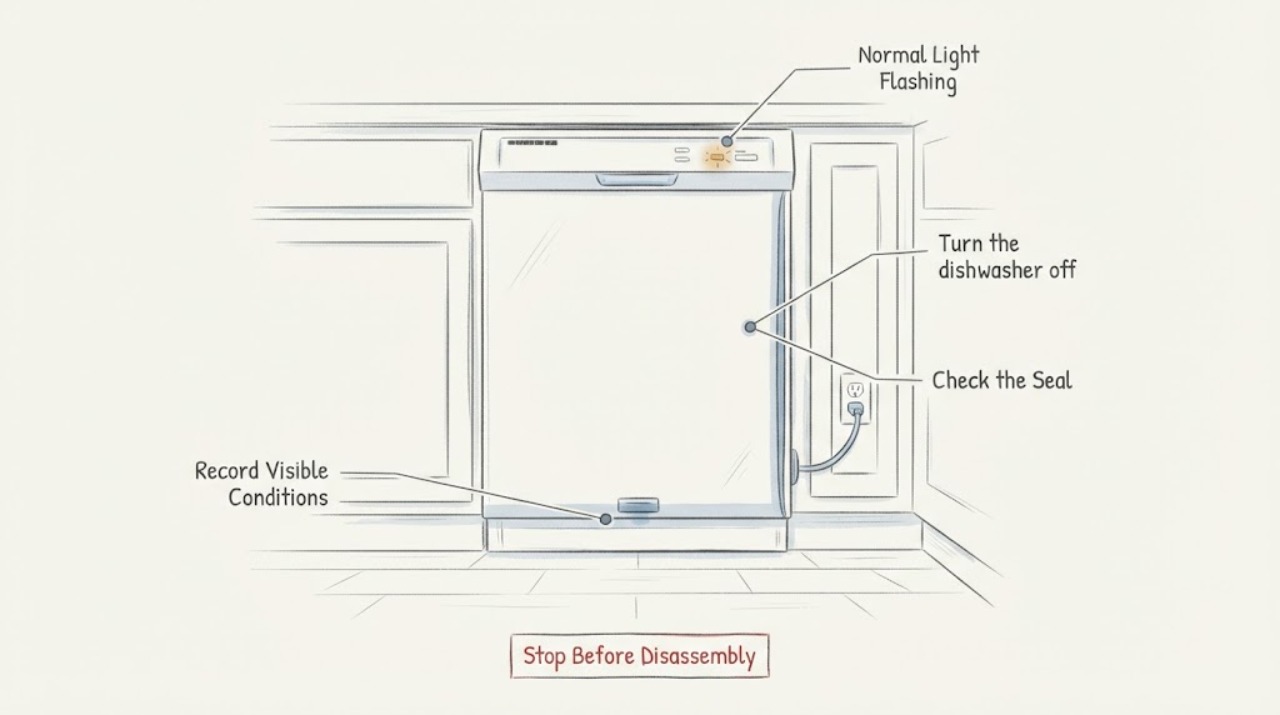
On the Samsung DW80M2020US, verify that the Normal light is the only light flashing. Samsung's official blinking-light guide defines a lone Normal indication as moisture detected by the dishwasher's leak sensor; the dishwasher may turn itself on and keep draining. Do not keep resetting it or run repeated cycles. Turn off power at the breaker, look for visible water at the supply and drain connections, check whether a recent installation or move left moisture near the sensor, and verify that only dishwasher detergent was used. Let the condition dry as Samsung directs, then restore power once to check the indication. If the light returns, if water is present, or if the pattern includes other lights, leave the dishwasher off and request service with the full model code.
Before you begin
Safety first
- Do not tip the dishwasher, remove the base/cabinet, bypass the leak sensor, perform live electrical tests or run repeated cycles while water or a leak condition is present.
Work through in order
Diagnostic checks
Use only checks that match the exact appliance or system and its official guide.
-
Check 1
With the controls visible, confirm whether only the Normal light flashes. Record any other illuminated or flashing lights, beeps, continuous drain sound and the complete model code from the rating label, including the regional suffix.
Expected result: Normal is the only flashing light, or another light is also flashing/illuminated.
Next step: If only Normal flashes, continue with the leakage checks. If any other lights are involved, use the exact DW80M2020US manual/support path for that combination and do not apply the single-Normal definition.
Why this matters
Why: Samsung assigns meanings to combinations of lights, and a lone Normal indication is different from multi-light combinations. A different pattern cannot be decoded as the single-Normal condition.
-
Check 2
Turn the dishwasher off at the circuit breaker before inspecting it. If water is visible or a supply connection is wet, close the dishwasher water supply if it can be reached safely; do not touch wet electrical connections.
Expected result: The unit is de-energized and dry externally, or water is visible near the door, supply hose, drain hose or floor.
Next step: Keep power off, wipe up only accessible water and arrange service/installer help for a continuing leak. Do not run a new cycle to “test” a wet or electrically unsafe dishwasher.
Why this matters
Why: Samsung directs users to remove power before troubleshooting a leakage indication. Visible water is a real leak/spill condition until the source is identified; the light should not be cleared by repeated power cycles.
-
Check 3
From outside the appliance, inspect both ends and the visible length of the water-supply hose, the drain-hose connection to the sink/disposal, and the door seal for moisture, loose connections, damage or a displaced seal. Do not pull the dishwasher out or remove panels.
Expected result: A hose connection, drain connection, seal or floor is wet, or the visible installation is dry.
Next step: Keep power and water off for a confirmed leak and have the installer or qualified service correct it. If no leak is visible, continue with installation/moisture-source checks rather than opening the base.
Why this matters
Why: Samsung lists supply/drain connections and the door seal among the external leak checks. A dry exterior does not rule out moisture below the unit or an internal leak; it only limits what can be concluded safely.
-
Check 4
Check whether the dishwasher was recently installed, moved, connected to a garbage disposal, or exposed to excess detergent/suds. If a disposal was recently connected, verify from the installation instructions that its dishwasher inlet cap was removed; use only dishwasher detergent, not hand dish soap.
Expected result: The unit was recently moved/installed, the disposal connection changed, the cap may still be present, or excess suds/detergent is visible.
Next step: Correct only an obvious external installation or detergent condition using the exact installation/manual instructions. Do not dismantle the dishwasher or substitute a component.
Why this matters
Why: Samsung says installation moisture, an unremoved disposal cap and lingering detergent can activate the moisture sensor or interfere with drainage. These observations do not prove a failed sensor or pump.
-
Check 5
After power is off and visible conditions are addressed, allow the dishwasher and the sensor area to dry as Samsung directs. Restore power once to check the indication; do not reset before the leakage checks or run repeated cycles.
Expected result: The Normal light clears and the dishwasher remains dry, or the light returns/continuous drain resumes, water appears, or the pattern changes to multiple lights.
Next step: If the light returns or water is present, keep the dishwasher off and request Samsung or qualified appliance service with the full model code, light pattern, leak observations and recent installation history. Do not bypass the sensor or open electrical panels.
Why this matters
Why: A cleared indication after drying does not prove the source is repaired. A returning light or a different pattern requires model-specific service; Samsung directs service when the leakage condition persists.
Use your observations
Decision map
Find the observation that best matches what you see, then follow the next safe action.
-
PATH 01Next step
What you see
Only the Normal light flashes, the dishwasher repeatedly tries to drain, and no other light pattern is present.
Do this next
Keep power off, inspect accessible supply/drain/seal areas, consider recent movement or installation moisture and allow drying time before one supervised power restoration.
Why this path and its safety boundary
Why it matters: Samsung identifies this combination as moisture detected by the leak sensor, even when the leak is not visible.
-
PATH 02Next step
What you see
Water reappears at a hose, door seal, disposal connection or floor, or the dishwasher is wet near an electrical connection.
Do this next
Leave power off, close the water supply if safe and arrange installer or qualified service. Do not run another cycle, remove panels or work on wet wiring.
Why this path and its safety boundary
Why it matters: The indication is accompanied by a confirmed leak or electrical safety hazard, so the dishwasher should not be operated.
-
PATH 03Next step
What you see
The light began after installation, moving the unit, connecting a disposal or using excess detergent, and no continuing external leak is found.
Do this next
Correct only the visible installation/detergent condition using the exact DW80M2020US instructions, let the sensor area dry and check the light once. Escalate if it returns.
Why this path and its safety boundary
Why it matters: Samsung lists installation moisture, disposal plumbing and detergent residue as conditions that can trigger the leak sensor or related drainage behavior.
-
PATH 04Next step
What you see
Another light flashes with Normal, the light returns after drying, the dishwasher continues draining or the appliance will not operate normally.
Do this next
Keep power off and use the exact model support/manual or request service. Do not transfer an error meaning from a different Samsung series or bypass the leak sensor.
Why this path and its safety boundary
Why it matters: The single-Normal definition no longer covers the observed state, or the moisture condition has not been resolved.
Helpful context
Understand the symptom
A single flashing Normal light is a leakage-protection indication in Samsung's current dishwasher light guide, not a diagnosis of a pump, valve or control board. First confirm that Normal is the only flashing light and record whether the dishwasher is trying to drain continuously. The assigned DW80M2020US model has an official Samsung support page with its user and installation manuals, so do not transfer a different Samsung model's light combination.
The safe checks stay outside the cabinet. Do not tip the dishwasher, remove its base, bypass the leak sensor or reach into live wiring. If the light persists after the visible conditions have dried or any leak is found, use Samsung service rather than forcing another wash cycle.
When checks do not resolve it
Need a professional?
Request service when water is present, the Normal light returns after drying and external checks, continuous draining persists, the dishwasher will not operate normally, or another light pattern appears.
Safety scope: Do not tip the dishwasher, remove the base/cabinet, bypass the leak sensor, perform live electrical tests or run repeated cycles while water or a leak condition is present.
Have this ready
- Provide the full DW80M2020US model code and suffix, exact flashing-light pattern, beeps/drain behavior, recent installation or movement, disposal connection history, detergent used and locations of any visible moisture.
Common questions
FAQ
What does a flashing Normal light mean on the Samsung DW80M2020US?
When Normal is the only flashing light, Samsung's official blinking-light guide identifies moisture detected by the leak sensor. The dishwasher may turn on and keep draining. Confirm that no other lights are involved before applying this definition.
What should I check first when the Normal light flashes?
Turn off power at the breaker, then inspect accessible supply and drain connections, the door seal, recent installation or movement, the garbage-disposal inlet-cap condition and excess detergent/suds. Let the unit dry as Samsung directs; do not reset before troubleshooting.
Can I remove the base or tip the dishwasher to clear the light?
No. Samsung's consumer guidance supports power-off, external leak/moisture checks, drying time and service. Do not tip the dishwasher, open the base or bypass its leak sensor without qualified model-specific service.
Read the exact guide
Official sources
- How to reset your Samsung dishwasherSamsung · Opened Samsung official reset guide. It says reset can clear some glitches but should follow troubleshooting; it does not replace leakage checks or service.
- DW80M2020US Dish Washer with Hybrid Tub | Samsung Support CASamsung · Opened Samsung's exact-model support page. Its page data identifies the DW80M2020US/AC model and lists the matching English/French user and installation manual files for the US/Canada model family. It is used to lock model scope; it does not authorize procedures absent from the manual.
- Lights are blinking on the Samsung dishwasherSamsung · Opened Samsung US official troubleshooting page. It states that combinations of blinking lights represent codes, warns that lights may blink during normal use, and specifically says a lone Normal light means the leak sensor detects moisture and the dishwasher may continuously drain. The exact model page is cited separately for DW80M2020US scope.
- Samsung dishwasher is leaking or has a leakage error codeSamsung · Opened Samsung US official leakage guide. It directs power off, visible supply/drain/seal inspection, disposal-cap check, excess-detergent check, drying time and service if the condition remains. It does not support removing the base or diagnosing an internal part for the reader.
Community feedback
Share a repair observation
Share a plain-text repair observation. Accepted observations are published automatically; this page may take a moment to update.