
On this page
Start here
Quick answer
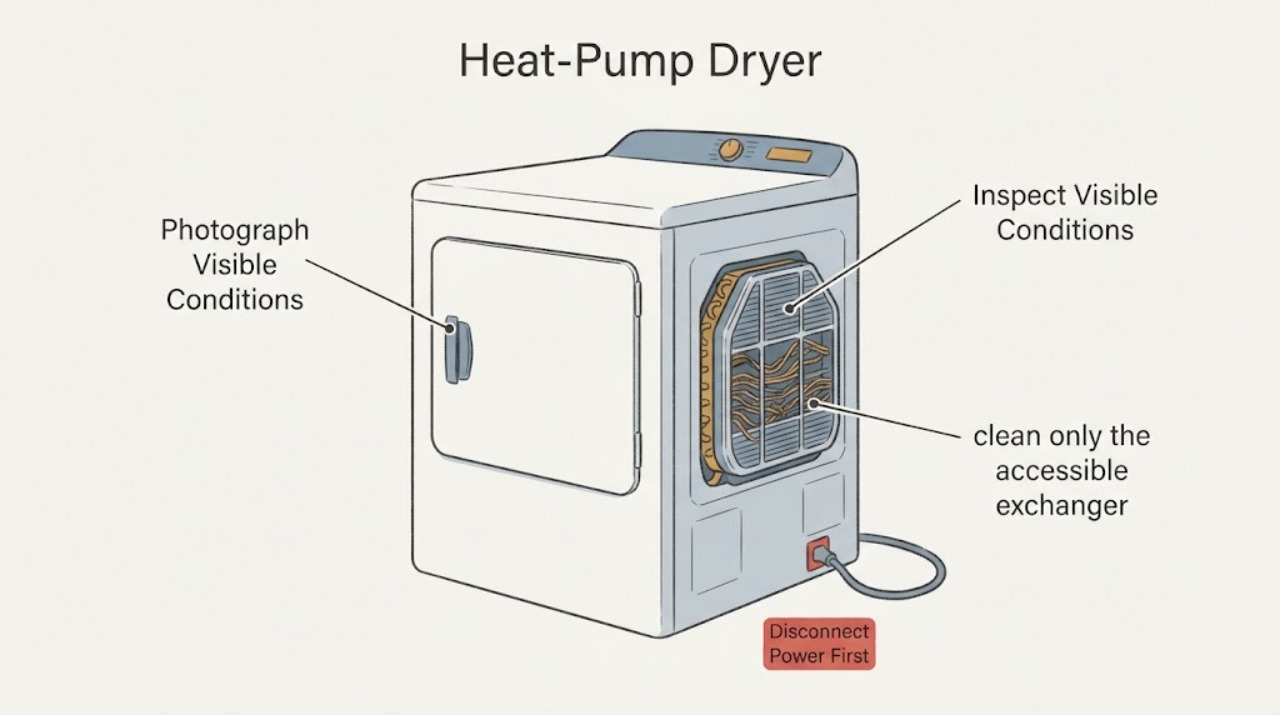
Do not straighten the heat-exchanger fins on a second-hand Samsung DV90T8240 dryer with a knife, screwdriver, comb, or other sharp tool. The base model is not a complete regional model: Samsung's opened support pages show DV90T8240SX/FQ in the UK and related SH/SX/SE suffixes in different markets, and Samsung warns that models, sequences, and settings vary by location. Photograph the rating label and confirm the full suffix and market before using a cleaning procedure. With the dryer unplugged and fully cool, inspect only from the user-accessible heat-exchanger cover for crushed or folded fins, a puncture, oily residue, hissing, an unsecured cover, unusual water, or damage from a previous owner. A small isolated bend with no leak, sharp damage, overheating, error, or drying problem is not enough to identify a failed heat exchanger; leave it alone and use only the exact manual's approved brush or brush-vacuum method. Samsung's heat-pump guidance says not to touch the exchanger with bare hands and not to bend or damage the fins. Extensive crushing, a puncture, refrigerant-like odor or residue, abnormal noise, overheating, smoke, repeated warning, long drying, or a cover that cannot lock is a stop-use condition for qualified Samsung appliance service. Do not remove the heat exchanger, add water or liquid cleaner, open the sealed system, or continue heated cycles to see whether a visibly damaged exchanger is safe.
Before you begin
Safety first
- Owner checks are limited to model/market identification, unplugged cool external inspection, exact-manual-approved lint/heat-exchanger maintenance, and one supervised cycle only when all covers and safety conditions are normal. Do not touch fins bare-handed, use sharp tools, add unapproved water or cleaners, remove panels, open the sealed system, test live wiring, bypass thermal/door protection, or install a generic part.
Work through in order
Diagnostic checks
Use only checks that match the exact appliance or system and its official guide.
-
Check 1
Unplug the dryer from a safe, dry position, let it cool completely, and photograph the rating label, the heat-exchanger cover, and the fin area without touching the fins. Record the full model suffix, serial information, country/market, and whether the dryer was acquired used or previously serviced.
Expected result: The label shows a complete DV90T8240 suffix such as SX, SH, or SE; only DV90T8240 is visible; the market is unknown; or the cover/fin area differs from the local manual.
Next step: Use the exact model and market in Samsung Support to retrieve the matching manual before any maintenance. If the suffix or market cannot be confirmed, keep the dryer unplugged for any damaged-fin, cover, leak, or performance concern and arrange model identification by qualified service.
Stop if: Do not remove panels, pull the dryer from a stacked installation, or keep testing while the model identity or maintenance boundary is unresolved.
Why this matters
Why: Samsung documents regional model and sequence differences. A base-model match does not establish the correct cover, brush direction, water instruction, alert behavior, or replacement path for a particular used machine.
-
Check 2
With power isolated and the exchanger cool, inspect only the visible face through the user-accessible cover. Look for a small isolated flattening, broad crushed rows, a hole, sharp or loose metal, oily residue, lint packed into the fins, a missing inner cover, or levers that do not lock.
Expected result: Only a small bend is visible and the fins remain continuous; several rows are crushed; there is a puncture, oily residue, sharp metal, loose cover, or a latch that will not secure; or the area cannot be viewed without disassembly.
Next step: Leave a minor isolated bend untouched and continue only with the exact manual's safe external checks. For crushing, puncture, residue, loose metal, an unsecured cover, or inaccessible damage, stop using the dryer and arrange qualified Samsung appliance service.
Stop if: Do not comb, scrape, pry, bend back, solder, glue, seal, or remove the heat exchanger or cabinet to improve its appearance.
Why this matters
Why: A minor visual deformation does not prove a failed sealed system or require a replacement. Crushing, puncture, residue, inaccessible damage, or an unsecured cover crosses the external-cleaning boundary and can affect airflow, heat transfer, or containment.
-
Check 3
If the exact manual confirms the cover and cleaning sequence for this suffix, clean only the accessible exchanger using the supplied appliance brush or the manual-approved brush attachment, with the dryer unplugged and cool. Keep the movement gentle and aligned with the manual; do not use a sharp fin comb, bare hands, water, liquid cleaner, compressed air, or an unapproved tool.
Expected result: Lint or dust lifts without contact damage; fins catch or deform; the brush cannot reach safely; the cover or levers do not reinstall; or the local manual gives a different procedure or no owner-accessible procedure.
Next step: Stop when the tool catches, fins deform, the cover cannot be secured, or the local manual does not match. Keep the dryer unplugged and use qualified service for damage or uncertain access; if cleaning is completed exactly as documented, continue only to a single supervised performance check when no hazard exists.
Stop if: Do not force the cover, spray the exchanger, flood the compartment, or continue a cleaning attempt that requires cabinet removal or contact with sealed-system components.
Why this matters
Why: Samsung's opened guidance says a heat exchanger may need regular cleaning and warns that damaged fins reduce drying performance. The exact model/region determines whether the cover, brush, vacuum, and any moisture instruction apply; a procedure from another Samsung family is not a universal authorization.
-
Check 4
Check the other user-accessible performance inputs while the dryer is off: clean and fully dry the lint filter as the exact manual directs, note whether the condenser/heat-exchanger warning is present, confirm the door and cover close correctly, and record the room, load size, drying time, and any water in the condensate path without opening the sealed system.
Expected result: The warning clears after the approved clean; drying is normal; drying is slow or clothes remain damp; the dryer overheats; water accumulates unusually; or an error, odor, noise, or electrical symptom appears.
Next step: Make only the exact manual's external correction and compare one supervised cycle. If the warning or drying problem persists, stop repeated testing and arrange qualified service; do not select a fan, sensor, compressor, or exchanger part from the symptom.
Stop if: Do not run heated cycles with a missing filter or unsecured cover, disconnect a duct or hose as a workaround, or bypass a thermal or door safety.
Why this matters
Why: A dirty filter, incorrect load, blocked airflow, or a normal condensate condition can affect performance without proving fin damage. Persistent underperformance, abnormal heat, water outside the expected path, or a warning after cleaning keeps an internal airflow, fan, sensor, or sealed-system fault possible.
-
Check 5
Observe one model-approved cycle only if the exchanger is intact, all covers and filters are secure, there is no visible leak or electrical/fire symptom, and the exact manual permits normal use. Stay present and record whether the drum rotates, the dryer reaches the expected cycle state, the load dries, and any warning or abnormal sound returns.
Expected result: The cycle completes normally; drying is slow but stable; the dryer stops with an error; the cabinet becomes unusually hot; the drum or fan makes a new noise; or smoke, burning odor, sparking, or a hot cord appears.
Next step: Stop using the dryer and arrange qualified service for recurring underperformance or any warning. For smoke, burning odor, sparks, a hot/damaged cord, or fire signs, isolate power only if safe and obtain urgent electrical/emergency help.
Stop if: Do not run repeated heated cycles to compensate for bent fins or to see whether a suspected leak worsens.
Why this matters
Why: A normal cycle makes severe fin damage less likely but cannot certify the heat exchanger or sealed system. Recurring poor drying, overheating, a warning, or abnormal noise after an approved clean requires diagnosis rather than another trial.
-
Check 6
Prepare a service handoff with the complete model/market, photographs, fin pattern, cover and lever condition, previous-owner or transport history, lint/filter condition, warning text, cycle/load, drying time, noise, temperature, and any residue or water observed. Do not order a replacement exchanger or straightener from a generic Samsung listing.
Expected result: The exact suffix is confirmed but the fins are substantially damaged or performance is abnormal; the suffix remains unknown; or the machine is normal apart from a small cosmetic bend.
Next step: For substantial damage, persistent symptoms, or uncertain identity, keep the dryer out of service and request a model-specific assessment. For a minor bend with normal operation, document it and follow the exact maintenance schedule without attempting to reshape it.
Stop if: Do not open the cabinet, recover refrigerant, access electrical terminals, or install a generic heat exchanger, fin comb, cover, or seal.
Why this matters
Why: Samsung's support material requires model-specific compatibility and directs persistent issues to support. A qualified provider must determine whether the damage is cosmetic, airflow-related, or part of a sealed-system or structural fault before naming an assembly.
Use your observations
Decision map
Find the observation that best matches what you see, then follow the next safe action.
-
PATH 01Next step
What you see
The full DV90T8240 suffix and market are confirmed, only a small isolated fin bend is visible, the cover locks, there is no puncture/residue/odor/overheating, and drying is normal.
Do this next
Leave the fins as found and follow the exact manual's regular lint and heat-exchanger maintenance. Monitor one normal cycle only when all filters/covers are secure; escalate if performance or warnings change.
Why this path and its safety boundary
Why it matters: There is no external evidence that a heat-exchanger replacement or fin-straightening operation is needed. A cosmetic bend cannot identify a sealed-system or airflow failure.
-
PATH 02Next step
What you see
The fins are broadly crushed, punctured, sharp, oily/residue-coated, or the inner/outer cover cannot be secured, or the damage is visible only after removing a panel.
Do this next
Keep the dryer unplugged and arrange qualified Samsung appliance service. Provide photos and the full model/market; do not straighten, seal, remove, or replace the exchanger yourself.
Why this path and its safety boundary
Why it matters: The condition exceeds a safe user clean and may affect heat transfer, airflow, structural protection, or the sealed system. The exact failed part cannot be selected from appearance alone.
-
PATH 03Next step
What you see
Lint is present but the exact regional manual confirms the owner-accessible cover, the fins are intact enough to clean, and there is no leak, overheating, or electrical/fire symptom.
Do this next
Unplug and cool the dryer, use only the supplied/manual-approved brush method, reinstall and lock every cover, and perform at most one supervised comparison. Stop and service if the tool catches or the warning/performance issue returns.
Why this path and its safety boundary
Why it matters: A model-approved brush or brush-vacuum cleaning may address airflow restriction; it does not authorize a sharp tool or prove the fins are the cause of a drying complaint.
-
PATH 04Next step
What you see
Drying remains slow, the heat-exchanger warning returns, the dryer overheats, water appears outside the expected condensate path, or abnormal noise/odor appears after a correct external clean.
Do this next
Stop repeated heated testing and arrange qualified Samsung appliance service. Keep the dryer unplugged for smoke, burning odor, sparks, severe heat, or visible damage; use urgent electrical/emergency help for immediate danger.
Why this path and its safety boundary
Why it matters: The symptom is not established as simple fin dirt or a cosmetic bend. Fan, airflow, sensor, condensate, electrical, or sealed-system causes remain possible and require model-specific diagnosis.
-
PATH 05Next step
What you see
Only the base DV90T8240 is known, the local suffix/market cannot be confirmed, or the supplied cover/brush/cleaning sequence does not match the machine.
Do this next
Recover the complete rating-label model and market through Samsung Support. Until the procedure is matched, do not use a fin comb, remove panels, add water/liquid cleaner, or run a visibly damaged dryer.
Why this path and its safety boundary
Why it matters: Evidence is insufficient for a model-specific user procedure or part compatibility. Regional Samsung dryers can differ in sequence, alerts, and maintenance access.
Helpful context
Understand the symptom
DV90T8240 is a base model family, not a complete market identity. Samsung's UK support page opened for DV90T8240SX/FQ lists manuals for that suffix, while Samsung's other support results show SH, SE, and SX variants. Do not transfer a cover location, latch, cleaning interval, or service instruction between suffixes without the exact rating-label model and local manual.
Bent fins are a condition to document, not a part diagnosis. A few flattened fins may coexist with normal drying, while broad crushing, a puncture, oil-like residue, hissing, overheating, or a persistent drying problem can indicate damage beyond a safe owner check. The safe decision is whether the exchanger remains intact and the exact model allows an external clean—not whether to comb it back into shape or keep running a questionable used dryer.
Only after diagnosis
Potential parts
- heat-exchanger assembly or protective cover
Consider only if qualified service confirms structural fin damage, a puncture, a failed cover, or another model-specific fault after identifying the complete regional model.
DV90T8240 is not a complete market part identity; confirm the full suffix, country, revision, mounting, and Samsung fit information. Do not order from a photograph or base-model name alone. - airflow, fan, sensor, or condensate-system component
Consider only when qualified diagnosis separates persistent drying or overheating from lint/filter conditions and confirms an internal component fault.
A bent fin or long cycle does not identify a fan, sensor, pump, or control part. Verify the complete model and technician diagnosis before any replacement.
When checks do not resolve it
Need a professional?
Request qualified Samsung appliance service for extensive fin damage, a puncture or oily residue, hissing, an unsecured cover, recurring warning or poor drying, overheating, abnormal noise, or any need to access the exchanger, fan, sensor, condensate path, controls, wiring, or sealed system. Use qualified electrical/emergency help for smoke, fire, sparks, a hot or damaged cord, or immediate electrical danger.
Safety scope: Owner checks are limited to model/market identification, unplugged cool external inspection, exact-manual-approved lint/heat-exchanger maintenance, and one supervised cycle only when all covers and safety conditions are normal. Do not touch fins bare-handed, use sharp tools, add unapproved water or cleaners, remove panels, open the sealed system, test live wiring, bypass thermal/door protection, or install a generic part.
Have this ready
- Provide the complete DV90T8240 suffix and market, serial label, photos of the fins and cover, whether the dryer was bought used or moved, the maintenance tool/procedure used, lint/filter condition, cycle/load, drying time, warning text, noise, heat, residue, water, and power history.
Common questions
FAQ
Can I straighten bent Samsung dryer heat-exchanger fins with a fin comb?
No. Samsung warns not to bend or damage the fins during cleaning. Do not use a knife, screwdriver, comb, or improvised tool. Leave a minor isolated bend alone and have broad crushing, sharp metal, or puncture damage assessed by qualified service.
Is DV90T8240 a complete Samsung dryer model number?
Not necessarily. Samsung's opened support material shows DV90T8240 variants such as DV90T8240SX/FQ and related SH/SE/SX regional suffixes. Read the complete rating-label model and market before applying a cover, cleaning, or parts instruction.
Can I clean the heat exchanger with water or liquid cleaner?
Do not assume that a procedure from another region applies. Samsung's opened Gulf guidance says not to use water or liquid cleaners and to use only the supplied cleaning brush; the Australian page has different wording for certain heat-pump products. Follow the exact local manual for your full suffix, and use service when it cannot be matched.
Does a small bend prove the heat exchanger needs replacement?
No. A visible bend alone does not establish a leak, airflow failure, or failed exchanger. Document it, avoid touching it, and watch for broad crushing, puncture, residue, overheating, warnings, abnormal noise, or persistent poor drying. Those findings require qualified model-specific diagnosis.
Read the exact guide
Official sources
- How to Clean the Heat Exchanger for Samsung DryerSamsung Gulf · Supports using the supplied brush, unplugging first, avoiding bare hands and liquids, and seeking professional help for persistent warnings or drying issues; it is not a direct fitment guide for every DV90T8240 suffix.
- Clothes Are Not Dry After Samsung Ventless Dryer CycleSamsung US · Supports separating lint/filter, heat-exchanger, load, cycle, condensate, and airflow observations from a component diagnosis; it does not identify the assigned fin damage or authorize internal repair.
- DV90T8240SX | Samsung Support UKSamsung UK · Directly confirms a regional DV90T8240 support identity and model-specific manual lookup; it does not prove that every DV90T8240 suffix shares the same cover, sequence, or cleaning instructions.
- Cleaning the Heat Exchanger on a Samsung DryerSamsung Australia · Supports unplugged/cool maintenance, supplied brush or brush-vacuum cleaning, and the warning not to touch or bend fins. The page explicitly says its information is for Australian products and models vary by location.
- Winterproof Your Laundry: Tips to Keep Your Appliances Running SmoothlySamsung UK · Supports routine heat-exchanger care, lint-filter cleaning, door/ventilation and loading considerations; it is general maintenance guidance rather than a DV90T8240 repair procedure.
Community feedback
Share a repair observation
Share a plain-text repair observation. Accepted observations are published automatically; this page may take a moment to update.