
On this page
Start here
Quick answer
First identify what ‘not completing’ means: the dryer may be stopping early, stopping mid-cycle, leaving clothes damp, or continuing to tumble after END. Samsung says Wrinkle Prevent can tumble without heat after a cycle, while an actual failure to stop, repeated mid-cycle shutdown, an error or a cycle that ends too soon needs a different path. Record the display, stage, whether the drum is turning or heating, load size, fuel type and any code. With no smoke, burning odor, sparks, abnormal heat, water near electrics or repeated breaker trip, check the selected cycle, door closure, load, lint filter, exhaust or heat exchanger and moisture sensors. Sensor Dry can finish when the lighter items appear dry, and very small loads may not contact the sensors. In a ventless model, also check the heat exchanger and drain hose if fitted. Stop immediately for smoke, burning odor, sparks, melting, scorched fabric, gas odor, unusual heat or a repeated trip; do not open panels or bypass a safety device. If the same symptom returns after one model-specific check, arrange Samsung or qualified appliance service.
Before you begin
Safety first
- Do not open panels, probe live wiring, adjust gas parts, bypass a thermal or door interlock, run with a missing or damaged filter, force a heat-exchanger cover, or continue testing after smoke, sparks, abnormal heat, strong odor or a repeated breaker trip.
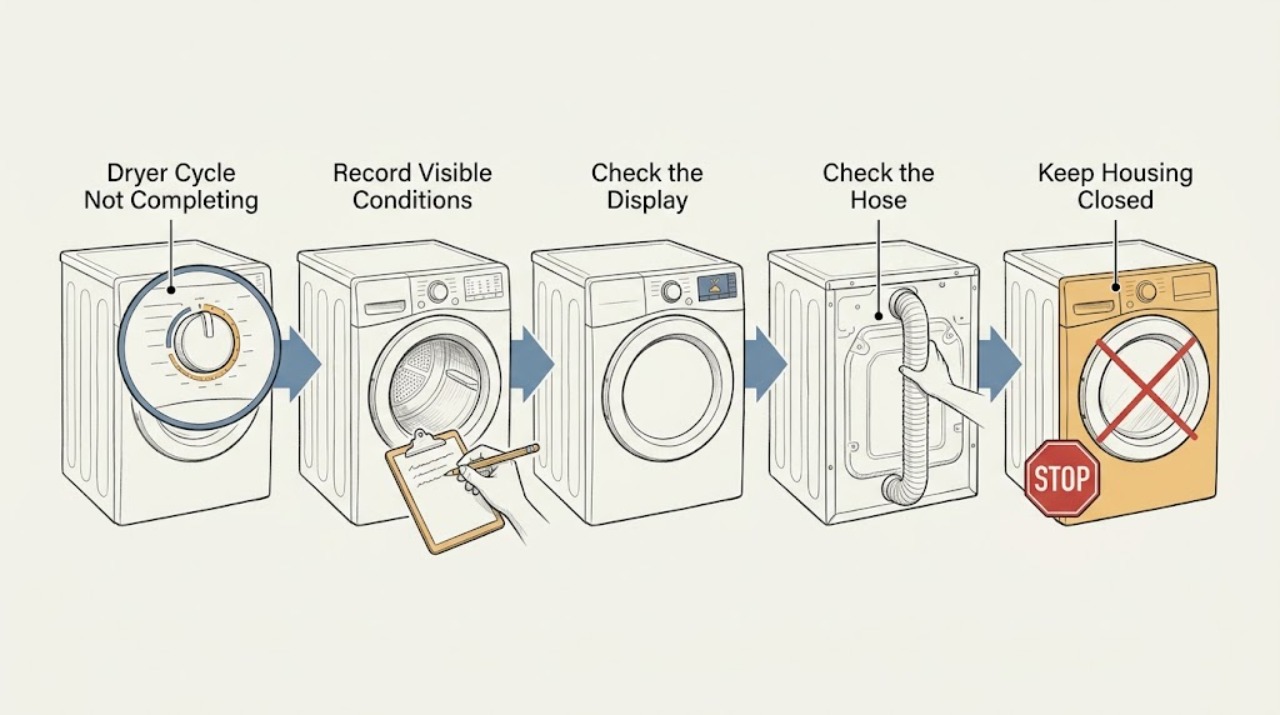
Work through in order
Diagnostic checks
Use only checks that match the exact appliance or system and its official guide.
-
Check 1
Stop the current cycle and record the exact symptom: early END, mid-cycle stop, no heat, damp load, a display or blinking code, or continued tumbling after END. Note the last visible stage, whether the drum rotates, whether warm air was present, the cycle and settings, load size, fuel type, and whether the door is open or closed. Stop without another run if there is smoke, burning or electrical odor, gas odor, sparking, melting, abnormal heat, water near electrics or a repeated breaker trip.
Expected result: The drum is still tumbling without heat after END, the cycle ends before the load is dry, the dryer stops during a stage, a code appears, or a hazard sign is present.
Next step: For gas odor or smoke, do not operate switches or appliances; clear the building and contact emergency help from a safe location. For other hazards, leave the dryer off and arrange qualified service. If no hazard is present, follow the branch that matches the recorded stage.
Why this matters
Why: Wrinkle Prevent can be normal after END. An early or mid-cycle stop points toward sensing, load, door, airflow, power or a component fault. A hazard requires immediate isolation rather than diagnosis.
-
Check 2
Check the cycle and controls against the model manual. If END is displayed and the drum tumbles intermittently without heat, open the door to end Wrinkle Prevent. If Sensor Dry ends while heavy items remain damp, compare the Dry Level and load type; mixed or bulky loads may need separation or a model-supported setting. If a small load ends early, confirm that enough items contact the moisture sensors. Do not assume a cooling phase is a failed heater.
Expected result: The dryer is in Wrinkle Prevent, a mixed or bulky load ends with heavy pieces damp, the load is extremely small, the selected cycle has no heat or the cycle still stops at the same stage.
Next step: Open the door to end Wrinkle Prevent, use a suitable cycle and Dry Level, separate heavy fabrics and follow the manual's minimum-load guidance. If a correctly loaded cycle still stops early or at the same stage, continue to the door, airflow and error checks.
Why this matters
Why: A post-cycle tumble is an intended feature. Sensor Dry responds to what the sensor bars detect, so lighter or insufficient loads can end before heavier pieces are dry. Some cycles intentionally use little or no heat, and cooling can feel cold.
-
Check 3
With the dryer cool, clean and fully reinstall the lint filter. For a vented model, inspect the visible duct connection and outside hood for lint, debris, animal entry, crushing, kinks and weak exhaust movement. For a ventless model, check the applicable heat exchanger, optional filter and drain hose or water container exactly as the manual permits. If the model has a vent-blockage test, run it only with a cool, empty drum using the model-specific button sequence.
Expected result: The filter is blocked or damaged, the duct or hood is restricted, a vent test reports a clog, a heat-exchanger alert appears, a drain hose is not draining or the accessible path is clear.
Next step: Clean the filter and the user-accessible heat-exchanger area or drain components only as the model manual directs, and arrange full duct cleaning when needed. Do not run with a missing or damaged filter. If the dryer remains hot, stops again or shows an abnormal-temperature code, leave it off for service.
Why this matters
Why: Restricted exhaust or a dirty heat exchanger can prevent heat and moisture from leaving, lengthen cycles and trigger protective behavior. A drain issue can keep a ventless cycle from completing. A clear visible path does not rule out an internal fan, heater or thermal fault.
-
Check 4
If the dryer stopped mid-cycle or shows a code, write down the exact code or blinking-light pattern before resetting. Check the door is fully latched and no item is caught in it, and check the accessible power connection without opening panels. Match the code to the exact Samsung manual; examples in Samsung's general guide include door, voltage, motor, dry-time, gas-ignition and temperature-related categories, but codes vary by model.
Expected result: The door indication clears, the code is a vent or load warning, power is stable, the same code returns after the model-approved reset, or the breaker opens again.
Next step: Correct only the accessible door, load, filter, vent or drain condition named by the manual. If a code returns, the dryer stops with a normal load, the door is damaged, power is abnormal or protection trips again, keep it off and request qualified service.
Why this matters
Why: A door or load indication can prevent a cycle from progressing. A recurring code after the specified reset is evidence for service, not a reason to keep restarting. A repeated power trip is an electrical safety event.
-
Check 5
After correcting a confirmed non-hazardous load, setting, filter, vent or drain issue and allowing the dryer to cool, perform at most one model-appropriate check with a suitable load. Observe whether the cycle passes the prior stop stage, whether heat and exhaust are normal, whether the drum stops at END, and whether any code or symptom returns. Do not run an unattended experiment, open the cabinet, test live parts or defeat a thermal, door or gas safety device.
Expected result: The cycle completes normally, only the prior load or setting reproduces the issue, the dryer stops again, a code returns, it will not heat, it becomes unusually hot or it continues tumbling after Power.
Next step: Stop immediately for smoke, sparks, odor, scorching, abnormal heat or a repeated trip. For persistent early stops, no heat, recurring codes or failure to stop, provide the technician with the model, code, stage, settings, load, airflow, drain and power observations.
Why this matters
Why: A single normal cycle after a confirmed external correction supports a load, control-state or airflow cause. Recurrence with a suitable load indicates an unresolved door, sensor, motor, heater, thermal, control, power or gas-system fault.
Use your observations
Decision map
Find the observation that best matches what you see, then follow the next safe action.
-
PATH 01Next step
What you see
The dryer displays END and tumbles without heat, or the drum light remains on briefly after Power.
Do this next
Open the door to end Wrinkle Prevent. If the drum continues turning or the panel will not power off after the model-specific reset, keep the dryer off and request service.
Why this path and its safety boundary
Why it matters: Wrinkle Prevent or model behavior may be operating normally.
-
PATH 02Next step
What you see
A Sensor Dry cycle ends early while heavy items remain damp, especially with a mixed, bulky or very small load.
Do this next
Separate heavy and light items, choose a suitable Dry Level and follow the model's minimum-load guidance. Use Manual Dry only when appropriate for the fabric and manual.
Why this path and its safety boundary
Why it matters: The sensors may have detected the lighter items as dry or lacked enough contact with the load.
-
PATH 03Next step
What you see
The dryer stops mid-cycle, runs unusually long or becomes very warm, and the filter, duct, hood or heat exchanger is dirty or restricted.
Do this next
Cool the dryer, clean the user-accessible path as directed and arrange safe full-duct cleaning for a vented model. Do not operate with a missing or damaged filter; escalate if the symptom returns.
Why this path and its safety boundary
Why it matters: Heat and moisture are not leaving as intended, which can trigger protective behavior and create a fire risk.
-
PATH 04Next step
What you see
A ventless model has a heat-exchanger alert, a full water container or drain hose that is not draining.
Do this next
Follow the exact model manual to clean the heat exchanger or optional filter and correct the drain or container condition. Do not force a cover or reach into inaccessible areas; request service if the alert or water issue returns.
Why this path and its safety boundary
Why it matters: The condenser or moisture-removal path may be preventing the cycle from completing.
-
PATH 05Next step
What you see
A door, temperature, voltage, motor, dry-time, gas-ignition or other code returns after the model-specific reset, or the breaker trips again.
Do this next
Keep the dryer off and arrange Samsung or qualified appliance service. Preserve the exact code, blinking pattern, stage and power behavior; do not keep resetting it or open the cabinet.
Why this path and its safety boundary
Why it matters: The code or power behavior requires model-specific diagnosis and may involve a safety or electrical fault.
-
PATH 06Next step
What you see
There is smoke, gas odor, burning or electrical odor, sparking, melting, scorched fabric, abnormal heat, water near electrics or an active fire sign.
Do this next
Stop use immediately. For gas odor or smoke, do not operate switches or appliances; clear the building and contact emergency help from a safe location. For other hazards, isolate power only if safe and obtain qualified service.
Why this path and its safety boundary
Why it matters: This is a gas, fire, electrical or water-safety event, not a cycle setting issue.
Helpful context
Understand the symptom
Define the stopping behavior first
A cycle that ends with damp clothing is not the same as a dryer that shuts off mid-cycle, and neither is the same as Wrinkle Prevent. Note the exact display and whether the drum is still turning, whether heat is present, and whether the cycle reached END. On some Samsung models the drum light can remain on briefly after power-off, and Wrinkle Prevent can tumble without heat after the drying portion is complete.
Treat heat and electrical signs as stop events
Smoke, burning or electrical odor, sparks, melting, scorched fabric, a very hot cabinet, gas odor, water near electrical parts or a breaker that opens again is not a load or setting issue. Stop the dryer and isolate it only from a safe dry position. A gas odor or smoke requires clearing the building and contacting emergency help from a safe location.
Match the checks to the model
Samsung dryer controls and airflow differ among gas, electric, vented and ventless models. Use the model label and matching manual before interpreting a code or opening a filter or heat-exchanger cover. The checks below remain external or user-accessible; they do not authorize cabinet disassembly, gas adjustment or live electrical testing.
Safety boundary
Stop conditions
- Gas odor, visible smoke, sparks, melting or an active fire sign
- Burning, electrical or plastic odor that persists or returns
- Abnormal cabinet or drum heat, scorched clothing or a repeated breaker trip
- Water near electrical parts or a damaged power connection
- A blocked, crushed or damaged exhaust path that cannot be cleared safely
- Any need to open the cabinet, work on gas or live wiring, or bypass thermal or door protection
Only after diagnosis
Potential parts
- lint filter, exhaust duct or heat-exchanger filter
Consider replacement only when the exact model manual identifies a damaged filter or duct; a blocked but intact path may only need safe cleaning.
Confirm the complete Samsung model and whether it is vented or ventless before selecting a part. - moisture or temperature sensor
Consider this only after cleaning the accessible sensor area and when qualified diagnosis confirms an abnormal cycle or temperature signal.
Sensor components are model-specific; do not open the cabinet for a user test. - door switch, thermal limiter, heater, motor or control
These are conditional possibilities only when a qualified technician confirms the corresponding door, heat, drive or control symptom after external checks.
Thermal, gas-ignition, motor and control components are safety-critical and must not be bypassed or substituted casually.
When checks do not resolve it
Need a professional?
Arrange Samsung or qualified appliance service for smoke, gas odor, burning or electrical odor, sparks, melting, scorched fabric, abnormal heat, repeated breaker trips, a recurring code, persistent mid-cycle shutdown, no heat after a clear airflow path, a continuing ventless drain or heat-exchanger fault, or failure to stop after END or Power.
Safety scope: Do not open panels, probe live wiring, adjust gas parts, bypass a thermal or door interlock, run with a missing or damaged filter, force a heat-exchanger cover, or continue testing after smoke, sparks, abnormal heat, strong odor or a repeated breaker trip.
Common questions
FAQ
Why does my Samsung dryer stop before the cycle is complete?
Record the stop stage first. A Sensor Dry cycle can finish when the lighter items seem dry, a restricted vent can trigger protective behavior, and a ventless model may need heat-exchanger or drain attention. A door, power or error condition can also interrupt a cycle. Smoke, burning or electrical odor, gas odor, sparks, abnormal heat or a repeated breaker trip requires immediate stop and service.
Why does my Samsung dryer keep tumbling after it says END?
Wrinkle Prevent can tumble the load without heat for a few minutes and then intermittently, and it ends when the door is opened. If the drum continues turning or the panel will not power off after the model-specific reset, request service.
Can a small load make a Samsung dryer end early?
Yes. Samsung explains that a very small load may not contact the moisture sensors enough for a Sensor Dry cycle to detect remaining wet fabric. Follow the model's minimum-load guidance, separate heavy and light items, and use a suitable cycle and Dry Level.
What should I check on a Samsung ventless dryer that will not finish?
Check the correct cycle and cooling stage, load size, lint filter, applicable heat exchanger, water container or drain hose, and any displayed alert according to the exact model manual. Do not force a cover or reach into inaccessible parts. A recurring alert or water issue needs service.
When should a Samsung dryer that stops mid-cycle be serviced?
Request service for a recurring mid-cycle stop after the accessible filter, vent, load, door and drain checks; any recurring code; no heat after a clear vent path; failure to stop after END; smoke, burning or electrical odor, gas odor, sparks, abnormal heat or a repeated breaker trip.
Read the exact guide
Official sources
- Clothes are not dry after using Samsung dryerSamsung Support US · Samsung dryer heat, lint filter, exhaust, vent blockage, sensor and cycle-duration troubleshooting
- Cycles, settings, and features on your Samsung dryerSamsung Support US · Samsung dryer cycle behavior, Sensor Dry, Dry Level, Eco Dry, Damp Alert and Wrinkle Prevent
- Samsung dryer displays an error codeSamsung Support US · Samsung dryer error, voltage, vent, door, motor, gas-ignition and reset guidance
- Samsung dryer will not stop spinning or power offSamsung Support US · Samsung dryer END, Wrinkle Prevent and failure-to-stop behavior
- Samsung dryer loses power or won't turn onSamsung Support US · Samsung dryer breaker, power connection and mid-cycle shutdown guidance
- Clothes are not dry after Samsung ventless dryer cycleSamsung Support US · Samsung ventless dryer heat exchanger, load, drain, cooling and cycle guidance
- Dryer SupportSamsung Support US · Samsung dryer model manuals and repair support
- Samsung dryer smells or smokesSamsung Support US · Samsung dryer smoke, gas, burning, electrical and abnormal-heat stop guidance
Community feedback
Share a repair observation
Share a plain-text repair observation. Accepted observations are published automatically; this page may take a moment to update.