
On this page
Start here
Quick answer
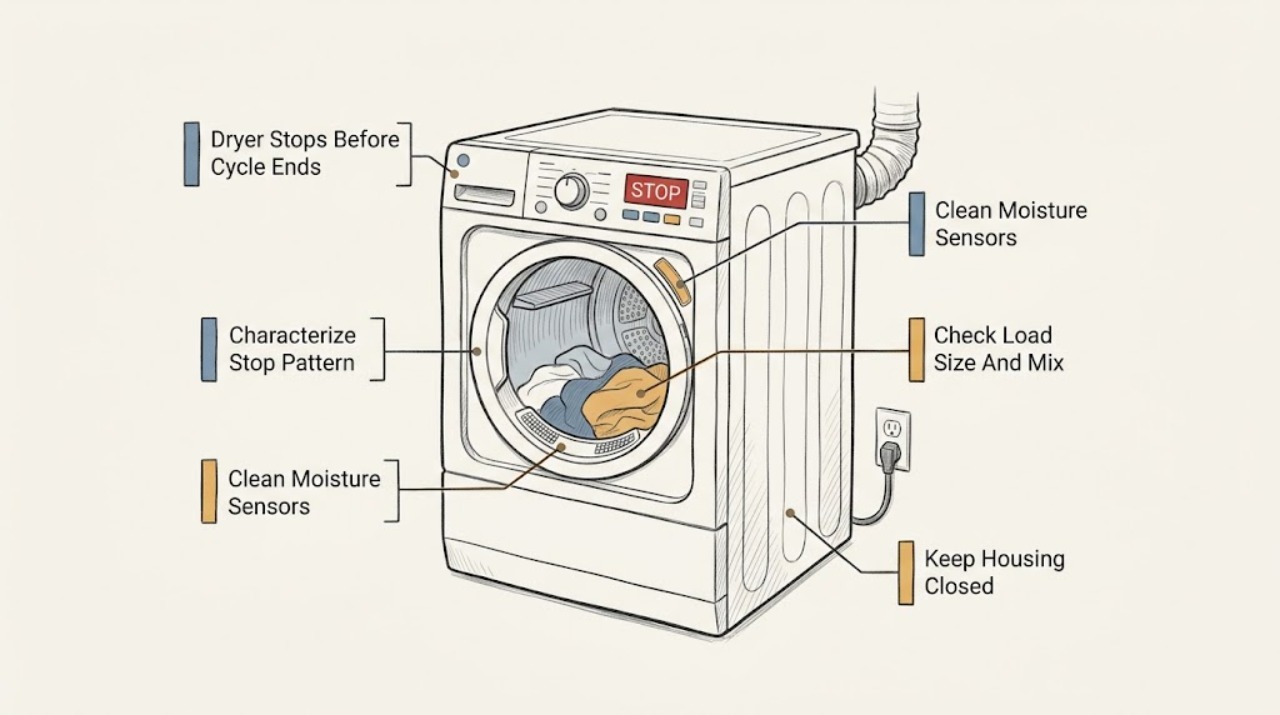
First determine whether the selected Sensor Dry cycle ends early while the clothes are still damp, or whether the entire Samsung dryer loses power during the cycle. For an early Sensor Dry finish, let the dryer cool, clean the two visible moisture-sensor bars inside the front of the drum with a soft cloth and a drop of dish soap, then check the load mix, load size, and model-specific Dry Level setting. Lightweight items can touch the sensors before heavier items are dry, and residue can make the sensors misread moisture. If the dryer actually powers off, inspect only the visible plug, cord, outlet, and household breaker from a dry, safe position; stop for burn marks or damage. A vent blockage can also trigger a Samsung safety shutoff, so do not keep repeating heated cycles when the vent is restricted, a blockage warning appears, or the dryer is unusually hot. If the problem returns after safe sensor, load, setting, power, and vent checks, or an error appears, arrange qualified appliance service.
Before you begin
Safety first
- This article supports ordinary-access observation, model-approved sensor cleaning, load and setting checks, and a model-approved vent test when its prerequisites are met. Do not open the cabinet, perform live electrical work, bypass safety devices, disconnect the vent for heated testing, or continue a cycle with smoke, gas odor, sparks, burning odor, severe heat, or electrical damage.
Work through in order
Diagnostic checks
Use only checks that match the exact appliance or system and its official guide.
-
Check 1
Let the dryer cool, then note the selected cycle, whether the clothes are dry or damp, whether the drum stopped, whether the display stayed on, and whether the whole appliance lost power; do not restart it if there is smoke, burning odor, unusual heat, or electrical damage.
Expected result: Classify the symptom as Sensor Dry ending with damp clothes, the dryer losing power mid-cycle, a vent or error warning, or normal intermittent tumbling after a completed cycle.
Next step: Use the sensor and load checks for a damp Sensor Dry finish; use the safe power and vent path for an actual mid-cycle shutoff; arrange service for recurring or unclear behavior.
Stop if: Stop using the dryer for smoke, flame, gas odor, sparks, a burning smell, a hot or damaged cord or outlet, or signs of fire.
Why this matters
Why: Damp clothes with the display still operating points first to moisture sensing, load, or settings. A dark display or tripped supply points toward power or a safety shutoff. Intermittent no-heat tumbling after completion may be a cycle feature rather than a premature stop.
-
Check 2
With the dryer off and cool, inspect the two curved metal moisture-sensor bars inside the front of the drum near the lint-filter area and wipe them with a soft cloth and a drop of dish soap, following the Samsung model instructions; do not remove the bars or open the cabinet.
Expected result: Record whether the bars have visible residue, film, or lint, whether they are clean after wiping, or whether they are damaged or inaccessible without disassembly.
Next step: After the bars are clean and no safety symptom is present, correct the load and settings before one supervised comparison cycle; arrange service if the cycle still ends early or the bars are damaged.
Stop if: Stop if cleaning requires removing a panel, touching wiring, forcing a part, or if the bars are cracked, loose, or electrically damaged.
Why this matters
Why: Residue can interfere with moisture sensing and make a Sensor Dry cycle end before heavier items are dry. Clean, damaged, or inaccessible bars make a sensor fault or another cause more likely and are not a reason to bypass the control.
-
Check 3
Review the load that ended early and separate unusually light fabrics from much heavier pieces according to the model manual; avoid testing with an extremely small load that may not contact the sensor bars consistently.
Expected result: Note whether light items were dry while towels, jeans, or other heavy pieces remained damp, whether the load was very small, or whether the load was reasonably balanced and still stopped early.
Next step: Use a compatible, reasonably balanced load and the model's recommended cycle for a single supervised comparison; if the result is unchanged, follow the setting or service branch instead of repeatedly running loads.
Stop if: Stop if the load contains items the care labels or Samsung instructions prohibit, if it smells scorched, or if the dryer becomes abnormally hot.
Why this matters
Why: A small or mixed load can let a light, dry item satisfy the Sensor Dry reading before heavier items are dry. A balanced load with the same symptom makes residue, settings, airflow, power, or a fault more likely.
-
Check 4
Read the selected cycle and visible options, then compare the Dry Level, Damp Alert, Eco Dry, and control-lock state with the exact Samsung model manual; do not assume another model uses the same controls.
Expected result: Record whether Sensor Dry and a lower or automatic dry level were selected, whether Damp Alert or an economy option changed the behavior, whether a Manual Dry or Timed setting is available, and whether any code or lock indicator appears.
Next step: Restore a model-approved cycle and level for one supervised comparison only; if the dryer still ends early with a suitable load, stop changing settings and arrange service.
Stop if: Stop if the display shows a persistent error, controls behave unpredictably, or changing settings would require bypassing a safety feature.
Why this matters
Why: A sensor-based level, mixed-load behavior, or an option that reduces heat can explain a different stop point, but a setting change does not explain a dark display, damaged cord, or repeated safety shutoff. An error or locked control requires model-specific instructions.
-
Check 5
Only when the symptom is an actual mid-cycle power loss or a blockage warning, inspect the visible plug, cord, outlet, breaker, outside hood, and accessible exhaust path from a dry, safe position; if the model provides a vent test, run it only with a cooled dryer, empty drum, closed door, and the exact model procedure.
Expected result: Record a tripped breaker, dark display, burn mark or cord damage, a restricted outside hood, unusually long drying, excessive heat, or a vent-test indication of blockage; also record when the safe checks look normal.
Next step: Leave the dryer off for electrical damage; have the electrical supply checked by an electrician and have a restricted vent cleaned or assessed by a qualified professional. If safe checks pass but power loss recurs, arrange appliance service.
Stop if: Do not remove the cabinet, perform live electrical measurements, bypass a door or thermal safety, disconnect the vent to run heated cycles, or repeatedly restart after a safety shutoff.
Why this matters
Why: A damaged plug, cord, or outlet requires the dryer to remain off and an electrician or qualified service. A restricted vent can cause a Samsung safety shutoff and is a fire risk. Normal visible supply and vent observations do not rule out an internal fault.
-
Check 6
If there are no safety symptoms and the sensors, load, settings, visible power supply, and vent path have been addressed safely, run one model-approved cycle while present and stop it if the original symptom returns.
Expected result: Observe whether the load dries and the cycle completes normally, ends early with damp clothing, powers off, displays an error, or produces unusual heat or odor.
Next step: Do not keep repeating the test; record the cycle and result and arrange qualified Samsung appliance service for a recurring symptom or any code.
Stop if: Stop immediately for smoke, flame, gas odor, sparks, burning odor, a hot or damaged cord, unusual heat, or a new vent warning.
Why this matters
Why: A normal completion supports a corrected sensor, load, or setting issue but does not prove an internal component is healthy. Any repeat early stop, power loss, error, smoke, odor, or abnormal heat leaves the cause unresolved.
Use your observations
Decision map
Find the observation that best matches what you see, then follow the next safe action.
-
PATH 01Safety boundary
What you see
Sensor Dry ends quickly, the display remains on, and clothing is still damp, especially after residue is visible on the sensor bars.
Do this next
Clean the visible sensor bars as Samsung directs, then correct the load mix and Dry Level for one supervised comparison; use service if the same pattern returns.
Why this path and its safety boundary
Why it matters: A false-dry reading from sensor residue or the load is more likely than a total power failure.
Safety stop: Do not bypass the sensor, remove its bars, or keep testing when the dryer is hot, smoky, or electrically damaged.
-
PATH 02Safety boundary
What you see
The load is very small, or light fabrics are dry while heavier items remain damp and the light items contacted the sensor bars.
Do this next
Follow the model's load guidance, separate incompatible weights when appropriate, and use Damp Alert or a model-approved manual cycle as a controlled comparison.
Why this path and its safety boundary
Why it matters: The Sensor Dry decision may have been satisfied by the lightest or driest fabric before the whole load was dry.
Safety stop: Stop if the load is scorched, prohibited by its care label, or the dryer becomes unusually hot.
-
PATH 03Safety boundary
What you see
The cycle, Dry Level, Eco Dry, Damp Alert, or control-lock state differs from the intended model setting, while the display and power remain normal.
Do this next
Use the exact model manual to restore a suitable cycle and level, then make one supervised comparison; request service if the early stop persists.
Why this path and its safety boundary
Why it matters: The selected program or option may change when the dryer decides the load is finished, but it does not explain a damaged electrical supply or repeated safety shutdown.
Safety stop: Do not bypass a control lock or safety feature, and stop for a persistent error or unpredictable control behavior.
-
PATH 04Safety boundary
What you see
The dryer loses power mid-cycle and a vent warning, long drying time, excessive heat, restricted outside hood, or failed vent indication is present.
Do this next
Stop the dryer, let it cool, and have the exhaust path cleaned or assessed using the model instructions and qualified help where access is not ordinary and safe; arrange service if power loss returns.
Why this path and its safety boundary
Why it matters: A restricted exhaust path is a plausible safety-shutoff cause and a fire-risk condition; the dryer should not be repeatedly heated while restricted.
Safety stop: Do not run repeated heated cycles, disconnect the vent for a workaround, or continue with a damaged duct or signs of fire.
-
PATH 05Safety boundary
What you see
The display is dark, the breaker trips, or the plug, cord, or outlet has burn marks, heat damage, or visible deterioration.
Do this next
Leave the dryer off and arrange electrician assessment for the outlet, cord, and supply; use qualified appliance service when the supply is confirmed safe but the dryer still loses power.
Why this path and its safety boundary
Why it matters: An electrical supply or connection fault is possible and cannot be safely distinguished from an appliance fault by repeated resets.
Safety stop: Do not touch damaged conductors, repeatedly reset the breaker, use an extension cord, or operate the dryer with a hot or damaged connection.
-
PATH 06Safety boundary
What you see
The dryer passes safe sensor, load, setting, visible power, and vent checks but still ends early, loses power, or displays an error.
Do this next
Stop repeated testing, record the exact cycle, load, display state, code, and timing, and arrange qualified Samsung appliance diagnosis.
Why this path and its safety boundary
Why it matters: An internal sensor, control, thermal, motor, airflow, or power-circuit fault remains possible and cannot be confirmed from ordinary access.
Safety stop: Stop immediately for smoke, flame, gas odor, sparks, burning odor, abnormal heat, or electrical damage and use urgent professional help.
Helpful context
Understand the symptom
Separate an early Sensor Dry finish from a power shutoff
The same complaint can describe two different events. If the drum stops because Sensor Dry decides the load is dry but the clothes are damp, start with the accessible sensors, load, and settings. If the display goes dark or the dryer loses power during a cycle, treat it as a power or safety-shutoff symptom and use the electrical and vent checks below. A panel or drum behavior after a completed cycle can also be a normal feature such as Wrinkle Prevent, so note whether the selected cycle actually ended or the dryer is continuing an intermittent no-heat tumble.
Sensor Dry can stop on the lightest item in a mixed load
Samsung explains that the moisture sensors can stop a Sensor Dry cycle when light fabrics contact the bars while heavier pieces remain damp. A very small load may not contact the bars consistently, and residue from dryer sheets can interfere with sensing. Clean only the visible bars, follow the exact model's Dry Level and Damp Alert instructions, and use a Manual Dry or Timed setting only as a controlled comparison when the model instructions permit it. Do not infer that a different cycle has repaired an unresolved electrical, airflow, or control fault.
A mid-cycle power loss needs a vent and supply decision
A dryer that loses power is different from one that merely finishes early. Look for an error or vent warning, unusually long drying, excessive heat, or a restricted outside hood. Samsung says its safety logic may shut the dryer off when a blockage is detected, and a clogged vent is a fire risk. The manufacturer's vent test, when available on the model, is intended for a cooled dryer with an empty drum and closed door; use the exact model instructions and do not open the cabinet or improvise live testing.
Know when the next safe step is service
If cleaning the sensors, correcting the load and settings, and clearing an identified vent restriction do not stop the symptom, record the cycle, load, display message, whether the panel went dark, and the result of each safe check. Recurring early stops can involve a sensor, control, airflow safety component, motor, or power circuit that requires model-specific diagnosis. Burn marks, a hot or damaged cord, smoke, sparks, flame, gas odor, or an electrical smell are stop-now symptoms, not reasons to run another test.
Safety boundary
Stop conditions
- Stop the dryer immediately for smoke, flame, gas odor, sparks, burning odor, unusual heat, a hot or damaged cord or outlet, or any sign of fire; arrange urgent qualified help.
- Do not repeatedly restart after a mid-cycle safety shutoff, blockage warning, breaker trip, or unexplained loss of power.
- Do not open the cabinet, touch live wiring, perform live electrical measurements, bypass a door or thermal safety, or improvise a control repair.
- Do not disconnect the exhaust vent to run heated cycles or continue using the dryer when the vent is visibly restricted, damaged, or unsafe to access.
- Stop and arrange qualified service when a persistent error appears, the symptom returns after safe checks, or the cause requires internal component access.
Only after diagnosis
Potential parts
- moisture sensor or sensor assembly
Consider this category only if the visible sensor bars are clean and correctly positioned but Sensor Dry still ends early with suitable loads and settings, and a technician confirms the sensor circuit is at fault.
Confirm the exact Samsung dryer model, sensor design, connector, and manufacturer fit information before ordering; do not bypass or substitute the sensor by guesswork. - thermal or airflow safety component
Consider this category only after the exhaust path is cleared or assessed and a qualified technician confirms a thermal or airflow safety component is failing rather than responding to a restriction.
Confirm the exact model and approved component specification with the technician or manufacturer; never defeat a thermal or airflow safety device. - electronic control board
Consider this category only when safe power, vent, sensor, load, and settings checks are normal but recurring early stops, power loss, or a code lead a technician to the control circuit.
Confirm the full model and revision, connector arrangement, and manufacturer fit information; do not replace a control board before supply and vent causes are ruled out.
When checks do not resolve it
Need a professional?
Arrange qualified Samsung appliance service when a suitable load still ends early after the sensor bars and settings are checked, the dryer repeatedly loses power, an error code persists, a vent blockage cannot be safely cleared, or an internal sensor, control, motor, thermal, airflow, or power fault is suspected. Arrange electrician assessment for a damaged cord, outlet, breaker, or household supply. Seek urgent help for smoke, flame, gas odor, sparks, burning odor, severe heat, or fire signs.
Safety scope: This article supports ordinary-access observation, model-approved sensor cleaning, load and setting checks, and a model-approved vent test when its prerequisites are met. Do not open the cabinet, perform live electrical work, bypass safety devices, disconnect the vent for heated testing, or continue a cycle with smoke, gas odor, sparks, burning odor, severe heat, or electrical damage.
Common questions
FAQ
Why does a Samsung dryer stop before the cycle ends while clothes are still damp?
If the display remains on, Sensor Dry may be ending on a light or already-dry item, a very small or mixed load, residue on the moisture-sensor bars, or a cycle and Dry Level setting. Clean the visible bars as Samsung directs, check the load and model settings, and arrange service if the same pattern continues.
Where are the Samsung dryer's moisture sensors?
Samsung describes two curved metal bars inside the front of the drum, commonly near the lint-filter area. With the dryer off and cool, wipe visible residue with a soft cloth and a drop of dish soap; do not remove the bars or open the cabinet.
Can a small or mixed load make a Samsung dryer finish early?
Yes. Samsung explains that light fabrics can contact the sensors and satisfy a Sensor Dry reading while heavier pieces remain damp, and a very small load may not contact the bars consistently. Follow the exact model's load guidance and compare a suitable load once rather than repeatedly running the dryer.
Can a blocked vent make a Samsung dryer stop during a cycle?
It can. Samsung says a vent blockage may trigger a safety shutoff and that a clogged vent is a fire risk. Stop repeated heated cycles, let the dryer cool, and have the exhaust path cleaned or assessed using the model instructions and qualified help when access is not ordinary and safe.
What should I do if the Samsung dryer loses power mid-cycle?
Do not repeatedly reset it. From a dry, safe position, look only for a tripped breaker or visible plug, cord, or outlet damage. Leave it off for burn marks, heat, or damage; use an electrician for the household supply and qualified appliance service if the supply is safe but the dryer still loses power.
When does a Samsung dryer that stops early need service?
Arrange service when safe sensor, load, setting, power, and vent checks do not resolve the symptom, an error code persists, the dryer repeatedly shuts off, or internal access would be needed. Smoke, flame, gas odor, sparks, burning odor, severe heat, or electrical damage require immediate stop and urgent qualified help.
Read the exact guide
Official sources
- Clothes are not dry after using Samsung dryerSamsung · Samsung troubleshooting guidance for dryers; exact controls and cycle behavior depend on the installed model and its manual.
- Run a Vent Blockage test on your Samsung dryerSamsung · Samsung vent-test guidance; availability and controls vary by model, so the installed manual controls the procedure.
- Samsung dryer will not stop spinning or power offSamsung · Samsung troubleshooting guidance for a dryer that keeps spinning or does not power off; it helps distinguish post-cycle behavior from a premature stop.
- Samsung dryer loses power or won't turn onSamsung · Samsung troubleshooting guidance for dryers that lose power or will not stay on; electrical work and damaged connections require qualified help.
Community feedback
Share a repair observation
Share a plain-text repair observation. Accepted observations are published automatically; this page may take a moment to update.