
On this page
Start here
Quick answer
If a Samsung dryer powers on but the drum does not tumble, first determine whether the cycle actually started. Check for an exact error code or blinking-light condition, make sure Child Lock is off, close the door fully, select Time Dry, and use the model's Start control while watching whether the timer counts down. If the timer does not count down, the start, door, lock, or setting state still needs attention. If the timer counts down while the drum remains still, Samsung says service is usually required; do not bypass the door interlock or open the cabinet to reach the belt or motor. If the display is blank, the breaker trips, or the cord or outlet is damaged or hot, stop and use a qualified electrical or appliance professional. A single model-authorized reset may clear a temporary electronic state, but a returning no-tumble symptom needs service.
Before you begin
Safety first
- Keep the dryer off for smoke, burning odor, arcing, a hot or damaged connection, repeated breaker trips, or a stationary drum after the timer starts. Do not bypass an interlock or open the cabinet.
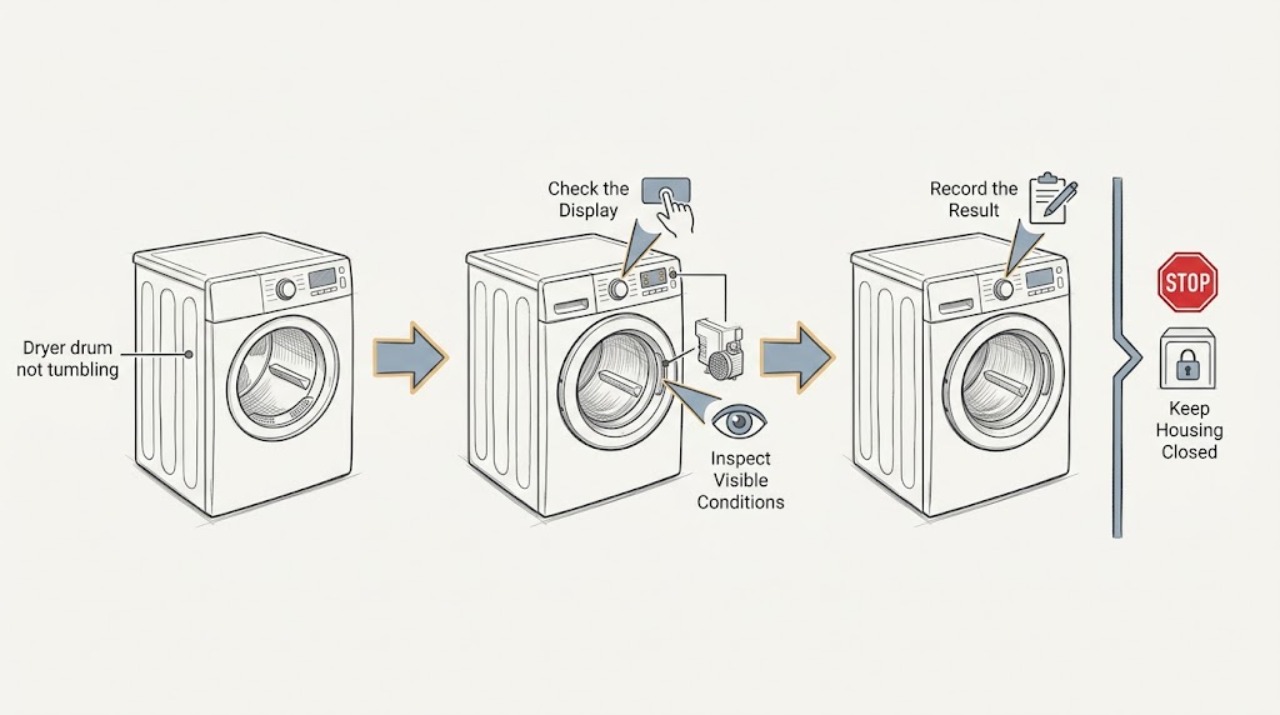
Work through in order
Diagnostic checks
Use only checks that match the exact appliance or system and its official guide.
-
Check 1
Before another cycle, note whether the control display is on, whether the drum light responds when the door opens if the model has one, whether the panel shows an error code or blinking lights, and whether there is smoke, a burning smell, a hot connection, visible damage, or repeated breaker operation.
Expected result: The display is blank, the drum light is absent, a code or blinking lights appear, the dryer has an electrical or burning symptom, or the controls appear normal.
Next step: For smoke, burning odor, arcing, a hot or damaged cord or outlet, or repeated breaker trips, stop and arrange qualified help. Otherwise record the exact display and continue only with the matching model guidance.
Why this matters
Why: A blank or damaged power path is different from a start-control problem. A code or blinking-light state may be preventing the cycle, while a hazard makes continued testing unsafe.
-
Check 2
Read any error code or blinking-light pattern exactly as displayed and check the matching Samsung model guidance. Look for an illuminated Child Lock icon and confirm from the manual or control panel how that model releases the lock; do not guess from another Samsung control layout.
Expected result: An error or blinking pattern is documented, Child Lock is on, the lock state is unclear, or neither an error nor a lock is present.
Next step: Apply only the exact model's error or Child Lock instruction. If the code returns, the lock will not release, or the panel remains unresponsive, leave the dryer off and request service.
Why this matters
Why: A documented code or active Child Lock can block a Start command before the drum is asked to move. An unrecognized or recurring code needs model-specific diagnosis rather than repeated button sequences.
-
Check 3
Close the dryer door fully without forcing it, select the model's Time Dry cycle, and touch or hold Start exactly as the control panel or manual directs. Watch the displayed timer rather than listening for a motor alone.
Expected result: The timer counts down, the timer does not count down, the door will not latch, or an error appears when Start is pressed.
Next step: If the timer does not count down, correct only the documented door, lock, or start state and make one further supervised attempt. If the timer counts down while the drum remains still, stop testing and arrange Samsung or qualified appliance service.
Why this matters
Why: A countdown confirms that the cycle started. No countdown keeps the door, Child Lock, setting, or start-command path in focus; a countdown with no drum movement points toward a fault requiring service.
-
Check 4
With the dryer off and the door closed, make only external observations for a jam or obstruction: note whether the drum can be moved normally by the ordinary user control or whether it is locked, scraping, grinding, or unusually loose. Do not remove panels, reach into the drive area, or bypass the door switch.
Expected result: The drum movement is abnormal, a mechanical noise or rubbing is present, the drum appears normal externally, or the drum does not move but the Time Dry timer did count down.
Next step: Keep the dryer off and give the technician the noise, feel, timer, and load details. Do not try to free the drum, lubricate internal parts, or run more cycles to compare.
Why this matters
Why: Abnormal mechanical feel or noise makes a drive, roller, idler, or motor problem more plausible, but it does not identify a replacement part. A confirmed countdown with a stationary drum already meets Samsung's service boundary.
-
Check 5
If the display is blank or the dryer loses power, have the circuit switched off before any power-cord inspection, then look only for visible damage, burn marks, looseness, or an obviously tripped breaker. Do not remove the receptacle cover, open the dryer, or perform a live voltage test.
Expected result: The plug, cord, or outlet is damaged or hot, installation looks loose or incorrect, the breaker trips again, or the connection appears intact and the dryer powers on.
Next step: For damage, heat, incorrect installation, or repeated trips, leave the breaker off and call a licensed electrician or qualified installer. If power is stable, continue only with the model-specific no-spin checks.
Why this matters
Why: Visible damage, incorrect installation, and repeated trips indicate an electrical service boundary. A powered dryer with a no-tumble symptom returns the diagnosis to the start-versus-spin test rather than the household outlet.
-
Check 6
After the documented checks and only when there is no smoke, burning odor, damaged connection, repeated trip, or recurring error, perform at most one reset exactly as the model guidance describes and record whether the same Time Dry test starts and the drum tumbles.
Expected result: The dryer recovers once, the timer counts but the drum remains still, the original code returns, or the dryer remains unable to start.
Next step: If the symptom returns, stop resetting and request service with the exact model, code, timer result, and reset result. Do not open the cabinet or continue cycling a stationary drum.
Why this matters
Why: One-time recovery can indicate a transient electronic state, but a returning fault or a timer that runs without tumbling is not repaired by more resets. Samsung warns that repeated clearing can remove useful error history.
Use your observations
Decision map
Find the observation that best matches what you see, then follow the next safe action.
-
PATH 01Next step
What you see
The display is on, the door closes, but the timer never counts down or Start produces an error or blinking-light state.
Do this next
Use the exact Samsung model guidance for the code, lock, door, and Start command. If it still will not start or a code returns, request service.
Why this path and its safety boundary
Why it matters: The cycle is not reaching the running state; Child Lock, door sensing, an error condition, or a model-specific start command is more likely than a proven belt or motor failure.
-
PATH 02Next step
What you see
The Time Dry timer counts down, but the drum remains stationary or makes abnormal mechanical noise.
Do this next
Stop the dryer and arrange qualified appliance service. Do not bypass the door switch, open the cabinet, or keep running a stationary drum.
Why this path and its safety boundary
Why it matters: The control has started the cycle, so an internal drive, motor, belt, idler, roller, or related fault becomes more plausible; the symptom does not identify a specific part.
-
PATH 03Next step
What you see
The display is blank, the dryer loses power, the plug or outlet is visibly damaged or hot, or the breaker trips again.
Do this next
Keep the circuit off when safe to do so and call a licensed electrician or qualified installer for damaged, loose, incorrect, or repeatedly tripping connections. Do not perform live testing.
Why this path and its safety boundary
Why it matters: The power supply or installation is an immediate service concern and cannot be safely separated from the appliance at user level.
-
PATH 04Next step
What you see
A single model-authorized reset restores tumbling, but the no-tumble symptom or the same code returns later.
Do this next
Stop resetting and request service with the model, exact code, cycle, timer behavior, and what changed after the reset.
Why this path and its safety boundary
Why it matters: A transient control state may have cleared, but recurrence shows that the underlying issue remains and repeated resets can erase useful diagnostic history.
-
PATH 05Next step
What you see
The dryer has smoke, burning odor, arcing, an overheating connection, a damaged cord, or another immediate hazard.
Do this next
Stop using the dryer, keep clear, and obtain qualified electrical or appliance help from a safe location. Do not restart it to collect more observations.
Why this path and its safety boundary
Why it matters: This is a fire or electrical safety event, not a routine no-tumble diagnosis.
Helpful context
Understand the symptom
Separate a failed start from a failed drive
A dryer can look as though its drum has failed when the cycle is actually blocked by Child Lock, a door that is not latched, an error state, or an uncompleted Start command. Samsung's useful dividing line is the timer: if a Time Dry timer does not count down, the cycle did not start; if it counts down while the drum stays still, the remaining fault is not a simple start-setting issue and service is the safe next step.
Keep the drive system behind the service boundary
A stationary drum after a confirmed start can involve an internal drive component such as a belt, idler, roller, motor, or control path, but the symptom alone cannot identify which part failed. Do not remove panels, reach around the drum, defeat the door switch, or run live electrical tests. Record the model, display behavior, timer result, and any noise or smell for the technician.
Treat power symptoms separately
A blank display or sudden loss of power is a supply and safety branch, not proof of a bad drum component. With the dryer disconnected only as directed by the manufacturer, visible checks can identify a tripped breaker or obvious cord, plug, or outlet damage. Burn marks, looseness, a hot connection, incorrect installation, or repeated trips require an electrician or qualified service rather than repeated start attempts.
Reset once, then preserve the evidence
Samsung notes that a reset can clear a temporary electronic glitch, but it does not repair a mechanical drive fault or a blocked vent. Use a reset only when the exact model guidance permits it and no hazard is present. If the drum still does not tumble or the same code returns, stop clearing the history and arrange service so the stored symptom remains useful for diagnosis.
Safety boundary
Stop conditions
- Stop immediately for smoke, a burning or electrical odor, arcing, a hot or damaged plug, cord, or outlet, or repeated breaker trips. Keep the dryer off and obtain qualified electrical or appliance help.
- Do not bypass the door switch or Child Lock, force the door, reach into the drive area, remove cabinet panels, alter wiring, or perform live electrical tests.
- Do not keep running cycles when the timer counts down but the drum stays still, when the drum scrapes or grinds, or when the same error returns after the model-authorized check or one reset.
- Use the exact model manual for button combinations, reset behavior, and any error code. Stop and provide the model and complete display to service when the instructions do not match.
Only after diagnosis
Potential parts
- drive belt
Consider this category only after qualified diagnosis confirms a belt or related drive fault when the cycle runs but the drum does not tumble.
Belts vary by exact Samsung model and design. Confirm the model and technician diagnosis before selecting any component. - drum rollers or idler pulley
Consider this category only when qualified inspection links abnormal rubbing, noise, or drum resistance to the support or tension components.
Rollers and idlers are model-specific and require safe cabinet access and fitment confirmation. - drive motor
Consider this category only after the timer-start test and a qualified inspection rule out door sensing, belt, support, and control causes.
Do not infer motor compatibility from appearance or a generic Samsung listing; confirm the exact model and diagnosis. - door switch or latch assembly
Consider this category only when the door is correctly positioned but the cycle will not start or the model's door-sensing diagnosis identifies the interlock.
Door-sensing components differ by model and must not be bypassed during troubleshooting.
When checks do not resolve it
Need a professional?
Request qualified appliance service when a Samsung dryer timer counts down but the drum does not tumble, the door or lock state cannot be corrected, the same code returns, the drum makes abnormal mechanical noise, or one permitted reset does not resolve the symptom. Call a licensed electrician or qualified installer for burn marks, damaged or loose power connections, incorrect installation, or repeated breaker trips. Treat smoke, arcing, a hot connection, or a burning odor as an immediate safety issue.
Safety scope: Keep the dryer off for smoke, burning odor, arcing, a hot or damaged connection, repeated breaker trips, or a stationary drum after the timer starts. Do not bypass an interlock or open the cabinet.
Common questions
FAQ
Why is my Samsung dryer drum not tumbling even though the display is on?
First determine whether the cycle started. Check the code and Child Lock, close the door, select Time Dry, and watch the timer. If the timer counts down but the drum remains still, Samsung's guide says service is usually required; do not open the cabinet or bypass the interlock.
What does it mean if the Samsung dryer timer does not count down?
The cycle has not started correctly. Recheck the door, Child Lock, exact model start command, and any displayed code using the model guidance. If the timer still will not count down, request service rather than repeatedly pressing buttons.
Can resetting a Samsung dryer make the drum spin again?
A single model-authorized reset can clear a temporary electronic state, but it cannot repair a mechanical drive fault. Samsung recommends troubleshooting first and requesting service if the symptom or code returns; repeated resets can erase useful history.
Should I replace the belt when my Samsung dryer drum will not tumble?
Not based on the symptom alone. A stationary drum after a confirmed start can involve a belt, motor, rollers, idler, sensing, or control fault. Keep the cabinet closed and have the exact model diagnosed before choosing a part.
When is a Samsung dryer no-tumble problem an electrical issue?
Treat a blank display, visible cord or outlet damage, burn marks, a hot connection, incorrect installation, or a breaker that trips again as a power-safety branch. Switch off the breaker before any permitted external inspection and call a licensed electrician or qualified installer; do not perform live testing.
Read the exact guide
Official sources
- Samsung dryer turns on but will not start or spinSamsung Support · Manufacturer troubleshooting guide for Samsung dryers; exact controls and manual instructions vary by model.
- How to reset your Samsung dryerSamsung Support · Manufacturer reset guidance for Samsung dryers; exact model instructions and error-code handling control.
- Samsung dryer loses power or won't turn onSamsung Support · Manufacturer power troubleshooting guide for Samsung dryers; electrical installation and outlet requirements must be handled for the exact installation.
Community feedback
Share a repair observation
Share a plain-text repair observation. Accepted observations are published automatically; this page may take a moment to update.