
On this page
Start here
Quick answer
A Samsung dryer drum that scrapes may be contacting a coin, button, pen, zipper, or other loose object; a heavy or uneven load can also create rubbing, grinding, or vibration. An unlevel dryer, loose pedestal or vent, or a worn internal rotating part is possible when the sound persists without laundry. Stop the cycle, empty the pockets, inspect the visible drum and door area, and check that the dryer is stable on a solid, level surface. If a safe empty comparison still scrapes, the drum binds or wobbles, the sound is sharp or worsening, or there is smoke, a burning or electrical smell, sparking, scorching, or a damaged cord, leave the dryer off and arrange qualified service.
Before you begin
Safety first
- This article covers ordinary-access observation, pocket and drum inspection, load and stability checks, accessible lint or vent checks, and one controlled empty comparison only. Do not open the cabinet, probe live circuits, reach into drive or blower mechanisms, force rotation, or operate a dryer with a hazard or persistent empty-drum scrape.
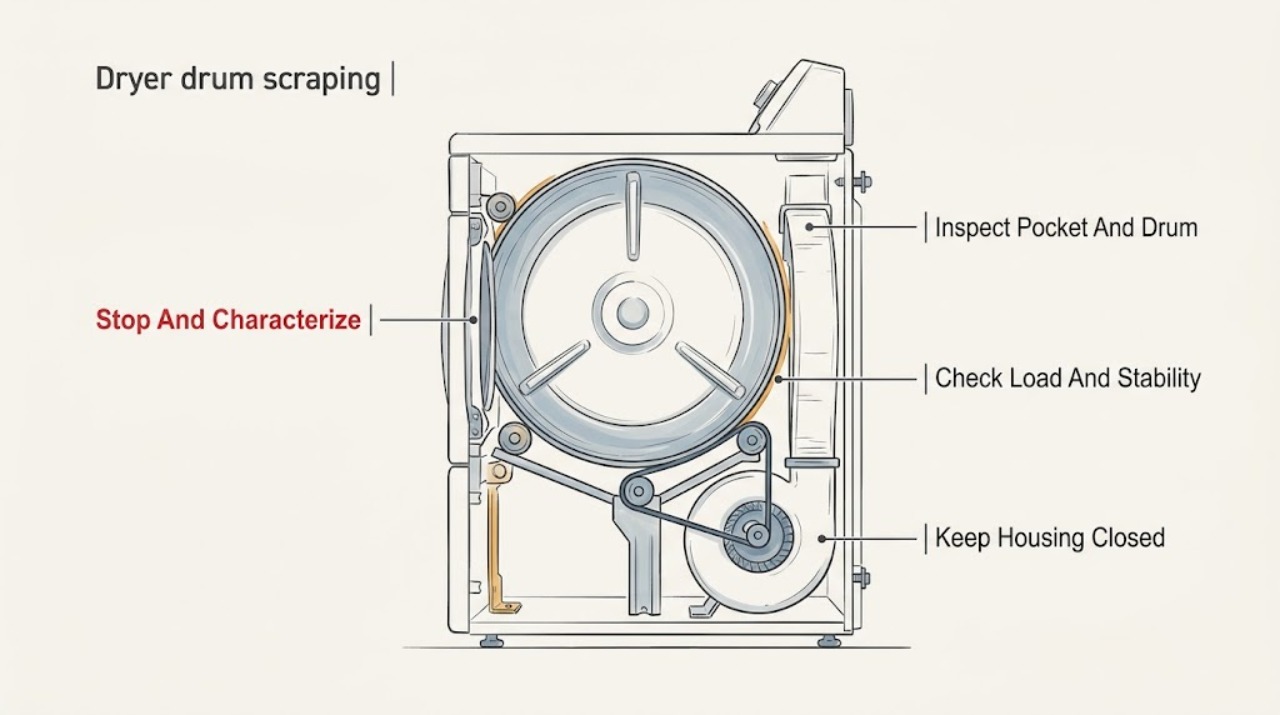
Work through in order
Diagnostic checks
Use only checks that match the exact appliance or system and its official guide.
-
Check 1
Stop the dryer and record the sound from outside the appliance before restarting; do not touch a hot or visibly damaged cord or continue if a hazard is present.
Expected result: Note whether the sound is a brief startup squeak, a metallic scrape on every rotation, a rattle or clank, a thump, or grinding; record whether it occurs only with clothes, at one speed or direction, or continuously, and note smoke, odor, sparks, scorching, or an error.
Next step: Continue only with ordinary-access checks when there is no smoke, spark, burning or electrical smell, scorching, damaged cord, water exposure, or repeated breaker trip; otherwise leave the dryer off and arrange qualified service.
Stop if: Stop immediately for visible smoke, gas odor, electrical smell, sparking, burning odor, scorching, a hot or damaged cord, exposed wiring, or a breaker that trips again.
Why this matters
Why: A load-specific rattle differs from a repeatable rotating-part scrape, and Samsung directs service when certain grinding or squealing continues with a normal load or when noise occurs while empty. Hazard signs are not a routine noise branch.
-
Check 2
With the dryer off and cool enough to handle, remove the load and inspect every pocket, zipper, button, and the visible drum surface and opening for loose objects without reaching into gaps beyond ordinary access.
Expected result: Record whether a coin, pen, button, fastener, or other object is present, whether a garment's hardware could have struck the drum, or whether the visible area is clear; note any visible scratch, bent edge, or damaged seal.
Next step: Remove only a loose object that is plainly accessible without tools, secure or turn clothing hardware inside out as appropriate, and then perform one controlled empty comparison if the dryer remains safe; request service if an object is trapped or damage is visible.
Stop if: Do not insert tools, wire, or fingers into the drum seam, front or rear support area, blower area, or any gap beyond ordinary safe access.
Why this matters
Why: Samsung identifies loose objects and oversized buttons, snaps, or zippers as causes of rattling, thumping, or similar load noise. A clear visible drum does not rule out an inaccessible object or internal wear.
-
Check 3
From outside the cabinet, check whether the load was unusually heavy or uneven and whether the dryer is stable on a solid, level surface; inspect for a loose pedestal, vent, cord, or nearby part that can rattle against the cabinet.
Expected result: Record whether the cabinet rocks or walks, the top is visibly out of level, the unit is loose on a pedestal, the vent moves, or the sound changes when the load is reduced to a normal weight.
Next step: Use the model's installation guide for ordinary leveling or securing checks only; reduce an excessive load and retest once, but arrange service if the dryer remains unstable or scraping continues with a normal load.
Stop if: Do not lift a stacked unit alone, remove structural brackets, disturb gas or exhaust connections, or operate a visibly unstable dryer.
Why this matters
Why: Samsung says heavy loads can produce squealing, squeaking, or grinding and that overload, leveling, a loose pedestal, or a vent or nearby part contacting the dryer can create movement or rattling. A stable empty unit that still scrapes points beyond these installation checks.
-
Check 4
After the object and stability checks show no hazard, perform one short empty-load comparison according to the owner's guide while remaining nearby; stop immediately if the scrape becomes harsh or any hazard appears.
Expected result: Classify the result as quiet when empty, the same scrape when empty, a brief sound that settles, or scraping that changes with drum speed or direction; note whether the drum wobbles or vibrates severely.
Next step: If quiet, reload only after checking pockets and hardware. If the scrape remains empty, stop using the dryer and provide the model and sound recording to qualified service.
Stop if: Do not run repeated empty cycles, leave the appliance unattended, or continue testing when the drum binds, grinds, scrapes metal-on-metal, smells hot, smokes, sparks, or vibrates severely.
Why this matters
Why: Silence when empty makes the load or a loose object more likely. Scraping that remains with no laundry makes the appliance the more likely source, and Samsung directs service for noise that occurs while empty; a persistent sharp scrape should not be normalized.
-
Check 5
If scraping is accompanied by weak airflow, a temperature or vent warning, a displayed code, or a power concern, check only the accessible lint screen and exhaust path and record the exact code without opening the cabinet.
Expected result: Record whether the lint screen or vent is obstructed, whether a vent-blockage or temperature code appears, whether the door or controls show a code, and whether the scrape persists after the accessible path is corrected.
Next step: Clean the lint screen and accessible exhaust path only as the model guide permits; if a code returns, scraping persists, or internal access is needed, leave the dryer off and request qualified diagnosis.
Stop if: Do not bypass a door or safety device, probe live wiring, dismantle the exhaust or blower area, or repeatedly reset a recurring code or tripping breaker.
Why this matters
Why: Samsung links some temperature and vent indications to clogged lint or exhaust paths and uses separate motor, door, voltage, and component codes. Correcting an accessible filter or vent condition does not identify or repair a persistent internal scrape.
Use your observations
Decision map
Find the observation that best matches what you see, then follow the next safe action.
-
PATH 01Safety boundary
What you see
The sound occurs only with a particular load, and a loose object or clothing hardware is found, or the empty comparison is quiet.
Do this next
Empty pockets, secure zippers or large fasteners, turn garments inside out when appropriate, remove only plainly accessible objects, and retest with a normal load once.
Why this path and its safety boundary
Why it matters: The laundry or an object is more likely than a persistent internal drum fault.
Safety stop: Do not use tools or fingers to retrieve an object caught in a seam, or continue if the drum edge, seal, or cabinet is damaged.
-
PATH 02Safety boundary
What you see
Squealing, squeaking, or grinding occurs with an unusually heavy load but reduces after the load is reduced and the drum is quiet or normal with an appropriate load.
Do this next
Follow the model's load guidance and avoid overloading; request service if the sound occurs with a normal load or begins in an empty drum.
Why this path and its safety boundary
Why it matters: Samsung identifies load weight as a possible contributor; the result does not prove an internal part is healthy if the sound returns with normal weight.
Safety stop: Stop for binding, severe vibration, a worsening metallic sound, burning odor, smoke, or sparks rather than testing heavier loads.
-
PATH 03Safety boundary
What you see
The dryer rocks, walks, vibrates, or is loose on a pedestal, or the vent or cord visibly contacts the cabinet and the sound changes when the unit is made stable.
Do this next
Follow the installation guide for safe leveling or securing checks; have an installer or qualified technician correct uncertain stacking, pedestal, gas, or vent hardware.
Why this path and its safety boundary
Why it matters: Installation movement or an external contact may be contributing to rattling or clanking, but it does not prove a persistent empty-drum scrape is resolved.
Safety stop: Do not operate a visibly unstable dryer, lift a stacked appliance alone, or remove structural or gas or exhaust connections.
-
PATH 04Safety boundary
What you see
The same scrape occurs during an empty comparison, repeats with each drum rotation, or occurs with a normal load despite a stable installation.
Do this next
Stop using the dryer and arrange qualified service; provide the model, timing, recording, load result, and any wobble or binding observation.
Why this path and its safety boundary
Why it matters: The appliance itself is more likely the source, and Samsung directs service when noise occurs while empty or continues after the basic checks.
Safety stop: Do not keep running empty cycles, lubricate the drum, or remove panels to inspect an internal support, belt, roller, idler, bearing, motor, or blower.
-
PATH 05Safety boundary
What you see
Scraping is accompanied by weak airflow, a vent-blockage or temperature indication, or a motor, door, voltage, or other component code.
Do this next
Clean the accessible lint screen and exhaust path as directed, record the exact code, and request service when it returns or the noise remains.
Why this path and its safety boundary
Why it matters: An accessible lint or exhaust issue may be present, but the code and persistent scrape require model-specific interpretation and may indicate service.
Safety stop: Do not dismantle the blower, bypass a door or safety device, probe live circuits, or repeatedly run a dryer with a persistent warning.
-
PATH 06Safety boundary
What you see
Smoke, gas odor, electrical smell, burning odor, scorching, a hot or damaged cord, water near electrical parts, or a repeated breaker trip occurs with the scraping.
Do this next
For gas odor or a gas dryer smoking, clear the building and contact emergency services without operating switches or appliances. For an electric dryer, turn it off and, if safe, disconnect power through the normal breaker or disconnect; keep it out of service and arrange qualified repair.
Why this path and its safety boundary
Why it matters: This is an immediate electrical, fire, or gas-safety boundary rather than a noise diagnosis.
Safety stop: Do not restart, open the cabinet, handle scorched wiring, use a phone in a building with a gas odor, or keep resetting a tripping breaker.
Helpful context
Understand the symptom
Start by separating laundry noise from an appliance scrape
Stop the cycle before investigating. Check pockets and remove coins, pens, buttons, and other loose objects; fasten zippers and turn garments with large hardware inside out when appropriate. A scrape or clank that occurs only with one load is more likely to follow the laundry. Samsung treats noise that remains while the dryer is empty as a reason to request service, so do not keep running cycles to make a persistent empty-drum scrape disappear.
Check load weight and installation movement
A heavy load can make squealing, squeaking, or grinding more noticeable, while an overloaded or uneven dryer can shift and vibrate. Samsung recommends using a level, solid surface, checking the vent and nearby parts for rattling, and adjusting the leveling feet only as the model guide permits. These checks can explain movement-related noise, but they do not establish that a sharp scrape in an empty drum is normal.
Treat persistent metallic scraping as a service boundary
If the sound remains without laundry, repeats with drum rotation, or is accompanied by a wobble, catch, severe vibration, burning odor, smoke, or electrical smell, the source may be inside the rotating or electrical assembly. Keep the cabinet closed and preserve the model, sound timing, and empty-versus-loaded result for a qualified technician. Do not lubricate, bend, pry, bypass a guard, or replace an internal part from the sound alone.
Safety boundary
Stop conditions
- Stop immediately for visible smoke, gas odor, electrical smell, burning odor, scorching, a hot or damaged cord, exposed wiring, water near electrical parts, or a breaker that trips again.
- Do not run repeated cycles when the drum scrapes while empty, binds, wobbles, grinds, or makes a worsening metal-on-metal sound.
- Do not insert tools, wire, or fingers into the drum seam, front or rear support area, blower area, or any gap beyond ordinary safe access.
- Do not remove the cabinet, belt, motor, rollers, idler, bearing, seals, guards, pedestal brackets, or gas and exhaust connections as a first-line check.
- Do not lubricate, bend, pry, bypass a safety device, or order an internal part from a noise description without model-specific diagnosis.
Only after diagnosis
Potential parts
- drum support, roller, bearing, or glide assembly
Consider this category only when a qualified diagnosis confirms rough, wobbling, binding, or scraping drum support components after excluding an object, load, and installation condition.
Match the complete Samsung model and the diagnosed support design; do not assume a roller, bearing, glide, or seal fits across product families. - drive belt or idler assembly
Consider this category only when a qualified technician confirms belt tracking, idler resistance, or related drive wear as the source of the scrape.
Confirm the model-specific belt path and idler design before ordering; cabinet access and electrical isolation are required for diagnosis or replacement. - blower wheel or blower-area component
Consider this category only when weak airflow or a qualified inspection identifies a damaged, obstructed, or noisy blower component.
Confirm the exact model, blower design, and source of the noise; do not reach into or operate an exposed blower assembly. - door or drum seal
Consider this category only when inspection confirms a damaged or displaced seal allowing the drum to rub or scrape.
Confirm the exact model and seal location before ordering; do not continue operating with a damaged seal or exposed metal edge.
When checks do not resolve it
Need a professional?
Arrange qualified Samsung appliance service when scraping continues with an empty drum, a normal load still produces grinding or scraping, the drum feels rough or binds, the unit remains unstable after ordinary installation checks, a code returns, or any internal access is required. Keep the dryer out of service for smoke, gas odor, electrical smell, sparks, burning odor, scorching, a damaged cord, water exposure, or repeated breaker trips.
Safety scope: This article covers ordinary-access observation, pocket and drum inspection, load and stability checks, accessible lint or vent checks, and one controlled empty comparison only. Do not open the cabinet, probe live circuits, reach into drive or blower mechanisms, force rotation, or operate a dryer with a hazard or persistent empty-drum scrape.
Common questions
FAQ
Why does my Samsung dryer scrape only with clothes inside?
A coin, pen, button, zipper, or other loose object may be striking the drum, or the load may be too heavy or uneven. Stop the dryer, check pockets and clothing hardware, and compare with one safe empty cycle. If scraping continues empty, request service.
What if the Samsung dryer still scrapes when empty?
Samsung treats noise that occurs while the dryer is empty as a reason to request service. Leave the dryer off and provide the model, sound timing, load result, and any wobble or binding observation to a qualified technician.
Can leveling fix scraping or grinding on a Samsung dryer?
Leveling and a solid surface can reduce movement-related vibration, and Samsung also calls out overload, a loose pedestal, or vent movement. A sharp scrape that remains with a stable empty drum needs service rather than repeated leveling adjustments.
Should I lubricate the Samsung dryer drum when it scrapes?
Do not add lubricant or open the cabinet based only on the sound. The cause could be a loose object, load, support, seal, drive, blower, or another internal assembly, and the exact part requires model-specific diagnosis.
Is a scraping Samsung dryer safe to keep running?
Do not keep running it when scraping persists empty, worsens, or is accompanied by binding, severe vibration, smoke, gas odor, electrical smell, burning odor, scorching, sparks, or a damaged cord. Follow Samsung's emergency guidance for smoke or gas and arrange qualified repair.
Read the exact guide
Official sources
- Samsung dryer smells or smokesSamsung Support US · Samsung US safety guidance for dryer smoke and odors; emergency response and local safety procedures also apply.
- Samsung dryer is vibrating or shakingSamsung Support US · Samsung US installation and vibration guidance for dryers; the owner's manual controls the exact leveling procedure.
- Samsung dryer is too noisySamsung Support US · Samsung US troubleshooting guidance for dryers; sound behavior and exact controls vary by model.
- Samsung dryer displays an error codeSamsung Support US · Samsung US error-code guidance; codes and display behavior vary by model and control generation.
- Samsung dryer loses power or won't turn onSamsung Support US · Samsung US power guidance for dryers; electrical work should be handled by a licensed electrician or qualified professional.
Community feedback
Share a repair observation
Share a plain-text repair observation. Accepted observations are published automatically; this page may take a moment to update.