
On this page
Start here
Quick answer
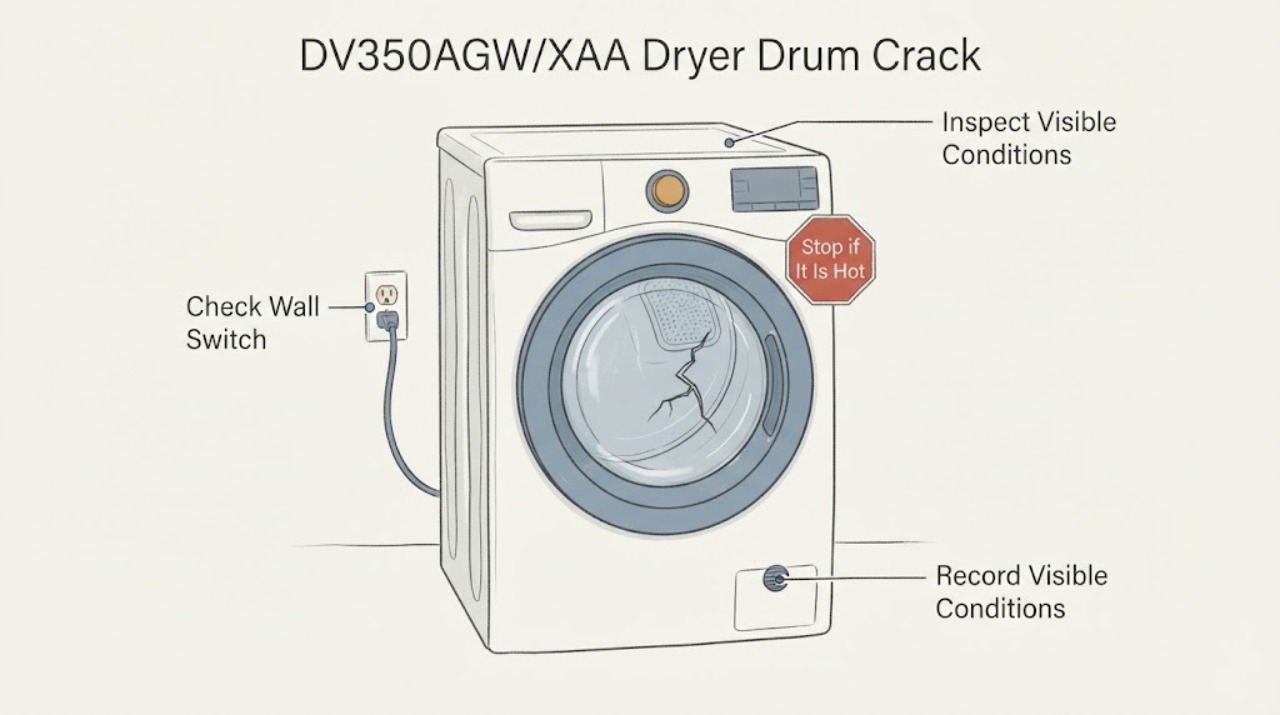
Stop using the Samsung DV350AGW/XAA if the drum is visibly cracked, has a sharp edge, catches fabric, or makes a new scraping, thumping, or grinding sound associated with the damage. Switch off the dryer and the circuit breaker before touching the power connection; do not run it to see whether the crack is harmless, hand-spin a damaged drum, glue or weld it, or open the cabinet. With power isolated and the drum cool, make only a visual inspection through the door, photograph the crack, and record whether there is lint, metal dust, a snag, burning odor, or power-cord damage. Samsung's noise guidance sends empty-drum thumping or persistent grinding to service, and its power guidance says to stop when burn marks or electrical damage are visible. The exact drum assembly or repair-versus-replace decision requires the full model/serial record and a qualified Samsung dryer technician; no replacement part is asserted here.
Work through in order
Diagnostic checks
Use only checks that match the exact appliance or system and its official guide.
-
Check 1
Stop the cycle and switch off the dryer. Before touching the power cord or outlet, switch off the dryer circuit breaker; if the unit is gas-connected, do not disturb the gas line. Keep the dryer out of service after a crack or a new harsh noise is reported.
Expected result: The breaker, cord, plug, or outlet shows heat damage, looseness, scorch marks, or repeated tripping; or the dryer smells hot/burnt or emits smoke.
Next step: Leave the breaker off and arrange the appropriate qualified electrician or appliance service. Do not restore power just to rotate or listen to the drum.
Stop if: Stop immediately for smoke, flame, exposed conductors, gas odor, a hot outlet, or a breaker that will not remain off.
Why this matters
Why: These are electrical or fire-risk signs in addition to the drum concern. Samsung says to stop and contact an electrician for visible power damage, and a damaged or malfunctioning dryer should not be used as a test subject.
-
Check 2
With power isolated and the drum cool, use a flashlight through the open door to inspect the visible drum surface and seam without putting fingers into the drum gap or forcing rotation. Look for a line that opens, a sharp lip, missing material, a snag point, metal dust, or fresh scraping marks.
Expected result: A crack, sharp edge, missing material, fabric snag, metal dust, or fresh scrape is visible; or the suspected line is only a stain or lint mark and the metal surface appears continuous.
Next step: For any structural-looking defect or uncertainty, leave the dryer off and photograph it for service. Do not touch, file, glue, weld, or hand-spin the suspected damage. If no defect is visible, continue documenting the noise rather than restarting the dryer.
Why this matters
Why: A structural break or snag point can damage clothing and may worsen as the drum rotates; a stain or lint mark does not prove a crack. Visual inspection cannot certify hidden drum or support damage.
-
Check 3
Record when the sound occurred and what was in the drum, without running another cycle: empty or loaded, heavy or light load, and whether the report was a scrape, thump, squeal, grinding sound, or one impact. Check only for loose coins, buttons, zippers, or other objects that are already accessible after power isolation.
Expected result: A loose object is plainly removable from the cool drum, the sound occurred only with a particular load, or the sound would occur with an empty drum.
Next step: Remove only a plainly accessible loose object and keep the dryer off if a crack, snag, or unexplained noise remains. Give service the sound pattern and load context; do not run a confirmation cycle.
Why this matters
Why: Samsung lists loose objects and load contact as possible noise sources, but says empty-drum thumping or persistent grinding should go to service. A loose object does not clear a drum that is visibly cracked.
-
Check 4
Photograph the drum defect and the model/serial label, and note the dryer type, whether the drum turns only when powered, any visible lint or metal dust, and any recent installation or impact. Do not remove the rear panel, front bulkhead, drum, belt, rollers, or supports.
Expected result: The label confirms DV350AGW/XAA or a different suffix, and the photos show a crack, a suspected seam, or no verifiable defect.
Next step: Send the exact label and photos to Samsung support or a qualified appliance technician for inspection. Decide repair versus replacement only after receiving a model-matched diagnosis and quote; do not order a drum by visual similarity.
Why this matters
Why: The full model and serial information determine the correct service documentation and whether a replacement drum or other assembly is even applicable. The assigned topic alone does not verify a part number or a repair cost.
Use your observations
Decision map
Find the observation that best matches what you see, then follow the next safe action.
-
PATH 01Next step
What you see
A visible crack has a sharp lip, missing metal, fabric snag, metal dust, or scrape marks, or the drum cannot be safely classified from the doorway.
Do this next
Keep the breaker off and arrange qualified Samsung dryer service; do not hand-spin, glue, weld, or run the dryer.
Why this path and its safety boundary
Why it matters: Treat the rotating drum as structurally unsafe and potentially capable of damaging clothing or worsening the fault.
-
PATH 02Next step
What you see
The drum is visually intact, but the dryer thumps when empty or continues to grind/squeal after a load is removed.
Do this next
Leave the dryer unused and provide the technician the sound recording, model/serial, and load context. Do not remove rotating assemblies.
Why this path and its safety boundary
Why it matters: Samsung treats empty-drum thumping and persistent grinding as service conditions; the symptom is not explained by ordinary load contact.
-
PATH 03Next step
What you see
A plainly accessible coin, button, zipper, or other object explains a one-time noise, and there is no crack, snag, scrape, or electrical damage.
Do this next
Remove only the accessible object with power isolated, document the result, and seek service before use if any crack or abnormal noise remains.
Why this path and its safety boundary
Why it matters: Samsung lists loose objects and load contact as possible noise causes, but this does not validate a previously reported drum crack.
-
PATH 04Next step
What you see
There is smoke, burning odor, visible power damage, a hot outlet, repeated breaker trip, or gas odor.
Do this next
Keep the dryer off; leave the area for active smoke/fire or gas danger and contact the appropriate emergency, gas, electrical, or appliance professional. Do not test the dryer.
Why this path and its safety boundary
Why it matters: The immediate hazard takes priority over identifying the drum part.
Helpful context
Understand the symptom
A visible drum crack is a stop-use condition
A crack in a rotating dryer drum can present a sharp edge or a place where fabric catches, and a new noise may come from the damaged rotating assembly or from a separate object. The noise does not identify a belt, roller, bearing, motor, or drum part. Treat the reported crack as real until a qualified technician confirms otherwise; do not keep a load running while deciding whether repair or replacement is better.
The safe user scope is visual documentation
The assigned identity is Samsung DV350AGW/XAA, but the public Samsung pages opened for this task do not expose a model-specific drum replacement procedure or compatible part number. The useful checks are therefore power isolation, a cool visual inspection, a check for obvious snagging or secondary damage, and a precise service report. Cabinet removal, welding, adhesive repair, belt or bearing diagnosis, and part ordering remain professional/model-matched work.
When checks do not resolve it
Need a professional?
Request qualified Samsung dryer service before further use for any visible drum crack, sharp edge, snag, metal dust, new scrape, empty-drum thump, persistent grinding, smoke/odor, or unresolved noise. Provide the full model/serial label and photos.
Have this ready
- DV350AGW/XAA full suffix and serial, gas/electric configuration if known, location and photos of the crack, whether fabric catches, load size, exact noise type, whether the drum was empty, and any lint/metal dust, odor, or power damage.
Common questions
FAQ
Can I keep using the Samsung dryer if the drum crack is small?
No. A sharp edge, snag, missing material, metal dust, or uncertain crack can worsen while the drum rotates. Switch off the breaker before handling the cord and arrange qualified service.
Can I repair a cracked dryer drum with glue or welding?
Do not attempt a glue, epoxy, weld, or improvised patch. The opened Samsung sources do not support those repairs, and the rotating drum and model-specific assembly require professional assessment.
Does a noisy Samsung dryer always mean the drum is cracked?
No. Samsung lists load contact and loose objects as possible noise causes, while empty-drum thumping or persistent grinding should go to service. Noise alone cannot identify a drum crack or another internal part.
Read the exact guide
Official sources
- Samsung dryer is too noisySamsung · Samsung dryer external noise triage, loose-object/load distinctions, and service boundary
- Samsung dryer loses power or won't turn onSamsung · Samsung dryer power isolation and visible cord/outlet damage boundary
- Dryers | Samsung Support USSamsung · Samsung dryer support portal for looking up the assigned DV350AGW/XAA model, manuals/downloads, and request-repair routing; it is not a model-specific drum replacement procedure
Community feedback
Share a repair observation
Share a plain-text repair observation. Accepted observations are published automatically; this page may take a moment to update.