
On this page
Start here
Quick answer
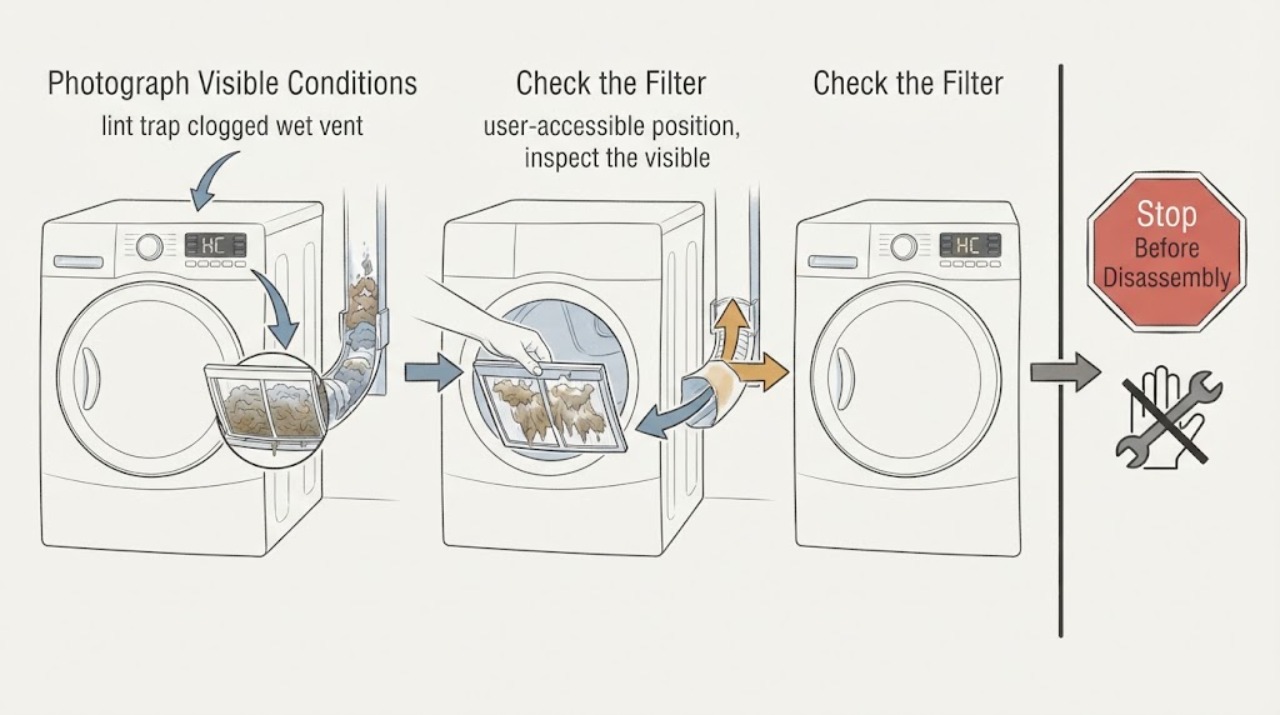
Samsung's US dryer guide defines HC as a heating error: the dryer is getting too hot, most commonly because a clogged lint screen or exhaust vent is trapping heat. A damp or visibly wet vent is evidence that moisture may not be leaving correctly, but it does not identify one failed sensor or heater. First photograph the complete display, confirm the full model and whether the dryer is electric or gas, let it cool, clean the lint screen, and inspect only the accessible exhaust path for lint, kinks, flattening, gaps, or unsuitable duct material. If your model supports Samsung's Vent Blockage test, run it only with a cool, empty drum and interpret its result rather than treating HC as the test itself. Do not confuse HC with HC2: Samsung lists HC2 under other errors as a gas-ignition code. If HC returns after the screen and vent are clear, or if there is smoke, burning odor, scorching, abnormal cabinet heat, a gas odor, sparks, or a power problem, stop using the dryer and arrange Samsung or qualified appliance/electrical service.
Work through in order
Diagnostic checks
Use only checks that match the exact appliance or system and its official guide.
-
Check 1
Stop the cycle and record the exact display, including HC versus HC2, hE, 1 HC, C80/C90, or a vent icon. Photograph the panel, read the complete model number, identify whether the dryer is electric or gas, and note whether the message appeared during heating, at the end of a cycle, or only after a Vent Blockage test.
Expected result: The display clearly says HC during a drying cycle, HC appears only as a vent-test result, HC2 is shown, or the code/model is incomplete or unreadable.
Next step: Use the full model's manual and the matching branch below. If the display is HC2, use the gas-ignition/service path; if it is a vent icon or C-series result, treat it as an airflow indication rather than HC.
Stop if: Do not substitute HC, HC2, hE, or C90 meanings from another Samsung model, and do not keep restarting to obtain a clearer code.
Why this matters
Why: Samsung defines HC as a heating error, while HC2 is a gas-ignition code and C-series results are vent-test outputs. The task shorthand MultiSteam VentSensor HE is not enough to select a model-specific sensor, heater, or vent part.
-
Check 2
Let the dryer cool, then remove the lint filter from its user-accessible location. Remove lint from the screen and filter housing as the exact manual describes. If the filter is washed on your model, reinstall it only when completely dry and seated; do not operate without the filter or with a damaged or broken screen.
Expected result: The lint screen is visibly clogged, coated with residue, damp, cracked, broken, or clean and intact.
Next step: Clean and fully dry an intact screen, or stop for a damaged screen and obtain the correct model-matched replacement. Continue to the accessible exhaust check only after the dryer is cool and safe.
Stop if: Do not run the dryer without the lint filter, use a broken screen, spray liquid into the cabinet, or reach into a moving or hot drum.
Why this matters
Why: Samsung identifies a clogged lint screen as a common cause of HC because trapped heat cannot leave. A clean screen makes that obstruction less likely but does not prove the exhaust duct, heater, sensor, or control is healthy.
-
Check 3
From a safe, user-accessible position, inspect the visible exhaust duct and exterior hood for heavy lint, water or condensation, kinks, flattening, gaps, disconnection, or unsuitable plastic/foil material. Check only what can be seen without moving the dryer, entering a wall or roof cavity, or dismantling the cabinet.
Expected result: The lint trap or duct is wet and the vent is visibly restricted, the duct appears correctly fitted and open, or inspection requires moving the dryer or disassembling the building vent.
Next step: Correct only an obvious accessible kink or loose external connection. Arrange qualified vent cleaning for a long, wall, roof, or cabinet run, and request appliance service if the path is clear but HC returns.
Stop if: Do not use plastic or foil ducting, push tools into an unknown wall/roof run, or continue if lint buildup is heavy, the duct is damaged, or the dryer has a fire or electrical symptom.
Why this matters
Why: Samsung explains that a blocked or poorly fitted vent prevents heat and moisture from escaping and can make the dryer reduce heat or produce an abnormal-temperature result. A damp vent supports an airflow concern but cannot identify one failed component.
-
Check 4
If the complete model's manual confirms that a Vent Blockage test is available, run it only with the drum cool and empty and the door closed. Use the manual's controls; on supported common models Samsung describes Adjust Time Up plus Dry Level, with Cycle 1 plus Wrinkle Prevent or Air Fluff plus Wrinkle Prevent as alternatives. Do not open the door during the test.
Expected result: The test reports 0 or End, CLg/Cg, C80/C90, Ct, or HC, or the model has no supported test or the procedure does not work.
Next step: Clean or have the exhaust path cleaned for a clog result. For HC, first follow the error guide's cord/drum/vent checks; if it returns with a clean path, request service. If the model has no test, do not force a button sequence from another model.
Stop if: Do not run the test with a hot or damaged dryer, laundry in the drum, a blocked door, smoke, burning odor, sparks, gas odor, or a power fault.
Why this matters
Why: Samsung says 0/End indicates a normal unblocked duct, CLg/Cg indicates a clog, C80/C90 indicate about 80%/90% restriction, Ct indicates an out-of-range internal temperature, and HC indicates abnormal temperature. These are test results with different meanings; HC is not proof of a vent-only fault.
-
Check 5
If HC remains after the lint screen and accessible exhaust path are clean and the model-supported test does not show a correctable blockage, stop diagnosing by replacing parts. Record the dryer type, exact model, code timing, lint/vent observations, whether the drum heats, and any power or gas symptoms for Samsung or qualified service.
Expected result: HC clears after cleaning, HC returns with a clear vent, HC2 appears, or there is smoke, burning odor, scorching, abnormal cabinet heat, gas odor, sparking, a hot plug, or a repeated trip.
Next step: Use the dryer only when no hazard or recurring code is present. For recurrence, HC2, low-voltage symptoms, or any hazard, leave it off and arrange Samsung/appliance service; use a licensed electrician for supply concerns and qualified gas service for gas-related work.
Stop if: Do not open the cabinet, probe live circuits, bypass a thermal or door safety, repeatedly reset the breaker, or replace a heater/sensor/control based only on HC.
Why this matters
Why: A cleared code supports a lint/airflow contribution. Recurring HC can still involve airflow installation, low voltage on an electric dryer, heater, temperature sensing, or control; HC2 requires a different gas-ignition path. A safety symptom overrides further testing.
Use your observations
Decision map
Find the observation that best matches what you see, then follow the next safe action.
-
PATH 01Next step
What you see
The full display is HC during a drying cycle, the lint screen is clogged or wet, and the visible exhaust path is restricted or damp.
Do this next
Cool the dryer, clean and dry the lint screen, correct only an accessible vent restriction, and use the model-supported vent test if available.
Why this path and its safety boundary
Why it matters: This pattern matches Samsung's documented heating-error mechanism of trapped heat and moisture from a clogged lint screen or vent more closely than a single failed sensor.
-
PATH 02Next step
What you see
The vent icon is lit or blinking, or the Vent Blockage test reports CLg/Cg, C80, or C90 rather than HC.
Do this next
Clean the lint screen and have the accessible or building exhaust path cleaned and inspected. Recheck only as the exact manual permits, and request service for a repeated result or unsafe access.
Why this path and its safety boundary
Why it matters: Samsung treats the icon and C-series results as exhaust-maintenance or vent-test indications; they quantify or signal airflow restriction and are not a universal heater or sensor diagnosis.
-
PATH 03Next step
What you see
The lint screen and vent are clean, dry, correctly fitted, and the dryer still displays HC or produces abnormal heat.
Do this next
Stop using the dryer and request Samsung or qualified appliance service; use a licensed electrician for supply/voltage concerns. Provide the exact model, fuel type, code timing, test result, and cleaning record.
Why this path and its safety boundary
Why it matters: The obvious airflow path has not explained the code. Samsung notes that electric dryers can also show heating issues related to low voltage, and a recurring HC needs service rather than a guessed heater or sensor.
-
PATH 04Next step
What you see
The display is HC2, the dryer is gas, or there is gas odor; alternatively the exact model/code is incomplete or the display is a different code.
Do this next
Turn off the dryer and arrange qualified gas/appliance service; for gas odor, leave the area and follow local gas-safety guidance. For an uncertain code, obtain the full model and display photo before any code-specific repair.
Why this path and its safety boundary
Why it matters: Samsung lists HC2 separately as a gas-ignition error, while incomplete identity or another code cannot safely inherit HC's vent/heating interpretation. Gas odor is an immediate safety issue.
Helpful context
Understand the symptom
HC is not the same as a Vent Sensor reminder or a vent-test result. Samsung's current US error guide places HC in heating errors and says the dryer is getting too hot; it places HC2 in the separate all-other-errors list as a gas-ignition error. The distinction matters before choosing a repair path.
The shorthand MultiSteam/VentSensor HE does not identify one complete Samsung model. Samsung's US product material shows Multi-Steam Technology and Vent Sensor on the specific DV56H9100EV electric dryer, while current Samsung support says code displays, vent tests, and features vary by model. Read the rating label and use the matching manual for any button sequence or service part.
A lint trap that is wet, coated, or clogged and a damp exhaust path can point to restricted airflow, but moisture alone does not prove a bad sensor, heater, or control. Keep the dryer off while it is hot or while there is a burning smell, smoke, scorching, gas odor, sparking, or damaged electrical hardware.
Only after diagnosis
Potential parts
- lint filter or screen
Consider a filter only when the exact model's screen is broken, damaged, or cannot be restored by the documented cleaning method. HC by itself is not a replacement-part diagnosis.
The task's MultiSteam VentSensor HE label is not a complete model number. Confirm the rating-plate model, fuel type, market, and Samsung fit information before ordering; do not use a generic screen or bypass the filter.
Common questions
FAQ
What does HC mean on a Samsung MultiSteam dryer?
Samsung's US guide lists HC as a heating error meaning the dryer is getting too hot. The most common supported check is a clogged lint screen or vent system; clean those first, then request service if HC returns. Do not confuse HC with HC2, which Samsung lists separately as a gas-ignition error.
Does a wet exhaust vent prove the Samsung dryer's sensor is bad?
No. Moisture or condensation in the vent can support an airflow restriction, but it does not identify a sensor, heater, or control failure. Inspect the accessible duct, use the exact model's Vent Blockage test if available, and get service for a recurring HC after the path is clear.
Can I run a Vent Blockage test when HC is displayed?
Only if the exact manual supports it and the dryer is cool, empty, intact, and safe. The test produces separate results such as 0/End, CLg/Cg, C80/C90, Ct, or HC; do not assume every Samsung model uses the same button combination or that a test result is the same as a service code.
Read the exact guide
Official sources
- Run a Vent Blockage test on your Samsung dryerSamsung US · Official Samsung US procedure; it explicitly says not all dryer models have this test and the user manual must confirm availability.
- Samsung dryer displays an error codeSamsung US · Current Samsung US dryer error guide. It states that display conventions and supported codes vary by model, so the complete model remains necessary for exact procedures.
- DV56H9100EV Samsung Front-Load Electric DryerSamsung Electronics America · Opened official US product brochure as a scope check only. The brochure confirms those features on DV56H9100EV; it is not evidence that every shorthand MultiSteam VentSensor HE dryer shares that model's code table or parts.
- Clothes are not dry after using Samsung dryerSamsung US · Current Samsung US dryer troubleshooting page used for the relationship between trapped moisture, lint, vent blockage, HC, and service; exact button sequences and features remain model-dependent.
- How to clean your Samsung dryerSamsung US · General Samsung US cleaning guidance; the exact filter location and any washing steps must follow the model manual.
- An icon is showing on my Samsung dryerSamsung US · Official icon guidance used to distinguish Vent Check reminders from HC codes; Samsung says icon appearance and availability vary by model.
Community feedback
Share a repair observation
Share a plain-text repair observation. Accepted observations are published automatically; this page may take a moment to update.