
On this page
Start here
Quick answer
Do not diagnose a Samsung dryer from a partial character or a code copied from another model. Photograph the complete display or the exact blinking-light pattern, record the model and the programme stage, and first rule out smoke, burning odour, abnormal heat, sparks, gas odour, or a repeated electrical trip. Samsung says some dryers show codes as blinking lights, and that the meaning varies by code family: door codes such as dC or dE point to the door or latch; temperature and heating codes can be linked to a blocked lint screen or exhaust vent; voltage codes require attention to the dedicated circuit and power connection; and communication codes may permit one documented power cycle. A code that returns, a damaged door or latch, an unresolved vent or temperature code, or any safety hazard needs Samsung or qualified service. Do not open panels, bypass a safety switch, or unplug a firmware download marked dn.
Before you begin
Safety first
- This article covers external observation, model-specific controls, lint-screen care, and accessible exhaust checks only. A qualified technician or licensed electrician must handle live voltage, terminal connections, cabinet panels, heaters, motors, sensors, wiring, gas ignition, damaged doors, and persistent safety faults.
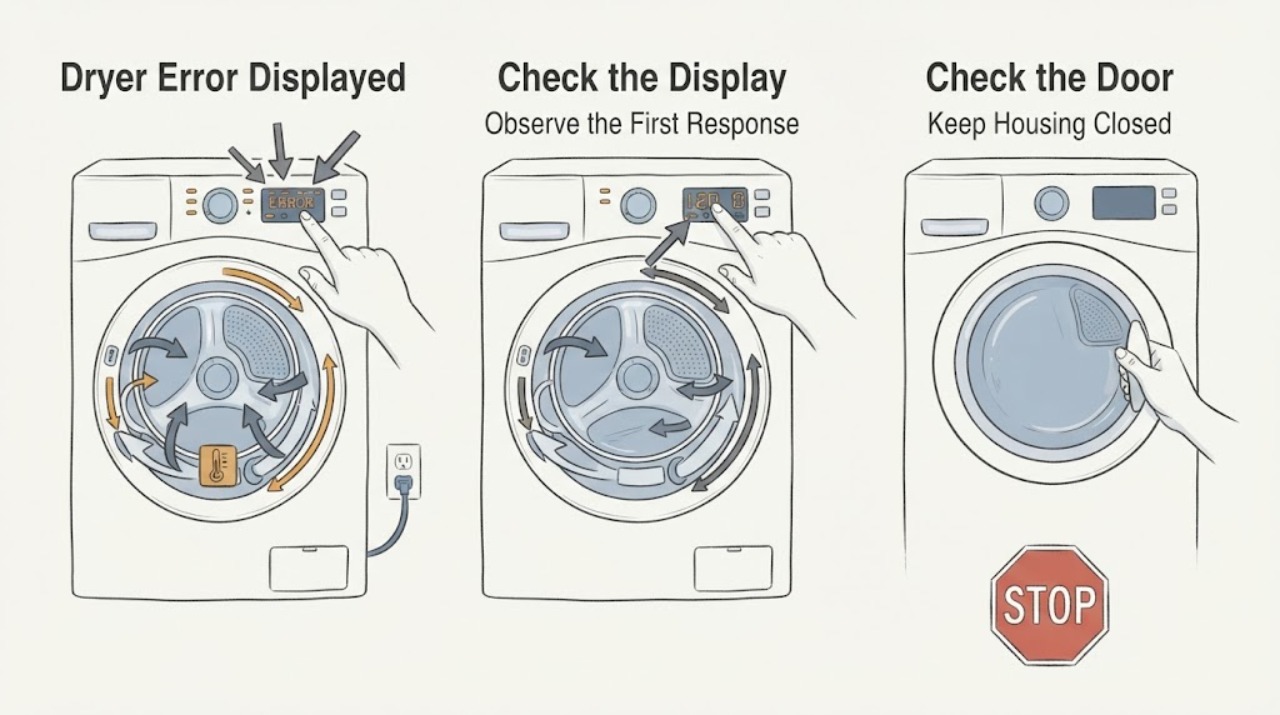
Work through in order
Diagnostic checks
Use only checks that match the exact appliance or system and its official guide.
-
Check 1
Stop the dryer and inspect from outside for smoke, burning odour, sparks, gas odour, unusual heat, melted material, damaged wiring or plug, a repeated electrical trip, or a loose or damaged door. If any is present, keep the door closed, isolate power only from a dry and safe position, and arrange service; do not restart it to reproduce the code.
Expected result: Record whether the drum is hot, whether the display is active, whether the error is a complete code or blinking-light pattern, and whether the fault appeared during start, heating, tumbling, cooling, or after the cycle ended.
Next step: Photograph the display or lights and the model label, then continue only with the low-risk check that matches the recorded code family.
Stop if: Do not run the dryer with smoke, burning odour, gas odour, sparks, exposed or damaged electrical parts, abnormal heat, melted material, or a repeated trip.
Why this matters
Why: A hazard takes priority over code interpretation. Without a hazard, the complete code, model, and programme stage distinguish a door, airflow, temperature, supply, control, or sensor path.
-
Check 2
Read the full model number and copy every display character, spacing, capitalization, and decimal-like mark; if there is no digital display, record which named lights blink and in what combination. Compare this record with the Samsung dryer error guide and the manual for that model.
Expected result: Classify the result as a listed door code, temperature or heating code, voltage or frequency code, vent-test result, communication or control code, child lock or status indication, dn download, or an unrecognized pattern.
Next step: Keep the code photo and model number with the service record; follow only the instructions for the matching Samsung model and code family.
Stop if: Do not substitute a similar-looking code from another model, repeatedly clear the display, or continue when the pattern is unreadable and the dryer has another symptom.
Why this matters
Why: Samsung groups codes by the subsystem they indicate, but display shapes and available tests vary by model. A blinking status or lint reminder is not automatically an error, while an unrecognized code must not be assigned a guessed meaning.
-
Check 3
For a door-related code such as dC, dE, dF, do, d0, 1 DC, or 1 dF, with the dryer off, inspect the visible latch area and door edge for caught laundry, lint, a loose latch, misalignment, or damage; close the door normally without slamming or forcing it.
Expected result: Record whether the latch is intact and catches normally, whether an item was caught, whether the door will not stay closed, or whether the door or latch is damaged.
Next step: If the area is clear and intact, perform only the model-approved retry once. If the code returns or the latch or door is damaged, leave the dryer unused and request service.
Stop if: Do not bend the door, defeat the latch sensor, remove the door, operate with cracked glass or loose hardware, or reach into a moving or hot drum.
Why this matters
Why: Samsung says this code family relates to the door, latch, and sensors that detect a secure closure. A cleared obstruction may explain one event; persistent code or visible damage points to a latch, sensor, alignment, or door repair.
-
Check 4
For a temperature, heating, or vent-blockage result, let the dryer cool and then clean the lint screen and the accessible exhaust path as the manual permits; inspect the visible duct for kinks, flattening, gaps, unsuitable material, or heavy lint without opening the cabinet.
Expected result: Record whether the lint screen is obstructed, the duct is visibly restricted, a vent test is available, and the displayed result is a clog indication, abnormal temperature, or a passing result.
Next step: Restore only the manual-approved vent arrangement and run the documented vent test if the model supports it; request service when the code returns, the test fails repeatedly, or the dryer remains too hot or does not heat.
Stop if: Stop for smoke, burning odour, scorching, abnormal cabinet heat, sparks, a gas odour, or a duct that requires roof, wall, cabinet, or electrical disassembly to inspect.
Why this matters
Why: Samsung identifies a clogged lint screen or vent as a common cause of temperature and heating errors because trapped heat and moisture cannot leave. A clear accessible path with a recurring code suggests a sensor, heater, airflow installation, or control fault rather than more cleaning.
-
Check 5
For a voltage or frequency code such as 9C1, 9E, 2E, 9E1, FC, FE, or 1 FC, stop the cycle and inspect only the visible plug, cord, outlet, and dedicated-circuit arrangement from a dry position; leave any energized measurement or terminal work to a licensed electrician.
Expected result: Record whether the dryer uses its own circuit, whether an extension cord is present, whether the cord or plug is loose, hot, burned, or damaged, and whether the code returns after the model-approved supply check.
Next step: Leave the dryer disconnected and request electrical or Samsung service when the connection is damaged, the installation is uncertain, the code returns, or the dryer has never heated correctly at that location.
Stop if: Do not use an extension cord, bypass the circuit protection, repeatedly reset a tripped breaker, open the power connection, or touch a hot or damaged plug or cord.
Why this matters
Why: Samsung associates these codes with abnormal supplied voltage or frequency. A damaged connection or recurring code requires a licensed electrician or qualified service, not repeated breaker resets or a guessed cord change.
-
Check 6
For a communication or other component code, first check whether the display is dn. If dn is shown, leave power connected and allow the firmware process to finish as Samsung directs. For an eligible non-download code, use only the manual or Samsung guide's single power-cycle interval, then restart once.
Expected result: Record whether the code clears, whether the dryer returns to normal controls, whether the same code comes back, and whether the dryer can start without a new heat, door, airflow, or supply symptom.
Next step: Stop testing and request Samsung service for a returning code, an unlisted code, a failed update, or any new safety symptom; do not keep cycling power.
Stop if: Never unplug or shut off power while dn is displayed; do not bypass controls, open the cabinet, or continue using a dryer that overheats, smells burnt, smokes, sparks, or trips.
Why this matters
Why: Samsung says communication codes may clear after a short shutoff, while dn indicates a download and must not be interrupted. A returning code indicates an unresolved control, sensor, motor, or communication problem.
Use your observations
Decision map
Find the observation that best matches what you see, then follow the next safe action.
-
PATH 01Safety boundary
What you see
The complete code is a Samsung door family code such as dC, dE, dF, do, d0, 1 DC, or 1 dF.
Do this next
Remove only a visible caught item, close the door normally, and retry only as the exact manual allows; persistent code or damage needs service.
Why this path and its safety boundary
Why it matters: The door, latch, or closure sensor is not confirming a secure door.
Safety stop: Do not operate with damaged door hardware or bypass the latch sensor.
-
PATH 02Safety boundary
What you see
The code is in Samsung's temperature or heating family, such as tS, tC, tE, tE3, HC, hE, HC4, or 1 HC.
Do this next
Cool the dryer, clean the lint screen and accessible exhaust path as directed, and request service if the code returns or heat remains abnormal.
Why this path and its safety boundary
Why it matters: The dryer has detected a temperature or sensor issue, or is getting too hot; restricted lint or exhaust airflow is a common supported check.
Safety stop: Stop for smoke, burning odour, scorching, abnormal cabinet heat, sparks, gas odour, or a trip.
-
PATH 03Safety boundary
What you see
The code appeared only after a Samsung vent-blockage test, such as Cg, Clg, C80, C90, C9, C8, Ct, dc, or C1/CL1.
Do this next
Follow the exact test instructions, remove laundry if the model identifies it, correct an accessible vent restriction, and use service for a repeated result or a test that cannot be run safely.
Why this path and its safety boundary
Why it matters: The test result concerns airflow, temperature range, door state, or laundry detected in the drum; it is not a universal service code.
Safety stop: Do not run the test with a hot or damaged dryer, open cabinet, blocked safe access, or any smoke, odour, spark, or electrical hazard.
-
PATH 04Safety boundary
What you see
The code is 9C1, 9E, 2E, 9E1, FC, FE, or 1 FC, or the dryer loses power or trips.
Do this next
Keep the dryer off, verify only visible connection and dedicated-circuit conditions, and request licensed electrical or Samsung service for a recurring code or damaged installation.
Why this path and its safety boundary
Why it matters: Samsung associates the code family with supplied voltage or frequency rather than a lint-only fault.
Safety stop: Do not keep resetting the breaker, use an extension cord, or open the power connection.
-
PATH 05Safety boundary
What you see
The display shows dn and the dryer is performing a firmware download.
Do this next
Leave power connected and wait for the dryer to restart itself; request service if dn remains for the duration Samsung specifies.
Why this path and its safety boundary
Why it matters: Samsung warns that interrupting this process can make the dryer inoperable.
Safety stop: Do not unplug or switch off power while dn is displayed.
-
PATH 06Safety boundary
What you see
Only a cycle-status or lint-reminder light blinks and the dryer has no other symptom or listed error pattern.
Do this next
Read the exact model manual for the icon, clean the lint screen if it is a maintenance reminder, and monitor for a separate symptom rather than forcing a reset.
Why this path and its safety boundary
Why it matters: Samsung says blinking does not always mean an error; some lights show cycle status or maintenance reminders.
Safety stop: Stop if another symptom appears, especially smoke, burning odour, abnormal heat, sparks, gas odour, or a trip.
Helpful context
Understand the symptom
Capture the exact message before clearing it
Samsung dryer displays are easy to misread: a lower-case d, a zero, a t, and a blinking status light can look alike. If the model has no digital display, Samsung says the error may be represented by blinking lights. Record every character, light, and the point in the cycle when it appeared, then match that record to the exact model manual. A code from a different Samsung dryer is not a universal diagnosis.
Separate a door or control indication from a heat and airflow fault
Door-related codes concern the latch and the sensors that confirm the door is secured. Temperature and heating codes can reflect restricted lint or exhaust airflow, while voltage codes concern the supply to the dryer. Check only the external, model-supported items for the displayed code; do not run the dryer with a damaged latch, blocked vent, burning smell, smoke, or abnormal heat.
Use reset guidance only where Samsung allows it
Samsung recommends a short power cycle for some communication or unlisted component codes, but the exception matters: a display of dn means a firmware download is in progress and Samsung cautions against unplugging or shutting off power during that process. A one-time reset is a diagnostic observation, not a repair and not permission to keep using a dryer whose code returns.
A vent test is not a substitute for component repair
On models that provide a vent-blockage test, use the exact manual sequence with the drum cool and empty. Samsung describes results such as a clogged vent, a temperature outside the test range, an open door, laundry detected in the drum, or abnormal voltage. Clean the lint screen and accessible exhaust path only as the model instructions permit; persistent temperature, heating, voltage, or component errors need service.
Safety boundary
Stop conditions
- Stop for smoke, burning odour, sparks, gas odour, scorching, abnormal cabinet heat, a damaged plug or cord, water near electrical parts, or a repeated trip.
- Do not open panels, test live voltage, remove the terminal cover, bypass a door or thermal safety device, or bridge wiring.
- Do not unplug or shut off power while Samsung code dn indicates a firmware download in progress.
- Do not use a code from another model as a diagnosis, repeatedly reset a returning code, or run a vent test on a hot, damaged, or unsafe dryer.
- Leave the dryer unused and arrange service when a door, latch, vent, heater, sensor, motor, control, or power fault remains after the exact manual's low-risk checks.
Only after diagnosis
Potential parts
- door latch or door sensor
Consider this category only if the exact model diagnosis confirms a persistent door-family code or a damaged latch after visible obstruction checks.
Confirm the full model and service documentation; do not substitute, defeat, or bypass the closure sensor. - lint filter or exhaust duct component
Consider this category only if the exact model and inspection identify a damaged filter or a component of the exhaust path that cannot meet the manual's airflow requirements.
Confirm the exact model, duct arrangement, material, length, and installation guidance; a filter or duct change does not replace a thermal or control diagnosis. - temperature sensor or thermal safety component
Consider this category only when a recurring temperature or heating code remains after the supported lint and exhaust checks and service diagnosis identifies the component.
Confirm exact model fit and safety specifications with Samsung or a qualified technician; do not bypass a thermal component.
When checks do not resolve it
Need a professional?
Request Samsung or qualified appliance service when the complete code is unlisted, returns after the exact supported check or one eligible reset, a door or latch is damaged, a temperature or heating code persists after the lint and exhaust checks, a vent test repeatedly fails, a voltage or frequency code appears, dn does not finish as Samsung specifies, or any smoke, burning odour, gas odour, spark, abnormal heat, water contact, or repeated trip occurs. Use a licensed electrician for a damaged or uncertain dryer power installation.
Safety scope: This article covers external observation, model-specific controls, lint-screen care, and accessible exhaust checks only. A qualified technician or licensed electrician must handle live voltage, terminal connections, cabinet panels, heaters, motors, sensors, wiring, gas ignition, damaged doors, and persistent safety faults.
Common questions
FAQ
Why is my Samsung dryer showing an error code?
The code identifies a possible door, temperature, heating, airflow, voltage, frequency, communication, control, or sensor condition. Record the complete code, model, and cycle stage first; then use the Samsung guide for that exact code family instead of guessing from a similar-looking character.
What should I do if my Samsung dryer has blinking lights instead of a code?
Samsung says some models use blinking lights for errors, while other blinking lights show cycle status or a lint reminder. Record the named lights and their pattern, check the exact model manual, and treat smoke, burning odour, abnormal heat, sparks, gas odour, or a trip as a stop condition.
Can a blocked vent cause a Samsung dryer error?
Yes. Samsung identifies a clogged lint screen or exhaust vent as a common cause of temperature and heating errors and provides a model-dependent vent test. Let the dryer cool, clean the lint screen and accessible exhaust path as the manual allows, and request service if the code or abnormal heat returns.
Can I reset a Samsung dryer error code?
Only when Samsung's guide or the exact manual permits a power cycle for that code. Do not interrupt a display of dn, which Samsung identifies as a firmware download in progress. A code that returns after one supported reset needs service rather than repeated power cycling.
When should I stop troubleshooting a Samsung dryer code?
Stop for smoke, burning odour, sparks, gas odour, scorching, abnormal heat, damaged power parts, water near electrical parts, or a repeated trip. Also stop when the door or latch is damaged, the code returns after the supported check, a vent test repeatedly fails, or a step requires live electrical work, cabinet access, or bypassing a safety device.
Read the exact guide
Official sources
- Samsung dryer displays an error codeSamsung Support · Official Samsung US troubleshooting guide; exact code availability and controls vary by dryer model and region.
- Clothes are not dry after using Samsung dryerSamsung Support · Official Samsung US dryer troubleshooting guide; test button combinations and available functions differ by model.
- Samsung dryer loses power or will not turn onSamsung Support · Official Samsung US power troubleshooting guidance; a licensed electrician handles uncertain or damaged electrical installations.
- Dryers | Samsung Support USSamsung Support · Official Samsung dryer support hub; the exact model manual controls available cycles, icons, tests, and procedures.
- Blinking lights on Samsung dryerSamsung Support · Official Samsung US guidance for models that use indicator lights; panel combinations vary by model.
Community feedback
Share a repair observation
Share a plain-text repair observation. Accepted observations are published automatically; this page may take a moment to update.