
On this page
Start here
Quick answer
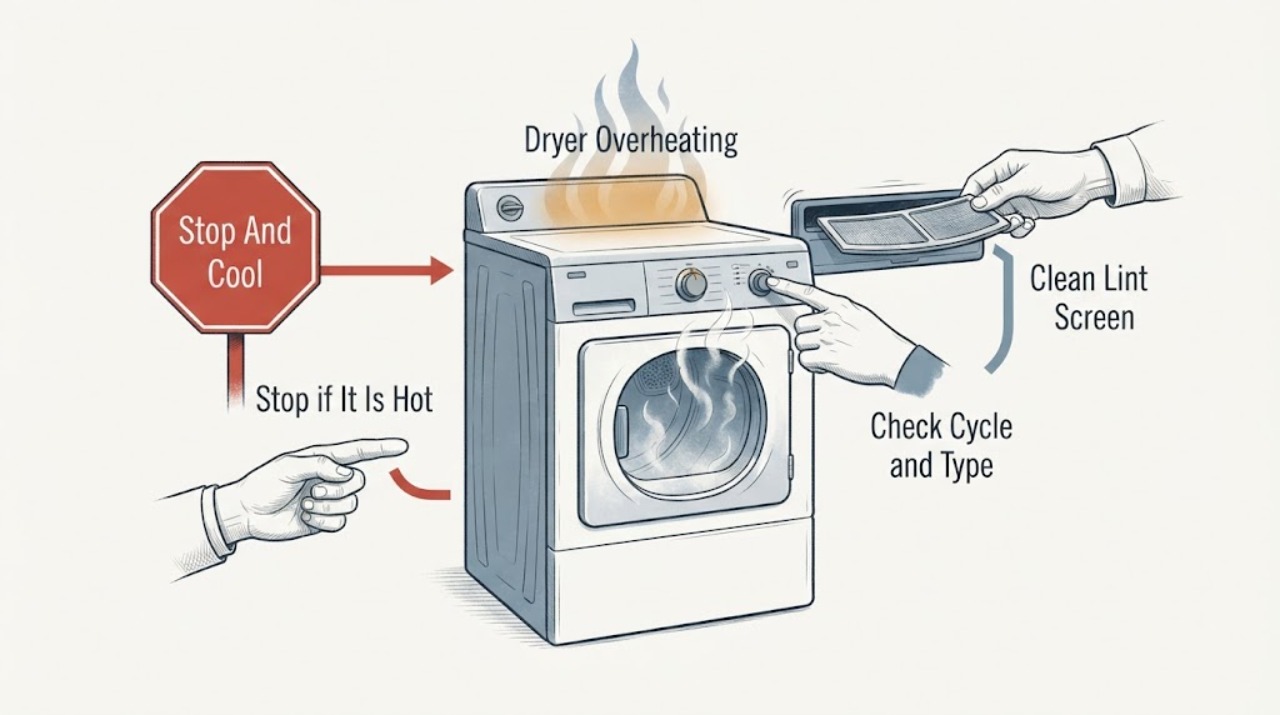
Stop a Samsung dryer immediately if the cabinet, laundry, plug, or outlet is unusually hot, or if there is a scorched smell, smoke, fabric damage, gas odor, arcing, or a breaker trip. Do not run another test cycle while it is hot or unsafe. Once the dryer is cool and safe to approach, identify the exact model, fuel type, cycle, load, and any display or blinking-light code. Clean the lint screen, inspect the accessible exhaust path and outside vent for restriction, and check a heat exchanger only when the exact manual identifies one for that model. A ventless model may use a heat exchanger and drain rather than a conventional outside duct. A clear filter does not rule out a crushed duct, blocked heat exchanger, heater, thermostat, motor, gas burner, control, or electrical fault. Keep the dryer off and arrange qualified service when overheating returns, an error remains, the vent is inaccessible, or any internal, gas, or electrical repair is suspected.
Before you begin
Safety first
- This article supports stopping and cooling, model identification, safe lint and accessible vent observations, model-approved ventless heat-exchanger care, supply observation, and documentation only. Do not open the cabinet, work on gas or live electrical parts, bypass safety controls, or keep using a hazardous dryer.
Work through in order
Diagnostic checks
Use only checks that match the exact appliance or system and its official guide.
-
Check 1
Stop the Samsung dryer, keep it off, and let it cool before touching the cabinet or laundry; if there is smoke, flame, a gas smell, a hot plug or outlet, arcing, or visible damage, leave the area and use the emergency branch.
Expected result: Record whether the warning was an unusually hot cabinet, hot clothes, scorched odor, smoke, gas odor, fabric damage, repeated shutdown, hot electrical connection, or breaker trip.
Next step: For a gas smell or smoke, clear the building and contact emergency help from a safe location; otherwise continue only after the dryer is cool and safe.
Stop if: Do not restart, open the cabinet, reset a breaker repeatedly, operate switches near a gas odor, or run an empty cycle to reproduce overheating.
Why this matters
Why: Smoke, gas, burning, electrical damage, or repeated thermal protection is a fire or combustion boundary, not an ordinary airflow check.
-
Check 2
With the dryer cool and safe, record the exact model, gas or electric fuel type, vented or ventless design, cycle and heat setting, load size, and any display code or blinking light.
Expected result: Classify the symptom as abnormal heat during a high-heat cycle, overheating across cycles, a cycle that ends or shuts down early, a heating error, or a normal cool-down being mistaken for no heat.
Next step: Use the exact model manual and the matching vented, ventless, gas, or electric branch; do not apply another model's code or test sequence.
Stop if: Do not run a high-heat test when the dryer is already unusually hot, smells scorched, shows smoke, or has a gas or electrical warning.
Why this matters
Why: Cycle settings, load, model design, and code interpretation change the correct check; Samsung says some blinking lights are status indicators while others indicate heating or voltage errors.
-
Check 3
With the dryer off and cool, remove and clean the lint screen exactly as the Samsung manual directs, then reinstall it fully before any future use.
Expected result: Record whether the screen is clogged, coated with residue, damaged, missing, or clean while the dryer still overheated.
Next step: Keep the dryer off for a missing or damaged screen and arrange the correct model-specific replacement or service; otherwise continue with the accessible vent check.
Stop if: Do not run the dryer without its filter, scrape it with a sharp object, spray flammable cleaner, or open the cabinet to clean hidden lint.
Why this matters
Why: A blocked or incorrectly seated filter can restrict airflow and allow lint accumulation; a clean filter does not prove the exhaust duct or internal airflow is clear.
-
Check 4
For a vented model, inspect only the visible duct and outside exhaust termination without moving the dryer; look for crushing, flattening, kinks, lint, a separated joint, an obstructed hood, or a flap that cannot open freely.
Expected result: Classify the accessible exhaust as clear and correctly fitted, visibly restricted or damaged, disconnected, or inaccessible without moving the appliance.
Next step: Keep the dryer off until a restricted or damaged path is cleaned and correctly restored according to the manual; arrange service if gas connections or built-in access are involved.
Stop if: Do not move a gas dryer, disconnect gas piping, use plastic or foil where the manual disallows it, reach into the cabinet, or run the dryer with a disconnected duct.
Why this matters
Why: Samsung says a restricted or unsuitable vent can prevent heat and moisture from leaving and can lead to heat buildup; an inaccessible path requires qualified service.
-
Check 5
For a Samsung ventless model, clean the heat exchanger or optional filter only when the exact model displays its cleaning request and the manual permits the cool, de-energized procedure; check the model's drain path if applicable.
Expected result: Record no heat-exchanger alert, a removable dust buildup cleaned per the manual, a blocked or wet drain path, or an alert that returns after the permitted cleaning.
Next step: Keep the dryer off and arrange service when the heat exchanger or filter is inaccessible, damaged, repeatedly alerts, or the drain path cannot be safely restored.
Stop if: Do not open unlisted panels, scrape fins, use sharp tools, use compressed air into the cabinet, or operate with a wet electrical area.
Why this matters
Why: A ventless dryer removes heat and moisture differently from a conventional exhaust dryer; a returning heat-exchanger alert or drain problem can keep heat in the system.
-
Check 6
If there is no gas, smoke, or electrical warning, inspect the accessible power connection and selected cycle for an extension cord, damaged cord, abnormal breaker state, or a setting that intentionally changes heat; make at most one manual-approved reset.
Expected result: Record gas or electric type, a loose or damaged cord, a hot outlet, a tripped breaker, a recurring trip, a normal supply, or a low-heat or cooling setting that explains the observed temperature.
Next step: Keep the dryer off and use qualified electrical service for damage or recurring trips; use the exact manual for a setting correction and stop if overheating remains.
Stop if: Do not use an extension cord, open the outlet or dryer, handle a hot connection, or repeatedly reset a breaker.
Why this matters
Why: Samsung identifies abnormal voltage and supply conditions as possible error paths, while some cycles intentionally reduce or delay heat; a hot or damaged connection is not a setting issue.
-
Check 7
Review the recent loads and drying history without running another overheating test; note overloads, bulky items, very small loads, contaminated fabrics, unusually long cycles, or heat that returns immediately after a clean vent.
Expected result: Record whether the problem follows a load or cycle, occurs with an empty cool drum, or returns despite a clean filter and accessible vent or heat exchanger.
Next step: Keep the dryer off for recurrence and arrange model-specific service; follow the manual's load limits and garment warnings once the appliance is cleared for use.
Stop if: Do not dry items contaminated with flammable liquids, leave hot laundry unattended, or keep testing a dryer that overheats with no load.
Why this matters
Why: Load and setting can change drying time, but overheating with an empty drum or after airflow maintenance points toward an internal heater, thermostat, motor, burner, sensor, or control fault.
-
Check 8
If overheating, a heating error, abnormal temperature, or warning odor remains after the safe filter, vent, heat-exchanger, and supply observations, leave the dryer off and arrange qualified Samsung dryer service.
Expected result: Give the technician the exact model, fuel and vent type, cycle and load, code or light pattern, temperature symptoms, vent findings, supply history, and any smoke, gas, burning, or electrical warning.
Next step: Keep the appliance out of service until qualified personnel diagnose the cause and confirm safe operation.
Stop if: Do not remove panels, bypass a thermal safety, probe live circuits, adjust gas controls, or replace internal parts by symptom alone.
Why this matters
Why: Persistent overheating can involve an internal heater, thermostat, thermal safety, motor, burner, gas control, sensor, blower, vent, or control circuit that requires model-specific testing.
Use your observations
Decision map
Find the observation that best matches what you see, then follow the next safe action.
-
PATH 01Safety boundary
What you see
There is visible smoke, flame, a gas smell, hissing, or a strong unexplained burning odor.
Do this next
Clear the building for smoke or gas odor, avoid appliances and electrical switches, and contact emergency help from a safe location.
Why this path and its safety boundary
Why it matters: The dryer may present a fire, gas, or combustion hazard.
Safety stop: Do not restart, use a phone inside, operate a valve or switch near the suspected leak, or return until qualified responders say it is safe.
-
PATH 02Safety boundary
What you see
The plug, outlet, cord, or breaker is hot, damaged, scorched, arcing, or repeatedly trips.
Do this next
Keep the dryer off and arrange qualified electrical service; follow emergency procedures for smoke or active fire.
Why this path and its safety boundary
Why it matters: The condition is an electrical fire risk rather than a lint-only problem.
Safety stop: Do not use an extension cord, touch a hot connection, open the outlet, or reset the breaker repeatedly.
-
PATH 03Safety boundary
What you see
The lint screen or accessible vent is clogged, crushed, flattened, disconnected, or the outside termination is blocked.
Do this next
Keep the dryer off until the path is cleaned and correctly restored under the exact manual; use qualified service for inaccessible or gas-connected work.
Why this path and its safety boundary
Why it matters: Restricted exhaust can trap heat and moisture and cause a heating error or overheating.
Safety stop: Do not run with a disconnected duct, move a gas dryer, or open the cabinet to clear hidden blockage.
-
PATH 04Safety boundary
What you see
The model is ventless and displays a heat-exchanger or optional-filter cleaning request, or its drain path is not working.
Do this next
Follow only the cool, model-approved heat-exchanger and drain instructions; arrange service for a returning alert, damage, or unsafe access.
Why this path and its safety boundary
Why it matters: The ventless heat and moisture path may be restricted or unable to remove heat correctly.
Safety stop: Do not open unlisted panels, scrape the heat exchanger, or operate with water near electrics.
-
PATH 05Safety boundary
What you see
No warning occurred, the filter and applicable vent path are clear, and the temperature difference follows a low-heat, cooling, Eco, or unusual load setting.
Do this next
Use the exact manual's cycle and load guidance, monitor one cleared cycle, and stop if the cabinet becomes unusually hot or any odor returns.
Why this path and its safety boundary
Why it matters: The observed temperature may reflect the selected cycle or load, but it must not be used to dismiss recurrent overheating.
Safety stop: Do not leave a dryer unattended when it has previously overheated or continue using it with abnormal heat.
-
PATH 06Safety boundary
What you see
The dryer overheats with a clean filter and applicable vent or heat exchanger, a heating error returns, or the symptom occurs with an empty drum.
Do this next
Keep the dryer off and arrange qualified Samsung appliance service with the model and exact symptom record.
Why this path and its safety boundary
Why it matters: An internal heater, thermostat, thermal safety, motor, burner, gas control, sensor, blower, or control fault remains possible.
Safety stop: Do not bypass a safety device, open panels, probe live circuits, adjust gas controls, or replace parts without diagnosis.
Helpful context
Understand the symptom
Overheating is a stop condition before it is a lint diagnosis
A Samsung dryer can feel warmer during a high-heat cycle, but an unusually hot cabinet, scorched odor, damaged fabric, smoke, repeated thermal shutdown, or a hot electrical connection is not normal operation. Stop the cycle and let the appliance cool. A gas smell or visible smoke requires evacuation and emergency help, not a vent test. After the area is safe, distinguish a vented dryer from a ventless model before using the correct maintenance path.
Airflow is the first low-risk maintenance path
Samsung links heating errors and heat buildup to a clogged lint screen or vent system. With the dryer off and cool, clean the lint screen and inspect only the accessible duct and outside termination for crushing, flattening, lint, a closed flap, or a disconnected joint. Do not move a gas dryer, open the cabinet, or use plastic or foil where the manual requires approved venting. If the accessible path is clear but heat remains abnormal, internal service is required.
Ventless dryers have a different heat-removal path
On applicable Samsung ventless models, the heat exchanger and its optional filter may need cleaning when the display requests it. Follow the exact model instructions only with a cool, de-energized appliance, and do not remove an unlisted panel. Check the drain path if the model uses one. A ventless dryer should not be judged by a conventional outside-duct assumption, and a heat-exchanger alert that returns after the manual-approved cleaning needs service.
Safety boundary
Stop conditions
- Stop and do not run another cycle for smoke, flame, gas odor, a scorched smell, damaged fabric, a hot plug or outlet, arcing, visible melting, or repeated thermal shutdown.
- For smoke or gas odor, clear the building, avoid appliances and electrical switches, and seek emergency help from a safe location; do not use a phone inside.
- Do not operate without the lint filter, with a crushed or disconnected vent, with an inaccessible or damaged heat exchanger, or with water near electrical parts.
- Do not move a gas dryer, open the cabinet, bypass a thermal safety, probe live wiring, adjust gas controls, or use an extension cord or improvised vent.
- Do not keep testing a dryer that overheats with an empty drum or after the applicable filter, vent, and heat-exchanger checks are clear; arrange qualified service.
Only after diagnosis
Potential parts
- dryer lint screen or filter
Consider this category only if the exact model's screen is missing, damaged, loose, or cannot be cleaned and seated correctly.
Confirm the exact Samsung model and fitment before ordering; do not operate without a correctly seated filter. - dryer exhaust duct or vent component
Consider this category only when a qualified assessment confirms a crushed, disconnected, blocked, or unsuitable vent path.
Confirm the exact model, fuel type, route, material, and installation requirements; moving gas appliances or inaccessible vent work requires qualified service. - ventless dryer heat exchanger or filter
Consider this category only for a ventless model when the manual identifies the heat exchanger or optional filter as damaged or a qualified diagnosis finds a restriction that cleaning cannot correct.
Confirm the exact ventless model and manual procedure; do not open unlisted panels or scrape the heat exchanger. - dryer heater, thermostat, or thermal-safety component
Consider this category only after airflow and applicable heat-exchanger paths are confirmed and a qualified technician diagnoses an internal temperature-control fault.
Confirm the exact model and professional diagnosis; never bypass or jumper a thermal safety device.
When checks do not resolve it
Need a professional?
Use emergency help immediately for smoke, flame, gas odor, or a carbon-monoxide alarm or compatible symptoms. After the area is safe, arrange qualified electrical service for a hot or damaged cord, plug, outlet, arcing, or repeated breaker trip; arrange qualified Samsung appliance service for recurrent overheating, a returning heating or abnormal-temperature code, an empty-drum heat event, an inaccessible or damaged vent or heat exchanger, or any suspected heater, thermostat, thermal safety, motor, burner, gas-control, sensor, blower, or control fault.
Safety scope: This article supports stopping and cooling, model identification, safe lint and accessible vent observations, model-approved ventless heat-exchanger care, supply observation, and documentation only. Do not open the cabinet, work on gas or live electrical parts, bypass safety controls, or keep using a hazardous dryer.
Common questions
FAQ
What should I do first if my Samsung dryer is overheating?
Stop the cycle and let the dryer cool. For smoke, gas odor, a scorched smell, arcing, a hot connection, or visible damage, leave it off and use the appropriate emergency or qualified-service path. Once safe, identify the exact model and clean the lint screen before inspecting the applicable vent path.
Can a clogged vent cause a Samsung dryer to overheat?
Yes. Samsung identifies a clogged lint screen or vent system as a common cause of heating errors and heat buildup. Inspect only the accessible path while the dryer is cool; do not move a gas dryer or open the cabinet, and arrange service if the restriction is inaccessible or the error returns.
Does a ventless Samsung dryer use a heat exchanger?
Applicable ventless models may use a heat exchanger and can display a model-specific cleaning request. Follow only the exact manual's cool, de-energized cleaning procedure; a returning alert, damage, or drain issue needs service.
Should I keep using the dryer if it overheats only once?
No. Let it cool and investigate the safe filter, applicable vent, load, and supply observations. If the cabinet or clothes were unusually hot, any odor or damage occurred, or the symptom returns, keep the dryer off and arrange qualified service.
Read the exact guide
Official sources
- Clothes are not dry after Samsung ventless dryer cycleSamsung Electronics · Official Samsung US guidance for ventless dryers; heat-exchanger and drain features vary by model.
- Samsung dryer loses power or won't turn onSamsung Electronics · Official Samsung US power guidance for gas and electric dryers; exact installation requirements control.
- Clothes are not dry after using Samsung dryerSamsung Electronics · Official Samsung US troubleshooting guidance for dryer heating and airflow; exact model instructions control.
- Appliance and Electrical Fire SafetyU.S. Fire Administration · U.S. government appliance and electrical fire-prevention guidance applicable to dryers.
- Blinking lights on Samsung dryerSamsung Electronics · Official Samsung US guide for models that use blinking lights instead of displayed error codes.
- Samsung dryer smells or smokesSamsung Electronics · Official Samsung US safety and odor guidance for gas and electric dryers.
- Carbon Monoxide Fact SheetU.S. Consumer Product Safety Commission · U.S. government consumer-safety guidance for carbon monoxide from fuel-burning products, including gas dryers.
Community feedback
Share a repair observation
Share a plain-text repair observation. Accepted observations are published automatically; this page may take a moment to update.