
On this page
Start here
Quick answer
When a Samsung freezer displays an error, do not erase the code before recording it. Photograph the complete display, including letters, numbers, alternating segments, and flashing icons, then identify the exact model. Samsung's official guide covers examples such as 21E freezer-fan, 85C low-voltage, communication, cooling-off, and post-power-outage codes, but the meaning and reset vary by model. Follow only the step Samsung gives for the observed code; if it returns, cooling stops, food is warming, water reaches electrical parts, or the panel behaves abnormally, keep the freezer closed and arrange qualified service.
Before you begin
Safety first
- Do not unplug unless Samsung directs it for the exact code or model. Do not remove panels, disconnect wiring, probe live circuits, chip ice from a fan, or work with wet hands or standing water. Keep the freezer closed while deciding whether food remains safe.
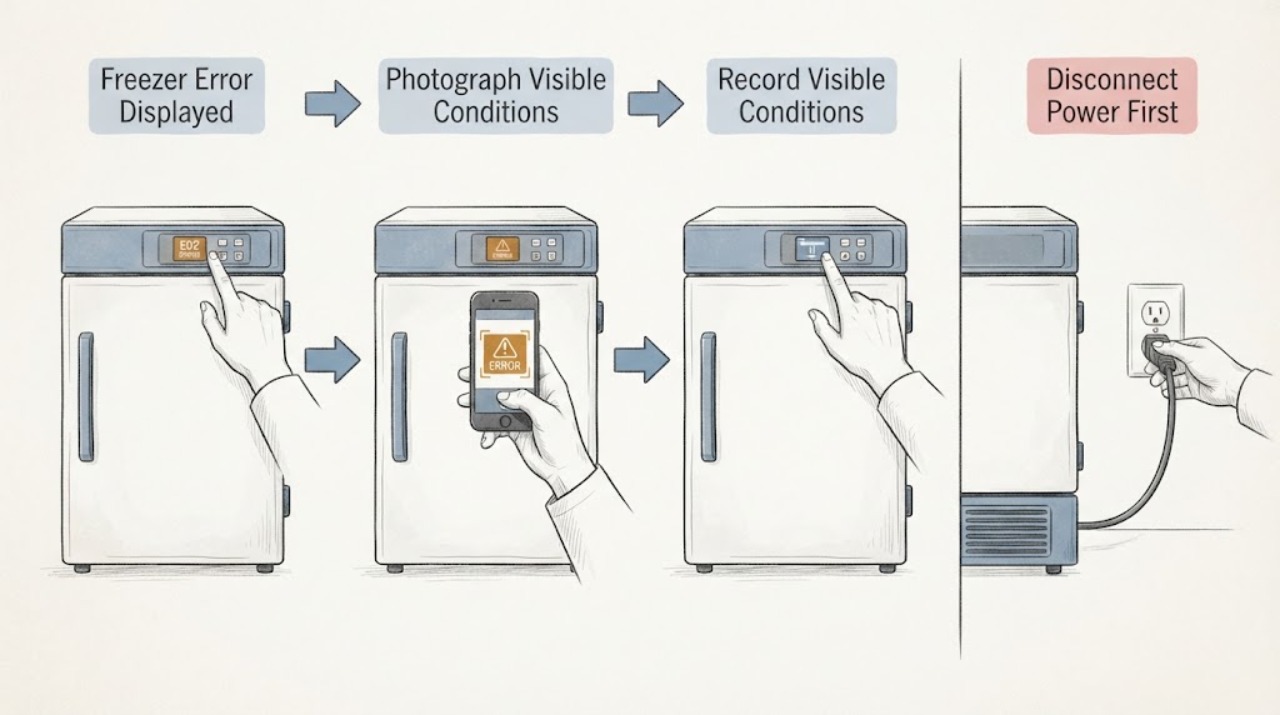
Work through in order
Diagnostic checks
Use only checks that match the exact appliance or system and its official guide.
-
Check 1
Before pressing buttons, photograph the entire control panel and write down every character, space, alternating pattern, flashing icon, audible alarm, and the freezer temperature shown.
Expected result: A complete code such as 21E, 22E, 22C, 85C, PC ER, PC CH, OF OF, O FF, or a pattern of lit segments provides more information than a partial character. Note whether the display alternates between two screens.
Next step: Keep the photo and exact model number together. Continue only with the branch that matches the complete display; do not substitute a similar-looking code.
Stop if: If the panel is hot, wet, cracked, sparking, or accompanied by smoke or a burning smell, stop touching the controls and arrange service.
Why this matters
Why: Samsung warns that interacting with the panel or unplugging without direction can make diagnosis harder. On older models, random-looking segments can themselves be the error indication.
-
Check 2
Find the exact model code on the appliance label or in the model documentation, and compare the recorded display with Samsung's model-specific manual or error-code guide.
Expected result: If the code and model match a documented entry, use that entry's stated action. If the display is an unlisted combination, alternating segment pattern, or a code from a different model family, the meaning is not confirmed.
Next step: For a documented code, follow only the corresponding low-risk instruction. For an unrecognized or pattern-based display, preserve the photo and request service instead of guessing a part or reset sequence.
Stop if: Do not dismantle the control panel, remove a door harness, or use a reset sequence copied from another model.
Why this matters
Why: Samsung's support pages state that model-specific instructions and manuals are needed, and that older or nonnumeric panels can show patterns a technician must interpret.
-
Check 3
Compare the display with Samsung's documented code categories without assuming that an example is your code: check for 21E freezer-fan, 22E or 22C fan, 85C low-voltage, 88 88 or 83E/85E/86E after a power event, PC ER or PC CH communication, and sensor or ice-system examples.
Expected result: 21E points to freezer-fan feedback; 85C is a Family Hub low-voltage indication; 88 88, 83E, 85E, and 86E can appear after power disruption; PC ER or PC CH indicates communication; 5E, 8E, 14E, 33E, 39E/39C, and 40E/40C identify other sensor, heater, ice-maker, or ice-room fan categories in Samsung's examples.
Next step: Use the exact matching entry if Samsung provides one. If the code is absent, ambiguous, or returns after the documented action, keep the appliance off as appropriate and arrange qualified service.
Stop if: Do not replace a fan, sensor, board, or compressor based only on a similar code or symptom.
Why this matters
Why: These labels are categories from Samsung's official guide, not a diagnosis of a specific freezer without its exact model and complete code. A recurring fan, sensor, communication, or compressor-related code generally needs service.
-
Check 4
Check whether the display reads OF OF, O FF, OFF OFF, or shows scrolling temperature bars, and whether the freezer is otherwise intact and dry.
Expected result: Those displays indicate Samsung Cooling Off mode, which disables cooling. If that pattern is absent, the freezer has a different error or cooling issue. If there is water near controls, wet insulation, or damaged wiring, do not touch the panel.
Next step: If the exact display matches Cooling Off mode, use only the button combination or Family Hub path Samsung lists for the correct panel, then confirm that the display no longer shows the mode and cooling resumes. If it returns, consult the model manual or request service.
Stop if: Do not press random button combinations, work with wet hands, or continue if the freezer is warming rapidly or food safety is becoming uncertain.
Why this matters
Why: Cooling Off mode is a user setting rather than proof of a failed cooling component, but the exit buttons vary by panel and model.
-
Check 5
If the code appeared after a power interruption, observe whether the freezer still has interior light or panel power and whether Samsung identifies the code as a post-outage or low-voltage condition.
Expected result: Samsung identifies 88 88, 83E, 85E, and 86E as possible post-outage or power-related displays, and 85C as a Family Hub low-voltage indication. A freezer that has no power, is warming, or repeatedly loses power needs a different service path.
Next step: Follow Samsung's documented instruction for the exact code. Do not unplug unless that page or the model manual directs it; after any directed reset, verify that cooling returns and the code stays cleared.
Stop if: Stop for repeated breaker trips, a hot plug or outlet, water near electrical parts, smoke, sparks, or a rapidly warming freezer.
Why this matters
Why: A brief power event can leave a code without proving a failed part, but a recurring code or loss of cooling must not be dismissed as a normal reboot.
-
Check 6
Only when Samsung explicitly directs a reset for the observed model and code, perform that single documented power cycle from a dry, safe position; then wait the stated recovery period and check the display, freezer temperature, and alarm status.
Expected result: A code that clears and does not return, with cooling continuing, may have been a temporary state. A code that returns, a panel that remains abnormal, or a freezer that stays warm means the fault remains.
Next step: If the same code returns or cooling does not recover, stop resets and arrange qualified service with the model, photo, code timing, and temperature history.
Stop if: Do not repeat the cycle, bypass a safety feature, remove covers, or move the appliance while it is wet or damaged.
Why this matters
Why: Samsung says not to unplug unless directed; its blinking-display guidance gives a specific two-minute power cycle for a particular blinking-panel case, while other codes require preserving the display for service.
Use your observations
Decision map
Find the observation that best matches what you see, then follow the next safe action.
-
PATH 01Safety boundary
What you see
Smoke, sparks, burning odor, hot wiring, water at electrical controls, repeated breaker trips, or rapidly warming food is present.
Do this next
Stop interacting with the freezer. From a dry, safe position only, isolate power if that can be done without touching water or exposed wiring; otherwise leave it alone and arrange urgent qualified service. Keep the door closed and follow local food-safety guidance for warming food.
Why this path and its safety boundary
Safety stop: Do not restart, open panels, or touch the appliance while standing in water.
-
PATH 02Safety boundary
What you see
The display shows OF OF, O FF, OFF OFF, scrolling temperature bars, or Family Hub compartments marked OFF.
Do this next
Use the Samsung instructions for the exact panel to leave Cooling Off mode, then verify that cooling resumes. If the mode will not clear or returns, use the model manual and request service.
Why this path and its safety boundary
Safety stop: Do not guess a button sequence from another panel.
-
PATH 03Safety boundary
What you see
The complete code matches a Samsung entry such as 21E, 85C, PC ER, PC CH, or a listed power-event code.
Do this next
Follow only the action Samsung documents for that code and model. A returning code, no cooling, or an unresolved fan, sensor, communication, or compressor category requires qualified service.
Why this path and its safety boundary
Safety stop: Do not infer a failed component or keep retrying an ignition-like or power-related condition.
-
PATH 04Safety boundary
What you see
The display is incomplete, alternates between screens, shows random segments, or does not match the model-specific guide.
Do this next
Preserve the photo and exact model information and request service. The display pattern itself may be diagnostic data.
Why this path and its safety boundary
Safety stop: Do not clear the panel, unplug without direction, or use an unverified reset sequence.
Helpful context
Understand the symptom
Record the whole display first
A Samsung freezer error may be a clear code such as 21E, a two-part code such as 22E or 22C, an alternating display, or apparently random lit segments on an older panel. Do not guess from one character. Photograph the panel while it is showing the fault, note whether the freezer is still cold, and find the exact model before attempting a reset.
What the display may be telling you
Some displays indicate a temporary state rather than a failed part. OF OF, O FF, OFF OFF, or scrolling temperature bars indicate Cooling Off mode, which disables cooling. A blinking temperature display can follow a warm compartment or an open door. Other codes identify fan, sensor, communication, voltage, or compressor-related conditions and need the model-specific instructions.
Protect the food and the appliance
Keep the freezer door closed while you document the fault. Move food only if it can be done without wet hands, standing water, exposed wiring, or prolonged door-open time. Do not open panels, disconnect door harnesses, probe live circuits, chip ice from a fan, or repeatedly power-cycle a code that Samsung says to preserve for diagnosis.
Only after diagnosis
Potential parts
- freezer fan assembly
Consider only after the exact model and a qualified diagnosis confirm a freezer-fan fault such as a returning fan code.
Confirm the exact model and manufacturer fit information before ordering any component. - freezer temperature sensor
Consider only if the exact code and qualified testing identify a temperature-sensing fault rather than a sealed-system or control problem.
Confirm the exact model and manufacturer fit information before ordering any component. - electronic control board
Consider only after qualified diagnosis confirms a control or communication fault and rules out a loose connection, power event, or another cause.
Confirm the exact model and manufacturer fit information before ordering any component.
When checks do not resolve it
Need a professional?
Request qualified appliance service when an error returns after its documented action, the code is not identifiable, a fan, sensor, communication, voltage, or compressor category is indicated, the freezer remains warm, or the panel is abnormal. Stop immediately for smoke, sparks, burning odor, repeated breaker trips, water near electrical parts, or rapidly warming food, and use an urgent local service or emergency route as appropriate.
Common questions
FAQ
Should I unplug a Samsung freezer when an error appears?
Not automatically. Samsung says not to unplug unless directed. First photograph the complete display and identify the exact model; use a power cycle only when Samsung gives that step for the observed condition.
What does 21E mean on a Samsung freezer?
Samsung labels 21E as a freezer fan error. The guide says the electronics are not sensing fan rotation; a frozen fan area, door-seal or door-open condition, or a fan motor fault may be involved. If the code persists, request service rather than replacing a part based on the code alone.
What does OF OF mean on a Samsung freezer display?
OF OF, O FF, OFF OFF, or scrolling temperature bars indicate Cooling Off mode, which disables cooling. The exit sequence varies by panel, so use the Samsung instructions for the exact model and confirm that cooling resumes.
What should I do if the error code keeps returning?
Stop repeating resets. Save the complete code or display photo, exact model, timing, and freezer temperature, then request qualified service. A returning code or a warm freezer can indicate a fault that needs model-specific diagnosis.
Read the exact guide
Official sources
- Samsung refrigerator error codesSamsung · Samsung refrigerator and freezer error-code meanings and documented troubleshooting
- Refrigerators | Samsung Support USSamsung · Samsung refrigerator model lookup, manuals, troubleshooting, and repair support
- Samsung refrigerator temperature display keeps blinkingSamsung · Samsung refrigerator and freezer blinking displays, post-outage indicators, model-specific codes, and directed reset guidance
- Samsung refrigerator shows code OF OF, O FF, or scrolling barsSamsung · Samsung refrigerator and freezer Cooling Off or Demo mode identification and model-specific exit steps
Community feedback
Share a repair observation
Share a plain-text repair observation. Accepted observations are published automatically; this page may take a moment to update.