
On this page
Start here
Quick answer
A Samsung freezer can feel warm on its sides, front edge, or door gasket during normal compressor operation because heat-radiating pipes release refrigerant heat and help prevent condensation. That surface warmth is different from an interior freezer that is too warm, a compressor area that is abnormally hot, or food that is softening. First identify where the heat is and check the actual food or compartment temperature without repeatedly opening the door. Keep clearance around the cabinet and interior vents, keep the door seal clean and closed, remove food that blocks airflow, and check for frost that prevents a seal. If the display blinks, food is thawing or unsafe, an error code appears, the cabinet becomes painfully hot, or there is smoke, burning odor, arcing, or a repeated trip, stop using the unit and move food to safe cold storage when possible. Do not remove panels or work on the sealed cooling system; arrange Samsung or qualified appliance service.
Before you begin
Safety first
- This article supports ordinary-access observation, safe loading changes, gasket cleaning, visible clearance checks, and model-approved settings only. Do not open panels, access live wiring or the compressor, melt frost with heat, or open the sealed cooling circuit.
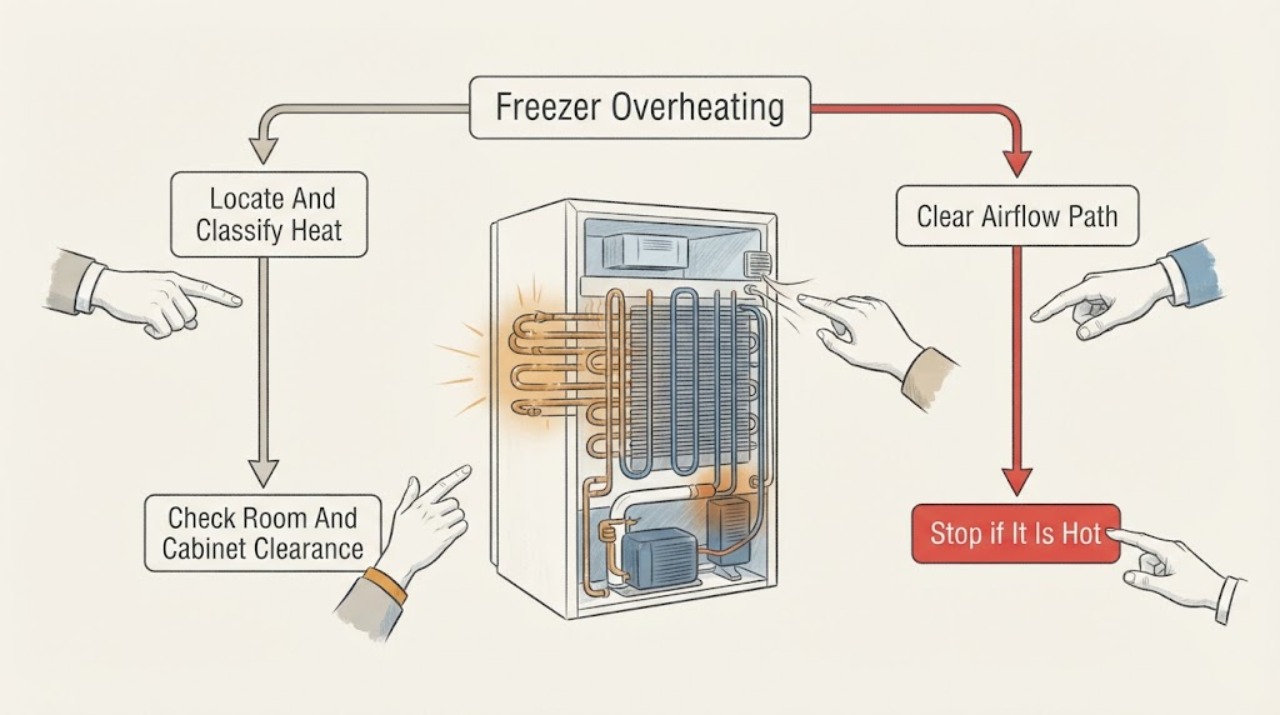
Work through in order
Diagnostic checks
Use only checks that match the exact appliance or system and its official guide.
-
Check 1
With the doors closed as much as possible, identify whether the heat is on the side walls, front frame or door gasket, rear compressor area, or inside the freezer compartment; note whether the compressor is running and whether the display is blinking.
Expected result: Record normal-to-warm cabinet surfaces with frozen food, an unusually hot or painful-to-touch surface, a hot rear compressor area, a warm interior, a blinking temperature display, an error code, smoke, odor, arcing, or a breaker trip.
Next step: If food is warming or a safety symptom is present, keep the door closed, protect the food, and follow the stop and service branch. If only the exterior is warm and food remains frozen, continue with clearance and airflow checks.
Stop if: Stop immediately for smoke, burning smell, arcing, exposed or wet electrical parts, a painful hot surface, a repeated breaker trip, or food that is no longer safely cold.
Why this matters
Why: Warm sides or the front frame can be heat-radiating piping during compressor operation. A warm interior, blinking display, food softening, abnormal odor, visible damage, or electrical symptom indicates a cooling or safety problem rather than normal cabinet warmth.
-
Check 2
From a safe position, inspect whether the freezer or refrigerator cabinet is in direct sun, beside an oven or cooktop, in an unusually hot room, or tightly enclosed by walls or cabinets; verify the installation clearance required by the owner's manual.
Expected result: Record whether the top, back, or sides are blocked, whether warm air can leave the rear area, whether a heat source is nearby, and whether the room conditions are outside the model's allowed range.
Next step: Remove only loose nearby obstructions and keep the appliance away from direct heat when the installation permits; do not drag a loaded appliance or alter built-in cabinetry. Recheck cooling after the manual's settling period, then arrange service if the interior remains warm.
Stop if: Do not move a built-in or heavy appliance alone, remove rear covers, touch hot compressor parts, or continue if the cord, outlet, cabinet, or floor is damaged or wet.
Why this matters
Why: Samsung says the unit expels heat while cooling and that insufficient clearance or a hot environment can prevent heat from leaving. This can make cabinet surfaces feel hotter and reduce cooling, but it does not explain smoke, electrical damage, or an unsafe food temperature by itself.
-
Check 3
Open the freezer briefly and inspect the rear or side vents, shelves, drawers, and food arrangement; keep food from touching or covering the vents and do not pack the compartment so tightly that air cannot circulate.
Expected result: Record clear vents, food pressed against vents, ice or frost covering a vent, a heavily overloaded compartment, or a temperature that remains warm despite open airflow.
Next step: Rearrange only loose food and keep the door closed. If frost covers a vent, use the Samsung frost guidance and the model manual; if the compartment stays warm after safe airflow correction, protect food and request service.
Stop if: Do not chip ice with a knife or metal tool, remove interior panels, force drawers, or continue using the freezer when food safety is uncertain.
Why this matters
Why: Blocked interior vents can prevent cold air circulation and can contribute to frost or uneven temperatures. If the vents are clear but food is warming, the cause is less likely to be simple loading and more likely to involve the door seal, settings, power, fan, or cooling system.
-
Check 4
Check that the freezer door closes fully, no food or drawer blocks it, the gasket is clean and seated, and the seal has no tear or gap; use a small paper strip at several points only when the door can close normally.
Expected result: Record slight resistance around the paper, an easy slip at one section, frost or condensation near the gasket, a warped or torn gasket, a blocked door, or frost that prevents complete closure.
Next step: Clean a dirty gasket with a damp cloth and mild dish soap, remove a loose obstruction, and restore only a gasket that has pulled out of its channel when the manual permits. For a torn seal, persistent gap, heavy frost, or a door that will not align, keep the door closed and request service.
Stop if: Do not heat the gasket, pry the door or liner, chip heavy frost, overtighten hardware, or keep using the unit when the door cannot seal or food is thawing.
Why this matters
Why: A clean, continuous seal keeps warm air out. A gap lets warm moist air in, which can create frost, block vents, and make the compressor run longer. A damaged seal or frost that cannot be safely cleared is a service condition.
-
Check 5
Read the freezer setting and every visible display message without repeatedly opening the door; check whether Cooling Off or Demo mode, Power Freeze, a temperature alert, or an error code is shown, and compare the setting with the owner's manual.
Expected result: Record a normal cooling mode, Cooling Off or Demo indication, a blinking temperature display, a freezer setting that was changed recently, or a specific error code.
Next step: Correct only an obvious user setting according to the model manual, then keep the doors closed while the freezer recovers. If an error code remains, the display continues blinking, or food is warming, stop experimenting and request Samsung service.
Stop if: Do not enter service mode, bypass an error, repeatedly power cycle a warm freezer, or change settings to mask an unsafe food temperature.
Why this matters
Why: Cooling Off or Demo mode prevents cooling, while a blinking temperature display means the unit detects a compartment that is too warm. Power Freeze or a lower setting can change operation, but a persistent alert or error code requires model-specific guidance and may require service.
-
Check 6
Keep the door shut and evaluate the condition of representative food, ice, and any safe temperature indication; if food is softening or the display remains warm, move food to known-safe cold storage when practical and document the time and symptoms.
Expected result: Record food that remains solidly frozen, ice cream that is soft or melting, food that is thawing or leaking, a stable temperature, a persistent alert, or cooling that returns only briefly before the exterior becomes abnormally hot.
Next step: Follow the food-safety guidance applicable to the food and your location, keep the unit off if a safety symptom is present, and arrange qualified appliance service with the model, display, frost, seal, clearance, and food observations.
Stop if: Do not taste questionable food, restart a unit with smoke or burning odor, open the sealed cooling circuit, or continue operation after repeated overheating or electrical symptoms.
Why this matters
Why: Frozen food with only warm exterior surfaces supports normal heat rejection. Soft or thawing food, a persistent alert, or repeated loss of cooling indicates that the freezer is not maintaining its condition and should not be judged by cabinet touch alone.
-
Check 7
If there is no smoke, odor, water, visible damage, or unsafe food condition and no code is displayed, perform only the model-approved power cycle once from a dry, safe position; then observe the display and cooling without opening the door repeatedly.
Expected result: Record whether the unit resumes cooling, whether the display performs a self-check or shows a code, whether the temperature alert clears, and whether the exterior heat or interior warmth returns.
Next step: Leave the unit undisturbed while it recovers according to the model guidance. If it does not cool, food remains unsafe, or symptoms return, transfer food when practical and arrange Samsung or qualified appliance service.
Stop if: Do not reset a unit with smoke, burning odor, arcing, water near electricity, a repeated breaker trip, or a severely hot cabinet; do not remove panels after a reset fails.
Why this matters
Why: A temporary control state may clear after a safe reset, but a returned code, persistent blinking alert, continued warm compartment, or repeated abnormal heat is not fixed by repeated resets. It needs model-specific diagnosis.
Use your observations
Decision map
Find the observation that best matches what you see, then follow the next safe action.
-
PATH 01Safety boundary
What you see
Only the side walls, front frame, or door gasket feel warm while the freezer remains cold, food is solidly frozen, and there is no smell, smoke, damage, or alert.
Do this next
Keep the required clearance, avoid nearby heat sources, keep children away from hot areas, and monitor the interior condition without repeatedly opening the door.
Why this path and its safety boundary
Why it matters: Samsung describes heat-radiating pipes and compressor operation that can make those surfaces warm during normal cooling.
Safety stop: Stop and request service if the surface becomes painfully hot, food warms, the display blinks, or an odor, smoke, arcing, or repeated breaker trip appears.
-
PATH 02Safety boundary
What you see
The cabinet is tightly enclosed, beside a heat source, in direct sun, or in a hot room, and the exterior is warmer while cooling performance is reduced.
Do this next
Remove loose nearby obstructions and restore manual-specified clearance when safely possible; request service if the built-in installation cannot provide the required space or the freezer remains warm.
Why this path and its safety boundary
Why it matters: Heat cannot leave efficiently, so the system may work harder and the cabinet may feel warmer.
Safety stop: Do not move a heavy or built-in appliance alone, remove covers, or work near hot compressor parts.
-
PATH 03Safety boundary
What you see
Frost or condensation is near the door, the paper test slips easily, the gasket is damaged, or frost prevents complete closure.
Do this next
Clean the gasket and remove only a simple door obstruction. Use the model-approved defrost process for heavy frost, then request service for a torn gasket, persistent gap, misalignment, or recurring frost.
Why this path and its safety boundary
Why it matters: Warm moist air may be entering, which can make frost block vents and force longer cooling operation.
Safety stop: Do not use a hair dryer, knife, metal scraper, sharp tool, or improvised heater to clear frost; stop if the door cannot seal or food is thawing.
-
PATH 04Safety boundary
What you see
Food covers an interior vent, the compartment is packed tightly, or ice blocks an air opening.
Do this next
Rearrange loose food while keeping the door open briefly, leave the vents clear, and follow the model's safe frost procedure. Request service when ice returns or the compartment stays warm.
Why this path and its safety boundary
Why it matters: Cold air cannot circulate properly, so temperatures can be uneven and frost can persist.
Safety stop: Do not pry panels, chip ice, or continue when food safety is uncertain.
-
PATH 05Safety boundary
What you see
Food is softening or thawing, the temperature display blinks, Cooling Off or Demo mode is shown, an error code appears, or a safe setting correction does not restore cooling.
Do this next
Keep the door closed, protect food in safe cold storage, record the exact display and model, and request Samsung or qualified appliance service.
Why this path and its safety boundary
Why it matters: The freezer is not maintaining the required cold condition; exterior warmth may be a symptom of extended operation rather than the root cause.
Safety stop: Do not taste questionable food, repeatedly reset the unit, disable an alert, or open panels to diagnose the cooling circuit.
-
PATH 06Safety boundary
What you see
The cabinet or compressor area is abnormally or painfully hot, or there is smoke, burning odor, arcing, visible electrical damage, water near electricity, or a repeated breaker trip.
Do this next
Stop using the appliance. If safe from a dry position, isolate power without touching damaged or wet parts; leave the area for smoke or fire and contact emergency response from a safe location. Move food only when it is safe, then arrange qualified service before any restart.
Why this path and its safety boundary
Why it matters: This is a fire, shock, or equipment-damage risk and is outside ordinary freezer checks.
Safety stop: Do not touch hot or damaged parts, operate switches in smoke, spray water, restart the freezer, remove panels, or attempt electrical or sealed-system repair.
Helpful context
Understand the symptom
Separate normal cabinet warmth from a warm freezer
Touching the outside cabinet does not tell you the freezer's food temperature by itself. Samsung says the sides or front can become warm when the compressor runs because heat-radiating pipes release heat and help prevent condensation. Treat the result as a fault when the interior food is softening, the temperature display blinks, a code appears, the compressor area is abnormally hot, or the cabinet has a burning smell or visible damage.
Clearance and interior airflow affect both heat and cooling
A refrigerator or freezer must release heat to the surrounding room. Samsung advises leaving clearance around the top, back, and sides, keeping the appliance away from direct sun and other heat sources, and leaving space around interior vents. A tight installation or blocked vent can make the outside feel hotter while reducing cooling performance.
A leaking seal or frost pattern can make the system work harder
Warm moist air enters when a door is blocked, left open, or not sealing. It can create frost, obstruct vents, and make the cooling system run longer. Clean the gasket, check it with a paper-resistance test, remove harmless door obstructions, and use only the model's approved defrost procedure for heavy ice. Do not use a hair dryer, sharp tool, or improvised heat source to melt frost.
Protect food before deeper troubleshooting
If food is thawing, leaking, or no longer staying safely frozen, keep the door closed and transfer food to a known-safe cold appliance or insulated container when practical. Record the display, food condition, frost pattern, and location of the heat before service. A power cycle or setting change is not a substitute for service when temperature does not recover or an error code remains.
Safety boundary
Stop conditions
- Stop immediately for smoke, burning odor, arcing, exposed or wet electrical parts, a painfully hot cabinet, or a repeated breaker trip.
- If food is thawing or its safety is uncertain, keep the door closed, move food to known-safe cold storage when practical, and follow local food-safety guidance.
- Do not use a hair dryer, sharp tool, metal scraper, knife, or improvised heater to clear freezer frost.
- Do not remove panels, probe live wiring, access the compressor, open the sealed cooling circuit, or bypass a control or temperature alert.
- Request qualified service when the interior remains warm, a code or blinking alert returns, a door seal is damaged, or abnormal exterior heat persists after safe clearance checks.
Only after diagnosis
Potential parts
- freezer door gasket
Consider this category only when inspection confirms a torn, warped, or persistently unseated gasket that prevents a complete seal.
Confirm the exact Samsung model and gasket profile before ordering; do not force the door or use heat to reshape a damaged seal. - temperature sensor
Consider this category only when model-specific service diagnosis links a persistent temperature reading, alert, or error to the sensor circuit.
Confirm the exact model and technician diagnosis before ordering; do not access internal wiring while the unit is energized. - evaporator or condenser fan assembly
Consider this category only when qualified diagnosis confirms a fan fault after safe checks show clear vents and proper door sealing.
Confirm the exact model and service documentation; fan access may involve panels, wiring, frost, or sharp components that require qualified work.
When checks do not resolve it
Need a professional?
Arrange Samsung or qualified appliance service when the freezer interior or food is warming, the temperature display blinks, an error code appears, Cooling Off or Demo mode cannot be corrected from the manual, the door gasket is torn or will not seal, frost returns, the cabinet or compressor area is painfully hot, or smoke, odor, arcing, water, or repeated breaker trips occur.
Safety scope: This article supports ordinary-access observation, safe loading changes, gasket cleaning, visible clearance checks, and model-approved settings only. Do not open panels, access live wiring or the compressor, melt frost with heat, or open the sealed cooling circuit.
Common questions
FAQ
Are warm sides on a Samsung freezer normal?
They can be. Samsung says heat-radiating pipes release heat during compressor operation, so side walls, the front frame, or the door gasket may feel warm. It is not a normal explanation for a warm interior, softening food, a blinking alert, smoke, burning odor, or a painfully hot surface.
Why is my Samsung freezer exterior hot while food is getting warm?
The system may be rejecting heat but not maintaining interior cooling. Check cabinet clearance, nearby heat sources, interior vents, door sealing, frost, settings, and the display. If food is warming or the temperature alert blinks, keep the door closed, protect the food, and arrange service rather than judging the freezer by its outer surface.
Can a blocked vent make a Samsung freezer overheat?
A blocked interior vent can disturb cold-air circulation, while tight cabinet clearance can prevent heat from leaving. Keep food clear of vents and restore the manual-specified space around the cabinet. Do not remove covers or chip ice; request service if the freezer stays warm or frost returns.
How do I check a Samsung freezer door seal?
Make sure no food or drawer blocks the door, clean the gasket with a damp cloth and mild dish soap, and test several points with a small paper strip: slight resistance supports a seal, while an easy slip suggests a gap. A torn gasket, recurring frost, or a door that will not close needs service.
What should I do if my Samsung freezer is painfully hot or smells burned?
Stop using it. Do not touch damaged or wet electrical parts, operate switches in smoke, spray water, remove panels, or restart the unit. Leave for a safe location when smoke, fire, or electrical danger is present, protect food only when safe, and arrange qualified service before any restart.
When should a warm Samsung freezer be serviced?
Request service when the interior or food is warming, a temperature alert or code remains, the door seal is damaged, frost returns, the cabinet or compressor area is abnormally hot, or safe clearance and airflow checks do not restore cooling. Do not open the sealed cooling or electrical system.
Read the exact guide
Official sources
- Samsung refrigerator error codesSamsung Support · Samsung USA refrigerator error-code reference; code meanings and displays vary by model.
- Frost forms in the Samsung freezer, refrigerator, or ice bucketSamsung Support · Samsung USA refrigerator and freezer frost troubleshooting; defrost controls and compartment design vary by model.
- Why does the sides, the outside cabinet and door gasket occasionally get hot to touch?Samsung Support India · Samsung refrigerator guidance; cabinet pipe layout varies by model and region.
- Cooling issues with Samsung refrigerator or freezerSamsung Support · Samsung USA refrigerator and freezer troubleshooting; controls and recovery behavior vary by model.
Community feedback
Share a repair observation
Share a plain-text repair observation. Accepted observations are published automatically; this page may take a moment to update.