
On this page
Start here
Quick answer
A Samsung gas-oven door that will not close is commonly blocked by a rack or divider, mis-seated after removal, held by a latch that is stuck in the locked position, or affected by bent hinges, a damaged gasket, glass, or frame. Let the oven cool completely before touching the door; Samsung says a hot range can lock the door as a safety precaution. Then push racks fully home, check the visible seal and hinge alignment, and compare the latch position with the exact model manual. Do not force the handle, defeat the lock, relight or test the gas system, or run the oven with a gap. If the door remains open, the frame or glass is damaged, the lock or plunger is stiff, the oven is still hot, or there is gas odor, smoke, abnormal flame, or electrical damage, stop and arrange qualified Samsung appliance service.
Before you begin
Safety first
- This article supports cool-oven observation and exact-manual checks for visible racks, closure, latch state, and model-approved lock handling only. Internal gas, electrical, sensor, control, hinge, latch, and door-glass work belongs to qualified service.
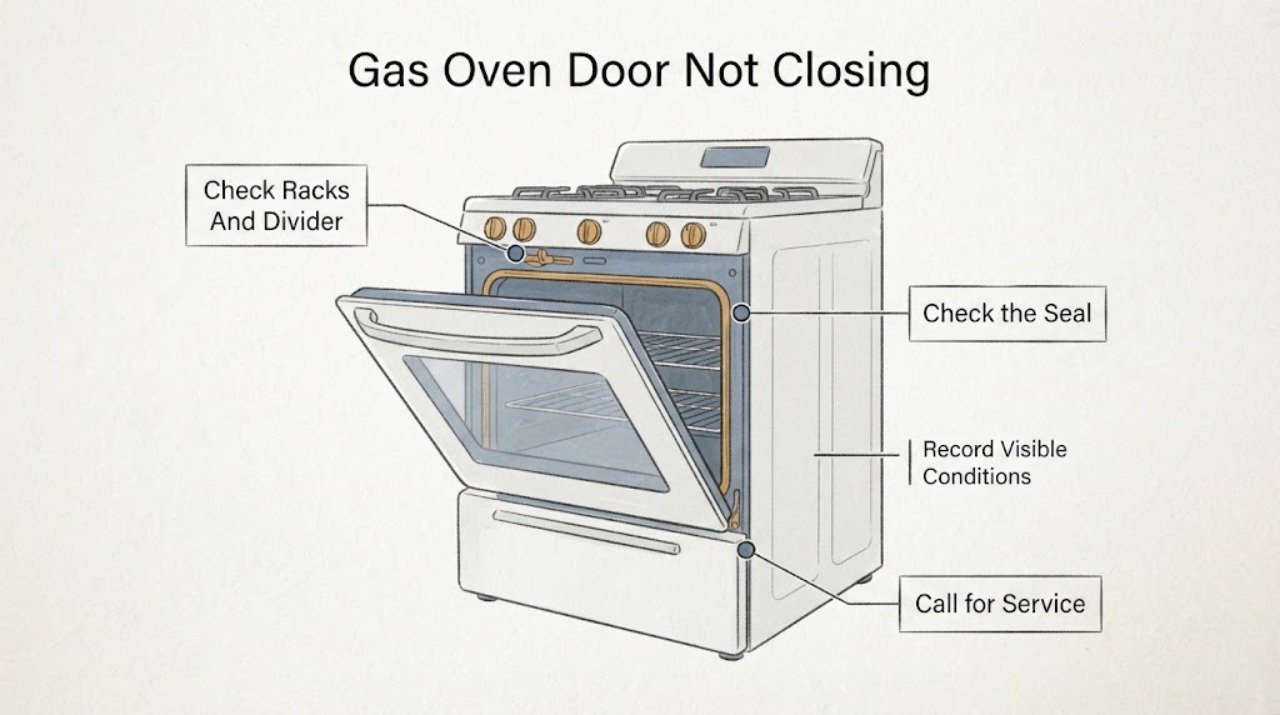
Work through in order
Diagnostic checks
Use only checks that match the exact appliance or system and its official guide.
-
Check 1
Stop the cooking function normally if the controls respond, keep clear of hot surfaces, and wait until the Samsung gas oven is fully cool before touching the door, latch, racks, or gasket.
Expected result: Record whether the door is locked only while hot, remains locked after cooling, is open but will not close, or is blocked by heat, smoke, odor, or a fault display.
Next step: Use the temperature-lock, latch, obstruction, damage, or hazard branch that matches the observation; preserve any display message and the mode that preceded it.
Stop if: Stop for gas odor, smoke, abnormal flame, burning odor, arcing, a hot outlet, a door that remains dangerously hot, or heating that continues after Cancel.
Why this matters
Why: A hot-door lock can be normal protection. A lock that remains after cooling, a door that cannot close when cool, or any uncontrolled heat points toward a lock, latch, sensor, control, hinge, or service condition.
-
Check 2
With the oven cool, push each rack fully into its guides and check any divider or partition for level seating without forcing it against the door.
Expected result: Record a rack or divider projecting forward, one side higher than the other, an object on the floor of the oven, or a clear cavity with the door still misaligned.
Next step: Remove only an obvious loose obstruction and reseat the rack or divider as the exact manual shows; do not operate the oven until the door closes and latches normally.
Stop if: Do not force a rack, scrape the gasket, reach into a hot cavity, or use the oven when an obstruction cannot be removed without disassembly.
Why this matters
Why: A projecting rack, divider, pan, or loose object can prevent the door from closing even when the hinges and latch are sound. A clear cavity shifts attention to hinge position, latch state, gasket, glass, or frame alignment.
-
Check 3
Inspect the visible gasket, glass, door edges, hinge-side gaps, latch catch, and frame from a cool, safe position without removing the gasket, glass, hinges, or trim.
Expected result: Record a clean even gasket and intact glass, a displaced or torn gasket, cracked or loose glass, a bent hinge, a frame gap, a damaged catch, or evidence of an object caught at the seal.
Next step: Remove only a loose visible object, photograph the damage, and arrange Samsung appliance or glazing service for any glass, hinge, latch, gasket, or frame damage.
Stop if: Do not press on cracked glass, bend hinges, remove the gasket, pry the catch, or continue operation with a damaged or unstable door.
Why this matters
Why: A seal or object can interfere with closure, but bent hinges, cracked glass, frame damage, and a damaged catch are physical service conditions. A clean intact door with an uneven gap makes hidden hinge or frame alignment more likely.
-
Check 4
If the door was recently removed for cleaning or service, compare both hinge arms and their seated position with the exact Samsung manual while the oven is cool; do not remove the door again as an experiment.
Expected result: Record whether both hinges are seated evenly, a hinge arm is extended or bent away from its normal position, one side sits higher, or the door was never removed.
Next step: Follow only the exact reattachment instructions if the manual clearly permits a normal correction; otherwise leave the door in place and request service with photos.
Stop if: Do not force hinge arms, remove hinge hardware, place fingers near a spring-loaded hinge, or operate with an unseated door.
Why this matters
Why: Samsung notes that a door removed and reattached incorrectly may not close and that hinge arms must be in the correct position. An uneven or bent hinge needs service rather than force.
-
Check 5
From the cool, open-door position, observe the visible latch and door-plunger switch without applying tools, bypassing the switch, or powering a cooking cycle.
Expected result: Record a latch in the normal open position, a latch held in the lock position, a plunger that moves freely, a stiff or non-returning plunger, or a lock or door message on the display.
Next step: Use only a model-approved latch reset if the exact Samsung guide describes it and the oven is cool; otherwise keep the gas oven off and arrange service.
Stop if: Do not pry, bend, short, tape, hold, or bypass the latch or plunger, and do not run the oven with a lock fault.
Why this matters
Why: A latch left locked or a plunger that does not move can prevent closure or make the control believe the door is in the wrong state. Samsung says a stiff plunger or continuing door code requires service.
-
Check 6
If the door is locked after a hot cycle, confirm that the oven has cooled and review the exact Samsung instructions for the model's lock, Child Lock, and power state without pulling the handle.
Expected result: Record a cool door that unlocks normally, a cool door that remains locked, a Child Lock or panel-lock indication, a self-clean or high-heat state, or a display that remains unresponsive.
Next step: Perform at most the exact manual-approved unlock or power-cycle step, then stop if the lock remains; do not force the door or repeat high-heat cycles.
Stop if: Do not force a hot or locked door, bypass the lock, or continue if the oven remains hot, unresponsive, smoky, or otherwise unsafe.
Why this matters
Why: Samsung says heat can lock the door and that Child Lock or a power cycle may matter when the oven is cool. A lock that persists after the permitted steps can involve the latch, sensor, or control and needs service.
-
Check 7
Before any further door check, note the gas-oven safety state from outside the appliance: fuel odor, delayed ignition, abnormal flame, smoke, burning odor, scorching, or heating that continues after the controls are canceled.
Expected result: Record no hazard, a gas or combustion symptom, a fire or smoke symptom, or electrical heat, arcing, or protective shutdown near the range.
Next step: Leave or isolate the area as appropriate, do not operate switches or relight the range when fuel is suspected, and contact emergency or qualified service from a safe location.
Stop if: Do not continue ignition tests, search for a gas leak, open panels, touch wiring, reset protection repeatedly, or use the oven with smoke or uncontrolled heat.
Why this matters
Why: Gas, fire, uncontrolled heat, and electrical symptoms override ordinary door troubleshooting. A no-hazard door fault can follow the mechanical branch, but a hazard requires the appliance to remain off and qualified or emergency response.
-
Check 8
If the door still will not close after the permitted cool, rack, seal, hinge-position, latch, and lock checks, keep the gas oven out of service and prepare the model-specific service record.
Expected result: Record the full model, gas-range configuration, door position, rack or divider state, recent removal, hinge and gasket condition, latch or plunger behavior, display message, temperature state, and any odor or smoke.
Next step: Request qualified Samsung appliance service and provide the complete record and photographs; do not order or install a part from the symptom alone.
Stop if: Do not remove the door, cabinet, lock, hinge, burner, gas fitting, or control panel without qualified service and the exact manual.
Why this matters
Why: A persistent fault after ordinary checks is consistent with hinge, latch, frame, door-lock, sensor, control, or other model-specific service work. Repeated force or test cycles can turn a closure problem into a gas, heat, or glass hazard.
Use your observations
Decision map
Find the observation that best matches what you see, then follow the next safe action.
-
PATH 01Safety boundary
What you see
The door locked during or after a hot or self-clean cycle and the oven is still hot.
Do this next
Allow complete cooling and follow the exact model's normal unlock sequence without pulling the handle.
Why this path and its safety boundary
Why it matters: Samsung identifies heat-triggered door locking as a safety precaution.
Safety stop: Do not force the door, operate the gas oven, or continue if smoke, fuel odor, abnormal flame, or uncontrolled heat is present.
-
PATH 02Safety boundary
What you see
A rack, divider, pan, or other visible object projects into the door path or is not seated level.
Do this next
Reseat or remove only the obvious item according to the exact manual, then confirm normal closure while cool.
Why this path and its safety boundary
Why it matters: The obstruction can prevent the door from closing without a hinge or latch failure.
Safety stop: Do not force the door against an obstruction or use the oven if the item cannot be removed without disassembly.
-
PATH 03Safety boundary
What you see
The door was recently removed and one or both hinge arms are not seated evenly or are in an extended position.
Do this next
Use only the exact Samsung manual's normal reattachment procedure or arrange service; keep fingers away from spring-loaded hinge areas.
Why this path and its safety boundary
Why it matters: Samsung says incorrect door reattachment can keep the door from closing.
Safety stop: Do not force, bend, remove, or restrain hinge arms or operate with an unseated door.
-
PATH 04Safety boundary
What you see
The latch remains in the locked position, the plunger is stiff or does not return, or a door code appears while the door is open or closed.
Do this next
Use only a documented cool-oven reset if the exact manual provides one; otherwise request Samsung service.
Why this path and its safety boundary
Why it matters: A latch or door-sensing condition may be preventing safe closure and needs model-specific handling.
Safety stop: Do not pry, short, tape, hold, or bypass the latch or plunger and do not operate the gas oven.
-
PATH 05Safety boundary
What you see
The gasket is displaced, the glass is cracked or loose, a hinge is bent, or the frame or catch is visibly damaged.
Do this next
Keep the door and gas oven out of service, protect people from the opening, and arrange qualified appliance or glazing service.
Why this path and its safety boundary
Why it matters: Physical door or glazing service is required; a setting change cannot make damaged hardware safe.
Safety stop: Do not press cracked glass, bend hinges, remove glazing, or force the door shut.
-
PATH 06Safety boundary
What you see
The oven is cool but the door remains locked or the panel stays locked or unresponsive.
Do this next
Follow the exact model's permitted unlock or one-time power-cycle instruction, then request service if the lock remains.
Why this path and its safety boundary
Why it matters: Child Lock, panel state, latch, sensor, or control behavior may be involved.
Safety stop: Do not force the door, bypass the lock, or run a cooking or gas test while the door state is unresolved.
-
PATH 07Safety boundary
What you see
Fuel odor, delayed ignition, abnormal flame, smoke, burning odor, scorching, or uncontrolled heating occurs with the door problem.
Do this next
Do not operate switches or relight the range when fuel is suspected; leave or isolate the area as appropriate and contact emergency or qualified service from a safe location.
Why this path and its safety boundary
Why it matters: This is an immediate gas, fire, or heat safety issue, not a door adjustment.
Safety stop: Do not continue ignition tests, search for leaks, open panels, or use the gas oven until cleared by qualified service.
-
PATH 08Safety boundary
What you see
Smoke, burning wiring odor, arcing, a hot outlet, repeated protective shutdown, or water near electrical equipment is present.
Do this next
Keep clear, isolate power only from a dry safe position when possible, and contact emergency or qualified electrical/appliance service.
Why this path and its safety boundary
Why it matters: The range must remain out of service while an electrical or fire hazard is assessed.
Safety stop: Do not touch wet equipment, reset protection repeatedly, remove panels, or attempt another door or gas test.
Helpful context
Understand the symptom
Cool the gas oven before deciding what is wrong
A Samsung range can lock its door while it is too hot, including after a high-heat function. That is a safety state, not proof that the hinges are bent. Keep the door closed while hot, cancel the cycle normally if the controls respond, and allow the appliance to cool. If the door is already open but the latch is in a locked position, do not force the door or keep operating the gas oven.
Start with racks, a divider, and recent door removal
Samsung's door guidance says racks should be pushed in fully and level on both sides, and a divider or partition must be seated correctly. If the door was recently removed, the hinge arms may not be in their normal position. Compare the result with the exact owner's manual rather than copying a hinge position from another Samsung gas model.
A stuck latch can mimic a hinge problem
When the latch fails to meet the catch, it can remain in a locked position even while the door is open. Inspect the latch and the small door-plunger area from a cool, ordinary-access position. A plunger that does not move freely, a latch that will not return, or a lock indicator that stays active is a service clue. Do not pry the latch, short the plunger, or hold an interlock while the oven is powered.
Keep gas and heat hazards outside the door adjustment
A door gap can let heat escape and can affect safe burner and control operation. Do not use the oven with a door that cannot close and latch, do not relight burners to investigate a door problem, and do not work on gas fittings or internal wiring. Fuel odor, delayed ignition, an abnormal flame, smoke, burning odor, arcing, a hot outlet, or a repeated protective shutdown requires immediate stop and the appropriate emergency or qualified service path.
Do not confuse a door fault with a temperature setting
Samsung's temperature guidance covers airflow, door closure, calibration, and gas-range behavior, but calibration cannot straighten a door, release a damaged latch, or repair a hinge. If the door closes normally but the oven runs hot, that becomes a separate model-specific temperature investigation. If it cannot close, solve the mechanical or lock condition first and keep the gas oven out of use.
Safety boundary
Stop conditions
- Keep the Samsung gas oven off for fuel odor, delayed ignition, abnormal flame, smoke, burning or plastic odor, scorching, uncontrolled heat, arcing, a hot outlet, or repeated protective shutdown.
- Do not force a hot, locked, misaligned, or damaged door; do not bypass, tape, short, or hold the latch, plunger, Child Lock, or any door interlock.
- Do not remove glass, hinges, latch parts, gaskets, trim, cabinet panels, burners, gas fittings, or internal wiring as a home diagnostic.
- Do not relight or repeatedly operate a gas range to test a door fault, search for a gas leak, or use the oven with a door that will not close and latch.
- Stop for cracked or loose glass, bent hinges, unstable frame or catch, a plunger that is stiff or does not return, a trapped rack or divider, or any part that requires force.
- Do not continue if the oven is unresponsive, water reaches electrical equipment, a protective device trips, or the door remains unresolved after the exact manual-approved checks.
Only after diagnosis
Potential parts
- Samsung oven door gasket
Consider this category only when the exact model gasket is torn, displaced, or no longer seals and the door, glass, and frame are sound.
Match the full Samsung model and cavity; do not use a gasket to compensate for a bent hinge, damaged glass, or frame misalignment. - Samsung oven door hinge
Consider this category only after qualified diagnosis identifies a bent, damaged, or incorrectly seated hinge on the exact model.
Confirm the exact model, hinge side, spring and latch arrangement, and safe installation method; do not handle a spring-loaded hinge as a home repair. - Samsung oven door latch or plunger switch
Consider this category only when the exact model's latch or door-sensing component is confirmed faulty after obstruction and cool-lock checks.
Match the exact model, gas-range configuration, connector, and lock design; never bypass the latch or plunger. - Samsung oven door glass or complete door assembly
Consider this category only when a qualified technician confirms cracked, loose, or incompatible glass or a damaged door structure.
Confirm exact model, cavity, glass safety specification, seal arrangement, and frame compatibility through qualified service; do not press or remove damaged glass.
When checks do not resolve it
Need a professional?
Arrange qualified Samsung appliance service when the cool door remains open or locked after the exact rack, hinge, latch, plunger, and model-manual checks; when the door was recently removed and will not reseat; when the gasket, glass, hinge, catch, frame, lock, or sensor is damaged; or when a door code returns. Use emergency or qualified gas service for fuel odor, delayed ignition, abnormal flame, smoke, or uncontrolled heat, and qualified electrical service for arcing, burning wiring odor, hot electrical equipment, water near electricity, or repeated protective shutdown.
Safety scope: This article supports cool-oven observation and exact-manual checks for visible racks, closure, latch state, and model-approved lock handling only. Internal gas, electrical, sensor, control, hinge, latch, and door-glass work belongs to qualified service.
Common questions
FAQ
Why will my Samsung gas oven door not close?
Check for a rack, divider, pan, or object in the path; then consider recent door removal, hinge position, latch state, gasket, glass, and frame alignment. Let the oven cool first and do not force the door.
Can heat keep a Samsung oven door locked?
Yes. Samsung says the range door can lock as a safety precaution when the oven is too hot. Allow it to cool and follow the exact model unlock guidance. If it remains locked when cool, request service rather than pulling the handle.
What if the Samsung oven door was recently removed?
The hinge arms may not be seated or positioned correctly. Compare them with the exact owner's manual and use only the normal reattachment procedure if clearly supported. Do not bend or force a spring-loaded hinge.
Can a rack or divider stop the oven door from closing?
Yes. Samsung says racks should be pushed fully in and level, and a divider or partition must be seated correctly. Remove only an obvious obstruction while the oven is cool; do not force the door against it.
What does a door code mean on a Samsung oven?
Samsung's support guide says the door code means the door is not closed and recommends checking the door-plunger switch and full closure. Code meanings vary by model; a returning code or stiff plunger needs service.
When should I stop using a Samsung gas oven with a door problem?
Stop for gas odor, delayed ignition, abnormal flame, smoke, burning odor, uncontrolled heat, cracked or loose glass, a bent hinge, a lock that will not release, arcing, a hot outlet, or repeated protective shutdown. Do not relight or test the gas system.
Read the exact guide
Official sources
- Samsung oven door is lockedSamsung Support · Official Samsung range guidance; lock behavior and permitted reset steps vary by model and owner manual.
- Door will not close on Samsung ovenSamsung Support · Official Samsung support guidance for oven and range doors; the exact gas-oven manual controls model-specific hinge and latch procedures.
- Samsung Wall Oven FAQsSamsung US · Official Samsung FAQ for wall ovens; gas range construction and exact model procedures may differ.
- Samsung range or wall oven error codesSamsung Support · Official Samsung code guide; only codes and steps supported by the exact model manual should be applied to a particular gas oven.
- Samsung oven temperature issuesSamsung Support · Official Samsung oven temperature guidance; model manual and qualified service control a gas appliance with a door or heat fault.
- Self Clean or other buttons do not light up or respond, or panel is locked on Samsung ovenSamsung Support · Official Samsung oven panel guidance; it does not authorize bypassing a door lock or operating an unsafe gas oven.
Community feedback
Share a repair observation
Share a plain-text repair observation. Accepted observations are published automatically; this page may take a moment to update.