
On this page
Start here
Quick answer
Stop using a Samsung microwave after its door handle comes off. Do not glue the handle back on, drill the door, pry the door, remove the door skin, defeat the latch, or run a heating test. With power safely disconnected, make only an external observation of whether the door, glass, frame, seals and latch look damaged or whether the door no longer closes and latches normally. Samsung's support guidance treats door/latch damage as a service issue and says a microwave that starts by itself is a fire hazard. Find the complete model number without disassembling the unit and request model-specific Samsung or qualified microwave service.
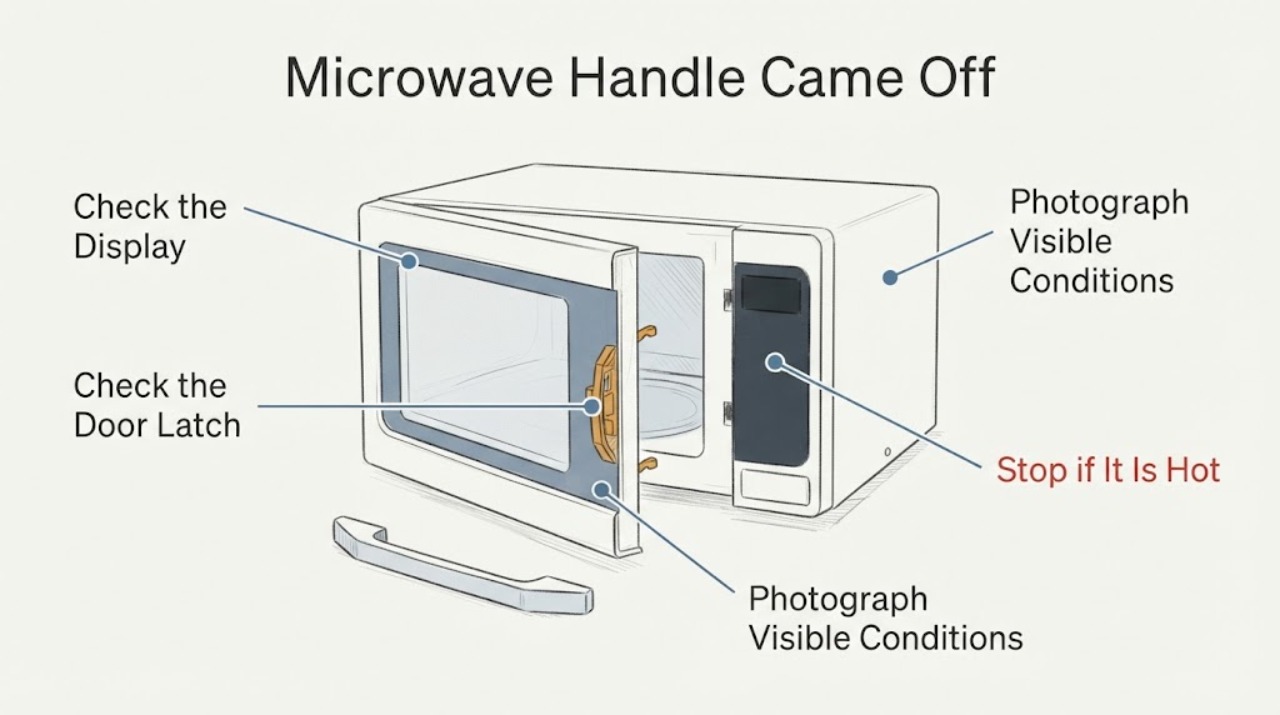
Work through in order
Diagnostic checks
Use only checks that match the exact appliance or system and its official guide.
-
Check 1
Stop using the microwave. If it is operating, use the normal stop control only if it can be done without forcing the damaged door; otherwise move away and disconnect power only from a safe, accessible plug or breaker. Do not pull on the detached handle or operate the door repeatedly.
Expected result: The microwave is already off and unplugged, or it starts, sparks, heats, or runs with no intentional command.
Next step: Leave the microwave out of service. If it started by itself, sparking or smoke occurred, or the power connection is hot/damaged, keep clear and request urgent qualified service; do not re-energize it to test.
Stop if: Stop immediately for arcing, smoke, burning odor, unexpected operation, exposed wiring, a cracked door or any unsafe electrical condition.
Why this matters
Why: A damaged door/handle can prevent normal latch operation, and Samsung classifies a microwave that starts by itself as a fire hazard. The symptom does not identify a specific interlock or control part.
-
Check 2
With power disconnected and the microwave cool, look from the outside at the door glass, frame, hinges, latch area, sealing surfaces and any loose screws or broken plastic. Do not remove trim, the door skin, the inner panel, the seal or the latch mechanism.
Expected result: The door is cracked, bent, loose, rubbing, no longer aligns, has a damaged seal/latch, or still closes squarely with no visible damage beyond the missing handle.
Next step: If any door, glass, hinge, latch or seal damage is present, leave the unit off and request service. Even if those parts look intact, do not operate without a model-matched repair decision.
Why this matters
Why: Samsung's guidance makes complete door closure and an undamaged latch/door condition prerequisites for safe operation. An intact-looking exterior does not prove the interlocks or microwave shielding are safe after handle damage.
-
Check 3
Keep the detached handle, screws and any fragments in a bag; photograph the door from both sides without opening panels; and read the model/serial label from its normal exterior or door-frame location if it is accessible without moving the appliance or forcing the door.
Expected result: The full model code is readable, or only a partial code is available; the handle hardware is complete, bent, cracked or missing.
Next step: Give Samsung or the qualified technician the complete model, photos, hardware condition and whether the door still latches. Do not order a generic handle or substitute hardware.
Why this matters
Why: Samsung's support portal uses the model code to locate the correct manual and service path. Handle appearance or screw count alone cannot establish compatibility or prove that the door structure is undamaged.
-
Check 4
Do not use epoxy, glue, tape as a structural repair, new holes, longer screws, a clamp, a makeshift pull or a tool to pry the door. Do not open the casing or adjust the door switches/interlocks.
Expected result: The proposed fix requires drilling, adhesive near the door, removing a panel, changing the latch or testing the microwave after a temporary repair.
Next step: Leave the microwave unused and request Samsung or qualified microwave service. Ask for the model-specific handle/door assessment rather than a generic replacement recommendation.
Stop if: Do not proceed if the door cannot close or latch normally, if glass/seals are damaged, or if access would expose internal microwave components.
Why this matters
Why: Those steps can change door alignment, seals or interlock behavior and are not model-supported by the available generic Samsung pages. A microwave repair requires model-specific instructions and qualified service.
-
Check 5
When contacting service, report that the Samsung microwave handle detached, whether the door can close and latch without the handle, any visible glass/frame/seal/latch damage, whether the unit was powered afterward, and the complete model and serial information.
Expected result: The technician can match the exact model manual/parts path, or the model cannot be identified without disassembly.
Next step: Use Samsung's model lookup/request-repair path or a qualified microwave technician. Do not operate the appliance while waiting for the assessment.
Why this matters
Why: A model-specific assessment is needed to distinguish a replaceable external handle from a door assembly, latch or interlock concern. Missing model information prevents a safe fitment or repair procedure.
Use your observations
Decision map
Find the observation that best matches what you see, then follow the next safe action.
-
PATH 01Next step
What you see
The door, glass, frame, hinge, seal or latch is cracked, bent, loose, misaligned, or will not close and latch normally after the handle detached.
Do this next
Keep the microwave disconnected and request model-specific qualified service; do not glue, drill, pry or remove panels.
Why this path and its safety boundary
Why it matters: The door condition is unresolved and safe microwave operation cannot be established by an external handle fix.
-
PATH 02Next step
What you see
The handle is off but the door appears visually intact and can be moved without forcing it.
Do this next
Do not run the microwave. Preserve the handle and hardware, identify the exact model, and request Samsung or qualified service.
Why this path and its safety boundary
Why it matters: This does not prove that the latch, door alignment, seals or interlocks are safe, and no model number is available for a fitment or repair instruction.
-
PATH 03Next step
What you see
The microwave starts, heats, sparks or the fan/light behaves abnormally without an intentional command after the handle came off.
Do this next
If it is safe, unplug it or switch off the breaker, do not use it, and request service. Do not re-energize for a test.
Why this path and its safety boundary
Why it matters: Samsung classifies a microwave that turns on by itself as a fire hazard; this is an urgent service boundary.
-
PATH 04Next step
What you see
The full model number cannot be read without moving the appliance, forcing the door or removing panels.
Do this next
Leave the unit out of service and have Samsung or a qualified technician identify the model and inspect the door assembly.
Why this path and its safety boundary
Why it matters: The correct handle/door design and service procedure remain model-specific and unresolved.
Helpful context
Understand the symptom
A detached handle is a door-use and safety problem, not a cosmetic repair to test by running the microwave. The handle may be attached differently across Samsung countertop, over-the-range and built-in models, and the task has no model number; the correct part and access method therefore cannot be inferred.
Keep the door and microwave intact. The safe public guidance is to stop operation, record the exact model and visible door condition, and let Samsung or a qualified microwave technician decide whether the handle, door assembly, latch or another part requires model-specific work.
When checks do not resolve it
Need a professional?
Immediately for unexpected operation, sparks, smoke, burning odor or electrical damage; otherwise before using the microwave again after the handle detached.
Common questions
FAQ
Can I glue the Samsung microwave handle back on?
No. Do not use glue, tape, drilled holes or substitute screws as a structural repair. The door must close and latch correctly, and the exact handle/door construction is model-specific. Keep the microwave out of service and request qualified service.
Is a detached handle automatically a microwave-radiation leak?
A detached handle alone does not identify the fault or prove leakage, but it can affect how the door is operated and leaves the latch/door condition unverified. Do not run the microwave to find out; have the exact model and door assembly inspected.
What if the microwave turns on after the handle came off?
Treat it as a fire hazard. If safe, unplug it or switch off the breaker, do not use it, and request service. Do not re-energize it for a test.
Read the exact guide
Official sources
- Samsung microwave turns on by itselfSamsung Support US · Opened Samsung's official microwave safety troubleshooting page. It directs service for a damaged latch mechanism and warns that a microwave starting by itself is a fire hazard requiring unplugging and no use.
- Samsung microwave does not heatSamsung Support US · Opened Samsung's official microwave troubleshooting page. It says the door must close completely, debris can prevent closure, clearances vary by model, and service is required when the issue remains; it is used only for the door/safety boundary, not a generic handle-repair procedure.
- How to clean a Samsung microwaveSamsung Support US · Opened Samsung's official cleaning guidance. It supports only a gentle external door/seal observation and warns against sharp objects, excess liquid and harsh cleaners; it is not used to authorize door or handle disassembly.
- Microwave SupportSamsung Support US · Opened Samsung's official microwave support portal. It requires the model code or product name to find manuals and offers user-manual and repair-request paths; it is used to enforce exact-model service scope rather than infer fitment.
Community feedback
Share a repair observation
Share a plain-text repair observation. Accepted observations are published automatically; this page may take a moment to update.