
On this page
Start here
Quick answer
If the Samsung microwave display and interior light are completely dark, check the plug, the outlet with another suitable appliance, and the household breaker or fuse. Restore a tripped breaker only once if it is safe and no burning odor, heat, or visible damage is present. If power is available but the microwave remains dark, or the breaker trips again, stop and request service; do not remove the cabinet or replace an internal fuse.
Before you begin
Safety first
- External power checks are the limit; appliance-side electrical and high-voltage work requires a qualified technician.
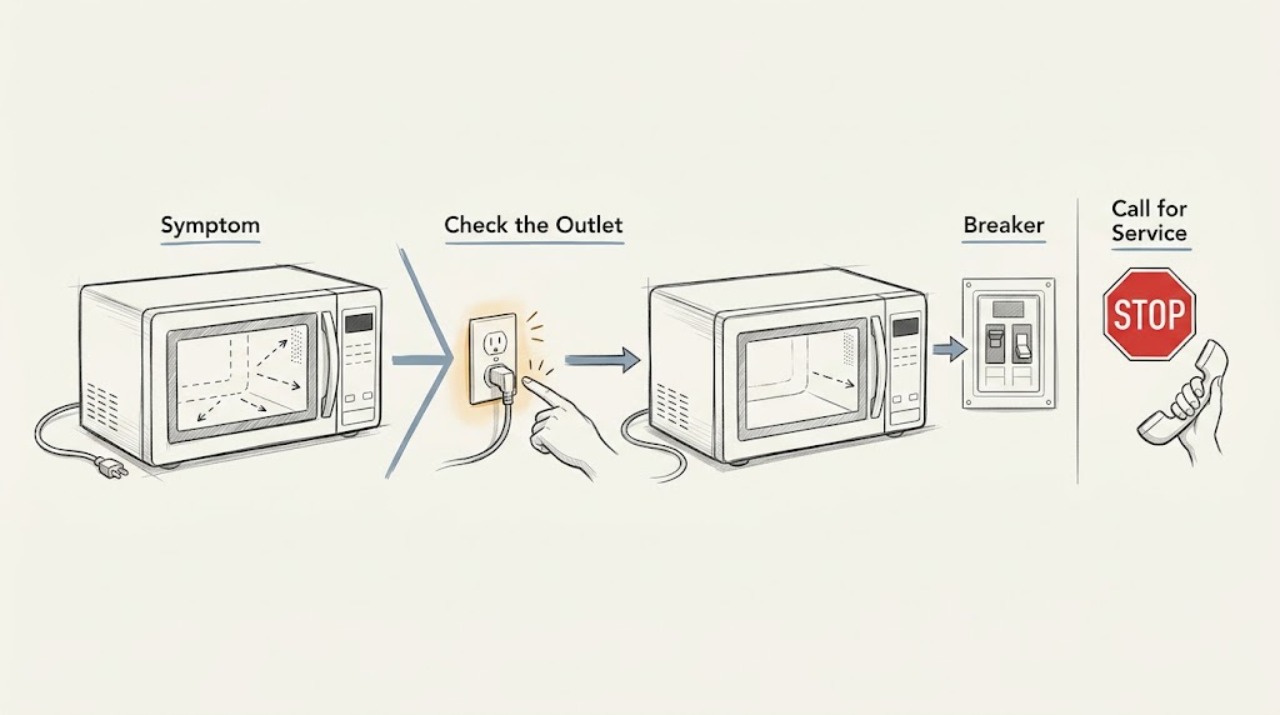
Work through in order
Diagnostic checks
Use only checks that match the exact appliance or system and its official guide.
-
Check 1
Check whether the clock/display, cavity light, or any control indicator is lit with the door closed and no cycle running.
Expected result: Everything is dark, or the display is lit but a cooking command does not begin.
Next step: For a lit display, stop this path and check the control lock and door instead of repeatedly resetting power.
Why this matters
Why: A dark unit points to external power; a lit display is a not-starting/control symptom rather than a no-power symptom.
-
Check 2
Inspect the plug and cord from outside for looseness, heat, scorching, or damage, then confirm the plug is fully seated in the intended outlet; do not use an extension cord unless the exact manual permits it.
Expected result: The plug is loose or damaged, the outlet is dead, or the cord and outlet appear normal.
Next step: Do not use a damaged cord or outlet. If the outlet is safely accessible, test it with another suitable appliance and have electrical damage assessed.
Why this matters
Why: A loose/damaged connection or dead outlet can leave the display dark; heat, scorching, or damage is a stop condition.
-
Check 3
At the household electrical panel, look for the microwave circuit breaker in a tripped or middle position, or a blown fuse if the home uses fuses.
Expected result: The breaker/fuse is tripped or open, or it appears normal.
Next step: If there is no heat, smoke, odor, or visible damage, restore the breaker once. Do not repeatedly reset it.
Why this matters
Why: Samsung identifies a tripped breaker as a common external cause; a normal breaker with a dark unit shifts attention to the outlet, cord, or appliance service.
-
Check 4
After confirming the outlet and breaker are safe, disconnect power at the plug or breaker for 60 seconds and restore it once.
Expected result: The display returns and remains stable, or it stays dark or the breaker trips again.
Next step: Stop using the microwave and request service for persistent darkness or repeat trips. Never open the cabinet to access a fuse or capacitor.
Why this matters
Why: A one-time control reset may clear a transient state; persistent darkness or repeat tripping indicates a condition requiring service.
Use your observations
Decision map
Find the observation that best matches what you see, then follow the next safe action.
-
PATH 01Next step
What you see
The display is lit even though the user reports that the microwave will not turn on.
Do this next
Check the exact model's control lock, cooking function, and door closure; do not keep cycling the breaker.
Why this path and its safety boundary
Why it matters: Power is reaching the controls; the symptom belongs to the not-starting path, such as lock, door, or panel response.
-
PATH 02Next step
What you see
The outlet is dead or the breaker was tripped, and the display returns after the external power issue is safely corrected.
Do this next
Monitor the circuit and stop if the breaker trips again or any heat, odor, or damage appears.
Why this path and its safety boundary
Why it matters: The household power path was the likely cause.
-
PATH 03Next step
What you see
The outlet and breaker are normal but the microwave stays dark after one 60-second reset, or the breaker trips again.
Do this next
Disconnect power when safe and request Samsung service; do not remove the cover or replace internal protective parts.
Why this path and its safety boundary
Why it matters: An appliance-side electrical fault remains possible and is not safe for internal user diagnosis.
Helpful context
Understand the symptom
Dark display versus a start problem
A completely dark display is a power-path symptom. If the clock is lit but Start does nothing, use the separate not-starting checks for control lock, door closure, and panel response.
When checks do not resolve it
Need a professional?
Provide the model, whether the display is completely dark, the outlet and breaker observations, and whether power returned after one reset.
Safety scope: External power checks are the limit; appliance-side electrical and high-voltage work requires a qualified technician.
Common questions
FAQ
What should I check when my Samsung microwave display is blank?
Check the plug and outlet, then look for a tripped breaker or blown fuse. Restore a breaker only once when safe; persistent darkness or repeat trips require service.
Can I replace a Samsung microwave fuse myself?
No. A fuse is inside the appliance's electrical system. If external power is present but the display remains dark, request service rather than opening the cabinet.
Read the exact guide
Official sources
- Samsung microwave control panel does not respondSamsung · Samsung microwave control reset guidance
- Samsung Microwave FAQsSamsung · Samsung microwave FAQ; exact model and household electrical installation govern
- Microwaves | Samsung Support USSamsung · Samsung microwave support hub
Community feedback
Share a repair observation
Share a plain-text repair observation. Accepted observations are published automatically; this page may take a moment to update.