
On this page
Start here
Quick answer
“Not working” can mean a dark display, a lit display that will not start, a running cycle that does not heat, a turntable or fan issue, or unsafe self-starting. Start by identifying which function fails, then check the corresponding external condition: outlet/breaker, control lock and door, cooking mode, tray/filter/venting, or a supervised cup-of-water test. Stop and request Samsung service for repeat breaker trips, a persistent no-heat result, damaged controls or door, smoke, burning odor, arcing, or any self-starting operation.
Before you begin
Safety first
- Users may perform only external checks, documented controls, cleaning, and a supervised water test; internal electrical, interlock, and high-voltage work requires a qualified technician.
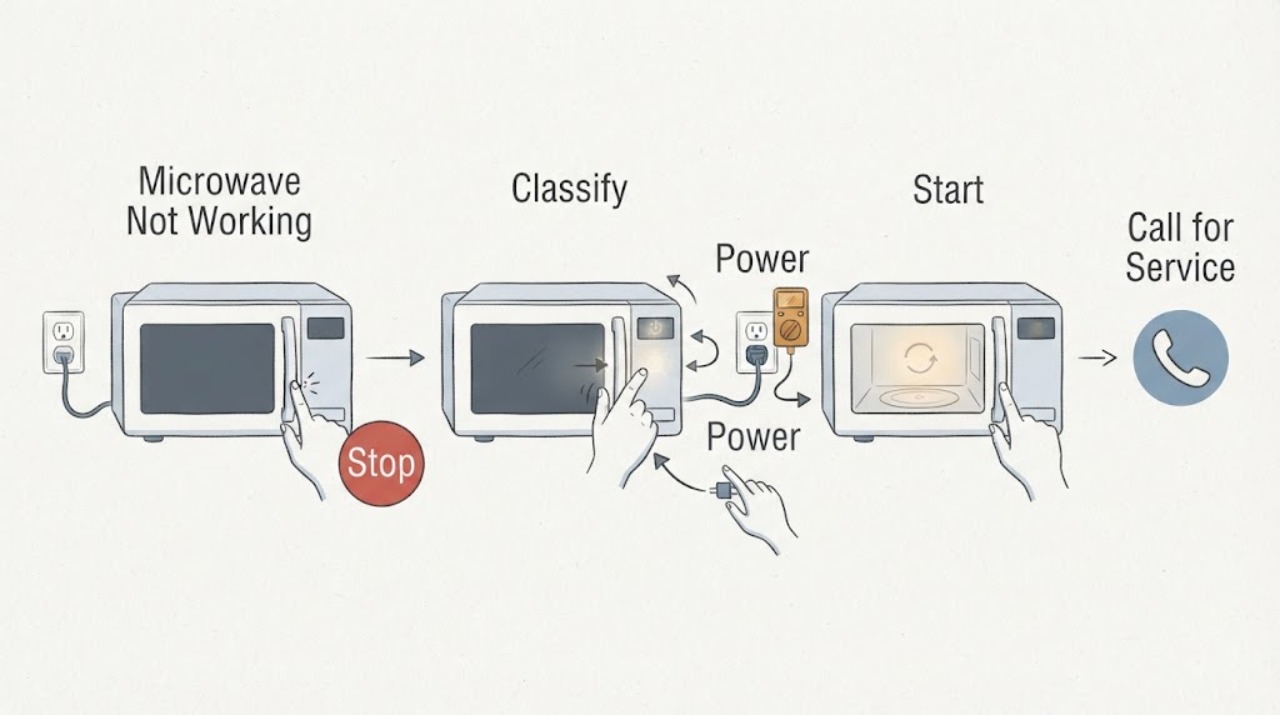
Work through in order
Diagnostic checks
Use only checks that match the exact appliance or system and its official guide.
-
Check 1
With no cycle running, observe the display, interior light, control response, and whether any fan or cooking activity starts without a command.
Expected result: The display is dark, the display is lit but Start does nothing, a cycle runs without heat, or the microwave starts by itself.
Next step: Follow the matching external check below and do not repeatedly press buttons or open the cabinet.
Why this matters
Why: These are distinct diagnostic axes with different safe next steps; self-starting operation is an immediate safety issue.
-
Check 2
If the display is dark, inspect the plug and cord from outside, test the outlet with another suitable appliance, and look for a tripped breaker or blown fuse.
Expected result: The outlet is dead or breaker tripped, or household power is normal but the microwave remains dark.
Next step: Restore a breaker once only when there is no heat, odor, smoke, or visible damage. Stop for repeat trips or damaged wiring.
Why this matters
Why: Samsung lists power supply and breaker conditions as first checks; persistent darkness with household power available points to service.
-
Check 3
If the display is lit but no cycle begins, confirm a normal cooking function, clear Control Lock if present using the exact model instructions, and clean/dry the door latch area and control panel.
Expected result: Start responds after a function, lock, door, or panel condition is corrected, or it remains unresponsive.
Next step: Request service for a damaged latch, self-activating panel, or persistent unresponsiveness after one 60-second reset.
Why this matters
Why: Samsung identifies non-cooking timer selection, control lock, incomplete door closure, and panel response as separate start blockers.
-
Check 4
If a cycle runs, use a microwave-safe cup of water for a brief supervised test and check Demo mode, Kitchen Timer, door closure, and model-specific over-the-range clearance.
Expected result: Water warms, the timer counts down unusually fast, water stays cool, or the door/clearance is abnormal.
Next step: Use only the exact model's settings and installation guidance. Never access the magnetron or other high-voltage parts.
Why this matters
Why: Warm water narrows the concern to food or container conditions; fast countdown suggests Demo mode, while cool water after external checks needs service.
-
Check 5
If the symptom is noise, poor rotation, or weak venting, clean and reseat the tray/roller ring and approved filters, then check external vent clearance without removing the mounted unit.
Expected result: The sound or rotation improves after cleaning/reseating, fan speeds differ normally, or the symptom persists.
Next step: Stop for grinding, smoke, arcing, burning odor, damaged parts, or persistent abnormal noise and request service.
Why this matters
Why: Samsung links residue, tray alignment, filters, and vent paths to accessible operation; persistence points to service.
Use your observations
Decision map
Find the observation that best matches what you see, then follow the next safe action.
-
PATH 01Next step
What you see
The display is dark and the outlet or breaker is faulty, then the display returns after a safe external correction.
Do this next
Monitor the circuit and stop if the breaker trips again or any heat, odor, smoke, or damage appears.
Why this path and its safety boundary
Why it matters: The household power path was the likely cause.
-
PATH 02Next step
What you see
The display is lit and Start works after clearing a lock, selecting a cooking function, or cleaning the door/panel.
Do this next
Use the exact model instructions and keep the latch and panel clean and dry.
Why this path and its safety boundary
Why it matters: An external control or door condition was more likely than an appliance-side failure.
-
PATH 03Next step
What you see
The timer runs but water stays cool after Demo mode, Kitchen Timer, door, and clearance checks are normal.
Do this next
Stop using the microwave and request Samsung service; do not open the cabinet.
Why this path and its safety boundary
Why it matters: An internal heating or control fault remains possible and cannot be safely isolated by the user.
-
PATH 04Next step
What you see
The unit starts without a command, cooking continues after Stop/Clear, or abnormal noise persists after accessible tray/filter checks.
Do this next
Disconnect power when safe, do not use the microwave, and request service with the observed symptom.
Why this path and its safety boundary
Why it matters: Self-starting is a fire hazard, and persistent mechanical symptoms need professional diagnosis.
Helpful context
Understand the symptom
Classify before you reset
A broad failure report is most useful when you record what the display, timer, cavity light, tray, fan, and food do. That observation prevents a no-power problem from being confused with a control-lock or no-heat problem.
When checks do not resolve it
Need a professional?
Provide the model, whether the display is dark or lit, what the timer and cavity do, the result of the outlet/breaker and water tests, and any error or sound description.
Safety scope: Users may perform only external checks, documented controls, cleaning, and a supervised water test; internal electrical, interlock, and high-voltage work requires a qualified technician.
Common questions
FAQ
What does “Samsung microwave not working” actually mean?
Classify it as dark display, lit display but no start, runs without heat, noise/rotation/vent problem, or unsafe self-starting. Each symptom has a different external check and service boundary.
When should I stop troubleshooting a Samsung microwave?
Stop for self-starting, cooking that continues after Stop/Clear, smoke, arcing, burning odor, damaged door or cord, repeat breaker trips, or persistent no-heat after external checks. Request service and do not open the cabinet.
Read the exact guide
Official sources
- How to clean a Samsung microwaveSamsung · Samsung microwave cleaning guidance
- Microwaves | Samsung Support USSamsung · Samsung microwave support hub
- Samsung microwave does not heatSamsung · Samsung microwave no-heat troubleshooting
- Samsung microwave turns on by itselfSamsung · Samsung microwave automatic-operation symptoms
- Samsung microwave is making weird noisesSamsung · Samsung microwave operating noise
- Samsung Microwave FAQsSamsung · Samsung microwave FAQ; exact model controls and installation govern
- Samsung microwave control panel does not respondSamsung · Samsung microwave control-panel symptoms
Community feedback
Share a repair observation
Share a plain-text repair observation. Accepted observations are published automatically; this page may take a moment to update.