
On this page
Start here
Quick answer
A Samsung oven can make a quiet hum or buzz from its cooling or convection fan, and a Samsung range with an induction cooktop can buzz depending on the cookware. First record whether the sound occurs during preheating, convection cooking, cooktop use, when the door opens, or after the oven is turned off. A fan that runs at expected intervals or after cooking while the electronics cool is different from a loud squeal, grind, or buzz that is getting worse. If the noise is accompanied by smoke, an unusual odor during normal use, sparking, a fan that never starts or never stops, or a control/heat problem, stop using the appliance and request Samsung service. Do not remove panels, defeat a door interlock, or run live electrical tests.
Before you begin
Safety first
- Do not remove panels, bypass an oven door interlock, perform live electrical or gas tests, or continue using the appliance after sparking, visible damage, persistent smoke/odor, or an increasingly harsh mechanical sound.
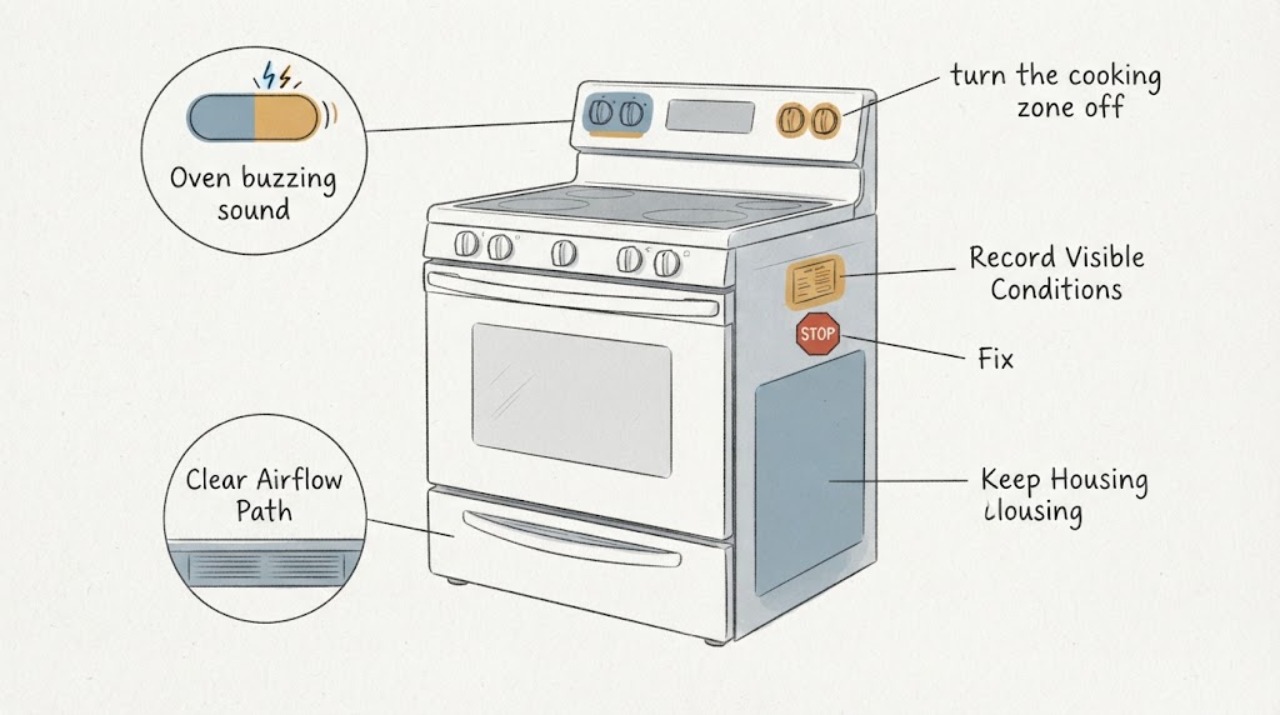
Work through in order
Diagnostic checks
Use only checks that match the exact appliance or system and its official guide.
-
Check 1
Record the full Samsung model and whether the appliance is a wall oven, electric/gas range, or induction range; note the mode, door state, cooktop state, and whether the buzz continues after cooking.
Expected result: The sound follows preheat/convection, follows cooktop use, changes when the door opens, or continues after the controls are off.
Next step: Use the branch that matches the appliance type and timing. Keep the exact model for Samsung's model-specific support path; do not transfer a range explanation to a wall oven.
Why this matters
Why: Those timings separate the cooling fan, convection fan, and possible induction-cookware path; the same word buzzing does not identify one mechanism.
-
Check 2
During a normal supported cycle, listen for a quiet airflow hum and note whether it starts when the oven/cooktop gets hot, cycles during convection, and stops after the electronics cool.
Expected result: The sound is a quiet airflow hum with expected fan timing, or it is loud and mechanical, with squealing, grinding, or scraping at start/stop.
Next step: If the sound is abnormal or the cooling fan never starts or never stops, stop repeated testing and request Samsung service.
Why this matters
Why: Samsung describes cooling and convection fan operation as normal sources of sound, while abnormal squealing, grinding, or squeaking warrants service.
-
Check 3
If the unit is a Samsung induction range, turn the cooking zone off, let cookware cool, and compare the sound with the zone unused; do not apply this step to a wall oven without an induction surface.
Expected result: The buzz occurs only with particular cookware or power levels on an induction zone, or it remains with the cooktop unused.
Next step: Try only cookware that the exact range manual supports if the sound is the normal induction type. If the buzz is loud, changes into a mechanical noise, or persists unrelated to cookware, arrange service.
Why this matters
Why: Samsung says induction cookware material can produce a normal buzz. A sound that remains with no induction load needs the oven/range fan and service branches instead.
-
Check 4
Observe the oven result without repeatedly opening the door: note whether it reaches the selected temperature, whether the display or heating behavior is abnormal, and whether the cooling fan eventually stops.
Expected result: The oven heats normally and the fan follows its cycle, or the oven will not heat/has a persistent fan or control symptom.
Next step: For persistent heat, display, or fan problems, use the exact model manual and request service. Do not diagnose a relay, fan motor, element, board, or gas system from sound alone.
Why this matters
Why: Samsung documents normal heating cycles and model-specific fan timing; a fan that never turns on/off or an oven that still will not heat is outside a simple noise explanation.
-
Check 5
Stop using the oven/range if the buzz is accompanied by smoke, an unusual odor during normal use, sparking, visible damage, or a worsening harsh sound.
Expected result: A spill is visibly producing odor/smoke, or the cavity is clean and the sign persists; electrical or mechanical hazard signs are also present.
Next step: Turn the appliance off, ventilate as appropriate, avoid panels and live tests, and request qualified Samsung service.
Why this matters
Why: Samsung says normal-use smoke/odor should be investigated and that smoke/odor from a clean oven requires service. Sparking, burning odor, and harsh mechanical noise are not safe reasons to keep testing.
Use your observations
Decision map
Find the observation that best matches what you see, then follow the next safe action.
-
PATH 01Next step
What you see
The buzz is a quiet airflow sound that starts while the oven or cooktop is hot, follows the convection cycle, and stops after cooling.
Do this next
Continue using the exact model's normal operating guidance unless the sound becomes loud, mechanical, or fails to stop.
Why this path and its safety boundary
Why it matters: Samsung describes cooling and convection fan operation as normal sound sources; the timing is more consistent with fan operation than a confirmed failed part.
-
PATH 02Next step
What you see
The appliance is an induction range and buzzing changes with cookware material or power level while the cooking zone is active.
Do this next
Switch off and cool the cookware, then use cookware supported by the exact range manual; request service if the sound is unusually loud or remains with the zone unused.
Why this path and its safety boundary
Why it matters: Samsung identifies cookware-dependent induction buzzing as normal and says no damage is being done by that sound alone.
-
PATH 03Next step
What you see
The sound is squealing, grinding, scraping, or significantly louder than before, especially as a fan starts or stops.
Do this next
Stop repeated cycles and request Samsung service with the model and a recording of the sound. Do not open the fan housing or bypass a door interlock.
Why this path and its safety boundary
Why it matters: Samsung treats abnormal fan sounds and unusually loud range noises as a service issue, not a user-adjustable setting.
-
PATH 04Next step
What you see
The oven will not heat, the cooling fan never starts or never stops, or the buzzing is accompanied by display/power symptoms.
Do this next
Turn the appliance off and use Samsung's exact model support/service path. Do not perform live electrical, gas, or control-board tests.
Why this path and its safety boundary
Why it matters: The symptom combination exceeds normal operating-noise guidance and can require model-specific diagnosis; the sound alone does not identify the failed component.
-
PATH 05Next step
What you see
Smoke or an unusual odor occurs during normal use and remains after the oven cavity is clean, or there is sparking or visible damage.
Do this next
Stop use, ventilate if safe, and request qualified service. Do not run another cycle to reproduce the noise.
Why this path and its safety boundary
Why it matters: Samsung says persistent odor/smoke from a clean oven requires service; sparking or visible damage adds a direct safety stop.
Helpful context
Understand the symptom
“Buzzing” describes a sound, not a confirmed failed part. Samsung ovens and ranges have a cooling fan for the electronics and, on applicable models, a convection fan that circulates heated air. A Samsung range may also transmit a cookware-dependent buzz from an induction cooktop. Start by noting the appliance type, full model number, cooking mode, whether the cooktop is active, whether opening the oven door changes the sound, and whether the noise continues after cooking.
Match the timing to the oven fan
Samsung says the internal cooling fan is not visible and can run when the electronics get hot, including heat produced by the oven or cooktop. The visible convection fan can also cycle at intervals; during convection cooking Samsung describes roughly 10 seconds on followed by 40–60 seconds off for the covered models. A quiet airflow hum that follows cooking and cooling is therefore different from a harsh sound that starts or stops with scraping, squealing, or grinding.
Check whether the buzzing belongs to an induction cooktop
If the Samsung appliance is a range with an induction surface, switch the cooking zone off and let the cookware cool before comparing the sound. Samsung says induction ranges can buzz depending on cookware material and that changing cookware may reduce a normal buzz. This branch applies to an induction range; do not apply it to a wall oven that has no induction cooktop.
Separate normal oven cycling from an abnormal noise
Observe the sound during an ordinary preheat or the model-supported cooking mode without opening the door repeatedly. Samsung says electric-oven convection fans can run during preheating even when convection was not selected, and the oven can cycle heating on and off while maintaining temperature. If the oven heats and the sound is a quiet fan or relay-related operating noise, it may be normal; a loud, worsening, or mechanical-sounding buzz is not identified by these general pages as a user-repairable part.
Check the symptom that accompanies the buzz
Record whether the oven reaches its setting, the display advances normally, the fan ever stops after cooling, and whether any error or power problem appears. Samsung directs model-specific support when a cooling fan never turns on or never turns off, and requests service when the oven still will not heat after the documented external checks. Do not infer a fan motor, relay, heating element, control board, or gas component from the buzz alone.
Treat smoke, odor, and electrical signs as a stop boundary
If smoke or an unusual odor appears during normal use, Samsung says to ventilate and inspect the cavity for spills; if the oven is clean and the odor or smoke remains, request service. Stop using the appliance for sparking, visible damage, a burning electrical smell, or a fan that makes an increasingly harsh sound. Keep the model number and a recording of the noise for Samsung support rather than opening the appliance or testing wiring.
When checks do not resolve it
Need a professional?
Request Samsung service if a fan never starts or never stops, the sound is loud or mechanical, the oven will not heat, the buzz remains unrelated to cookware or normal fan timing, or smoke, unusual odor, sparking, visible damage, or display/power symptoms occur. The general guidance cannot select an internal part or safe teardown procedure without the exact model.
Safety scope: Do not remove panels, bypass an oven door interlock, perform live electrical or gas tests, or continue using the appliance after sparking, visible damage, persistent smoke/odor, or an increasingly harsh mechanical sound.
Have this ready
- Full model number, appliance type, cooking mode, whether an induction zone or cookware was active, when the sound begins/ends, whether the oven heats, whether the fan stops after cooling, and a short recording if safe.
Common questions
FAQ
Is a buzzing sound normal on a Samsung oven?
It can be. Samsung describes quiet cooling/convection fan sounds as normal, and induction ranges can buzz depending on cookware. A loud, worsening, squealing, grinding, or scraping sound needs service.
Why does the oven fan keep running after cooking?
Samsung says the cooling fan can continue while the electronics cool. If it never turns off, or the sound is abnormal, use the exact model support path and request service.
Could the cookware cause the buzz?
Only when the appliance is a Samsung induction range: Samsung says cookware material can produce a normal induction buzz. Turn the zone off and let cookware cool before comparing; this does not apply to a wall oven without an induction cooktop.
Should I open the oven to find the buzzing part?
No. A sound does not identify a safe part to replace, and the public Samsung guidance directs persistent abnormal fan/noise, heat, smoke, or odor symptoms to service. Do not remove panels or perform live tests.
Read the exact guide
Official sources
- Samsung oven fan is making a noise or will not turn offSamsung Support US · Samsung ovens; cooling and convection fan operation, normal timing, abnormal fan sounds, and service boundary
- Samsung oven temperature issuesSamsung Support US · Samsung ovens/ranges; normal heating cycles, external heat/power checks, and service when oven will not heat
- Samsung cooktop and range: common sounds and operational noisesSamsung Support US · Samsung ranges/cooktops and ovens; normal fan, induction cookware, relay, gas, and metal-expansion noises
- There is smoke or an odor coming from Samsung ovenSamsung Support US · Samsung ovens; smoke/odor distinctions for first use, self-clean, and normal use, plus ventilation and service boundary
- Wall Ovens | Samsung Support USSamsung Support US · Samsung wall ovens; model lookup, manuals, troubleshooting, and repair request path
Community feedback
Share a repair observation
Share a plain-text repair observation. Accepted observations are published automatically; this page may take a moment to update.