
On this page
Start here
Quick answer
Samsung uses more than one communication-related information code, and the meaning can vary by oven design and model. On Samsung's official oven guidance, C-F0 means communication is absent between the main PCB and sub PCB, while C-F2 means a communication problem is maintained between the Touch IC and the main or sub micom. First record the exact code and model, then use the applicable Samsung instructions: turn the oven off and restart it; if the listed guidance calls for it, switch power off for at least 30 seconds and reconnect. If the code returns or is not listed, stop troubleshooting at the controls and arrange Samsung service rather than opening the oven or guessing a board or harness.
Before you begin
Safety first
- Do not open the oven control compartment, reseat internal connectors, probe live circuits, bypass an interlock or order a board from the generic communication message.
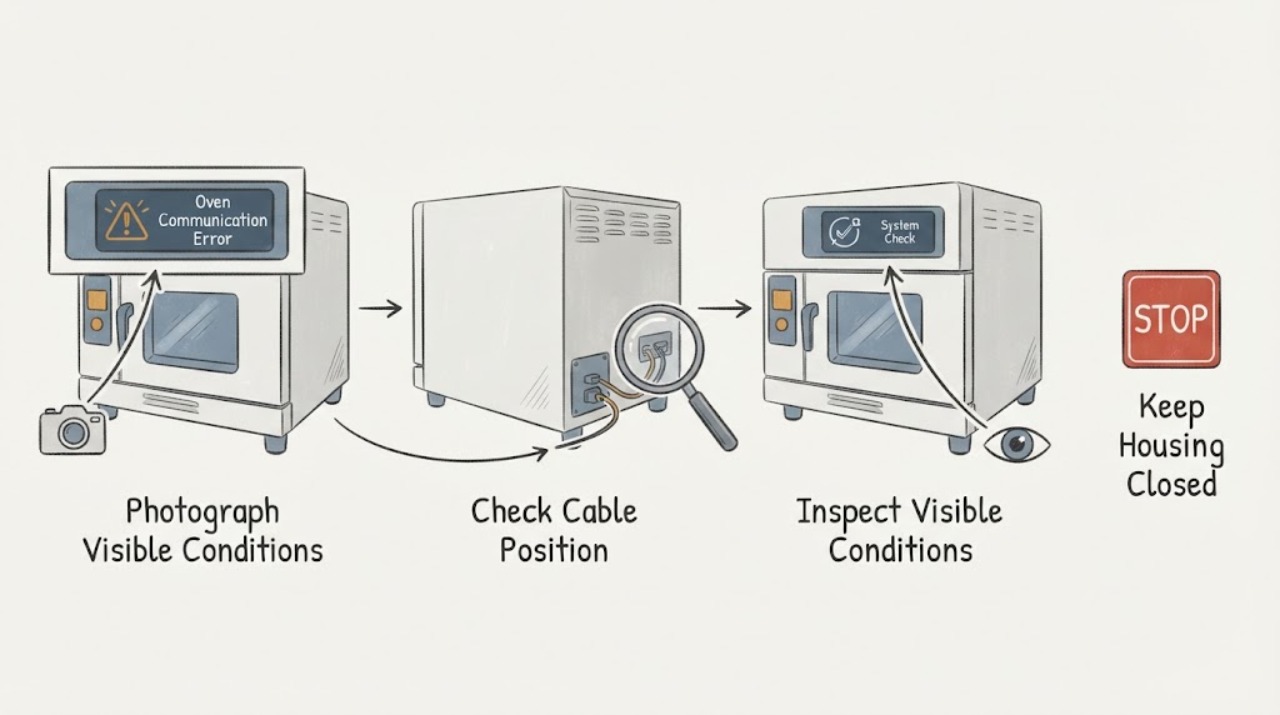
Work through in order
Diagnostic checks
Use only checks that match the exact appliance or system and its official guide.
-
Check 1
Photograph the complete display message and read the oven's model from its rating plate or manual. Record whether the display is C-F0, C-F2, another code, or an unclear character sequence.
Expected result: The code is C-F0, C-F2, another clearly identified code, or cannot be identified.
Next step: Use the matching Samsung manual for a clearly identified code. If the display cannot be read, do not infer a board or wiring fault; arrange model-specific support if the message persists.
Why this matters
Why: Samsung assigns different meanings to C-F0 and C-F2 and warns that information codes can vary by model; an unclear or different code is not established as a communication error.
-
Check 2
For a clearly identified Samsung oven communication code, turn the oven off using its controls and attempt the restart described by Samsung. If the code remains and the applicable page calls for a power reset, switch the oven circuit off for at least 30 seconds, then restore power.
Expected result: The display clears and the oven returns to normal selection, or the same communication code returns.
Next step: If it clears, monitor the next normal use without opening the appliance. If it returns, stop at the user controls and request Samsung service.
Why this matters
Why: A clear display after the reset is not proof that a board or harness was defective; a returning code is Samsung's trigger for further support rather than repeated resets.
-
Check 3
Compare the observed code and appliance category with the exact Samsung manual for the model; do not apply a range-only or another-region instruction just because the wording says communication error.
Expected result: The manual matches the oven and code, or the manual has a different code/design or cannot be found.
Next step: If the manual does not match, stop model-specific troubleshooting and contact Samsung with the model and display photo. Do not substitute another model's firmware, button sequence or part diagnosis.
Why this matters
Why: Samsung's official oven page says unlisted codes require the specific model manual and that the information-code design may differ by model. The U.S. page's additional firmware path is limited to named induction range models and cannot be generalized to an unknown oven.
-
Check 4
Stop using the oven and arrange qualified service if the communication code returns, the oven will not operate normally after the prescribed reset, or there is smoke, a burning smell, abnormal heating, a damaged power cord or repeated breaker operation.
Expected result: The fault recurs or any electrical/thermal warning sign is present.
Next step: Leave the oven off, use the accessible disconnect or breaker only when safe, and provide Samsung service with the exact model, code, region and reset result. Do not open the control compartment.
Why this matters
Why: A recurring communication error needs model-aware diagnosis; a thermal, smoke or electrical warning raises the safety priority and is not a user-level board repair.
Use your observations
Decision map
Find the observation that best matches what you see, then follow the next safe action.
-
PATH 01Next step
What you see
The display clearly shows C-F0 on a Samsung oven.
Do this next
Turn the oven off and restart it. If it persists, follow the applicable Samsung power-reset instruction once, then request service if it returns.
Why this path and its safety boundary
Why it matters: Samsung describes C-F0 as no communication between the main PCB and sub PCB; the code identifies a communication condition, not which internal part has failed.
-
PATH 02Next step
What you see
The display clearly shows C-F2 on a Samsung oven.
Do this next
Turn the oven off and restart it. If it continues, use the model-appropriate power reset and arrange service for a recurring code; do not remove the panel or touch internal connectors.
Why this path and its safety boundary
Why it matters: Samsung describes C-F2 as a maintained communication problem between the Touch IC and the main or sub micom; it is not the same definition as C-F0.
-
PATH 03Next step
What you see
The code is not C-F0/C-F2, cannot be read, or the Samsung manual for the exact model is unavailable.
Do this next
Record the exact model and display, use Samsung's matching manual/support path, and stop if the message persists. Do not borrow another model's error definition.
Why this path and its safety boundary
Why it matters: Samsung says information-code meanings and display designs can differ by model, so the generic phrase communication error is insufficient to select a control sequence or component diagnosis.
Helpful context
Understand the symptom
A generic communication error is not a part diagnosis
Do not treat every Samsung communication message as proof that the main board, touch panel, wiring or another particular part has failed. Samsung's UK oven page separates C-F0, where communication is absent between the main PCB and sub PCB, from C-F2, where a communication problem is maintained between the Touch IC and the main or sub micom. The same page says that information-code design and meaning can differ by model and directs users to the manual for an unlisted code.
Use the code and model to choose the safe branch
Photograph the display and read the rating-plate model before resetting repeatedly. If the display is C-F0 or C-F2, the Samsung oven guidance supports an off-and-restart attempt followed by at least 30 seconds without power if the problem continues. Samsung's U.S. range/wall-oven guide likewise says a C-F0 is a communication error between electronic components and routes a returning error to service. A different code, an unclear character, or a different appliance category needs its own model manual rather than a copied C-F0 sequence.
Keep the repair boundary outside the control compartment
The official pages provide user-level reset and service direction, not a safe oven-panel procedure for tracing communication wiring. Do not remove the control panel, reseat ribbon cables, probe live circuits, bypass a safety device or order a board based only on the message. If the code returns after the applicable reset, or if the oven has a damaged cord, burning smell, smoke, abnormal heat or breaker activity, stop using it and request qualified Samsung service.
When checks do not resolve it
Need a professional?
Request Samsung service when the communication code returns after the applicable reset, the code is unlisted or unclear, or the oven has smoke, burning smell, abnormal heating, damaged power wiring or repeated breaker operation. Keep the oven off until the service path is clear.
Safety scope: Do not open the oven control compartment, reseat internal connectors, probe live circuits, bypass an interlock or order a board from the generic communication message.
Have this ready
- Provide the full model number, region, exact display code or photo, when it appears, whether the oven heats or responds, the result of one applicable reset, and any smoke, smell, heat or breaker symptom.
Common questions
FAQ
What does a Samsung oven communication error mean?
It depends on the displayed code and model. Samsung's UK oven guidance defines C-F0 as no communication between the main PCB and sub PCB, while C-F2 is a maintained communication problem between the Touch IC and the main or sub micom. Those definitions do not identify a specific failed part.
Can I clear a Samsung oven communication code myself?
Samsung supports turning the oven off and restarting it for C-F0/C-F2; if the problem continues, its guidance calls for switching power off for at least 30 seconds and reconnecting. If the code returns, contact Samsung service rather than repeating resets or opening the oven.
Should I replace the control board for C-F0 or C-F2?
No component should be named from the code alone. Samsung describes a communication condition and directs recurring errors to support; the exact model and service diagnosis are needed before any internal part decision.
Read the exact guide
Official sources
- Check out the information codes on my ovenSamsung UK · Opened Samsung's official oven support page; it explicitly covers C-F0 and C-F2 communication conditions and says unlisted codes require the specific model manual.
- Samsung range or wall oven error codesSamsung Electronics America · Opened Samsung's official U.S. range/wall-oven troubleshooting page; it defines C-F0 as a communication error between electronic components and routes returning errors to service.
Community feedback
Share a repair observation
Share a plain-text repair observation. Accepted observations are published automatically; this page may take a moment to update.