
On this page
Start here
Quick answer
On the Samsung NX58M9420SS gas range, C-d1 after Self Clean should be treated first as a hot, safety-locked oven state and a possible door-lock malfunction—not as proof that a latch, motor, or control board needs replacement. Let the range cool naturally, keep the door closed, and never pull the handle or start Self Clean again to test it. Samsung's oven-code guide describes C-d1 as a door-lock malfunction and gives an off/restart followed by a power-off step, but it also warns that information codes and designs vary by model; use the NX58M9420SS/AA instructions for any reset. If the fully cooled range still shows C-d1 or repeatedly locks and stops, leave it off and arrange qualified Samsung appliance service.
Before you begin
Safety first
- This is a gas range with a high-temperature Self Clean function and an automatic door-lock system. Owner checks stop at cooling, outside observation, display transcription, and one exact-model-documented recovery. Door-lock access, control-panel work, live electrical diagnosis, gas work, and safety-device repair require a qualified technician.
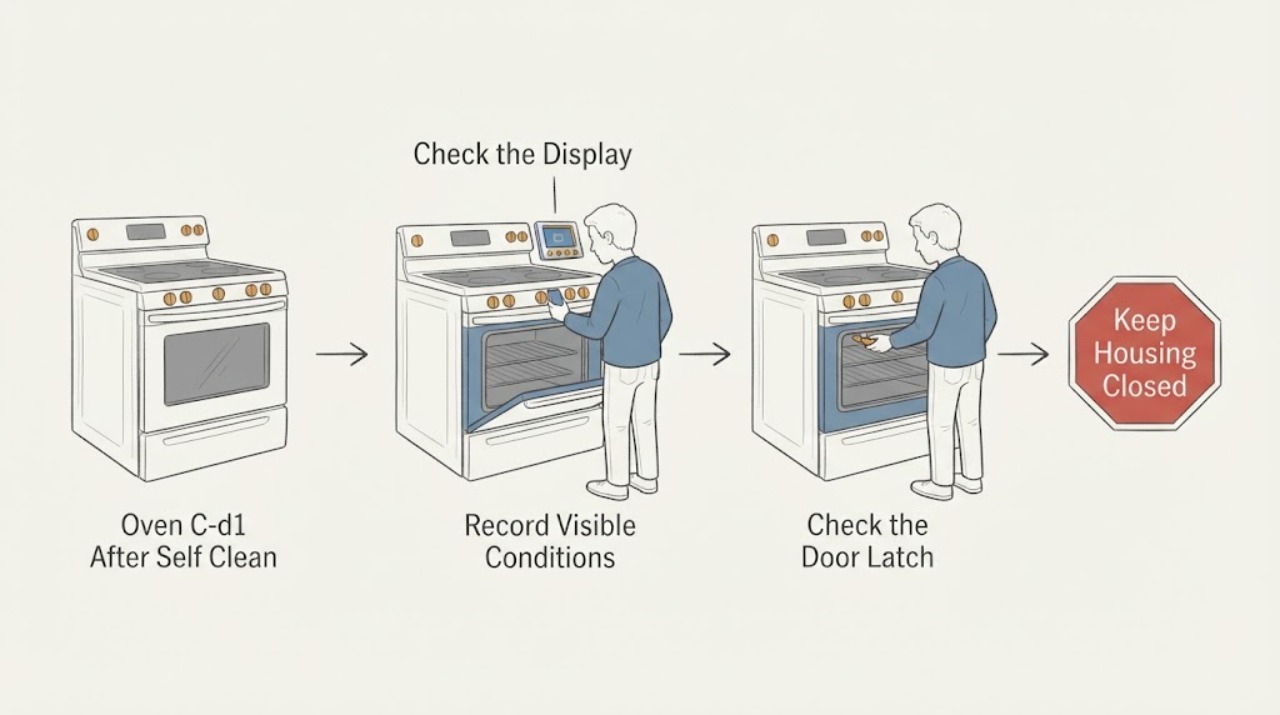
Work through in order
Diagnostic checks
Use only checks that match the exact appliance or system and its official guide.
-
Check 1
If C-d1 appears immediately after Self Clean, turn the range off at the controls if they respond and let the cavity and door cool naturally. Stand clear of the door and escaping heat or steam; do not pull the handle, pry the door, or run Self Clean again.
Expected result: The lock icon or locked door remains while the range is still hot, then the heat and steam subside without forcing the door.
Next step: Wait until the range is fully cool before any further owner-level check. If there is smoke, a gas odor, a flame problem, sparks, or uncontrolled heat, skip troubleshooting and use the safety boundary below.
Stop if: Do not force the door, restart Self Clean, reach into a hot cavity, or remove a panel.
Why this matters
Why: Samsung says the door locks during Self Clean and remains locked until the oven has cooled enough; the immediate post-clean lock can therefore be a protective temperature state rather than proof of a replaceable part.
-
Check 2
From outside the appliance, verify the rating-label identity as Samsung NX58M9420SS; if the label includes the regional suffix, record it (the U.S. support path uses NX58M9420SS/AA). Record the full display as C-d1 rather than assuming CD1, and note whether Self Clean completed, was canceled, or stopped early.
Expected result: The model and suffix are clear, the display is exactly C-d1, and the event is tied to a completed or interrupted Self Clean cycle; or the identity/code cannot be read reliably.
Next step: Use the exact NX58M9420SS/AA manual or Samsung support entry before attempting a reset. If the model or display cannot be matched, leave the range off and provide the photo and timeline to service.
Stop if: Do not open the control area or reach behind the range to read a label while it is hot or energized.
Why this matters
Why: The NX58M9420SS is a gas slide-in range with Self Clean, but Samsung warns that information-code designs and steps vary by model. An incomplete identity or ambiguous character prevents a safe model-specific procedure.
-
Check 3
After the range is fully cool, look only from the front for an obvious obstruction or door misalignment and see whether the display and ordinary buttons respond. Do not push the latch, defeat a door switch, remove the door, or disassemble the lock.
Expected result: The door is visibly unobstructed and the controls respond, or the door remains locked and the controls are unresponsive after cooling.
Next step: If the exact model instructions allow it and no hazard is present, continue to the single documented recovery step; otherwise arrange service without trying to move the mechanism by hand.
Stop if: Do not force the handle, bypass the lock, remove panels, or perform live electrical testing.
Why this matters
Why: Samsung's locked-door guidance says an overheated oven can lock and that some models may also need to be powered on before the lock disengages. A cooled door that remains locked without an ordinary obstruction is not an owner-level latch diagnosis.
-
Check 4
Only after cooling and only with no gas, smoke, spark, excessive-heat, or breaker symptom, follow the exact NX58M9420SS/AA owner instructions for turning the oven off and restarting it once. If the exact guide permits a power interruption, perform that one documented interruption; do not choose an undocumented interval or repeat the cycle while searching for a different result.
Expected result: The code clears and the door operates normally, or C-d1 returns/never clears after the one model-directed recovery.
Next step: If the code persists or returns, stop using the oven and arrange qualified Samsung service. Do not run another Self Clean cycle as a test and do not guess whether the latch, motor, sensor, or control board is at fault.
Stop if: Do not repeatedly reset the breaker, bypass a safety device, open the console, or work on gas or energized circuits.
Why this matters
Why: A single documented clear can remove a temporary control state, but it does not prove that the door-lock circuit is healthy. Samsung's general C-d1 page lists off/restart and then power off for 30 seconds or more, while its U.S. locked-door guide describes a 60-second breaker cycle; the exact model instructions control.
-
Check 5
Before requesting service, record the exact model/suffix, the complete C-d1 display, whether the door actually locked, when Self Clean was completed or stopped, how long the range cooled, what the controls did, and whether any smoke, gas odor, sparks, unusual heat, or breaker trip occurred.
Expected result: The code is persistent or recurrent, the lock cycles repeatedly, the range stops itself, or any abnormal heat, smell, smoke, power, or gas symptom accompanied the code.
Next step: Leave the gas range off and provide the recorded evidence to qualified Samsung appliance service; use an electrical or gas-safety professional when the associated symptom is electrical or gas-related.
Stop if: Do not keep cooking through a persistent code, repeat Self Clean, or open the oven/range panels.
Why this matters
Why: Those details let a technician separate a post-clean thermal lock state from an unresolved door-lock, control, power, or safety fault without unsafe owner testing. A community report confirms that this exact model has been described with C-D1 after Self Clean, but it does not establish a safe part replacement or DIY repair.
Use your observations
Decision map
Find the observation that best matches what you see, then follow the next safe action.
-
PATH 01Next step
What you see
The door is locked only while the oven is still hot after Self Clean, and the heat gradually subsides.
Do this next
Keep the range undisturbed until fully cool; do not force the door or restart Self Clean. Then use only the exact model's documented next step.
Why this path and its safety boundary
Why it matters: This pattern is consistent with Samsung's temperature-protection lock and does not by itself identify a failed latch or board.
-
PATH 02Next step
What you see
The NX58M9420SS is fully cool, but C-d1 remains, the lock repeatedly cycles, or the oven stops again after one documented recovery.
Do this next
Leave the oven off and arrange qualified Samsung service with the complete code, model suffix, Self Clean timeline, and reset result.
Why this path and its safety boundary
Why it matters: The user-visible safety state has not cleared, so an unresolved door-lock, control, sensing, or power fault is more likely than a temporary post-clean display state; the code alone cannot select a part.
-
PATH 03Next step
What you see
The code clears after the range is cool and the one model-directed recovery, the door operates normally, and there is no abnormal heating or smell.
Do this next
Record the clear, avoid using Self Clean as a test, and stop and request service if C-d1 or abnormal door/heating behavior returns during ordinary use.
Why this path and its safety boundary
Why it matters: A temporary control state is possible, but clearing the code does not prove that the lock system will remain reliable.
-
PATH 04Next step
What you see
C-d1 is accompanied by smoke, a gas odor, sparks, a tripped breaker, uncontrolled or excessive heat, damaged wiring, or a door that cannot be safely managed.
Do this next
Stop using the range, keep people away from hot or energized areas, and contact the appropriate qualified appliance, electrical, or gas-safety service from a safe location.
Why this path and its safety boundary
Why it matters: The safety symptom takes priority over interpreting the code; a reset is not an adequate response.
Helpful context
Understand the symptom
Why the timing matters
Self Clean drives the cavity to a very high temperature. Samsung says the automatic lock stays engaged until the oven cools sufficiently, and forcing it can damage the locking system. That makes the post-clean cooling state the first decision point; a C-d1 that remains after cooling is a service signal, not a reason to guess a part.
Keep the display evidence
The exact model is important here: the U.S. NX58M9420SS specification identifies a slide-in gas range with Self Clean, while Samsung notes that information-code formats and remedies can differ across models. Record the complete display as C-d1, including the hyphen and capitalization, before it clears or changes.
When checks do not resolve it
Need a professional?
Call qualified Samsung appliance service when the code persists or returns, the door stays locked after cooling, the range stops itself, or the exact model instructions do not support a safe owner action.
Safety scope: This is a gas range with a high-temperature Self Clean function and an automatic door-lock system. Owner checks stop at cooling, outside observation, display transcription, and one exact-model-documented recovery. Door-lock access, control-panel work, live electrical diagnosis, gas work, and safety-device repair require a qualified technician.
Have this ready
- Provide Samsung NX58M9420SS and any suffix, the exact C-d1 display, Self Clean completion or interruption, cooling timeline, whether the door locked or cycled, the result of the one permitted model-directed step, and any smell, smoke, heat, or power symptom.
Common questions
FAQ
Can I pull the Samsung oven door open after Self Clean shows C-d1?
No. Let it cool naturally. Samsung warns that forcing the automatic lock can damage it, and the door can remain locked until the oven cools.
Does C-d1 prove that the latch or control board needs replacement?
No. It identifies a door-lock malfunction in Samsung's general oven-code guide, but the code alone does not select a part. A persistent or recurring code after cooling needs model-qualified service.
Should I run Self Clean again to clear C-d1?
No. Do not repeat Self Clean as a test. Follow only the exact NX58M9420SS/AA instructions for one permitted recovery, and stop for service if the code remains or returns.
Read the exact guide
Official sources
- Samsung oven door is lockedSamsung Electronics America · Samsung ranges; model-specific behavior can differ
- NX58M9420SS_V3.inddSamsung Electronics America · U.S. Samsung NX58M9420SS range specification
- Samsung Oven C-D1 Error Code - Door lock failureReddit r/appliancerepair · Exact Samsung NX58M9420SS community symptom report; not an official repair procedure
- How to clean your Samsung ovenSamsung Electronics America · Samsung ovens; use the model manual where controls differ
- warranty | Official Samsung Support USSamsung Electronics America · Exact model support path with the /AA suffix
- Check out the information codes on my ovenSamsung Electronics UK · Samsung UK oven information-code guide; exact model and market instructions take precedence
Community feedback
Share a repair observation
Share a plain-text repair observation. Accepted observations are published automatically; this page may take a moment to update.