
On this page
Start here
Quick answer
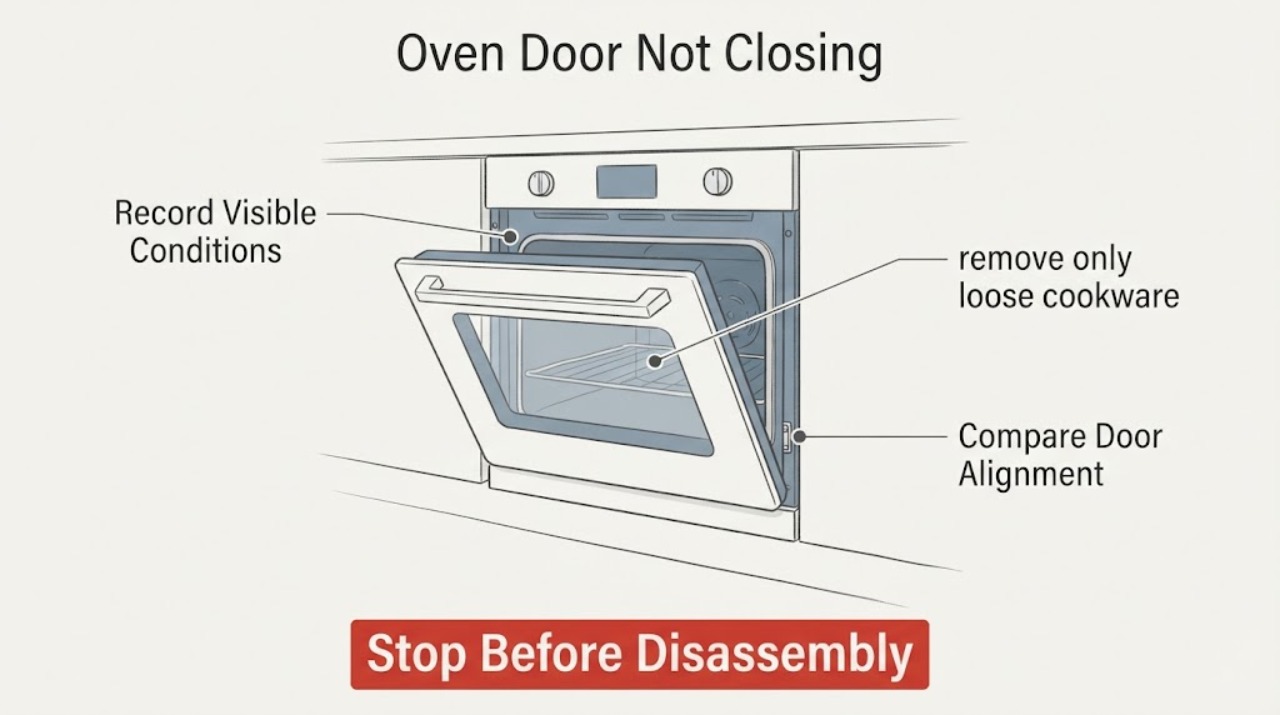
If a Samsung oven door will not close, first decide whether the oven is still hot or in a self-clean lock state. Keep hands away from hot surfaces, wait for a safe cool condition, and check that racks, a divider, tray, liner, or food is not blocking the door. Samsung identifies a recently removed door that was reattached incorrectly, hinges left in an unlocked position, a latch stuck in the locked position, and physical damage as common paths. Do not slam or force the door, bend a hinge, defeat the latch, or run the oven with a gap. A cracked glass panel, bent hinge, smoke, burning odor, gas odor, abnormal flame, or a door that still will not close after the manual-approved checks requires the oven to remain off and qualified service.
Work through in order
Diagnostic checks
Use only checks that match the exact appliance or system and its official guide.
-
Check 1
Record whether the Samsung oven is hot, cooling after cooking, in self-clean, or fully cool, and note any lock icon, Hot message, door code, smoke, odor, or gas symptom. Do not pull on the door or start another cycle while it is hot or locked.
Expected result: The door is locked while hot, remains locked after the oven is cool, is open but misaligned, or the display reports a door or lock condition.
Next step: Let a hot oven cool naturally and follow the exact manual. If the door remains locked when cool, an error returns, or any smoke, gas odor, or damage is present, keep the oven off and arrange qualified service.
Why this matters
Why: A hot or self-clean state can intentionally keep the door locked, while a cool oven with a continuing lock or gap points toward a latch, hinge, control, or physical alignment issue. Samsung says the exact model manual controls lock behavior.
-
Check 2
When the cavity and door are cool, remove only loose cookware or items that the manual says the user may remove, then push each rack fully to the rear and check that any divider or partition is seated level. Do not force a rack past a resistance point or use a liner as a spacer.
Expected result: A rack, divider, tray, foil, liner, or food vessel projects into the door path, sits unevenly, or nothing removable blocks the frame.
Next step: Remove or reseat the item only when cool and according to the manual, then close the door gently once. If it still will not close or the item is damaged, stop and arrange service rather than applying force.
Why this matters
Why: Samsung says racks must be fully inserted and level, and the same applies to a divider or partition. A removable obstruction can explain a door gap; no obstruction shifts attention to the seal, hinges, latch, frame, or door installation.
-
Check 3
Inspect the cool door seal, glass edges, frame, handle, and visible hinge area from the outside. Look for a twisted or displaced gasket, hardened residue, bent metal, cracked glass, a hinge that sits unevenly, or a frame that has shifted; do not remove screws or disassemble the door.
Expected result: The seal or frame is visibly damaged, the glass is cracked, a hinge is bent or out of position, residue blocks the seal, or all visible surfaces look intact.
Next step: For cracked glass, bent metal, a loose hinge, or frame damage, leave the oven off and arrange qualified service. For a cool, minor surface residue, clean only the accessible surface with the model's approved method and do not wet the gasket or door cracks.
Why this matters
Why: Samsung identifies physical damage or misalignment as a service condition. A gasket or residue issue can prevent contact, but a bent hinge, cracked glass, or shifted frame can make force unsafe and can affect heat containment.
-
Check 4
If the door was recently removed or cleaned between the glass panes, compare the visible hinge position with the exact Samsung manual and note whether both hinges enter their receivers evenly. Do not reattach an unidentified door, hold a sprung hinge, or continue if a hinge is extended, bent, or difficult to control.
Expected result: The door was recently removed, one hinge is not seated like the other, both hinges appear even, or the reattachment history is unknown.
Next step: Use only the model manual's reattachment procedure if the door is cool and the steps clearly match. Otherwise leave the door and oven alone and arrange qualified service; do not force the door against a hinge.
Why this matters
Why: Samsung says a removable door may fail to close when it was not reattached correctly and warns that hinges must not be left in an unlocked or bent position. Uneven hinge position can explain a door gap, but it is not a cue for improvised hinge work.
-
Check 5
With the oven cool and power controlled normally, observe the latch and door-catch position without putting fingers into a spring-loaded mechanism. If the exact Samsung support procedure for the model identifies a stuck latch reset, follow only that light, manual-approved step; do not pry, bend, or bypass the latch or door plunger.
Expected result: The latch is visibly held in a locked position while the door is open, the latch does not move as the manual describes, the plunger is stiff, or the latch and catch appear normal.
Next step: Stop and request service for a stiff, damaged, or unresolved latch or plunger. If a manual-approved reset does not restore gentle closure, keep the oven off and do not repeat it.
Why this matters
Why: Samsung says a latch that remains in the locked position can prevent closure and identifies the door plunger as a model-specific service clue. A stiff or damaged latch or plunger is an interlock concern, not a reason to defeat it.
-
Check 6
Copy any complete door, lock, or other error code and note whether it appears with the door open, closed, cool, or after self-clean. Check the code in the exact model manual; do not infer a code from another Samsung oven or repeatedly cycle a hot appliance.
Expected result: A door code appears while the door looks closed, the code clears after cooling, another code returns, or no code appears despite a visible gap.
Next step: For a returning code, a cool door that remains open, or a code with physical damage, leave the oven off and provide the model and sequence to Samsung or qualified service. Do not open the control area.
Why this matters
Why: Samsung says door codes can involve the door plunger or closure, and that codes and control behavior vary by model. A cleared display does not prove that a damaged latch, hinge, seal, or frame is safe.
-
Check 7
After all cool, manual-approved external checks, verify that the door closes evenly without slamming and that the seal meets the frame all around. Do not run a bake or self-clean cycle with a door gap, a damaged seal, an unlocked latch, cracked glass, or a loose hinge.
Expected result: The door closes gently and evenly, closes but leaves a gap, springs back open, or cannot reach the catch.
Next step: If closure is not complete and even, keep the oven unused and arrange qualified Samsung service. If it closes normally, resume use only according to the exact manual and stop for any renewed heat, smoke, odor, or latch symptom.
Why this matters
Why: Gentle, even closure supports a resolved obstruction or alignment issue, but a gap or spring-back indicates that heat containment or the door safety system may still be compromised. Samsung sends unresolved closure problems to service.
Use your observations
Decision map
Find the observation that best matches what you see, then follow the next safe action.
-
PATH 01Next step
What you see
The door is locked while the oven is hot, cooling, or completing a self-clean operation.
Do this next
Do not force or pry the door. Keep people away from hot surfaces and wait for the model's safe cool state; request service if the lock remains after cooling.
-
PATH 02Next step
What you see
A removable item projects into the door path or is not level.
Do this next
With the oven cool, reseat or remove the item according to the manual and close the door gently once. Stop if resistance remains.
-
PATH 03Next step
What you see
The problem began after door cleaning, glass cleaning, or door removal.
Do this next
Use only the exact model manual to verify hinge position and reattachment. Do not hold a sprung hinge or force the door against uneven hinges; arrange service if the fit is uncertain.
-
PATH 04Next step
What you see
The latch remains locked while open, the plunger is stiff, or the catch cannot engage.
Do this next
Do not bypass or bend the interlock. Follow a model-approved light reset only if clearly documented; otherwise keep the oven off and request service.
-
PATH 05Next step
What you see
There is cracked glass, a bent hinge, displaced frame, torn seal, loose handle, or another physical defect.
Do this next
Stop using the oven and arrange qualified service. Do not tape, bend, drill, glue, or clamp the door as a temporary repair.
-
PATH 06Next step
What you see
A door, lock, or other error remains or returns after the oven is cool.
Do this next
Record the complete code and model, consult the exact manual, and request Samsung service for a persistent code. Do not run a heat cycle to compare results.
-
PATH 07Next step
What you see
There is smoke, burning odor, gas odor, abnormal flame, arcing, a hot connection, or a safety alarm.
Do this next
Stop using the oven immediately. Avoid flames and electrical switches when gas may be present, leave the area when appropriate, and contact local emergency, gas-safety, electrical, or appliance professionals as the hazard requires.
Helpful context
Understand the symptom
Do not make a hot or locked door a force test
A Samsung oven door can stay locked while the oven is very hot, particularly after self-clean. Keep people away from hot glass and escaping heat, and do not pry, slam, or repeatedly pull the handle. Once the oven is cool and the area is safe, diagnose the obstruction or alignment rather than trying to overcome the latch.
Start with removable items and recent work
A rack, divider, tray, liner, or food vessel can stop a door before the seal meets the frame. A door that was removed for cleaning may also have hinges in the wrong position. These are different checks from a bent hinge, damaged glass, or latch fault, so note what changed before the symptom began.
Samsung models do not share every door detail
Samsung ranges and wall ovens vary in rack systems, dividers, latches, control locks, self-clean behavior, and door construction. Use the exact model manual for any removal or reattachment procedure. A general door diagram cannot authorize hinge work on an unidentified model.
A door gap can affect safe operation
Do not cook with a door that remains open, misaligned, or unable to latch. Heat can escape, controls may report a door error, and a damaged seal or glass can worsen. If the frame, hinge, glass, or latch looks damaged, stop at the visual check and arrange service.
Safety boundary
Stop conditions
- Stop immediately for cracked or shattered glass, a bent or loose hinge, a hot or damaged handle, smoke, burning odor, gas odor, abnormal flame, sparks or arcing, a hot electrical connection, or a fire or carbon-monoxide alarm.
- Do not force, slam, pry, tape, clamp, or prop the door; bend or hold a sprung hinge; bypass a latch, plunger, or control lock; remove the control panel; or run the oven with a door gap.
- Do not run self-clean or another heat cycle to reproduce a closure problem. Keep the oven off until a qualified professional confirms a safe door and interlock condition.
Only after diagnosis
Potential parts
- oven door seal or gasket
Consider this category only when the exact model manual or qualified technician confirms that a damaged or displaced seal is preventing safe closure.
Door seals vary by Samsung oven model and door design. Confirm the complete model and manufacturer fit information; do not use a substitute seal to hold a misaligned door closed. - oven door hinge or latch assembly
Consider this category only after qualified diagnosis confirms a hinge, catch, latch, or plunger fault rather than a rack obstruction or incorrect door installation.
Hinges and latch assemblies are model-specific, spring-loaded, and safety-related. Do not bend, bypass, or change them as a user test.
When checks do not resolve it
Need a professional?
Arrange qualified Samsung appliance service when the door remains open after the cool rack, divider, seal, hinge, latch, and model-manual checks; when a door code returns; or when any glass, frame, hinge, catch, plunger, or seal damage is present. Seek electrical or emergency help for smoke, arcing, a hot connection, gas odor, abnormal flame, or an alarm. Provide the complete model, door history, heat or self-clean status, code, and visible damage.
Common questions
FAQ
Why will my Samsung oven door not close?
Check the oven's hot or self-clean state first, then look for a rack, divider, tray, or residue blocking the path. If the door was removed, hinge position and reattachment matter; a stuck latch, bent hinge, damaged seal, or physical misalignment needs service.
Can I force a Samsung oven door closed?
No. Do not slam or pry it, bend the hinges, or defeat the latch. Keep the oven off if closure is not gentle and even, especially when glass, the frame, or a hinge is damaged.
What if the Samsung oven door is locked while the oven is cool?
Check the exact model's lock and self-clean guidance, record any door code, and do not force the latch. A cool door that stays locked or a returning code needs qualified service.
Could an oven rack keep the Samsung door from closing?
Yes. Samsung says racks and dividers should be fully inserted and level. With the oven cool, reseat or remove the item only as the manual permits; stop if resistance remains.
What if I removed the Samsung oven door for cleaning?
Use the exact model manual to verify both hinge positions and reattachment. Do not hold a sprung hinge or force the door against uneven hinges; arrange service if the procedure or fit is uncertain.
Can I use the oven with a small door gap?
No. A door gap can affect heat containment and the safety interlock. Keep the oven off until the door closes evenly and the seal, latch, hinge, and frame are confirmed safe by the manual or a qualified professional.
Read the exact guide
Official sources
- Door will not close on Samsung ovenSamsung US · Samsung oven and range door obstruction, hinge, latch, and service guidance
- Samsung range or wall oven error codesSamsung US · Samsung oven door code, plunger, Demo, power, and model-specific fault guidance
- Self Clean or other buttons do not light up or respond, or panel is locked on Samsung ovenSamsung US · Samsung oven hot-panel, control-lock, self-clean state, power-cycle, and service guidance
- Samsung Wall Oven FAQsSamsung US · Samsung wall-oven door closure, hinge, latch, damage, seal, and service context
- How to clean your Samsung ovenSamsung US · Samsung oven door, seal, rack, self-clean lock, hot-surface, and cleaning safety guidance
Community feedback
Share a repair observation
Share a plain-text repair observation. Accepted observations are published automatically; this page may take a moment to update.