
On this page
Start here
Quick answer
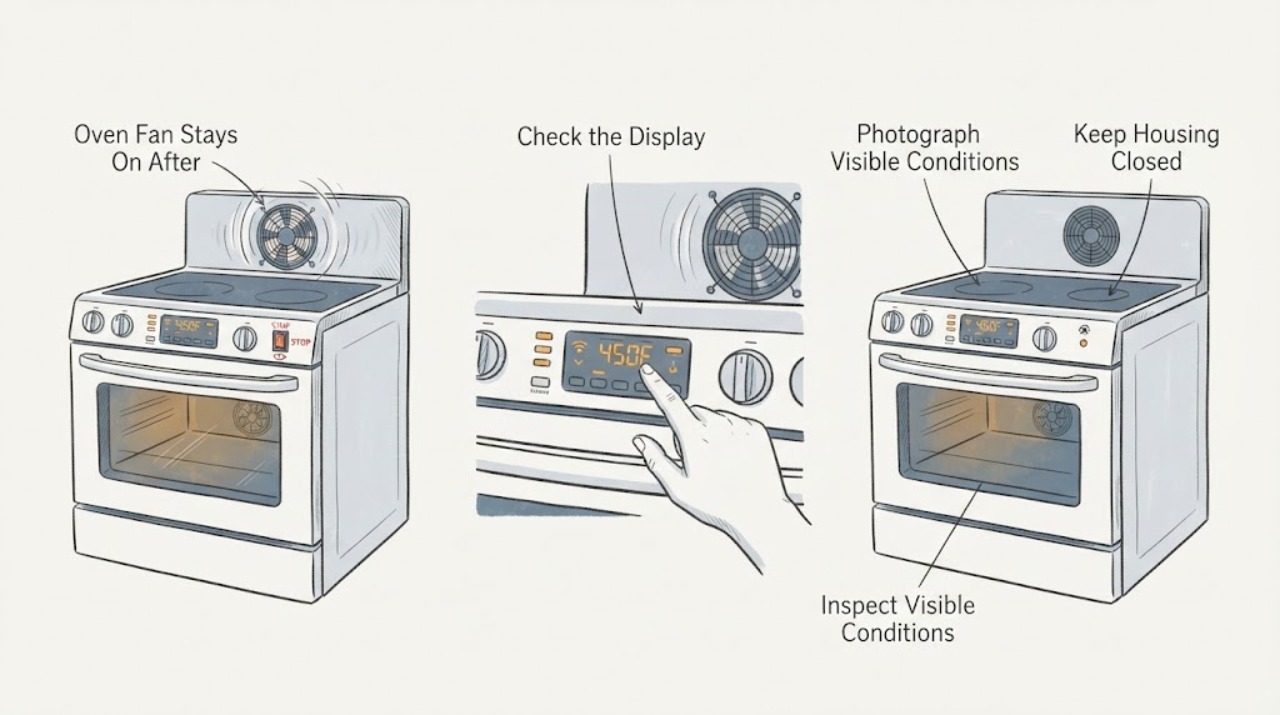
A Samsung BF64CCBST fan can continue after cooking while the built-in oven cools, so a fan running immediately after use is not by itself proof of a failed relay or fan motor. Samsung's exact-model support page identifies BF64CCBST/XSA as a built-in oven and lists its market-specific user manual; confirm the full suffix and market before applying controls. From a safe position, confirm that the cooking mode is actually off and that the cavity temperature is falling. A steady airflow with no active heating, smoke, burning smell, abnormal noise, or rising heat can be a normal cool-down. Do not switch off the wall isolator or unplug the oven while it is still cooling unless a safe emergency requires isolation, because Samsung warns that interrupting cooling can lead to overheating or damage. Record when the fan starts, whether it stops after the oven is fully cool, whether the display or mode remains active, and whether the sound is smooth airflow or grinding/squealing. If the fan remains on after the oven has cooled, runs with the oven unused, the controls do not cancel, heat continues, the cabinet becomes unusually hot, or there is smoke, odor, arcing, or a breaker event, stop using the oven and arrange qualified service. Do not open panels, probe wiring, tap a relay, bypass a thermal device, or run a long powered test to force a diagnosis.
Before you begin
Safety first
- Do not open the oven cabinet, remove the control or rear panel, probe live wiring, tap or bypass a relay/thermal device, or continue heating to reproduce the symptom. Keep hands away from hot surfaces and keep vents clear. If power must be isolated, use only a dry, safely accessible disconnect; leave the area and use emergency help for fire or heavy smoke.
Work through in order
Diagnostic checks
Use only checks that match the exact appliance or system and its official guide.
-
Check 1
From a safe position, turn the BF64CCBST's model-labeled mode control to Off or use the documented cancellation control once. Do not touch the hot door, cavity, racks, element, or fan opening, and do not cut power merely to silence a fan that may be cooling the oven.
Expected result: The display leaves the cooking mode and only smooth airflow remains while heat falls, or an element stays energized, heat continues rising, the display remains in a mode, or smoke/odor appears.
Next step: For fan-only operation, leave vents clear and let the oven cool. For continuing heat, smoke, odor, or loss of control, stop using the oven and isolate energy only from a safe, dry, accessible point before arranging qualified service.
Stop if: Stop immediately for smoke, flames, burning odor, arcing, melted controls, exposed wiring, a repeated breaker trip, or a temperature that keeps rising after cancellation.
Why this matters
Why: Fan-only airflow can be normal post-use cooling. Heat that continues after Off or a control that does not respond is not explained by a normal cool-down and needs a safety/service path.
-
Check 2
Read and photograph the complete rating-label model and market suffix, then compare the display, clock/timer, mode indicator, lock state, and any error message with the BF64CCBST manual listed by Samsung. Do this from outside the cool-down path without starting another cooking or cleaning cycle.
Expected result: The label shows BF64CCBST/XSA or another suffix, a timed/cleaning/lock state remains visible, the display is blank but the fan runs, an error is shown, or the model and manual cannot be matched.
Next step: Follow only the matching manual's cancellation step once. If the fan remains on after the oven is cool, the model cannot be matched, or an error returns, stop troubleshooting and provide the label and display photo to Samsung service.
Stop if: Do not enter service mode, repeatedly reset the oven, or continue cooking while the control state or model identity is uncertain.
Why this matters
Why: A mode or control state can make a fan or display appear active, but the exact control response is market- and model-dependent. A missing identity prevents safe use of another Samsung oven's button sequence.
-
Check 3
Observe the sound and trend only from outside: note whether it is a steady airflow, a cycling fan, grinding, squealing, rubbing, clicking, or an airflow that remains unchanged while the oven is fully cold and unused. Record the start time, selected mode, display state, and when the exterior and cavity feel cooled without touching hot surfaces.
Expected result: The sound is smooth and fades as the oven cools, the fan cycles with residual heat, the sound is abnormal, or the same fan runs for a fully cold oven or starts with no recent use.
Next step: Allow a normal cool-down once and document the result. If the fan is abnormal, never stops after cooling, or runs while the oven is unused, keep the oven out of use and arrange Samsung or qualified built-in-oven service.
Stop if: Stop if the cabinet becomes unusually hot, the sound turns into scraping or electrical clicking, or smoke, odor, sparks, or vibration appears.
Why this matters
Why: Falling heat with smooth airflow supports a cooling function. Abnormal noise can indicate a loose or damaged fan, while operation with no heat or no recent use makes a persistent control, temperature-protection, or fan fault more relevant; neither observation proves a particular part.
-
Check 4
When the oven is fully cool, inspect only the visible external vent area and door seal for an obvious obstruction, damage, or gap. Do not insert tools, remove covers, dismantle the fan shroud, or use a thermometer or long heat cycle to test the oven.
Expected result: The vent and seal look clear and intact, a loose external object blocks airflow, the door or cabinetry is damaged, or the oven is still unusually hot after the fan has run.
Next step: Remove only a loose, external obstruction with the appliance cool. For damage, persistent heat, or any internal obstruction, leave the oven off and arrange service; do not alter the installation or open the cabinet.
Stop if: Stop for damaged insulation, heat damage to cabinetry, a blocked built-in vent that cannot be cleared externally, or any need to remove a panel.
Why this matters
Why: Clear ventilation supports ordinary cooling, while an obstruction or damaged seal can affect heat management. Persistent heat after a cool-down interval is not a reason to keep powering the oven or to infer a relay fault.
-
Check 5
After one safe cool-down observation, document whether the fan stopped once the oven was fully cool and whether the issue recurs while unused. Keep the complete model suffix, market, fan sound, mode, display, temperature trend, and any breaker or odor history for a service call; do not run repeated or extended tests.
Expected result: The fan stops after the oven cools and does not recur, it remains on while fully cool, it returns on every use, or it is accompanied by abnormal heat, an error, or an unresponsive control.
Next step: If it stops normally, keep vents clear and monitor without long tests. If it remains on or recurs, leave the oven off and request qualified Samsung service with the recorded evidence.
Stop if: Do not restore power for another test when there is smoke, fire, damaged wiring, an unsafe breaker, water near electricity, or continuing uncontrolled heat.
Why this matters
Why: A fan that stops with falling heat is consistent with the documented cooling function. Recurrence after cooling or operation without a heat event requires model-specific diagnosis; the symptom does not select a relay, sensor, fan motor, or board by itself.
Use your observations
Decision map
Find the observation that best matches what you see, then follow the next safe action.
-
PATH 01Next step
What you see
The mode is Off, no element is visibly energized, heat is falling, the airflow is smooth, and the fan stops after the oven cools.
Do this next
Leave the vents clear, do not interrupt the cool-down at the wall switch, and monitor the next normal use. Consult the exact BF64CCBST manual if a display or timer remains active.
Why this path and its safety boundary
Why it matters: This pattern matches Samsung's documented post-use cooling behavior and is not, by itself, evidence of a failed fan motor or relay.
-
PATH 02Next step
What you see
The fan remains on while the oven is fully cold and unused, recurs after every use without cooling, or makes grinding, rubbing, squealing, or repeated electrical clicking.
Do this next
Keep the oven out of use and arrange qualified Samsung or built-in-oven service. Supply the full model suffix, market, sound description, mode, and the time at which the oven became fully cool.
Why this path and its safety boundary
Why it matters: The behavior is outside the simple fan-only cool-down pattern. A loose/damaged fan or a control/temperature-protection issue is possible, but the observed sound and timing do not prove which component is at fault.
-
PATH 03Next step
What you see
The fan is accompanied by an element that stays hot or energized, temperature that rises after Off, smoke, burning odor, sparks, a damaged cabinet, or a breaker event.
Do this next
Stop use, keep clear of hot surfaces, isolate energy only from a safe dry position if that can be done without approaching danger, and arrange qualified service. Use emergency help for fire or heavy smoke.
Why this path and its safety boundary
Why it matters: This is an uncontrolled-heating or electrical safety condition, not a normal cooling-fan question. Do not use the fan as evidence that the oven is safe to keep running.
-
PATH 04Next step
What you see
The display or clock still shows a timed function, cleaning state, lock, or other mode, or the complete BF64CCBST suffix cannot be matched to the available manual.
Do this next
Use the exact market manual listed on Samsung's BF64CCBST support page, cancel the mode once when safe, and escalate if the fan or heat remains active. Keep the appliance off while the identity or control state is unresolved.
Why this path and its safety boundary
Why it matters: The visible fan may be responding to a model-specific operating state, but Samsung notes that built-in-oven controls and designs vary. An unresolved identity is not permission to borrow another model's reset sequence.
Helpful context
Understand the symptom
BF64CCBST is an older built-in Samsung oven platform with market-specific suffixes such as XSA and XEE in Samsung's support listings. The model label matters because control layouts and manuals vary. A fan heard after use should first be classified by what else is happening: cooling air with falling heat, a still-active cooking mode, a convection fan moving cavity air, or a fault in which heat or controls do not follow Off.
The useful boundary is not an invented number of minutes. Samsung's public guidance says the cooling fan runs until the oven has cooled and says to seek repair when the problem continues; the exact model manual should control any mode or cancellation detail. Avoid a long powered experiment, because a persistent fan can be a symptom while an active element, rising temperature, smoke, or damage changes the situation to an immediate stop-use condition.
When checks do not resolve it
Need a professional?
Use Samsung or qualified built-in-oven service for a fan that persists after cooling, abnormal fan noise, a fan that runs while unused, continued heat after Off, a control that will not cancel, or an unresolved model/market manual mismatch.
Safety scope: Do not open the oven cabinet, remove the control or rear panel, probe live wiring, tap or bypass a relay/thermal device, or continue heating to reproduce the symptom. Keep hands away from hot surfaces and keep vents clear. If power must be isolated, use only a dry, safely accessible disconnect; leave the area and use emergency help for fire or heavy smoke.
Have this ready
- Provide the complete BF64CCBST model suffix and market, serial number if safely visible, manual version if known, selected mode, timer/lock/display state, fan sound, start and stop timing, whether the cavity and exterior were fully cool, any heat after Off, and any smoke, odor, spark, damage, or breaker history.
Common questions
FAQ
Is it normal for the Samsung BF64CCBST oven fan to run after cooking?
It can be. Samsung says a built-in oven's cooling fan runs after use until the oven has cooled. Smooth airflow with falling heat and a fan that stops once cool fits that behavior; a fan that remains on while fully cold or runs with the oven unused needs service.
Should I switch off the wall isolator to stop the fan?
Not during an ordinary cool-down. Samsung warns that cutting power while the oven is cooling can prevent proper cooling and cause overheating or damage. Use an accessible disconnect only for an immediate safety concern and only from a safe position, then arrange service.
How long should the BF64CCBST fan run?
Do not use an invented minute limit. Samsung's guidance is that the fan runs until the oven has cooled, and the exact model, mode, installation, and starting temperature affect the observation. Record when the oven becomes fully cool and whether the fan stops; do not keep the oven powered for a long test.
How can I tell the cooling fan from the convection fan?
A convection fan circulates air in the cavity during a cooking mode; a cooling fan protects the oven and controls after use. Use the display, selected mode, airflow location, and falling-heat pattern from outside. Do not reach into the oven or remove covers to identify a fan.
Does a fan that never turns off mean the relay or control board is bad?
No. Persistent operation can involve a fan, airflow, temperature-protection, control, or wiring issue, and the symptom alone does not identify a part. Keep the oven off if it stays on while cold, is noisy, or is paired with heat or an error, and have qualified service diagnose it.
Read the exact guide
Official sources
- Troubleshooting guide for Samsung built-in ovenSamsung UK Support · General Samsung built-in-oven guidance; the page warns that controls and images can differ by model, so BF64CCBST manual details remain controlling.
- Troubleshooting guide for Samsung built-in ovenSamsung New Zealand Support · Samsung New Zealand built-in-oven guidance used to cross-check the cooling-versus-fault distinction; the page explicitly says actual design can differ by model.
- Single Built in with Large Grill (BF64CCBST) | Samsung Support AustraliaSamsung Australia · Exact BF64CCBST/XSA support page for the Australia/New Zealand market; it lists the exact model and manual while controls and options may differ in other markets.
Community feedback
Share a repair observation
Share a plain-text repair observation. Accepted observations are published automatically; this page may take a moment to update.