
On this page
Start here
Quick answer
On the Samsung NE58F9500SS/AC electric range, a red or orange glow visible through the ceramic glass inside the selected radiant burner circle can be normal: Samsung says radiant elements cycle on and off to maintain the selected setting, so the glow can appear and fade even at high heat. The hot-surface indicator is a separate safety indicator and can remain lit after the controls are off until the surface cools to about 150°F. First confirm that the new light is inside the bottom-right burner circle and appears only when that knob is on, rather than being a spark, bright pinpoint outside the element, glow around a crack, or light that remains with the knob off and the surface cool. Stop using the range and isolate power from a dry, safe position for arcing, smoke, burning odor, cracking, scorching, uncontrolled heating, a hot connection, or repeated breaker trips. Do not lift the glass, remove the rear panel, probe wiring, or infer a switch or element part from a photo.
Before you begin
Safety first
- Do not lift the ceramic cooktop, remove rear or control panels, touch a socket or terminal, bridge a switch, use a meter on energized wiring, or continue operating after an arc, crack, smoke, burning odor, scorching, hot connection, or breaker trip. Isolate power only from a dry, accessible position if safe.
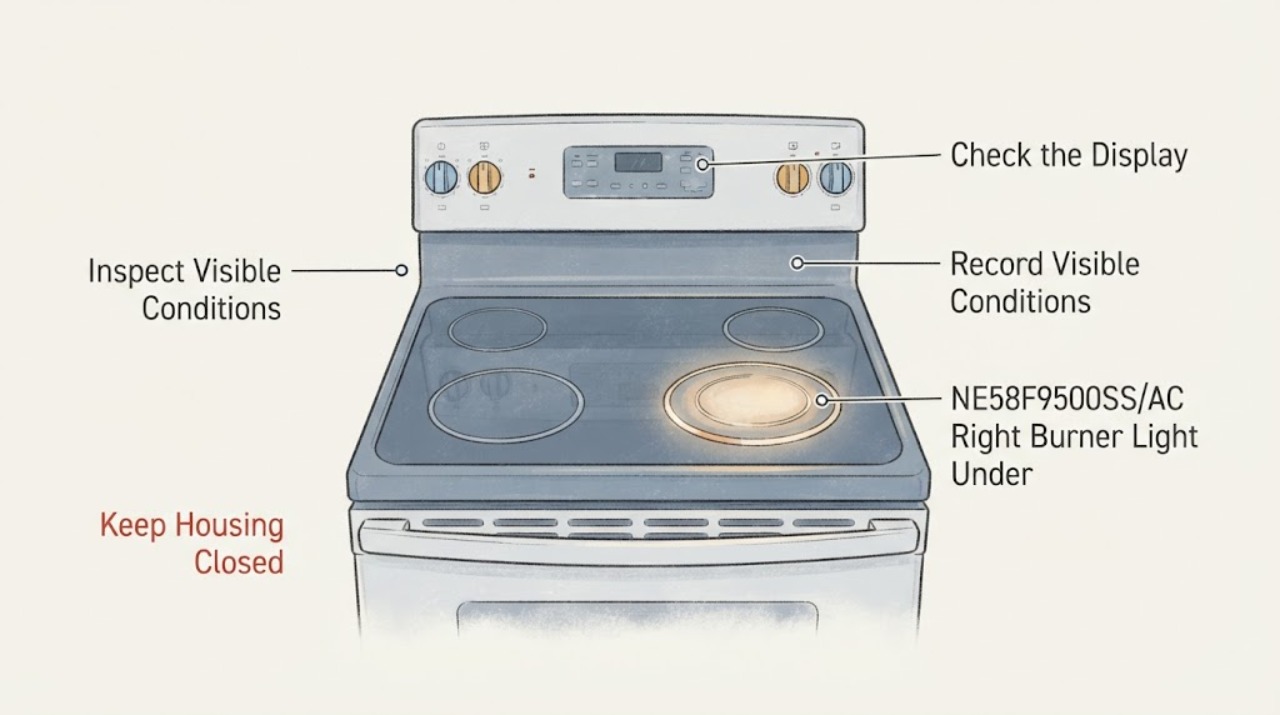
Work through in order
Diagnostic checks
Use only checks that match the exact appliance or system and its official guide.
-
Check 1
From a safe standing position, read the rating label and confirm the complete model is NE58F9500SS/AC. With no visible hazard, note whether the light is inside the permanent bottom-right radiant-element circle, whether it appears only when that knob is turned on, whether it fades and returns, and whether the separate hot-surface or cooktop-on indicator is also lit.
Expected result: The glow stays inside the selected burner circle and follows the knob, or it appears outside the circle, without the knob, or in a separate location under the glass.
Next step: If the location or model suffix is uncertain, stop interpretation and use the exact Samsung manual linked for the model. Keep the range off and arrange service for a glow that does not follow the selected burner.
Stop if: Do not touch the glass, lift the cooktop, remove panels, or continue if there is a spark, smoke, burning odor, crack, scorching, hot connection, or repeated breaker trip.
Why this matters
Why: A selected-area glow that cycles with the radiant element is consistent with Samsung's normal operation. A location or control mismatch means the observation is not explained by the ordinary radiant-glow guidance and should not be diagnosed from a photograph.
-
Check 2
Without touching the surface, watch one normal heat cycle from outside the appliance: the selected bottom-right element may glow red and then fade as it regulates heat. Turn the knob to OFF at the control and record whether the glow fades with residual heat, whether the panel's hot-surface indicator remains lit, and whether any light continues under a fully cool glass surface.
Expected result: The glow cycles with heating and fades after OFF while the hot-surface indicator remains temporarily lit, or the glow stays bright, appears with the knob OFF, or persists after the surface is cool.
Next step: For normal cycling, use the range normally with the control fully OFF when finished and never leave high or medium heat unattended. For a glow that persists after cooling or with OFF, stop using the range and arrange service.
Stop if: Do not test by holding a switch, moving cookware across a hot surface, or placing a hand near the glowing area.
Why this matters
Why: Red-to-fade cycling and a lingering hot-surface indicator are documented normal behaviors. A bright or persistent glow unrelated to the selected element or residual heat needs qualified assessment; the indicator itself does not prove a wiring or element fault.
-
Check 3
After the range and glass are fully cool, inspect the visible ceramic surface only with all controls OFF. Look for a crack, chip, cloudy burn mark, blackened spot, melted material, moisture, or a glow at an edge or point rather than across the intended element area; do not wipe a hot surface or remove trim.
Expected result: The glass and surrounding surface are intact, or a crack, chip, moisture, scorching, melted material, or point/edge glow is visible.
Next step: Keep the range isolated and contact Samsung or qualified appliance service for any visible damage or abnormal glow. Do not use the affected burner or continue cooking while waiting for a diagnosis.
Stop if: Do not lift the ceramic top, clean between layers, scrape a crack, or touch a suspected energized part.
Why this matters
Why: An intact surface with ordinary area-wide element cycling supports normal radiant operation. Physical damage, contamination, or an unexpected point/edge glow is not a safe user-level distinction and can involve heat or electrical damage.
-
Check 4
Compare the range's display, other surface elements, kitchen lights, cord/connection area, and breaker behavior without opening anything. Note whether only the selected element glows normally or whether the display flickers, another element activates unexpectedly, the connection becomes hot, or protection trips.
Expected result: Only the selected element cycles normally, or the display/other elements fluctuate, the connection is hot, or the breaker trips.
Next step: Keep the range off and arrange qualified appliance or electrical service for any fluctuation, unexpected activation, hot connection, or trip. Do not repeatedly reset the breaker or use another burner to compare under a hazard.
Stop if: Do not access the terminal block, remove rear covers, use a meter, or make live measurements.
Why this matters
Why: An isolated selected-element glow is consistent with local radiant heating; whole-appliance fluctuation or protection activity raises a supply/control concern that cannot be resolved by changing a knob or ordering an element.
-
Check 5
If the only concern is that the hot-surface indicator remains lit after cooking, leave all surface controls OFF and allow the range to cool naturally while keeping people and combustibles away from the glass. Do not use the indicator as permission to touch the surface; if it never turns off after the range is cool, record that separately.
Expected result: The indicator goes out after cooling, or it never turns on, never turns off, or does not agree with the actual surface condition.
Next step: Arrange Samsung service for an indicator that never operates correctly or for any simultaneous abnormal glow. Do not bypass the indicator or continue using the range based on a guessed part diagnosis.
Stop if: Do not touch or cool the glass with water, open the control panel, or reset protection repeatedly.
Why this matters
Why: Samsung describes the hot-surface indicator as a warning that remains until the cooktop is below about 150°F. A disagreement between the indicator and a cool surface is a service issue, but it does not identify a particular sensor or control component.
Use your observations
Decision map
Find the observation that best matches what you see, then follow the next safe action.
-
PATH 01Next step
What you see
The light is a broad red glow inside the selected bottom-right burner circle, appears only with that control on, cycles/fades, and no crack, odor, spark, or control abnormality is present.
Do this next
Use the range normally with the control turned fully OFF when finished and never leave the surface unattended at high or medium settings. Do not treat the glow as a failed part.
Why this path and its safety boundary
Why it matters: This matches Samsung's description of a radiant element visible through ceramic glass and cycling on/off to regulate heat.
-
PATH 02Next step
What you see
The only continuing light is the separate hot-surface indicator after the knob is OFF, and it goes out once the cooktop has cooled.
Do this next
Keep the surface untouched until cool and monitor only for normal indicator behavior. If it remains on when cool or fails to illuminate when hot, request service.
Why this path and its safety boundary
Why it matters: Samsung documents this as a heat warning; the indicator can remain on after shutdown until the surface is about 150°F.
-
PATH 03Next step
What you see
The glow is bright at Low from a cold surface, persists with the knob OFF after cooling, appears as a point/edge/arc, or is accompanied by a crack, scorch, burning odor, smoke, hot connection, or breaker trip.
Do this next
Stop using the range, isolate power from a dry, accessible position if safe, and obtain qualified Samsung appliance or electrical service. Do not reproduce the arc or open the range.
Why this path and its safety boundary
Why it matters: Samsung's temperature guidance treats bright-red operation at Low as a service condition, and the other signs are not established as normal radiant cycling. The exact element, limiter, switch, wiring, glass, or supply cannot be selected safely from the appearance alone.
-
PATH 04Next step
What you see
The model suffix is uncertain, the light location does not match the selected burner, the display/other elements fluctuate, or the symptom cannot be separated from a photo.
Do this next
Keep the range off, capture the rating label and a safe exterior photo, and arrange Samsung or qualified service with the control state and timing. Do not order an element, switch, or glass from a visual resemblance.
Why this path and its safety boundary
Why it matters: The generic electric-range guidance cannot establish which circuit or indicator is involved, and Samsung notes that model-specific instructions should be used.
Helpful context
Understand the symptom
Identify what is glowing before treating it as a fault
The supplied identity is Samsung NE58F9500SS/AC, and Samsung's Canadian support page lists that exact suffix and the user-manual download. This is an electric range with radiant surface elements, not a gas burner or an interior oven lamp. A glow inside the marked bottom-right element circle while its control is on can be the heating element seen through the ceramic glass. A separate panel indicator can stay lit after cooking to warn that the surface is still hot; it is not the same thing as a new light under the glass.
Normal cycling has a clear boundary
Samsung says radiant elements cycle on and off to regulate the selected temperature, so seeing red and then a fading glow is expected. That explanation applies only when the light follows the selected burner and the glass, controls, and surrounding area remain intact. A spark, pinpoint arc, glow outside the element's marked area, crack, scorching, burning smell, or continued heating with the knob off is not established as normal by the user guide and requires the range to remain out of service until it is assessed.
When checks do not resolve it
Need a professional?
Arrange Samsung or qualified appliance/electrical service when the glow is outside the selected element, remains with the control OFF after cooling, is bright at Low from a cold surface, the hot-surface indicator disagrees with a cool surface, another control or element changes unexpectedly, or any electrical/heat warning occurs.
Safety scope: Do not lift the ceramic cooktop, remove rear or control panels, touch a socket or terminal, bridge a switch, use a meter on energized wiring, or continue operating after an arc, crack, smoke, burning odor, scorching, hot connection, or breaker trip. Isolate power only from a dry, accessible position if safe.
Have this ready
- Provide the complete NE58F9500SS/AC label, market, affected bottom-right control, whether the glow is broad or point-like and inside the marked circle, knob state, timing of red/fade behavior, hot-surface indicator state, glass condition, display/other-element behavior, smell/smoke, and breaker history.
Common questions
FAQ
Is a new red light under the ceramic glass normal on the NE58F9500SS/AC?
It can be normal if it is a broad glow inside the selected radiant burner circle and it appears and fades as that burner cycles. Samsung documents this behavior. A point-like glow, arc, crack, scorch, odor, or glow with the control OFF after cooling is not something to diagnose from a photo; stop using the range and arrange service.
Is the hot-surface light the same as the glow under the burner?
No. Samsung describes the hot-surface indicator as a separate warning that can remain lit after the controls are off until the surface cools to about 150°F. The radiant element itself can also be visible through the glass while heating.
Should I replace the bottom-right element or switch?
Not from the appearance alone. Confirm the exact model, control state, location, and whether the glow cycles normally first. If the symptom is persistent, bright at Low from cold, associated with an arc or damage, or accompanied by electrical signs, qualified service should identify the affected circuit and compatible part.
Read the exact guide
Official sources
- How to use your Samsung electric cooktopSamsung · Opened official Samsung guidance; it notes that steps/features vary by model but directly explains that an electric range element can glow through glass, cycle on/off, and leave a hot-surface indicator lit.
- NE58F9500SS Electric Range, 5.8 cu.ft | Samsung Support CASamsung · Opened Samsung Canada support page that identifies the NE58F9500SS/AC exact model and links the matching user manual; it does not itself establish that an abnormal under-glass glow is a failed part.
- Samsung electric and induction cooktop temperature issuesSamsung · Opened official Samsung support guide for electric/ceramic cooktops and ranges; it supports the normal-versus-abnormal observation boundary but does not identify a specific NE58F9500SS/AC part.
Community feedback
Share a repair observation
Share a plain-text repair observation. Accepted observations are published automatically; this page may take a moment to update.